


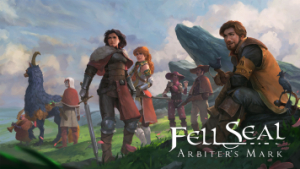


Fell Seal: Arbiter's Mark is a story-driven, turn-based tactical RPG set in a fantasy world with a touch of steampunk. Take control of the Arbiter Kyrie, an agent of the Immortal Council tasked with preserving stability and order throughout the land, and lead your troops through difficult encounters.
Experience an epic and mature story, unfolding through over 40 story encounters and topped with challenging end-game content.
Classic tactical combat battles, with rugged terrain and elevation, taking place on beautiful hand-drawn environments.
A deep and complex class system with over 30 classes and 300 abilities lets you truly customize every one of your characters through the selection of their class, sub-class and passives. Carefully craft the character you envision, be it a versatile generalist, a dedicated spell-caster or a mighty foe-crushing specialist!
Customize your troops' appearance your way, by selecting their portrait, outfit, colors and overall visuals from a wide selection.
Equip your army with over 240 pieces of equipment, either purchased, gathered from fallen enemies or created from crafting.
(Source: gog.com)
Support Summary
Game Information
Screenshots Comparison
Solutions & Issues
In 16:10 aspect ratio, the gameplay is slightly hor-, though this does not affect gameplay.
At resolutions less than 900 pixels tall (1024x640, 1280x800), there is a menu option which allows the player to force sprites, including characters, to draw at their pixel-perfect size with the tradeoff being reduced map area drawn on the screen. This setting is enabled by default.
By default, the game will run in ultrawide and super-wide aspect ratios as pillarboxed beyond 16:9.
Custom resolutions can be set by editing Documents\Fell Seal\GameConfig.txt on Windows, though this is specifically stated by the developer as being unsupported. When a custom resolution is set: FMV cutscenes become vert- and the hardcoded subtitles become cropped off. Rendered cutscenes remain hor+, but show unintended areas; sprites which were meant to "fly" off the edge of the screen in 16:9 aspects will not extend past the edge of the screen and instead hang where they would normally be unseen. The options menu exhibits a background glitch. The in-game UI retains proper sizing and moves to the screen edges.
21:9 and 32:9 custom resolutions are technically playable, but many players will find the negative effects to detract from their experience significantly.
By default, the game will run in multi-monitor aspect ratios as pillarboxed beyond 16:9, making the outside two monitors in a 3x1-L configuration entirely unused.
Custom resolutions can be set by editing Documents\Fell Seal\GameConfig.txt on Windows, though this is specifically stated by the developer as being unsupported. When a custom resolution is set: the title menu screen becomes entirely unusuable and the player will be unable to start the game unless they know the location of that menu option and use arrow keys to select it off-screen. FMV cutscenes become vert- to such a degree as to be incomprehensible. Rendered cutscenes remain hor+, but show a significant amount of unintended areas; sprites which were meant to "fly" off the edge of the screen in 16:9 aspects will not extend past the edge of the screen and instead hang where they would normally be unseen. The UI enlarges greatly, to the point of non-usability, and covers many screen areas required to play the game.
No issues noted. Since the game is sprite-based and the artwork pixel-based, there seems to be no benefit to 3840x2160 over 1920x1080 or 2650x1440.
Gameplay Screenshots


In-Game (Rendered) Cutscenes


FMV Cutscenes


Menu Screenshots


4K UHD Screenshots


Additional Screenshots


