





Far Cry 5 is an action-adventure first-person shooter game developed by Ubisoft Montreal and Ubisoft Toronto. The game takes place in the fictional Hope County, Montana, where charismatic preacher Joseph Seed and his cult Project at Eden's Gate holds a dictatorial rule over the area. The story follows an unnamed junior deputy sheriff, who becomes trapped in Hope County and works alongside factions of a resistance to liberate the county from Eden's Gate.
Support Summary
Game Information
Screenshots Comparison
Solutions & Issues
Native widescreen support. Vert+ for aspect ratios narrower than 16:9. FOV slider available in the Options menu.
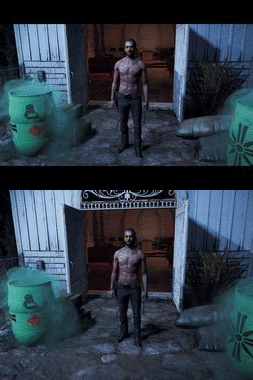
To remove the black bars from cutscenes:
- Download Remove_BB.7z from PCGamingWiki.
Unpack Remove_BB.exe to the game folder
C:\Program Files (x86)\Steam\steamapps\common\FarCry5\bin
or
C:\Program Files (x86)\Ubisoft\Ubisoft Game Launcher\games\FarCry5\bin- Run Remove_BB.exe and apply the patch to FC_m64.dll
FC_m64.dll can also be patched manually using a hex editor. Replace the following bytes:
40 55 53 56 57 41 56 48 8D AC 24 B0 FD FF FF => B0 01 C3 56 57 41 56 48 8D AC 24 B0 FD FF FF
73 06 F3 0F 59 DA EB 04 F3 0F 5E CA => 73 06 0F 1F 40 00 EB 04 0F 1F 40 00
Native hor+, FOV slider in the Options menu works in 21:9.
The widescreen solution for the black bars in cutscenes is applicable here as well. Alternatively, use Rose's solution.
FC_m64.dll can also be patched manually using a hex editor. Replace the following bytes:
40 55 53 56 57 41 56 48 8D AC 24 B0 FD FF FF => B0 01 C3 56 57 41 56 48 8D AC 24 B0 FD FF FF
73 06 F3 0F 59 DA EB 04 F3 0F 5E CA => 73 06 0F 1F 40 00 EB 04 0F 1F 40 00
Resolutions, HUD, and UI are supported. Only one big issue: FOV cannot be changed.
To unlock the FOV slider and remove the black bars from cutscenes:
- Download Unlock_FOV_1_011.7z from PCGamingWiki.
Unpack Unlock_FOV_1_011.exe to the game folder
C:\Program Files (x86)\Steam\steamapps\common\FarCry5\bin
or
C:\Program Files (x86)\Ubisoft\Ubisoft Game Launcher\games\FarCry5\bin- Run Unlock_FOV_1_011.exe and apply the patch to FC_m64.dll
FC_m64.dll can also be patched manually using a hex editor. Replace the following bytes:
40 55 53 56 57 41 56 48 8D AC 24 B0 FD FF FF => B0 01 C3 56 57 41 56 48 8D AC 24 B0 FD FF FF (disable anti-cheat protection)
73 06 F3 0F 59 DA EB 04 F3 0F 5E CA => 73 06 0F 1F 40 00 EB 04 0F 1F 40 00 (removes black bars in cutscenes)
00 00 B8 78 00 00 00 C3 => 00 00 B8 60 01 00 00 C3 (unlocks FOV in the game)
83 B9 E8 00 00 00 01 BA 58 00 00 00 => 83 B9 E8 00 00 00 01 BA 55 05 00 00 (unlocks the FOV slider in the menu)
B8 A0 00 00 00 0F 44 C2 F3 0F 5E 04 08 => B8 A0 00 00 00 0F 44 C2 90 90 90 90 90 (unlocks the FOV slider in the menu)
C3 84 D2 74 1D => C3 84 D2 74 00 (unlocks the FOV for actions: climbing, using the wingsuit, etc.)
C2 B8 B2 3D => C2 B8 B2 BD (fixes water rendering corruptions at high FOV values)
Gameplay Screenshots


In-Game (Rendered) Cutscenes


FMV Cutscenes


Menu Screenshots


4K UHD Screenshots


Additional Screenshots


