

KKnD, or Krush, Kill 'n' Destroy is a series of post-apocalyptic real-time strategy games by Beam Software. KKnD was released in 1997, while a sequel - KKND2: Krossfire was released in 1998. Towards the end of 1997, KKnD Xtreme, an expanded version of the original was released, which featured extra missions and enhancements.
Support Summary
Widescreen | Ultra/Super‑Wide | Multi-Monitor | 4K Ultra HD | |
Support | ||||
Method | ||||
HUD | ||||
Cutscenes | ||||
FMVs |
Screenshots Comparison
Solutions & Issues
I have made a hack which enables you to play old classic "KKND Xtreme" (game from 1997, created by Melbourne House) in almost any resolution.
Manual Instructions or Automatic Exe available:
MANUAL (CUSTOM RESOLUTION) INSTRUCTIONS
1. Open "KKND.exe" in your favorite hex editing program (for example Tiny Hexer)
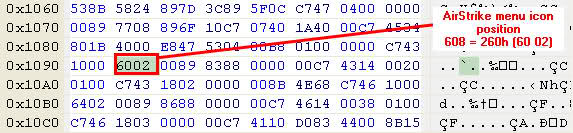
2. Airstrike menu icon position editing
Search for (see additional screenshot 1)
Replace highlighted hexadecimal numbers with your calculated x-postion of airstrike menu icon.
Airstrike menu icon has 32x32 pixels.
x-position = resolution_width - 32 (decimal)
For example if your desired resolution is 1280x1024
x-postion = 1280 - 32 = 1248 = 4E0h (hex), in little endian that is E0 04
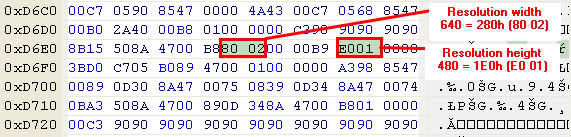
3. Resolution editing
Search for (see additional screenshot 2)
Replace highlighted hexadecimal numbers with your custom resolution numbers
For example: resolution 1280x1024
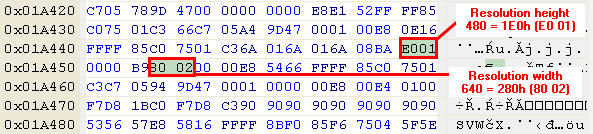
resolution width is 1280 = 500h (hex), in little endian that is 00 05
resolution height is 1024 = 400h (hex), in little endian that is 00 04
Repeat for (see additional screenshot 3)
4. Airstrike menu icon position editing (2)
Search for (see additional screenshot 4)
Do same as step 2.
5. Save your modified exe file
RESOLUTION CHANGER
I also made a small application which enables you to change resolution in almost any you want.
Just run this app, choose resolution, click apply and play the game. (You must have .net framwork 3.5 or higher installed for it to work).
You can download it below
Gameplay Screenshots


Additional Screenshots