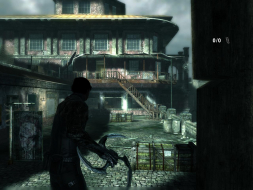
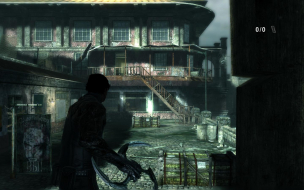
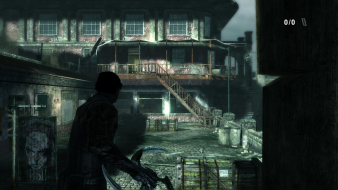
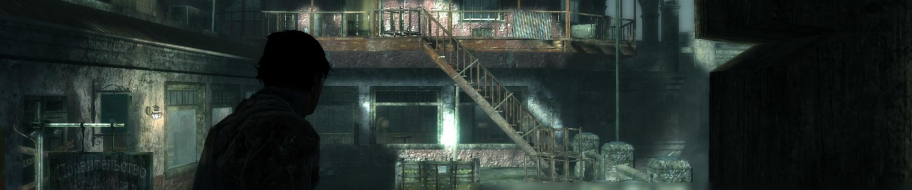
Dark Sector is a single-player focused third-person shooter from Digital Extremes, who made the Unreal Tournament series through UT 2004, amongst other titles. The game has minor strategy elements and a boomerang-style bladed weapon which makes for some unique gameplay. Dark Sector was originally released only on consoles but has been ported to PC.
First off, fraps would only take pictures when the game booted up before I changed resolutions. At first I had no idea why my pics were not all saving, until I realised I had to boot the game seperately for each resolution (even though it changes resolutions successfully in the game).
Secondly, this might not be new to you guys, but Vert- plus stretched vertically is a new one on me... At first I thought it was just the HUD, which is still weird, but no, it's the whole game. If someone could explain to me what causes this I would be grateful.
The config files for the game are some of the smallest I have ever seen. Each one is about a paragraph long and though they list common options, there is nothing there I can find that is not in the game menu. I scoured the Appdata and Documents folders as well and came across no additional files. If someone knows of another config file for the game outside its main directory, please let us know.
In the end, despite being on a widescreen 1920x1200 monitor, I am playing this one in 4:3, which is sad.
I tried this and found the same thing. I'd call it a huge bug or design flaw. Everything is stretched vertically to beyond your resolution, so HUD elements are clipped off the screen. I also couldn't get any sound whatsoever, so enabled the subtitles, but then ofc they were also clipped off the bottom of the screen. It's almost as if they intended it.
For me it was stretched vertically off the screen in any resolution for any AR. I have a feeling it takes the AR from your desktop and then sticks with it no matter what you choose.
I was very close to buying this game; thankfully I came here first. You saved me $20 wasted on a broken game StingingVelvet, thank you very much.
Vertically stretched in widescreen resolutions is indeed a new one. One wonders if they're accidentally chaning the vertical FOV when they mean to change the horizontal one.
Interestingly enough, the existing template *does* handle this situation. Basically, the change is considered to be vert -, which in itself is a consequential flaw, but since everything is distorted in both 16:10 and 16:9, neither is considered to be correctly implemented, which is a damaging flaw.
Anyway, how about 1440x900 resolution? Did you test that?
Grade is D+
Lack of correct widescreen aspect ratio support is a damaging flaw
CCE: 99.5%
I seem to have found a fix.. sort of. It seems to work for me, at least better than the stretched crap.
I am running this on my 1080p LED DLP TV. Nvidia GTX260. Desktop at 1920x1080.
By using 1680x1050 for the game it seems to work.
Even though it is 1680x1050, my TV still shows 1920x1080. It may be possible that it is being scaled up to 1920x1080 by the video card, but it works and looks much better.
If someone can get REAL 1920x1080 with no stretch that would be great, but this is as close as i've seen. Menus, HUD, Gameplay all looks correct.
I seem to have found a fix.. sort of. It seems to work for me, at least better than the stretched crap.
I am running this on my 1080p LED DLP TV. Nvidia GTX260. Desktop at 1920x1080.
By using 1680x1050 for the game it seems to work.
Even though it is 1680x1050, my TV still shows 1920x1080. It may be possible that it is being scaled up to 1920x1080 by the video card, but it works and looks much better.
If someone can get REAL 1920x1080 with no stretch that would be great, but this is as close as i've seen. Menus, HUD, Gameplay all looks correct.
1920x1080 or 1280x720, are stretched for me.
Yeah this is a temp fix for everybody really, although I think the HUD will still be off. If you disable any option for maintaining the AR in your video card drivers, then run a 16:10 res , it will probably look fine on a 16:9 display as it will be stretched horizontally to fit, canceling out the vertical stretching.
I think the best bet is to wait for a patch on this one ....
I took some shots of the Xbox 360 version so you can compare how things should look.
Ignore the differences with the background; everything is always moving.
The game is designed around 16:9, with the Xbox 360 version of the game using the 16:9 view and downscaling it to 640x360 (still 16:9) for 4:3. Black bars are automatically added to expand it to 640x480.
Topic split to Dark Sector in Request/Discuss. I can see a lot of discussion about this game, so for clarity keep this thread for things specifically affecting the Detailed Report. 8)
You have to run it at the resolution ths PS3 version runs at which is 1152x640
To do so go to the games folder, then find the folder titled CONFIG, in there open the file DS.cfg in notepad and change the resolution to 1152x640
It is the only resolution that I have found that does not look like crap on widescreen.
You are welcome.
Doing this makes the game load in 640x480 for me, even if I make the DS.cfg file read only.
While I was in there though I did notice this entry, which might be helpful in some way? It's the only thing I didn't recognize as not widescreen/FOV related:
It may not be a solution if you wish to play at a higher res but is the only option we have that does not suck ass.
So you went into Dark Sector/Configs and opened the DS.cfg file, and in there where it reads Graphics.FullScreenSizeX='###" 's you changed it to read as follows...
You're right, though it says 640x480 it does load up in your custom resolution.
However, you are wrong in saying it is no longer stretched. Here is a picture:
Look at the target reticule and the top of his head and compare them to the 4:3 shots in my report. The game is still stretched.
Also, as I said, that is such a low res that it would not change the grade, as playing it in such a res would be considered worse than playing it in 1600x1200 for most, which would be a damaging flaw.
Bummer, that is so odd cause that circle is totally round on my 37 inch widescreen. Perhaps it has to do with the fact that I have a somewhat odd screen size, it has to be at 1366 x 1280 in order for things to look correct on the desktop... Anyway, so sorry I could not help ya out :(
Haha... I work from home on the PC, and I keep many forums open while I work.
Bummer, that is so odd cause that circle is totally round on my 37 inch widescreen. Perhaps it has to do with the fact that I have a somewhat odd screen size, it has to be at 1366 x 1280 in order for things to look correct on the desktop... Anyway, so sorry I could not help ya out :(
It could be an issue where your TV is stretching the image slightly horizontally, which causes it to look more normal. It could also be something else.
If you could download fraps and take a screenshot of your game we would all appreciate it.
> Thank you for contacting Aspyr Tech Support!
>
> Unfortunately Dark Sector was not developed for Windows Vista 64 since 64 bit operating systems work quite differently than 32 bit PC operating systems. Games that were developed for a previous 32 bit PC OS, as this one was, have many problems running on Windows Vista and Windows XP 64 bit. Thus this game is not supported on Windows Vista 64.
>
> Please sign up for the Aspyr news letter for future updates about Windows Vista patches.
>
> https://www.aspyr.com/news/newsletter_signup
>
> Sorry we could not resolve your problem.
>
> We'll check some Vista 64 systems here and see if we can find a work around for the problem, although since you are not supported we can't guarantee we will find a solution.
>
> Aspyr Tech Support
I'm fairly this problem isn't OS related, unless literally everyone who has reported this problem is using a 64-bit OS. I'm going to reply to them and send them a link to this thread and various other threads on the Steam forums and Digital Extremes forums.