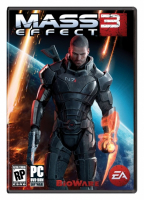
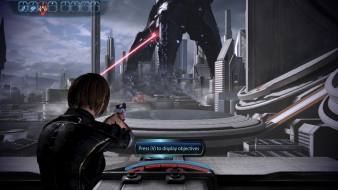
Mass Effect 3 is a Role-playing Game (RPG) / Third-Person Shooter hybrid set in a Science Fiction universe. Mass Effect 3 is the third game in the popular Mass Effect series, and is rumored to be the final installment. In it players continue the adventures of Commander Shepard utilizing extreme character customization which is the hallmark feature of the series. Additional features include: the ability to import decisions from both of the previous games into the new game, ownership/play of previous games not required, customizable weapons, improved mobility and melee combat, many returning characters (if they were not killed off in previous imported games), an improved cover system that allows for more action and more.
Join Commander Shepard in the struggle against the Reapers in the conclusion to the Mass Effect trilogy.
Not everyone will survive. An ancient alien race, known only as "Reapers," has launched an all-out invasion leaving nothing but a trail of destruction in their wake. Earth has been taken, the galaxy is on the verge of total annihilation, and you are the only one who can stop them. The price of failure is extinction. You are Commander Shepard, a character that you can forge in your own image. You determine how events will play out, which planets to explore, and whom to form alliances with as you rally a force to eliminate the Reaper threat once and for all. How you wage this war is completely up to you: go into combat with guns blazing or use cover to plan a more tactical assault. Utilize your squad to full effect or take a lone wolf approach. Rain death from a distance or go toe-to-toe with enemies using devastating melee attacks. Mass Effect 3 will react to each decision you make as you play through a truly unique experience of your own creation.
Mass Effect 3 is a Role-playing Game (RPG) / Third-Person Shooter hybrid set in a Science Fiction universe. Mass Effect 3 is the third game in the popular Mass Effect series, and is rumored to be the final installment. In it players continue the adventures of Commander Shepard utilizing extreme character customization which is the hallmark feature of the series. Additional features include: the ability to import decisions from both of the previous games into the new game, ownership/play of previous games not required, customizable weapons, improved mobility and melee combat, many returning characters (if they were not killed off in previous imported games), an improved cover system that allows for more action and more.
Join Commander Shepard in the struggle against the Reapers in the conclusion to the Mass Effect trilogy.
Not everyone will survive. An ancient alien race, known only as "Reapers," has launched an all-out invasion leaving nothing but a trail of destruction in their wake. Earth has been taken, the galaxy is on the verge of total annihilation, and you are the only one who can stop them. The price of failure is extinction. You are Commander Shepard, a character that you can forge in your own image. You determine how events will play out, which planets to explore, and whom to form alliances with as you rally a force to eliminate the Reaper threat once and for all. How you wage this war is completely up to you: go into combat with guns blazing or use cover to plan a more tactical assault. Utilize your squad to full effect or take a lone wolf approach. Rain death from a distance or go toe-to-toe with enemies using devastating melee attacks. Mass Effect 3 will react to each decision you make as you play through a truly unique experience of your own creation.
The game works great, all menus and everything without any kind of hack/mod. The only problem is that the framerate sucks! Feels like I'm barely getting 15 FPS just walking around the Normandy. Sure, my system isn't that super high-spec, but I feel like it should run better than this. It flies when running on a single monitor, with all the graphics settings maxed.
Athlon 4200+
4 GB DDR2 800 MHz
ATI 5570 1 GB x16 2.0
three 1280x1024 panels
Seems to be working pretty good for me, Menu's all seem to be intact. Im running the game with no vsync hack and im getting fairly decent frames per second. 90-100 fps @ 6028x1080
Just wondering what FOV most people are using, im currently on 85* and it seems to be ok. Any higher and it gives me a headace.
■ i7 950 @ 4.3ghz ■ Asus RIII Formula ■ 12gb Gskill 1600mhz ddr3 ■ GTX 580 3gb SLI @ 935/2105mhz 1.138v ■ Enermax Revo 1020w PSU ■ Lian Li PC-Z70 ■ Dell U2311H x3 ■ Watercooled CPU + GPU's ■ "On the road of life there are two types of people...Those who are on the way & those who are in the way!"
The game works great, all menus and everything without any kind of hack/mod. The only problem is that the framerate sucks! Feels like I'm barely getting 15 FPS just walking around the Normandy. Sure, my system isn't that super high-spec, but I feel like it should run better than this. It flies when running on a single monitor, with all the graphics settings maxed.
Athlon 4200+
4 GB DDR2 800 MHz
ATI 5570 1 GB x16 2.0
three 1280x1024 panels
You might find that it's dropping just below 60 fps in multi monitor mode and is vsyncing it to 30fps instead.
Open up DocumentsBioWareMass Effect 3BIOGameConfigGamerSettings.ini Then add this line to the bottom of the [SystemSettings] section: UseVsync=False
It will still cap your fps at 62, although it wont artificially slow it down to 30. If you want to remove the fps cap altogether then add this line below the UseVsync line with whatever number you want the max fps to be: MaxSmoothedFrameRate=300
I'd leave the FPS smoothing where it's at unless you can maintain a higher FPS consistently. The FPS smoothing in UE3 is gorgeous and works wonders. Just disable vsync and leave FPS smoothing on.
Is it possible to have two grades assigned to the game for multi-monitor?
I ask as Eyefinity users have few if any issues at default with ME3...whereas Nvidia Surround users are very broken unless using a patch like Helifax's. I can understand assigning a "C" on the basis of Nvidia, but ME3 for Eyefinity has fewer annoyances/bugs than games like Fallout3 or FO:NV...and those games got silver medals (B). The only thing I and others see as broken on ME3 is that the HUD elements are not centered, but the are still completely visible and usable. All other menus look fine and are scaled/placed properly.
I see "C" and think "aw crap this probably won't work", whereas for Eyefinity users the game works fine....so long as you don't go futzing back and forth between bezel compensated and non-compensated resolutions and forget to change things back.
Is it possible to have two grades assigned to the game for multi-monitor?
I ask as Eyefinity users have few if any issues at default with ME3...whereas Nvidia Surround users are very broken unless using a patch like Helifax's. I can understand assigning a "C" on the basis of Nvidia, but ME3 for Eyefinity has fewer annoyances/bugs than games like Fallout3 or FO:NV...and those games got silver medals (B). The only thing I and others see as broken on ME3 is that the HUD elements are not centered, but the are still completely visible and usable. All other menus look fine and are scaled/placed properly.
I see "C" and think "aw crap this probably won't work", whereas for Eyefinity users the game works fine....so long as you don't go futzing back and forth between bezel compensated and non-compensated resolutions and forget to change things back.
No for a few reasons. Firstly, with automatic grading, you can't do this. We are not looking to split the grading for each multi-mon type because there are very few games in this situation for what works out to be alot of overhead. Secondly, if the game is flawed for Multi-Monitor, it gets scored accordingly. It's no different to a game that supports 16:9 but not 16:10 - it affects some people but not others, but overall it is flawed. You have to read the DR to find out what the issue is. If you're an Eyefinity user, you read the DR and find out you're ok, then so be it.
The grade is for Multi-Monitor in general, and we don't reward it for being good on one type of multi-mon setup but excluding others.
Is it possible to have two grades assigned to the game for multi-monitor?
I ask as Eyefinity users have few if any issues at default with ME3...whereas Nvidia Surround users are very broken unless using a patch like Helifax's. I can understand assigning a "C" on the basis of Nvidia, but ME3 for Eyefinity has fewer annoyances/bugs than games like Fallout3 or FO:NV...and those games got silver medals (B). The only thing I and others see as broken on ME3 is that the HUD elements are not centered, but the are still completely visible and usable. All other menus look fine and are scaled/placed properly.
I see "C" and think "aw crap this probably won't work", whereas for Eyefinity users the game works fine....so long as you don't go futzing back and forth between bezel compensated and non-compensated resolutions and forget to change things back.
No for a few reasons. Firstly, with automatic grading, you can't do this. We are not looking to split the grading for each multi-mon type because there are very few games in this situation for what works out to be alot of overhead. Secondly, if the game is flawed for Multi-Monitor, it gets scored accordingly. It's no different to a game that supports 16:9 but not 16:10 - it affects some people but not others, but overall it is flawed. You have to read the DR to find out what the issue is. If you're an Eyefinity user, you read the DR and find out you're ok, then so be it.
The grade is for Multi-Monitor in general, and we don't reward it for being good on one type of multi-mon setup but excluding others.
Then could we have the detailed report edited to the effect that Eyefinity is fine, and only Nvidia Surround is borked at default and requires any sort of patch to be usable?
The way the report is now, it reads like all multi-monitor users need a patch to get it usable.
Does anyone know what atiags.dll does? Its in the BinariesWin32 folder. With it there the game wont launch (no error, just instant background crash).
Problem is that Eyefinity doesnt work for me (every menu zoomed 500%) and Im wondering if the lack of this ATI file is causing it.
EDIT: Ok, that is the problem! ATIAGS lets the game know if the system is running Eyefinity!
http://pastebin.com/7xG9KQKU
Just got this today, was having some fun with friends in multiplayer. It is really the only mode I intend to play for now so I wanted to know if anybody has used the multi-monitor fixer on multiplayer and not had issues (mainly detected as a cheat/hack)
I used to play ME3 with 2xHD5850 graphic cards and Eyefinity @ 3x1@ 5760x1080 pixels. It worked really good, no FPS issues, stutterign whatsoever...I decided it is time to upgrade my system and bought a new HD7950 to replace my crossfire system. (in time when prices drop there will be a 2nd one). But now, ME3 seems not fluid when gaming. The 7950 should have more than enough capacity to handle ME3, also the fact that while gaming ME3 the GPU Load never rises above 40% is suspicious . Same Evefinity setup as above mentioned, of course.
Also I was not able to observe similiar effects in other games (Deus ex 3, Skyrim, Sleeping Dogs, SWTOR so far).
Any ideas? or just sit and wait for a better driver? At the mom cat 12.8 installed.
Just wanna say THANK YOU To HELIFAX for creating the ultra-sweet WS Fixer plugin for this game!
For the last 2 years i have used both WSF and FWS at the same time, when apparently all i really needed was WSF! Yes it is very important to activate the WSF plugin during the EA opening cinematic, which i am doing now and it works wonders, my only remaining issue is that in multiplayer i cant get the weapon zoom to function properly. ANY THOUGHTS?
Basically i have to deactivate the plugin after the MP mission starts, then make damn sure i reactivate it before the mission ends or i wont be able to exit the post-mission stats screen due to overscan issues... This isn't too much of an issue but i was wondering if there was a work-around?
-blubberduck/Gungoose86
ONCE AGAIN THANK YOU FOR ALL YOUR HARD WORK MASTER H! YOU HAVE MADE SO MANY OF MY FAVOURITE GAMES ULTRA WS & SOFT-TH COMPATIBLE!
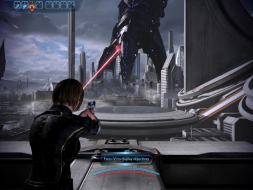
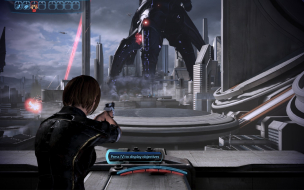
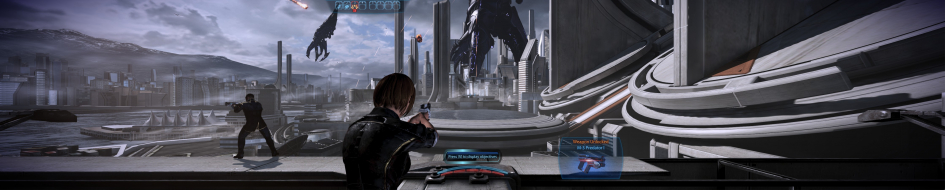
Attached image is a screenshot from my ME3 Multiplayer game rendered with SoftTH, at 3648 x 1152 @60hz... I'm getting around 110 fps with some tearing and V sync off.
Attachments
SoftTH_MassEffect3.exe_2015_10_01_04_56_52_14.jpg (1.05 MiB) Viewed 8757 times
SoftTH_MassEffect3.exe_2015_10_01_06_59_10_46.jpg (362.29 KiB) Viewed 8766 times
This is the most i can zoom in with the plugin active.
SoftTH_MassEffect3.exe_2015_10_01_03_47_12_10.jpg (671.45 KiB) Viewed 8758 times
Acer Predator AG7750-U222 (2010) 16G DDR3 RAM, Dual GTX 980s, Intel 6-Core 990X CPU @3.75 Ghz (OC), Sony 43 inch 4KTV (center display in Landscape mode) two 1280p 24" monitors (attached to center display in Portrait mode), Windows 7 64-Bit on 2TB Western Digital Black HD, Windows 10 64-Bit on WD 1.5TB Green. PDP Stealth Xbox ONE Wired Controller for decreased latency.
UPDATE: I have used FWS and WSF each alone with the game, and there are some small drawbacks for each... With FWS u get to change FOV in game with a preset, yet the HUD Crosshair for me is slightly off, the bullets hit just above the crosshair, my config is: 3648 x 1152, with a W/H setup of 1920 x 1080, with HUD-X at 852, and HUD-Y at 0... Any ideas? Everything is perfectly centered except that the crosshair is too low. I have experimented with different coordinates but still nothing. And with WSF the crosshair is dead on, but i can't ZOOM properly...
Acer Predator AG7750-U222 (2010) 16G DDR3 RAM, Dual GTX 980s, Intel 6-Core 990X CPU @3.75 Ghz (OC), Sony 43 inch 4KTV (center display in Landscape mode) two 1280p 24" monitors (attached to center display in Portrait mode), Windows 7 64-Bit on 2TB Western Digital Black HD, Windows 10 64-Bit on WD 1.5TB Green. PDP Stealth Xbox ONE Wired Controller for decreased latency.
blubberduck86, I would try adjusting your FWS resolution override values like this:
Width: 3648 Height: 1152 Hud Width: 2048 (16:9 fake center) Hud Height: 1152 (16:9 fake center) Horizontal Display Count: 3 (fake sides) Vertical Display Count: 1 Hud X: 800 (which is 3648 minus 2048, then divided by 2 = width of fake side) Hud Y: 0
It seems feasible this would correct your crosshair. Failing that, could also try shutting off FWS resolution override, & doing LUA edits instead (read my linked instructions in previous post). I would pretend you are using PLP during these LUA edits (fake sides, to make proper HUD etc on center).
Good deal thanks! I'll give it a try and report back...
Acer Predator AG7750-U222 (2010) 16G DDR3 RAM, Dual GTX 980s, Intel 6-Core 990X CPU @3.75 Ghz (OC), Sony 43 inch 4KTV (center display in Landscape mode) two 1280p 24" monitors (attached to center display in Portrait mode), Windows 7 64-Bit on 2TB Western Digital Black HD, Windows 10 64-Bit on WD 1.5TB Green. PDP Stealth Xbox ONE Wired Controller for decreased latency.