

Compete against your rivals in this Formula One racing simulator.
Support Summary
Game Information
Screenshots Comparison
Solutions & Issues
OK, firstly you must have GP4 patched to V9.6.
After installation of patch, game will then be GP4 v1.02.
You then must also use a Decrypted-nocd exe file. Without this exe file, GP4 editor programs won't work.
Patch 9.6 and GP4v1.02 decrypted-nocd exe can be found here: http://www.grandprixgames.org/list.php?28
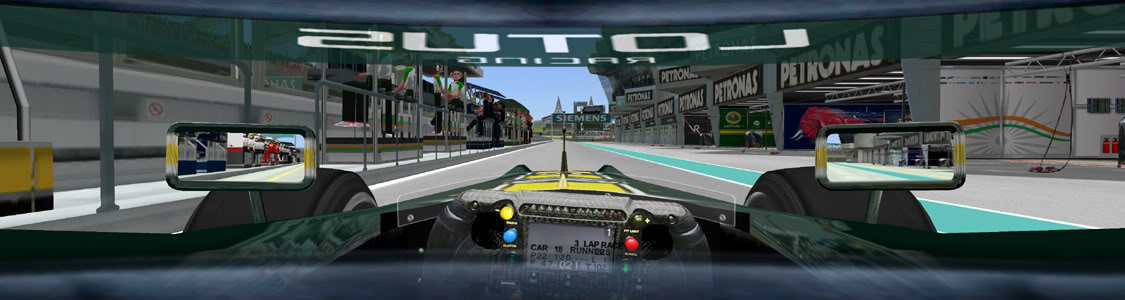
Once that's all up and running, you need to change your GP4 resolution via the GP4 "f1graphics.cfg" file. This is in the main GP4 folder.
Change the top lines in this file as follows:
1 ; f1graphics.cfg controls all settings (default 0)
3840 ; [RELEASE] Game 3D Horizontal Resolution
1024 ; [RELEASE] Game 3D Vertical Resolution
Note that in-game resolution will still be reported as 640x480 (or similar). Do not change this. Let the f1graphics.cfg file do the work.
When in cockpit view, use the keyboard "+" and "-" keys to zoom in and out. This will hopefully give you a desired view.
You may want to further alter this view, to set a camera position that is closer by default so that the +/- keys work in a more suitable range. In any event, you will probably need to alter the rear clipping plane of the cockpit camera, otherwise the cockpit sides will be cut off in front of the camera.
To do both these things (alter default camera view/rear clipping plane), download and install a program called GP4Tweaker. It can be found [url=http://gp4tweaker.vadertrophy.com/]here[/url]. I *think* the one you're after is "gp4tweaker_v1045_reloaded".
Within GP4Tweaker, navigate to:
ONBOARD CAMERA POSITION . By altering the Z value you can get your camera close to where your default needs to be, and you can then use keyboard "+" and "-" to zoom in and out from there.
ONBOARD CAMERA PROJECTION for rear clipping plane. I *think* it is the near clipping plane you will need to adjust.
Note that these things can be edited in real time during game play if you enable RT EDIT for these features within GP4Tweaker. During RT-edit mode, press TAB key few times until associated edit mode shown on screen, e.g. If you want to edit onboard camera position, press TAB until "ONBOARD CAMERA POSITION EDIT MODE" shown, then press H (left), K( right), I (up), M (down), U (forward), J (backward), V (centering), and Q (reset to original position).
Cockpit cameras can also be altered via a program called "Team Editor". You can get that [url=http://www.realgpx.com/Pages/accueil.php?pages=teameditor&menu=menus]he…] but I reckon it might not be necessary as GP4Tweaker will probably suffice.
Please note ALL of the above is from memory. I haven't played GP4 since F12010 was released, and it was years before that when I last needed to modify camera etc positions....so it's been a while.
As for the menu font alteration, PM me if you need the font file.
Gameplay Screenshots