Uru: Ages Beyond Myst is an adventure video game developed by Cyan Worlds and published by Ubisoft. The title is the fourth game in the Myst canon. Departing from previous games of the franchise, Uru takes place in the modern era and allows players to customize their onscreen avatars. Players use their avatars to explore the abandoned city of an ancient race known as the D'ni, uncover story clues and solve puzzles.
Cyan began developing Uru shortly after completing Riven in 1997, leaving future Myst sequels to be produced by third party developers. Uru required five years and $12 million to complete. Uru was initially conceived as a multiplayer game; the single-player portion was released, but the multiplayer component, Uru Live, was delayed. The online video game service GameTap released the multiplayer portion of Uru as Myst Online: Uru Live in February 2007, but the service was canceled again the following year due to a lack of subscribers. GameTap passed the rights to Uru Live back to Cyan, who announced their intention to resurrect the game. In 2010 Cyan Worlds made Uru Live Open Source and it's now known as Myst Online: URU Live again
Uru was not as well received as previous Myst titles. Critics admired the visuals and new features of the game but criticized the lack of multiplayer in the retail version and clunky controls. Uru sold poorly, while the first three games had sold millions of copies each. The game was a critical and commercial disappointment for Cyan, causing the company financial troubles; nevertheless, it has attracted a cult following.
Support Summary
Game Information
Screenshots Comparison
Solutions & Issues
Note: Retail (DVD) game installer crashes in Eyefinity. Switch to single monitor mode to install to avoid heartache.
Game can only be played in 4:3 or 5:4 natively (up to a resolution of 1600x1200).
A patch is available: the UniWS Patcher
You have to create a Character in a natively supported resolution first. The cut-scenes at the start cause the game to break and return to 800x600 if you try to do a character creation in 16:10 or 16:9. Once your character is created, be sure to return the resolution to 800x600 before patching and running the game using the method below.
For Game to start in your custom resolution add -iinit To_Dni to the Uru shortcut."F:\Games\Myst Uru Complete Chronicles\UruExplorer.exe" -iinit To_Dni
Game will then play in your desired resolution, but the image is stretched.
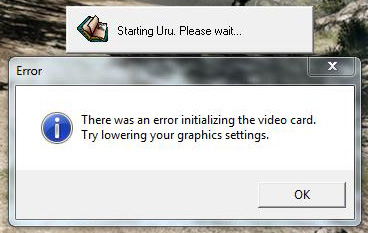
No Surround support, even using the UniWS patcher. Game fails to initialize, refer to Surround gameplay screenshot.
Gameplay Screenshots


FMV Cutscenes

Menu Screenshots


Additional Screenshots