Page 1 of 2
Cold Fear
Posted: 19 Apr 2009, 07:00
by P3ndula
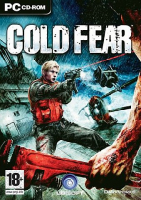 Widescreen Grade: IncompleteMulti-monitor Grade: IncompleteRead Full Detailed Report - Cold FearIn this third-person survival horror game, US Coast Guard Tom Hansen explores a Russian ship during a storm.
Cold Fear
Posted: 06 Jun 2009, 16:52
by P3ndula
Widescreen Grade: CUltra-Widescreen Grade: CMulti-monitor Grade: Incomplete4k Grade: IncompleteRead Full Detailed Report - Cold FearIn this third-person survival horror game, US Coast Guard Tom Hansen explores a Russian ship during a storm.
Re: Cold Fear
Posted: 29 Dec 2009, 11:50
by ndsijpn900
Cold Fear EXE Widescreen Hacks
--------------------------
DECIMAL (+ DECIMAL SWAP 640x480 -> 8004x4060) -> HEX
DEFAULT - 640x480
80 02 00 00 BF E0 01
CHANGED TO -
640x400
80 02 00 00 BF 90 01
DEFAULT - 800x600
20 03 00 00 BF 58 02
CHANGED TO -
800x500
20 03 00 00 BF F4 01
DEFAULT - 1024x768
00 04 00 00 BF 00 03
CHANGED TO -
1024x640
00 04 00 00 BF 80 02
DEFAULT - 1280x1024
00 05 00 00 BF 00 04
CHANGED TO -
1280x800
00 05 00 00 BF 20 03
DEFAULT - 1600x1200
40 06 00 00 BF B0 04
CHANGED TO -
1280x720
00 05 00 00 BF D0 02
http://s000.tinyupload.com/index.php?file_id=00086400324098633771&gk=hotel
This is quick hack orignally for own use. Game will crash if display not support resolution, (game default to 1024x768, you should set resolution with original exe first then overwrite with hacked exe). Is simple enough to hexedit own resolution in. Appear correct aspect ratio.
pszjpn900

Re: Cold Fear
Posted: 12 Jan 2010, 16:26
by Kroeter
thanks a lot for providing a solution for cold fear!
Unfortunately I don't understand it.
I try to get a 16:10 (1680x1050) resolution running.
what do I have to do?
could you please explain the procedure more precisely for amateurs like me :roll:
many thanks in advance!
Re: Cold Fear
Posted: 16 Jan 2010, 17:20
by vibi
Hello
Thanks for the solution pszjpn900 :rockout , for me that's work very good in 1920*1200, i have changed the 1600*1200 line.
For Kroeter, i explain the procedure.
- Download a software like XVI32, Hex Editor,
here
- Download the official "alternative Executable"
here
- Move ColdFear_Retail.exe in the Cold Fear folder
- Launch the game and in the graphics options select 1600*1200
- Open ColdFear_Retail.exe with XVI32.exe
- Go to Search --> Find, select "Hex string" and write "40 06 00 00 BF B0 04" and "OK"
- In the principal window, "40 06" is for 1600 in hex, replace it by "90 06" for 1680
- "B0 04" is for 1200 in hex, replace it by "1A 04" for 1050
- Now you have the Line "90 06 00 00 BF 1A 04" for 1680*1050 (for 1920*1200 that's "80 07 00 00 BF B0 04")
- Save this modified file in Cold Fear folder, keep a copy of original ColdFear_Retail.exe in case of problem
- Launch the game and now the game is in 1680*1050
Voila, and sorry for my english.
Vibi
Re: Cold Fear
Posted: 17 Jan 2010, 17:00
by Kroeter
many thanks, vibi! :bowdown
will try it asap.
Re: Cold Fear
Posted: 24 Apr 2010, 17:31
by m4teus
If I want 1366x768, what should I replace for
00 05 00 00 BF 00 04
00 05 and 00 04 ??
(using 1280x1024)
Re: Cold Fear
Posted: 25 Apr 2010, 18:15
by scavvenjahh
Re: Cold Fear
Posted: 28 Oct 2010, 08:33
by P3ndula
tardy thank you to ndsijpn900 & vibi. great stuff. maybe admin can move it to confirmed solutions so others can find it.
Re: Cold Fear
Posted: 28 Oct 2010, 11:00
by Paradigm Shifter
Moved to Confirmed Solutions. :)
ColdFIX - Cold Fear widescreen + any resolution patch
Posted: 30 Apr 2012, 15:05
by Voodooman
Good news everyone!
I created simple console patch, a ColdFix which patch Cold Fear executable for usage of any desired resolution, so you dont need to manually hex-edit it anymore.
This tool also removes black bars in main menu and cut-scenes - making screen space 100% observable.
And as a little bonus it would also fix pre-rendered cut-scene and bonus video stretching and would make aspect ratio of any bik videos 100%.
You can download it here http://dl.dropbox.com/u/75754626/ColdFix_v0.8_beta.rar
Its not completely finished, a beta yet, but at the moment it can do all the things, just not exactly the way i wish, but later i would probably update it.
Right now it works this way:
Patches 640x480 resolution by any resolution you entered in prompt.
Allows to re-patch game any time you want, if for example you need to change resolution.
Removes black bars during 1st patching, since there is no need to repatch these values and since they are not inside exe they would not be patched again.
Re-encodes FMV with correct aspect ratio which is automatically calculated based on entered resolution.
As all bonus videos are 4:3 they would be hor+ centered with black bars at sides to preserve full image.
Cut-scenes are Anamorphic widescreen - effective frame space is widescreen, something near 1.85:1, but they are endcoded as 4:3 wtih hardcoded black bars. So all cut scenes would be ver- and hor fit. This works fine on any resolution with ratio up-to 1:85:1 but tripple screen displays could have potential problems where upper and lower sides would be cropped too much and low res videos doesnt look sexy, when they upscaled to 3 screens.
This is one of things i plan to fix in future, but i dont have any devices to test it and select the most optimal way to render FMV cut-scenes.
I need at least list of common resolutions per screen and all together plus some opinions. My current idea is to crop video until it would fix center screen and then add black bars for entire space of left and right screens.
Few more things i plan to-do:
Replace manual entering of resolution by enumeration of all supported resolutions.
Automatically patch config file to avoid game crash if wrong resolution selected (this is actually done, i just had no time to test new portions of code with base and not sure that offset of resolution byte in config will remain the same for others, so i removed this part of code for now - few config files SAVESCOLDFEAR.DAT could help )
Improve Bik re-encoding to make it 100% looseless and to preserve all 5 audio channels (right now i only managed to keep 1st audio channel with English voices).
Or as alternative, do inline patch for binkw32.dll , injection of microcode that would apply aspect ratio correction based on filename. This is ideal solution, but would be challenging for me as i barely remember asm and have quite limited time these days, so any help appreciated.
Usage is simple, put all exe and dll files in game folder, run ColdFix.exe and do as instructed ;-)
Some dumbass antiviruses may have false positive due of mpress packer.
Sounds great ! Solution added
Posted: 30 Apr 2012, 15:39
by scavvenjahh
Sounds great ! Solution added to the DR.
If you could add comparison screenshots and details by the time the fix is finished, please do. Just use the Edit button on top of the DR page. ;)
Should i add screenshots made
Posted: 01 May 2012, 10:17
by Voodooman
Should i add screenshots made after fix?
Yes please ! The screenies
Posted: 02 May 2012, 11:13
by scavvenjahh
Yes please ! ;) The screenies should answer the question: how does Cold Fear look in all ARs after the fix ?
I just saw the game is available on Steam. Does your patcher work on the Steam or retail disc version only ?
Im not sure about Steam
Posted: 07 Jun 2012, 11:05
by Voodooman
Im not sure about Steam version.
In most cases Steam executables have steam bootstrap which loads steam and executes encrypted code, but some devs dont protect theirs exes on steam, so im not sure.
But anyway official unprotected patch (which is the only version i tested) is available and there is no harm to replace exe from steam version with this one. However patch designed to not use fixed offset, but use a pattern of 640x480 resolution in hex with separator instead, so in theory it should would with any unprotected exe.
But if someone would upload exe from steam version, i can tell for sure.
TADA!As promised, i updated
Posted: 23 Jul 2012, 13:00
by Voodooman
TADA!
As promised, i updated patcher to v0.9
Some improvements:
+ you dont need to start game or select 640x480 resolution prior patching, 4 bytes in binary config file autopatched now, if no config exist, its generated for you..
+ Improved BIK re-endcoding default quality to make it loseless and in same time to keep size of files close to original.
+ original video files will be kept in OLDER folder, in case if you will change resolution and will need to re-encode videos again only original files will be re-encoded, no more re-encoding of re-encoded videos mess.
+ added external INI config file so anyone could manually tweak BIK compression for advanced users.
+ all audio channels with various languages are preserved now inside BIK, but it could be tweaked via ini so you can set maxTrackid=0 to force English language only, this would save some extra time if you dont need to re-encode other (will probably enhance this in next update, to allow forcing any language).
+ added minimum resolution limitation with return to entry prompt to prevent some miscalculations such as divide by zero, also anything except for numbers now considered as delimiter.
+ added detailed Debug log, so you can post it here in case if something will go wrong.
+ some cosmetic improvements, like more information about whats going on and pauses between 3 major step, so u can just look at numbers and generate debug log, or just patch exe, without converting all videos again.
+ merged all external tools into single exe for easier installation and to keep game folder clean of crap, however, if you will quit without re-encoding - 3 extra exe will remain in folder, you can delete them or they will be deleted next time you re-encode videos.
You can download new version here:
https://dl.dropbox.com/u/75754626/ColdFix_v0.9_beta.rar
Report me bugs or something that doesnt work right for you!
Also im still thinking about Tripple head display support and need help such as information about how resolution treated there, how to detect tripplehead and how to deal with prerendered scenes.
And yeah, i tested patch will all retail versionы i could find (us and rus, also crack by Hooldum) - works as good as official unprotected exe, steam version not tested, need exe from it but i suppose it should work fine.
That application trashed my
Posted: 23 Aug 2012, 04:33
by tigpoppa
That application trashed my game I had to redownload it and reinstall it, it made it so only a narrow 4:3 window was visible and had huge black bars on the sides when I wanted 1920x1080
does anyone know the hex for this because the above application is broken.
Re: Cold Fear
Posted: 06 Nov 2013, 04:22
by swili
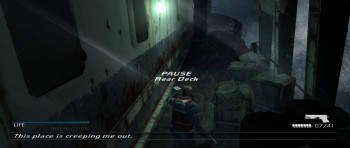
If i did everything correctly, this patch is not HOR+ but VERT-
1600x1200

1280x800
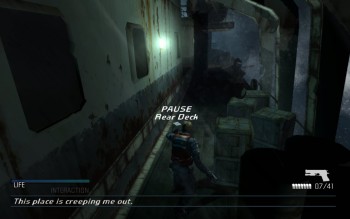
2560x1080
Re: Cold Fear
Posted: 02 Mar 2014, 21:36
by BlitzOreo
Can someone reupload Coldfix? It seems that Dropbox decided to remove it due to too much traffic.
Re: Cold Fear
Posted: 08 Mar 2014, 08:13
by qqq
Can someone reupload the patcher please? The old link is dead, and i can't find any other links. Thank you.