


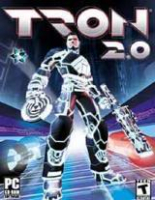
Tron 2.0

Detailed breakdowns of how games react to widescreen, ultra-wide, 4k and multi-mon
User avatar
scavvenjahh
Editors
Editors
Posts: 3424
Joined: 06 Mar 2008, 17:20

Tron 2.0

Post by scavvenjahh »


Widescreen Grade: C
Ultra-Widescreen Grade: Incomplete
Multi-monitor Grade: Unsupported
4k Grade: Incomplete

Read Full Detailed Report - Tron 2.0

Tron 2.0 was developed by Monolith Productions. This is a FPS that is designed as a continuation of the movie Tron. Players can use a variety of weapons including the famous identity disc from the movie. Points can be earned which allow players to upgrade and customize their character's abilities. Light cycle racing is available in singleplayer and multiplayer modes.
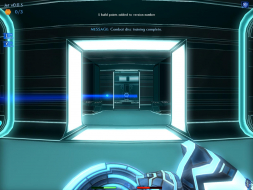

4:3


16:10
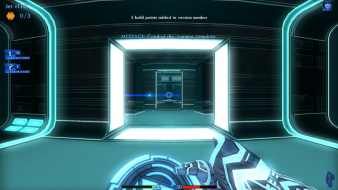

16:9
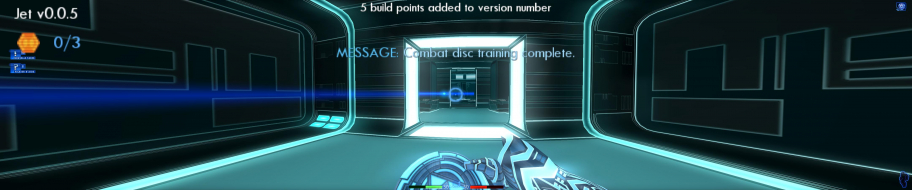

3x1

Last edited by scavvenjahh on 12 Oct 2014, 21:06, edited 2 times in total.
Reason: Edit
User avatar
skipclarke
Founder
Founder
Posts: 7358
Joined: 13 Oct 2003, 05:00

Re: Tron 2.0: Detailed Report

Post by skipclarke »

Can you switch between the WS and TH/EF resolutions within the game? Could you change to the WS resolution to handle menu issues?
User avatar
scavvenjahh
Editors
Editors
Posts: 3424
Joined: 06 Mar 2008, 17:20

Re: Tron 2.0: Detailed Report

Post by scavvenjahh »

Nope, at least not through the options menu. (Maybe with console commands...?) There are only 4:3 res's to choose from, and leaving the menu forces the resolution to switch back to 640x480 anyway.
The_cranky_hermit
Insiders
Insiders
Posts: 3010
Joined: 07 Nov 2005, 04:16

Re: Tron 2.0: Detailed Report

Post by The_cranky_hermit »

This mod seems like it's a suitable replacement for the old stretching solution, and can be our new "endorsed" solution. Does that make sense? If so, can you post that DR in a new thread, to replace this one?
User avatar
skipclarke
Founder
Founder
Posts: 7358
Joined: 13 Oct 2003, 05:00

Re: Tron 2.0 (DX10): Detailed Report

Post by skipclarke »

Split to a new topic.
User avatar
scavvenjahh
Editors
Editors
Posts: 3424
Joined: 06 Mar 2008, 17:20

Re: Tron 2.0 (DX10): Detailed Report

Post by scavvenjahh »

Split to a new topic.
This is not DX10... just a mod ;) (The DX10 renderer is for UE1 games)
User avatar
skipclarke
Founder
Founder
Posts: 7358
Joined: 13 Oct 2003, 05:00

Re: Tron 2.0 (DX10): Detailed Report

Post by skipclarke »

[quote]Split to a new topic.
This is not DX10... just a mod ;) (The DX10 renderer is for UE1 games)
Oh, yea. Oops. Too many games running around in my head.
The_cranky_hermit
Insiders
Insiders
Posts: 3010
Joined: 07 Nov 2005, 04:16

Re: Tron 2.0 (Killer App Mod 1.1): Detailed Report

Post by The_cranky_hermit »

It's not possible to play on "normal" multiplayer servers with this mod, is it?

Is it possible to play any multiplayer at all?

Anyway,

Calculated grade: D+

Hack/Mod solution is a damaging flaw.

CCE: 98.5%
redrain85
Posts: 32
Joined: 26 Mar 2010, 00:58
Contact:

Re: Tron 2.0 (Killer App Mod 1.1): Detailed Report

Post by redrain85 »

It's not possible to play on "normal" multiplayer servers with this mod, is it?

That's correct.

Is it possible to play any multiplayer at all?

It is, but everyone else you are playing against must also be using the mod. This includes both the server and the clients.

Mind you, the mod was designed so that it can easily be disabled in order to play against people who do not have it yet. But then you lose many of the new features and benefits.
TRON 2.0: Killer App Mod - Adds 16:9 and 16:10 widescreen support, game fixes, and much more


BenQ EW2420 | XFX Radeon 6870 1 GB GDDR5 | EVGA GT240 512 MB GDDR5 (Hybrid PhysX) | Asus M3A32-MVP Deluxe | AMD Phenom II X6 1100T BE 3.3 GHz | 4 GB G.Skill DDR2-1066 |

Auzentech X-Fi Prelude 7.1 | PCP&C Silencer 750W Quad | Coolermaster Elite 330 case | Windows 10 Technical Preview
The_cranky_hermit
Insiders
Insiders
Posts: 3010
Joined: 07 Nov 2005, 04:16

Re: Tron 2.0 (Killer App Mod 1.1): Detailed Report

Post by The_cranky_hermit »

Mind you, the mod was designed so that it can easily be disabled in order to play against people who do not have it yet. But then you lose many of the new features and benefits.

Would those "features and benefits" include proper widescreen support?
redrain85
Posts: 32
Joined: 26 Mar 2010, 00:58
Contact:

Re: Tron 2.0 (Killer App Mod 1.1): Detailed Report

Post by redrain85 »

The short answer is: yes, you lose proper widescreen support if you disable the mod.

The long answer is: depending on how you disable it, you can maintain partially correct widescreen. If you use the game launcher and click the Custom button, then remove the X from the checkbox beside the word "Retail", you partially disable the changes that the mod made to your TRON 2.0 installation. (But not all of them.) Disabling the mod this way would allow you to play on normal servers that are not using the mod.

As an example, however, you will lose the FOV fixes to the cutscenes in the Single Player game. There will also be issues in multiplayer if the mod is partially disabled, with HUD elements becoming stretched and so on.

So what it boils down to is that you would still be playing in a widescreen resolution with most of the geometry and interface being correct, but not all of it. To me, that would be unacceptable. But perhaps others wouldn't mind.
TRON 2.0: Killer App Mod - Adds 16:9 and 16:10 widescreen support, game fixes, and much more


BenQ EW2420 | XFX Radeon 6870 1 GB GDDR5 | EVGA GT240 512 MB GDDR5 (Hybrid PhysX) | Asus M3A32-MVP Deluxe | AMD Phenom II X6 1100T BE 3.3 GHz | 4 GB G.Skill DDR2-1066 |

Auzentech X-Fi Prelude 7.1 | PCP&C Silencer 750W Quad | Coolermaster Elite 330 case | Windows 10 Technical Preview
redrain85
Posts: 32
Joined: 26 Mar 2010, 00:58
Contact:

Re: Tron 2.0 (Killer App Mod 1.1): Detailed Report

Post by redrain85 »

So I'm wondering why this hasn't been listed as a confirmed solution yet, nor mentioned at all in the main Tron 2.0 entry in the Games list? With the TRON Evolution game out and the movie sequel due shortly, a lot of people will probably be revisiting Tron 2.0 and looking for a way to play it in widescreen, but may not find it here unless they check the detailed report. Thanks in advance for any updates to the site.

Within the next couple of months I'm going to start work on another version to try and alleviate any remaining issues in widescreen. Most notably the hit detection on the System Memory screen (subroutines) at 16:9 AR.

I also created a troubleshooting guide for anyone who has problems installing it or getting it to work.
http://tronfaq.blogspot.com/2010/11/tron-20-killer-app-mod-help-and.html
TRON 2.0: Killer App Mod - Adds 16:9 and 16:10 widescreen support, game fixes, and much more


BenQ EW2420 | XFX Radeon 6870 1 GB GDDR5 | EVGA GT240 512 MB GDDR5 (Hybrid PhysX) | Asus M3A32-MVP Deluxe | AMD Phenom II X6 1100T BE 3.3 GHz | 4 GB G.Skill DDR2-1066 |

Auzentech X-Fi Prelude 7.1 | PCP&C Silencer 750W Quad | Coolermaster Elite 330 case | Windows 10 Technical Preview
User avatar
scavvenjahh
Editors
Editors
Posts: 3424
Joined: 06 Mar 2008, 17:20

Re: Tron 2.0 (Killer App Mod 1.1): Detailed Report

Post by scavvenjahh »

You're absolutely right. I simply didn't realize there was an existing Wiki page with the outdated solution. Comparison screenshots need re-uploading, too so I'll do my best to fix all that very soon.
C.G.B.
Posts: 2
Joined: 27 Dec 2010, 09:55

Re: Tron 2.0 (Killer App Mod 1.1): Detailed Report

Post by C.G.B. »

Hi

I have a problem with the newest NVidia Drivers. Problem is, while the mod installs correctly (new models are shown), the widescreen option doesnt work. It seems the new NVidia Drivers I just installed automatically set the game to its hightst native resolution (1280x1024) and then limit the screen with huge black bars to either side.

Im sure its an option you can turn off, but Im not able to find out where exactly. Any ideas?
redrain85
Posts: 32
Joined: 26 Mar 2010, 00:58
Contact:

Re: Tron 2.0 (Killer App Mod 1.1): Detailed Report

Post by redrain85 »

Did you take a look at the troubleshooting guide I mentioned a couple of posts back, C.G.B.?

There's a section that talks about widescreen, and how you might be able to fix it if you're having problems.
TRON 2.0: Killer App Mod - Adds 16:9 and 16:10 widescreen support, game fixes, and much more


BenQ EW2420 | XFX Radeon 6870 1 GB GDDR5 | EVGA GT240 512 MB GDDR5 (Hybrid PhysX) | Asus M3A32-MVP Deluxe | AMD Phenom II X6 1100T BE 3.3 GHz | 4 GB G.Skill DDR2-1066 |

Auzentech X-Fi Prelude 7.1 | PCP&C Silencer 750W Quad | Coolermaster Elite 330 case | Windows 10 Technical Preview
C.G.B.
Posts: 2
Joined: 27 Dec 2010, 09:55

Re: Tron 2.0 (Killer App Mod 1.1): Detailed Report

Post by C.G.B. »

Did you take a look at the troubleshooting guide I mentioned a couple of posts back, C.G.B.?

There's a section that talks about widescreen, and how you might be able to fix it if you're having problems.


While my post has been waiting to be approved I found an offical post on the Nvidia forums. The problem is a known bug and will be fixed. The screwed up double time, because not only does the newest set of drivers cause this "black bar bug", it also removes the options from the Nvidia control center to manually adjust the screen size -_-

So....My question has been answered, although somewhat unsatisfactory :D
redrain85
Posts: 32
Joined: 26 Mar 2010, 00:58
Contact:

Re: Tron 2.0 (Killer App Mod 1.1): Detailed Report

Post by redrain85 »

Well, I think I've fixed the hit detection in the System Memory screen (where you work with subroutines). It was most noticeable in 16:9 resolutions. This fix is planned to be implemented in the next version 1.2 of the mod.

http://www.youtube.com/watch?v=orpFkYH50O4

I also managed to make a change so that when you go to Options > Display from the main menu, the game doesn't kick you back to 640x480 any more because it won't allow non-4:3 resolutions. In fact, you can now select any resolution your display supports. The upside is that you'll probably never have to fiddle with an .ini file again, and can usually get the resolution you want from right inside the game. The downside is that you're able to pick any resolution, including one that doesn't fit your current aspect ratio. If you want to change aspect ratios, it will require reinstalling the mod.
TRON 2.0: Killer App Mod - Adds 16:9 and 16:10 widescreen support, game fixes, and much more


BenQ EW2420 | XFX Radeon 6870 1 GB GDDR5 | EVGA GT240 512 MB GDDR5 (Hybrid PhysX) | Asus M3A32-MVP Deluxe | AMD Phenom II X6 1100T BE 3.3 GHz | 4 GB G.Skill DDR2-1066 |

Auzentech X-Fi Prelude 7.1 | PCP&C Silencer 750W Quad | Coolermaster Elite 330 case | Windows 10 Technical Preview
redrain85
Posts: 32
Joined: 26 Mar 2010, 00:58
Contact:

Re: Tron 2.0 (Killer App Mod 1.1): Detailed Report

Post by redrain85 »

So I've been working on trying to implement Eyefinity/Surround support, and think I may be having some degree of success. Though it's still not there yet. Also, I can't really test these changes to see if they're actually working as expected, because I only have one monitor.

But before I go any further with it, I'd like to put this question to WSGF members:

In terms of the positioning of the HUD elements, what would be considered best practices for interface placement? Or failing that, what would people prefer?

[list]1) All the interface elements in the center screen, or
2) The way it is now with the elements spread across multiple screens (as can be seen in the screenshots earlier in this topic)?
[/list:u]

Of course, I'm talking about the HUD icons/bars during gameplay. Not menus, message boxes, etc.

To me it seems logical to place everything on the center screen, but I wanted to know if anyone felt otherwise. With 3 monitors it might be all right, but with 5 displays the HUD would probably be too spread out and hard to read.
TRON 2.0: Killer App Mod - Adds 16:9 and 16:10 widescreen support, game fixes, and much more


BenQ EW2420 | XFX Radeon 6870 1 GB GDDR5 | EVGA GT240 512 MB GDDR5 (Hybrid PhysX) | Asus M3A32-MVP Deluxe | AMD Phenom II X6 1100T BE 3.3 GHz | 4 GB G.Skill DDR2-1066 |

Auzentech X-Fi Prelude 7.1 | PCP&C Silencer 750W Quad | Coolermaster Elite 330 case | Windows 10 Technical Preview
tet5uo
Insiders
Insiders
Posts: 405
Joined: 28 Nov 2010, 22:18

Re: Tron 2.0 (Killer App Mod 1.1): Detailed Report

Post by tet5uo »

Yeah center screen all the way!

:triplewide
User avatar
scavvenjahh
Editors
Editors
Posts: 3424
Joined: 06 Mar 2008, 17:20

Re: Tron 2.0 (Killer App Mod 1.1): Detailed Report

Post by scavvenjahh »

Yeah, screw 5 displays - center it all ! 8)
Also, I can't really test these changes to see if they're actually working as expected, because I only have one monitor.
You could use "faux TripleHead" i.e a very wide resolution, windowed (like 1920x480) to get a rough idea of how multi-mon tweaks would look like.
Post Reply

Who is online

Users browsing this forum: Semrush [Bot] and 11 guests
