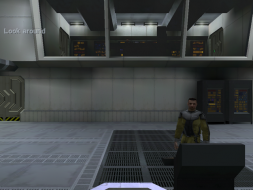
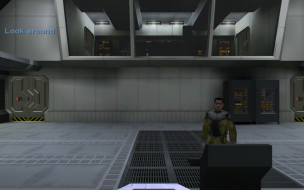
Halo: Combat Evolved

Detailed breakdowns of how games react to widescreen, ultra-wide, 4k and multi-mon
User avatar
Dem Pyros
Posts: 1060
Joined: 08 Dec 2006, 06:01

Halo: Combat Evolved

Post by Dem Pyros »


Widescreen Grade: C
Ultra-Widescreen Grade: Incomplete
Multi-monitor Grade: C
4k Grade: Incomplete

Read Full Detailed Report - Halo: Combat Evolved

Halo: Combat Evolved is a first person shooter developed by Bungie Studios and published by Microsoft Games. Released on November 15, 2001, it was a launch title for the Xbox and helped push the console ahead in the console war. It was ported to the PC and Mac in 2003 and has spawned several sequels. The player assumes the role of Master Chief, the rank of a cybernetically enhanced warrior who is fighting to save Earth from an alien race called "The Covenant." Deserted on a mysterious "Halo" ring world, he is left to discover its deadly secrets.


4:3


16:10


16:9


3x1

Last edited by Dem Pyros on 22 Oct 2013, 09:34, edited 4 times in total.
Reason: Edit
The_cranky_hermit
Insiders
Insiders
Posts: 3010
Joined: 07 Nov 2005, 04:16

Halo:Combat Evolved

Post by The_cranky_hermit »

Does the FOV hack work fine in multiplayer?

Grade: D+

CCE: 98%

Hack solution is a damaging flaw.
lowlymarine
Posts: 3
Joined: 19 Nov 2006, 23:20

Halo:Combat Evolved

Post by lowlymarine »

Wait...what? D+? Really? Seeing as plain-old Vert- is C(+), it would actually score higher if no one had bothered to create the FOV tool? Or is there something else wrong that I'm missing?
User avatar
Dem Pyros
Posts: 1060
Joined: 08 Dec 2006, 06:01

Halo:Combat Evolved

Post by Dem Pyros »

Does the FOV hack work fine in multiplayer?

Grade: D+

CCE: 98%

Hack solution is a damaging flaw.
From what I experienced, the FOV worked fine in multiplayer without getting booted.
User avatar
DaFox
Posts: 2356
Joined: 14 Nov 2006, 15:48

Halo:Combat Evolved

Post by DaFox »

Wait...what? D+? Really? Seeing as plain-old Vert- is C(+), it would actually score higher if no one had bothered to create the FOV tool? Or is there something else wrong that I'm missing?


I'm with marine even though you get a better experience the score still drops, at the very least a hack should continue to produce a C/C+ assuming it works flawlessly in multiplayer, If it does not then it deserves a D.
legionaire45
Posts: 3
Joined: 16 Aug 2008, 01:04

Halo:Combat Evolved

Post by legionaire45 »

If you want to use a custom resolution all you have to do is go to your shortcut properties and add "-vidmode width, height, refreshrate" (eg. "-vidmode 1680, 1050, 60") to the target. This should work for any resolution although I have only tested it up to 2560 x 1600. Last I checked the 1.08 patch breaks Bitterbanana's FOV hack so you might want to look for an up to date version or something else to post since 1.08 is going to become a mandatory update soon (if it hasn't become one already).
The_cranky_hermit
Insiders
Insiders
Posts: 3010
Joined: 07 Nov 2005, 04:16

Halo:Combat Evolved

Post by The_cranky_hermit »

Hack solutions result in a D grade. That's how the grading system has worked since it existed. If you want to propose a change to the grading system itself, this isn't the right place for it. The Insider's "Site Updates & Requests" board is more appropriate if you want to make a thread there.
User avatar
Dem Pyros
Posts: 1060
Joined: 08 Dec 2006, 06:01

Halo:Combat Evolved

Post by Dem Pyros »

If you want to use a custom resolution all you have to do is go to your shortcut properties and add "-vidmode width, height, refreshrate" (eg. "-vidmode 1680, 1050, 60") to the target. This should work for any resolution although I have only tested it up to 2560 x 1600. Last I checked the 1.08 patch breaks Bitterbanana's FOV hack so you might want to look for an up to date version or something else to post since 1.08 is going to become a mandatory update soon (if it hasn't become one already).
...I was using 1.08 and the FOV hack worked fine for me in both singleplayer and multiplayer.
User avatar
skipclarke
Founder
Founder
Posts: 7358
Joined: 13 Oct 2003, 05:00

Halo:Combat Evolved

Post by skipclarke »

Wait...what? D+? Really? Seeing as plain-old Vert- is C(+), it would actually score higher if no one had bothered to create the FOV tool? Or is there something else wrong that I'm missing?

We tend to be hard on devs who could have given us more than they did. If we can come up with a solution for Hor+ WS, then they should have up front.

The fact that a 3rd party unraveled their code and wrote a patch to fix their issue (that they could have avoided, and/or could have fixed in their own patch) points to the fact that either they don't support our vision, or are lazy.

I guess in this sense, it may be more a reflection of the dev than the game. But the fact that they made the community work so hard counts against them.
Widescreensteff
Posts: 6
Joined: 17 Aug 2008, 22:22

Halo:Combat Evolved

Post by Widescreensteff »

16:9: 86.0730329272
16:10: 80.0806445763


The game uses a FOV of 70 by default, that is correct, but that is not the right FOV for the game. It looks normal with a FOV of 90 on a 4:3 Display, just like it should look. They had to change it to 70 for the xbox. On the PC, of course, you can use a FOV of 90. And if you have an 16:10 screen, you should use a FOV of 100!
legionaire45
Posts: 3
Joined: 16 Aug 2008, 01:04

Halo:Combat Evolved

Post by legionaire45 »

[quote]
...I was using 1.08 and the FOV hack worked fine for me in both singleplayer and multiplayer.
Lucky, apparently a lot of other people haven't been having too much luck with it. I miss widescreen :(.

Someone is updating the hack for 1.08 users anyway, I'll post a link in this post when he finishes and releases it.

BTW, just as an FYI - Bitterbanana's FOV hack and most other Halo hacks work by hacking the game client's memory and plugging in values (in this case, changing the view frustum). This stuff is not really a patch, more of a hack or client side addon. Because of this if a hack works in singleplayer it should work in multiplayer and vice-versa no matter what - there is no code that checks what apps are running in the background to block out the app anyway.

If Bitterbanana or someone ever patches YeloBattery for 1.08 then the UI stretching issue should be fixed.

Please do cut Gearbox, Bungie and MS some slack - the game was released in 2003 or 2004, way before widescreen monitors became popular. Halo CE has never been officially supported and Halo PC is probably not supported by now either. The score can stay at whatever it is because that is the way the rules are but please do cut the developers some slack considering widescreen monitors are still a rarity amongst Halo users. They aren't lazy - they just didn't anticipate that widescreen users would become a sizable minority 5 or so years after their game was released. I'd also say that the fact that the community is there to provide tools like this is a pretty good indication that people are into the game, but that's rather subjective isn't it. :P

EDIT: Updated FOV Hack is here.
User avatar
Dem Pyros
Posts: 1060
Joined: 08 Dec 2006, 06:01

Halo:Combat Evolved

Post by Dem Pyros »

Please do cut Gearbox, Bungie and MS some slack - the game was released in 2003 or 2004, way before widescreen monitors became popular.
Pfft.

Let me just remind you that The Legend of Zelda: Ocarina of Time when run off an emulator has perfect Triplehead support.

Made in 1998.

So they deserve no slack whatsoever in my book.
User avatar
DaFox
Posts: 2356
Joined: 14 Nov 2006, 15:48

Halo:Combat Evolved

Post by DaFox »

[quote]Please do cut Gearbox, Bungie and MS some slack - the game was released in 2003 or 2004, way before widescreen monitors became popular.
Pfft.

Let me just remind you that The Legend of Zelda: Ocarina of Time when run off an emulator has perfect Triplehead support.

Made in 1998.

So they deserve no slack whatsoever in my book.

Original Half-Life works great in widescreen aswell.
legionaire45
Posts: 3
Joined: 16 Aug 2008, 01:04

Halo:Combat Evolved

Post by legionaire45 »

[quote]Please do cut Gearbox, Bungie and MS some slack - the game was released in 2003 or 2004, way before widescreen monitors became popular.
Pfft.

Let me just remind you that The Legend of Zelda: Ocarina of Time when run off an emulator has perfect Triplehead support.

Made in 1998.

So they deserve no slack whatsoever in my book.
Assuming you are referring to Project64, the emulator is handling the widescreen support and increased resolution. The original N64 is only capable of outputting at a maximum resolution of 640 x 480 with whatever field of view the game chooses to use - in the case of Ocarina of Time, probably something like 70-90 degrees due to it being a 4:3 aspect ratio resolution. Project64 handles the resolution and field of view changes in the "modern" emulated version.

Anyway, that means that at best OoT only had wide screen support in 2001, when Project64 was released. That also assumes that the developers of the emulator had figured out how to get it to run at resolutions greater then the standard 640x480 res in the initial release. I don't know for sure, but I doubt that it had support for larger/widescreen resolutions in the initial release. If you want to you can look through the project logs and find out when it supported it.

Original Half-Life works great in widescreen as well.

True, but that's just because Valve is cool like that 8) . It still requires an ugly fix to get the FoV set properly (autoexec.bat file needs to have "fov xx" or whatever added, there's an article on this site IIRC). Yes, it would be nice if Halo had a built in menu option to change the FoV but considering neither games are supported I doubt Bungie, Gearbox or MS would take the time to update it because then they would have to put together a support team for a game with a very small community of gamers. The costs of that don't justify something that can be done just as well by simply running a little app in the background that doesn't have any performance overhead at all.

Anyway, the FoV Hack has been updated, link is in my last post.

User avatar
Dem Pyros
Posts: 1060
Joined: 08 Dec 2006, 06:01

Halo:Combat Evolved

Post by Dem Pyros »

Nonetheless, even the fact that some little developers making an emulator for a Nintendo 64 and implementing widescreen (if even at a later point) for MULTIPLE games proves the point that it is Microsoft's fault for not updating Halo: Combat Evolved with correct widescreen capability.

It's not difficult, and they can easily release a patch enabling it.

I don't see any reason to not fault them for it.
Somian
Posts: 17
Joined: 22 Jan 2008, 12:51

Halo:Combat Evolved

Post by Somian »

How can i set it over 1600x900, i need 1920x1080 =/
InnerGoat
Posts: 19
Joined: 05 Aug 2006, 18:30

Halo:Combat Evolved

Post by InnerGoat »

In the shortcut target you need to add -vidmode 1920,1080,60 to force it to your resolution and refresh rate (assuming 60hz).
JohnFrost
Posts: 1
Joined: 23 Dec 2008, 00:13

Halo:Combat Evolved

Post by JohnFrost »

For those who don't like the hacky temporary nature of the FOV program, or can't get it to work, there's a permanent solution.

http://forum.macologist.org/showthread.php?t=555

Says it's for Mac, but it's the same files on PC, so it works there too...also works on Halo 2, and probably on the Halo demo.

The directions there are somewhat confusing, though. Basically, open up each MAP in a hex editor (but don't bother with bitmaps or sounds), and replace every instance of AA 61 9C 3F with the FOV you desire. I don't know if it's replacing any important non-FOV numbers by accident, but I tested the first SP map and everything worked okay. The DM maps only have around 73 instances to replace, and the SP maps have upwards in the hundreds (you'll definitely want to click the "replace all" button).

Assuming 1.221730470657349 really does equal 70 FOV (or approx), to find the number, take your desired FOV and divide it by 57.29577978221061839928051578009. You can round the result up to the nearest hundredth or whatever if you like, then convert it to hex. XVI32, the program I use, has an "encode number" option to convert the number to "32 bit IEEE single". That will give you the hex to replace into each map.

Here are some common ones I've worked out already:

AA 61 9C 3F = 1.22173047065735 = 70 (Halo's default, 4:3)
DB 0F C9 3F = 1.57079631941659 = 90 (Quake's default, 4:3)
F3 66 DF 3F = 1.74532924379621 = 100 (16:10)
0B BE F5 3F = 1.91986216817583 = 110 (16:9)
Mesh
Posts: 845
Joined: 28 May 2007, 03:10

Halo:Combat Evolved

Post by Mesh »

neat thread, just when I bought halo too.
User avatar
StingingVelvet
Posts: 1506
Joined: 09 Aug 2006, 14:17

Halo:Combat Evolved

Post by StingingVelvet »

Edit: see below.
Post Reply

Who is online

Users browsing this forum: No registered users and 10 guests