Dungeons & Dragons: Dragonshard

Detailed breakdowns of how games react to widescreen, ultra-wide, 4k and multi-mon
Post Reply
Tanuki
Posts: 2866
Joined: 07 Jul 2007, 23:55

Dungeons & Dragons: Dragonshard

Post by Tanuki »


Widescreen Grade: C
Ultra-Widescreen Grade: Incomplete
Multi-monitor Grade: Unsupported
4k Grade: Incomplete

Read Full Detailed Report - Dungeons & Dragons: Dragonshard

Developed by Liquid Entertainment, Dragonshard is an RTS set in the Dungeons & Dragons universe.
Players can choose one of three factions and compete against the AI or online against other opponents. This game has campaigns and single-map skirmishes available.
Players compete concurrently on dual maps consisting of the overworld Eberron and the underworld Khyber.
The story for the campaigns was written by Keith Baker, creator of the Eberron universe.


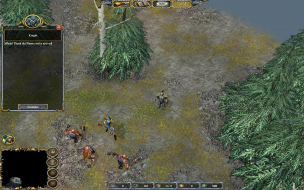
4:3


16:10


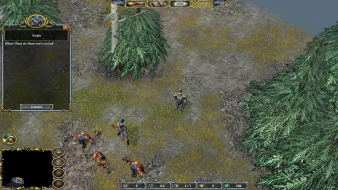
16:9


3x1

Last edited by Tanuki on 27 Apr 2014, 07:25, edited 2 times in total.
Reason: Edit
The_cranky_hermit
Insiders
Insiders
Posts: 3010
Joined: 07 Nov 2005, 04:16

Dragonshard: Detailed Report

Post by The_cranky_hermit »

==Grading==

Calculated grade: D+

Major unresolved issues: None
Minor unresolved issues: None

Summary of widescreen-related flaws:
Hack solution
Vert -
Stretched 2D screens
Stretched HUD
Vert - cut-scenes

Cranky's coverage estimate: 100%
satom
Posts: 1
Joined: 26 Feb 2007, 16:31

Dragonshard: Detailed Report

Post by satom »

Unfortunatly, for the European V1.24b this don't work. I still found the changing hex values, but if i change this to e.g. to 9006 and 1A04 for my
1680*1050 Display, the changed resolution disapears. Any Hints?

Regards,

Thomas
Tanuki
Posts: 2866
Joined: 07 Jul 2007, 23:55

Dragonshard: Detailed Report

Post by Tanuki »

If you followed the readme you changed the 1024x768 value. Try seeing what you game res is displaying with(Take a screenshot). Also take a screenshot of the fmvs, they should be in your resolution now.

Other than that, try changing all the bolded values.
Vornar
Posts: 5
Joined: 20 May 2008, 23:38

Dragonshard: Detailed Report

Post by Vornar »

Welcome. I would also want to adjust the resolution for myself "1680 x 1050" or "1440 x 900" but I don't know how to do it. I apologise for it, that my English is so weak, but poorly of it I am able. Greeting

Post Reply

Who is online

Users browsing this forum: No registered users and 12 guests