Page 1 of 2
Team Fortress 2
Posted: 06 Nov 2007, 05:47
by Tanuki
 Widescreen Grade: AUltra-Widescreen Grade: BMulti-monitor Grade: B4k Grade: IncompleteRead Full Detailed Report - Team Fortress 2Developed by Valve, Team Fortress 2 is a class-based, multiplayer FPS. Players choose teams and then compete against one another with various winning objectives such as "capture the flag". There are nine specialized classes that the player can select. Players are encouraged to work together as teams to compensate for the weaknesses of different classes. The game has a unique, cartoon style which allows you to enjoy your repeated deaths at the hands of your turncoat friends.
Team Fortress 2
Posted: 06 Nov 2007, 15:26
by mengzor
screw you and your super high resolutions ./cry
Team Fortress 2
Posted: 06 Nov 2007, 18:28
by Tanuki
screw you and your super high resolutions ./cry
Can't blame me for sticking with my native. :D
Team Fortress 2
Posted: 07 Nov 2007, 02:13
by The_cranky_hermit
Well, it finally happened. The first Valve-developed game using the Source engine that doesn't get certified. I don't like doing this, but I have to ding it a notch for the cropping at 16:9.
Valve, are you reading this? Move the "tip" up an inch and a half in your next patch! A Source game not getting certified violates the laws of physics or something.
==Grading==
Calculated grade: B+
Major unresolved issues: None
Minor unresolved issues: None
Summary of widescreen-related flaws:
Cropping bug
Cranky's coverage estimate: 100%
Team Fortress 2
Posted: 07 Nov 2007, 02:20
by Tanuki
Adding further juice is the fact that there is cropping on the right side in 4:3.
Maybe it is my DPI settings? I will have to switch and check. Although no other game has this problem with the DPI. 8)
Team Fortress 2
Posted: 07 Nov 2007, 04:51
by Tanuki
Not my DPI.
I am relieved.
Team Fortress 2
Posted: 07 Nov 2007, 05:35
by karnak
1360x768 not tested? Is it not a real widescreen resolution?
/emo
Team Fortress 2
Posted: 07 Nov 2007, 05:42
by The_cranky_hermit
You could say it isn't "real." While most HDTVs use 1360x768 as their native res, I have yet to see one that actually supports it through HDMI.
Team Fortress 2
Posted: 07 Nov 2007, 05:48
by karnak
referencing this thread [url]http://www.widescreengamingforum.com/node/]
My 32" LCD TV works great at 1360x768 with a DVI - HDMI cable, even though it explicitly states in teh manual do not do this, only use the vga port for PC display. The VGA port is limited to 800x600, 1024x768, 1280x1024 either displaying centered, or just plain stretched to fit screen by hitting pic mode on the remote.
I know us TV as monitor ones are a bit of the odd ones out.
Team Fortress 2
Posted: 07 Nov 2007, 05:52
by Tanuki
I do requests, just not often.

Team Fortress 2
Posted: 07 Nov 2007, 05:52
by The_cranky_hermit
Support for 1360x768 over HDMI is extremely unusual. That's one of the reasons why its testing isn't part of the DR template. Another reason is because it's impractical - many systems just won't support it, even through custom resolution tweaking.
Team Fortress 2
Posted: 07 Nov 2007, 08:48
by skipclarke
I don't see/get the clipping issue. Can someone point it out to me?
Team Fortress 2
Posted: 07 Nov 2007, 09:00
by Tanuki
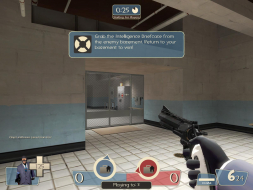
Singleplayer anomalies
4:3
Right menu is cropped on right side.
16:9
Tip text is cropped on bottom.
Goodnight world.
Team Fortress 2
Posted: 07 Nov 2007, 11:44
by X-Warrior
Singleplayer anomalies
4:3
Right menu is cropped on right side.
16:9
Tip text is cropped on bottom.
Goodnight world.
Ahhh right... so we've just found ourselves a game that's made for 16:10 widescreen and screws the 4:3 users :lol:
I think I have to see this for myself... watch for the result.
Team Fortress 2
Posted: 07 Nov 2007, 11:58
by X-Warrior
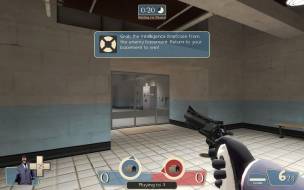
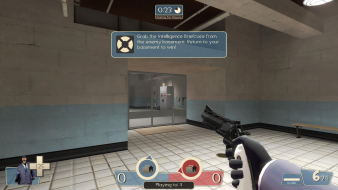
1280x960:

1600x900:

No anomalies on my screen...
Team Fortress 2
Posted: 07 Nov 2007, 12:26
by g00seberry

Fine here too ....
Team Fortress 2
Posted: 07 Nov 2007, 12:57
by X-Warrior
Reminds me of a HUD glitch I had in HL2 by the way... switching resolution back and forth solved that. Maybe this game engine doesn't like resolution changing very much.
Team Fortress 2
Posted: 07 Nov 2007, 17:55
by Tanuki
Can someone post their 1600x1200 and 1920x1080 pics?.
I would like to isolate this problem if possible.
Team Fortress 2
Posted: 07 Nov 2007, 18:18
by Tanuki
I have located the source of the problem. Thanks to X-Warrior.
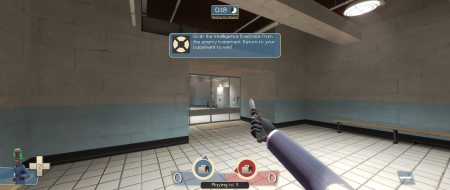
The game does not apply resolution changes properly without a restart. Since the game is designed to switch resolutions in-game this is a problem. But not one we are concerned about in the DR.
Here is an example...


When I was working on HL Source I would get crashing if I switched resolutions enough. You think they could have ironed out these bugs by now.
Team Fortress 2
Posted: 07 Nov 2007, 18:44
by skipclarke
I had problems with TF2 crashing when I was switching between 4:3, 16:10 and Surround when I was trying to get screen caps for the start of my video. Looks like this one is Certified, and the world is right again.