

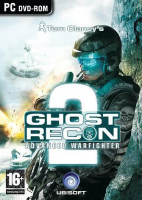
Ghost Recon Advanced Warfighter 2 (GRAW 2)

Detailed breakdowns of how games react to widescreen, ultra-wide, 4k and multi-mon
Post Reply
User avatar
Mach1.9pants
Insiders
Insiders
Posts: 1512
Joined: 29 Jul 2007, 05:24
Location: NZ

Ghost Recon Advanced Warfighter 2 (GRAW 2)

Post by Mach1.9pants »


Widescreen Grade: B
Ultra-Widescreen Grade: Incomplete
Multi-monitor Grade: C
4k Grade: Incomplete

Read Full Detailed Report - Ghost Recon Advanced Warfighter 2 (GRAW 2)

Tom Clancy's Ghost Recon Advanced Warfighter 2 (GRAW 2) is the sequel to Tom Clancy's Ghost Recon Advanced Warfighter. It expands on the game play of Ghost Recon Advanced Warfighter and is the fourth installment in the popular Ghost Recon tactical shooter video game series, published by Ubisoft.

The game takes place in 2013 (although the back of the game's cover says 2014), immediately after the events of Ghost Recon Advanced Warfighter (GRAW), just south of the United States border, and deals with the conflict between a Mexican rebel group, Mexican loyalists, and the U.S. Army for a time span of 72 hours. A wide array of location types are included, featuring mountains, small towns, urban environments, and a large hydro-electric dam just north of the U.S.-Mexico border.

The game play is similar to the first GRAW, although some new features, like Eternal Eyes, have been added to improve gameplay. This makes the direction of friendly units much more accurate and effective. The squad A.I. is improved, with fewer problems occurring than in the last GRAW. Units will actively seek cover and descriptively call out targets (i.e. "behind the red car", or "under the green roof"). The game also features Crosscom 2.0.
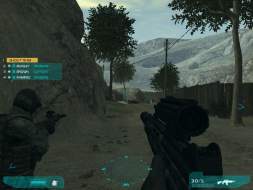


4:3


16:10
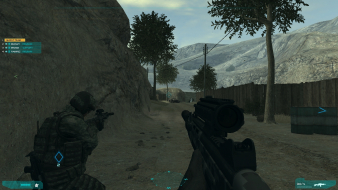

16:9
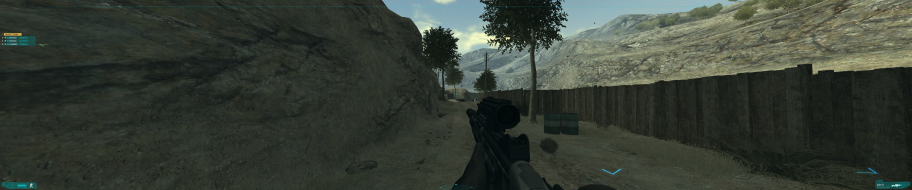

3x1

Last edited by Mach1.9pants on 13 Nov 2013, 21:28, edited 3 times in total.
Reason: Edit
The_cranky_hermit
Insiders
Insiders
Posts: 3010
Joined: 07 Nov 2005, 04:16

GRAW 2

Post by The_cranky_hermit »

Thanks for the report! My comments:

==Singleplayer anomalies==

Actually, I wouldn't necessarily call this an anomaly. When you're using a scoped rifle, additional peripheral vision isn't particularly important. In this situation, it's arguably more desirable to have a larger scoped view at the expense of losing hor +.

Does the game have any other things you would call anomalies?


==Cut-scenes==

Your shot labeled 1280x1024 is actually 1920x1200, and your shot labeled 1680x1050 is actually 1280x1024. Also, these are not anamorphic. Anamorphic means that the widescreen shot has thinner black bars, which isn't the case here. This is vert -. You can tell because the 5:4 shot has vegetation visible on the bottom of the viewable area that gets cropped off in the widescreen shot.

Also, are you sure these are FMVs? They look to me like they are rendered with the game's engine, plus vert - is very uncommon in FMVs.


== Grading ==

Calculated grade: C+
Potential grade: B

Major unresolved issues:
Is 1280x720 or 1920x1080 supported?

Minor unresolved issues:
Are 1280x800 and 1440x900 supported?
Are there any singleplayer anomalies?

Summary of widescreen-related flaws:
Stretched HUD
Vert - cut-scenes

Cranky's coverage estimate: 87%
Gabbo
Posts: 381
Joined: 24 Dec 2005, 11:13

GRAW 2

Post by Gabbo »

1280x720 and 1920x1080 work fine.
User avatar
Mach1.9pants
Insiders
Insiders
Posts: 1512
Joined: 29 Jul 2007, 05:24
Location: NZ

GRAW 2

Post by Mach1.9pants »

1280x720 and 1920x1080 work fine.

Report edited, cheers
M1.9P :D
The_cranky_hermit
Insiders
Insiders
Posts: 3010
Joined: 07 Nov 2005, 04:16

GRAW 2

Post by The_cranky_hermit »

== Grading ==

Calculated grade: B

Major unresolved issues: None
Minor unresolved issues: None

Summary of widescreen-related flaws:
Stretched HUD
Vert - cut-scenes

Cranky's coverage estimate: 100%
User avatar
scavvenjahh
Editors
Editors
Posts: 3424
Joined: 06 Mar 2008, 17:20

Re: GRAW 2

Post by scavvenjahh »

Here's some long overdue party-pooping...

As was tirelessly demonstrated by Paddy back in the day, GRAW2 was originally a Vert- game that ultimately became Hor+/Vert+. It's hard to spot on Mach's screenshots, but the comparison screenshot DB makes it all too obvious:
4:3 (color) over 16:10 (grey)


The AR can be set in-game to 4:3, 5:4, 16:10 or 16:9. It can also be edited manually:

Code: Select all

C:Program FilesUbisoftGhost Recon Advanced Warfighter 2Datasettingsrenderer_settings.xml

        <render_settings>
             <variable name="aspect_ratio" value=""/>
But no value will make the game strictly Hor+ and "0" ("auto AR" in GRAW1) only results in broken graphics in GRAW2.

==Surround Gaming Support==
Partial solution, .ini edit required.
Checking "show all resolutions" from the in-game options menu will let you select any multi-mon res, but the AR has to be edited manually, see above.
However since this is NOT a strictly Hor+ game, AR values above ~3.5 will result in increasingly broken graphics (missing objects, upside-down scene... although the Vert- scope sight and strategic map always work ok!).

So...
Multi-monitor gameplay will be slightly stretched, even in 15:4.
'Faux' Surround up to 3:1 (e.g 1920x640) works ok, but the vertical FOV increase clearly becomes overwhelming.

1024x768 (in-game AR 4:3)


1920x640 ("aspect_ratio" value="3.0")
User avatar
thales100
Editors
Editors
Posts: 1898
Joined: 06 Nov 2008, 01:08

Re: GRAW 2

Post by thales100 »

Multi-monitor gameplay will be slightly stretched, even in 15:4.


Yes, unfortunately it looks awful.
The_cranky_hermit
Insiders
Insiders
Posts: 3010
Joined: 07 Nov 2005, 04:16

Re: GRAW 2

Post by The_cranky_hermit »

Vert + flaw noted and recorded as blemish.

Should we consider this game's surround support "flawed" (and remember - this is the grading equivalent of no surround support at all)?
User avatar
thales100
Editors
Editors
Posts: 1898
Joined: 06 Nov 2008, 01:08

Re: GRAW 2

Post by thales100 »

Ah this game doesnt support surround, no way. :wink:
User avatar
scavvenjahh
Editors
Editors
Posts: 3424
Joined: 06 Mar 2008, 17:20

Re: GRAW 2

Post by scavvenjahh »

Definitely flawed. The game looks like crap at any regular Surround res.
The_cranky_hermit
Insiders
Insiders
Posts: 3010
Joined: 07 Nov 2005, 04:16

Re: GRAW 2

Post by The_cranky_hermit »

Calculated grade: B-

Blemishes:
Flawed surround
Too much FOV increase
Stretched HUD
Vert - cut-scenes

CCE: 100%
User avatar
thales100
Editors
Editors
Posts: 1898
Joined: 06 Nov 2008, 01:08

GRAW 2 [Hack] [Hor+ Gameplay/Cutscenes/Scope]

Post by thales100 »

This is some kind of "Pushing the oldie to the limit" part 2, as a sequel to the topic i started some time ago at ghostrecon.net, concerning Ghost Recon - you may check it here .
Btw who would say that antialiasing in GRAW 2 could be done (Nvidia users only).
And what else would contribute to a better gfx experience running this title ? The answer is quite obvious for us, surround gamers - proper multi monitor support, what means a way to fix the aspect ratio when running GRAW 2 on super wide resolutions.
GRAW 1 supports surround resolutions out of the box, due to an "auto" option for the "aspect ratio", in the game menu, that was unfortunately "forgotten" in GRAW 2.
Playing a FPS on multi monitors is obviously much more immersive than on a single screen, no matters its size.

Add antialiasing, as said before, to the mix, that already features PhysX, and you have the ultimate Ghost Recon graphics experience.
Then you may also run some cool mods, like Brettzies Weapon Pack Graw2, edit the HUD to get rid of some unnecessary stuff (edit as you wish hud_visibilty.xml file at ...ghost recon advanced warfighter 2Settings, using the notepad) and voila - a refreshed ghost recon for all fans of the series, in both SP and MP.

You can download the GRAW 2 Widescreen Fix (created by HaYDeN ) so it'll run fine on multi monitors (steam version was used and tested, cant guarantee that retail will properly work, but HaYDeN offered to update the app upon a request to make it compatible with retail too :wink: ), from here.


Cutscenes and all gameplay (including scoped view) will be HOR+, expanding the horizontal component of the FOV while keeping the vertical component roughly the same. This is the ideal solution for widescreen and multi monitors setups, as it grants a wider picture.

I recommend you to try Ghost Recon Advanced Warfighter 2 with antialiasing (if you are a Nvidia user) and running on multi monitors - its a refreshed gaming experience.
Ah well, now i really wish we had less "run and gun" SP/coop "missions" for this game, and many more with an original Ghost Recon touch, stealth and action well balanced for realism and additional immersion, but thats another story.
Check the mini video and screenshots below (click on the pics to enlarge 5040x1050).

Setup:
GRAW 2 (V.1.5.0.3048, steam version)
GRAW 2 Widescreen Fix
Brettzies Weapon Pack Graw2 (unbundled version)
Quiet Ghosts
Nvidia Surround at 5040x1050 + 4xMSAA antialiasing forced using Nvidia Inspector (more information here)


Hud Visibility (suggestion):


Post Reply

Who is online

Users browsing this forum: Bing [Bot] and 7 guests

