Jade Empire

Detailed breakdowns of how games react to widescreen, ultra-wide, 4k and multi-mon
Post Reply
Black.Arrow
Posts: 15
Joined: 30 Jun 2007, 00:45

Jade Empire

Post by Black.Arrow »


Widescreen Grade: B
Ultra-Widescreen Grade: B
Multi-monitor Grade: C
4k Grade: B

Read Full Detailed Report - Jade Empire

You play as an martial arts student who is trying to rescue his/her abducted Master from a group of assassins. While unveiling the circle of treachery, you can choose to follow the Way of the "Open Palm" or the "Closed Fist" (Good/Evil - much like the KotOR series) and influence the story and people in this way.


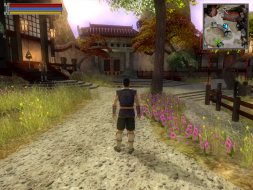
4:3


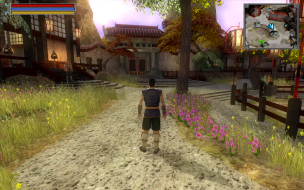
16:10


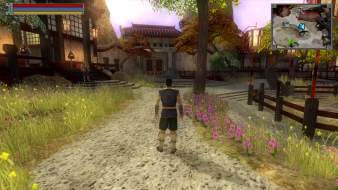
16:9


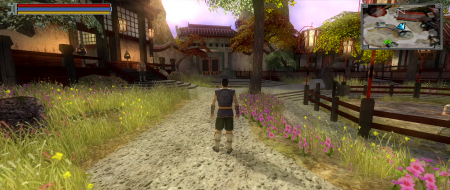
21:9


3x1

Last edited by Black.Arrow on 12 Jan 2017, 04:00, edited 5 times in total.
Reason: Edit
The_cranky_hermit
Insiders
Insiders
Posts: 3010
Joined: 07 Nov 2005, 04:16

Jade Empire (SE): Detailed Report

Post by The_cranky_hermit »

==Supported resolutions==

Which ones were supported natively, and which ones required a .ini edit? Also, why couldn't you test 1280x720? It seemed to work fine for you in Lost Planet and NWN2.


==Singleplayer anomalies==

I'm not sure I understand what the graphical glitch here is. Can you explain what's happening that shouldn't?


== Grading ==

Calculated grade: B-
Potential grade: B

Major unresolved issues:
None

Minor unresolved issues:
*waiting for your response*

Summary of widescreen-related flaws:
Graphical glitch in shooter minigame
Stretched HUD
Stretched FMVs

Cranky's coverage estimate: 97.5%
Black.Arrow
Posts: 15
Joined: 30 Jun 2007, 00:45

Jade Empire (SE): Detailed Report

Post by Black.Arrow »

I've updated the report. All of the resolutions listed as working were supported natively.
1280x720 and 1440x900 weren't, so I tried to edit them in the .ini.
I posted the result in the report under failed resolutions.

The graphical glitch is on the top-left and right sides.
There should be water, but instead there is nothing rendered.

EDIT: Nevermind, 1280x720 worked and its also available in the options menu, I accidentally set the wrong refresh rate. (-1; dunno how that happened :oops: )
The_cranky_hermit
Insiders
Insiders
Posts: 3010
Joined: 07 Nov 2005, 04:16

Jade Empire (SE): Detailed Report

Post by The_cranky_hermit »

== Grading ==

Calculated grade: B

Major unresolved issues: None
Minor unresolved issues: None

Summary of widescreen-related flaws:
Graphical glitch in shooter minigame
Stretched HUD
Stretched FMVs

Cranky's coverage estimate: 99.5%
Tanuki
Posts: 2866
Joined: 07 Jul 2007, 23:55

Jade Empire (SE): Detailed Report

Post by Tanuki »

1920x1200 and 1440x900 confirmed native.
User avatar
scavvenjahh
Editors
Editors
Posts: 3424
Joined: 06 Mar 2008, 17:20

Jade Empire (SE): Detailed Report

Post by scavvenjahh »

==Surround Gaming support==

Native.
Simply select 16:9 aspect ratio to access SG resolutions in the options menu (or run SGU).

Here are some screenshots to compare to the original poster's:

SG Ingame (sorry, not the same place/characters...)


SG Minigame

Note that you can move your ship to the edges of your display, so you can spot and shoot enemies earlier than in normal resolutions.

SG FMV


SG Cutscene


==Take it or leave it==

[+] The character sheet, quest log, texts and subtitles stretch too, but can still be read easily, which is the most important.
[-] There are quite a lot of nice short FMVs throughout the game, their stretching is much more annoying.
[-] Maps are mostly corridor-like (even the cities) and everything happens right under your nose. The game is too "narrow" by nature to really benefit from SG, if you will.
[-] Hotkey for PowerDeskSE's Bezel Management is NOT functional ingame. (Alt-tabbing to use the hotkey on the desktop then get back into the game works though.)

WidescreenWallaby
Posts: 32
Joined: 21 Oct 2006, 19:47

Jade Empire (SE): Detailed Report

Post by WidescreenWallaby »

Runs great at 2560x1600 for me.
Post Reply

Who is online

Users browsing this forum: No registered users and 5 guests