
Sacrifice

Detailed breakdowns of how games react to widescreen, ultra-wide, 4k and multi-mon
Post Reply
Tanuki
Posts: 2866
Joined: 07 Jul 2007, 23:55

Sacrifice

Post by Tanuki »


Widescreen Grade: C
Ultra-Widescreen Grade: C
Multi-monitor Grade: C
4k Grade: C

Read Full Detailed Report - Sacrifice

Take control of alien wizards as they seek to control manaliths and banish their opponents from the realms. Harvest the souls of your enemies' creatures and create more powerful, deadly beings to ravage the lands. Sacrifice your own followers to destroy your opponent's altar and claim victory. Master the spells given to you by the five gods of this new world: the righteous god of Life, Persephone, the humble god of Earth, James, the all-knowing god of Air, Stratos, the industrious god of Fire, Pyro, and the sinister god of Death, Charnel. Summon tornados and volcanos to scatter your enemies or remove the very ground from beneath their feet and watch their armies plummet into oblivion. Sacrifice awaits.
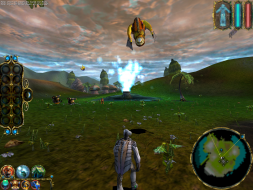

4:3
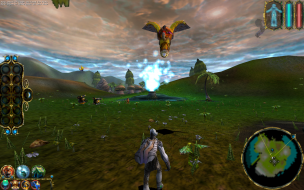

16:10
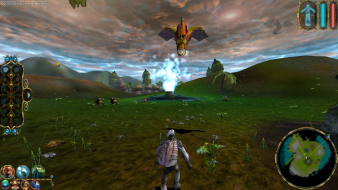

16:9
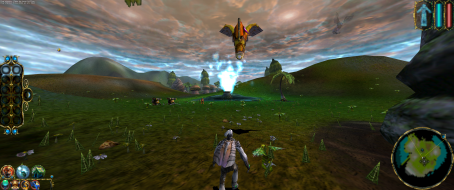

21:9


3x1

Last edited by Tanuki on 20 Jul 2015, 14:40, edited 4 times in total.
Reason: Edit
The_cranky_hermit
Insiders
Insiders
Posts: 3010
Joined: 07 Nov 2005, 04:16

Sacrifice: Detailed Report

Post by The_cranky_hermit »

This solution involves both registry editing and hex editing. That's going to put some people off, so the grade is going to suffer.

==Grading==

Calculated grade: D+

Major unresolved issues: None
Minor unresolved issues: None

Summary of widescreen-related flaws:
Complicated solution
Vert -
Vert - cut-scenes

Cranky's coverage estimate: 100%
Tanuki
Posts: 2866
Joined: 07 Jul 2007, 23:55

Sacrifice: Detailed Report

Post by Tanuki »

To be fair the registry editing does the hex editing for you. :D
The_cranky_hermit
Insiders
Insiders
Posts: 3010
Joined: 07 Nov 2005, 04:16

Sacrifice: Detailed Report

Post by The_cranky_hermit »

I wouldn't say that it does. I mean, you're still looking at hex code, and you still have to overwrite hex bytes with your own hex values. The main difference is that you're using regedit instead of a third party hex editor.
Tanuki
Posts: 2866
Joined: 07 Jul 2007, 23:55

Sacrifice: Detailed Report

Post by Tanuki »

But learning is fun. 8)
Sweetz
Posts: 287
Joined: 03 Mar 2007, 06:34

Sacrifice: Detailed Report

Post by Sweetz »

Damn Intel, little-endian is soooo annoying.

Anyway, to make this easier for people who don't understand hex or endianness, here are the values for some common resolutions.
Follow Sakatei's method and when you edit the value, make the first 12 digits (shown in 6 groups of 2) match what you see below, don't change anything other than the first 12.

If anyone needs a resolution not listed here just ask and I'll add it.

1280x720: 00 05 00 00 D0 02

1360x768: 50 05 00 00 00 03

1440x900: A0 05 00 00 84 03

1680x1050: 90 06 00 00 1A 04

1920x1080: 80 07 00 00 38 04

1920x1200: 80 07 00 00 B0 04
Tanuki
Posts: 2866
Joined: 07 Jul 2007, 23:55

Sacrifice: Detailed Report

Post by Tanuki »

Updated to fix some issues.
Resistance156
Posts: 23
Joined: 18 Mar 2008, 01:59

Sacrifice: Detailed Report

Post by Resistance156 »

Hi, I'm new to the forum, but this is the only place I could find widescreen info for Sacrifice, which I'm just starting to play again... I got ~2/3 through a campaign years ago, but didn't finish and now I'm starting over again as it's just a great game.

Anyway, I tried the edit listed above, and it works for 1440x900 and 1920x1080 that I've tested it on, but I get a glitch... At certain camera angles/zoom levels, certain objects/character disappear. They re-appear when the camera reaches a certain view angle/zoom level as well...

This is quite annoying, as I'd love to play this at 1920x1080 on my 37" LCD, but I have to use a default Sacrifice res that's quite a bit lower and not meant for 16:9 use to remedy the problem.

Is this a known problem? Does anyone know a fix?

Here are my specs:
Gateway P-6831 FX
1.66ghz dual core (T5450), I'll eventually upgrade to a T9300 2.5ghz dual core
3gb RAM
8800M GTS (512mb, 64 stream processors)
Vista Home Premium 32-bit
Tanuki
Posts: 2866
Joined: 07 Jul 2007, 23:55

Sacrifice: Detailed Report

Post by Tanuki »

Anyway, I tried the edit listed above, and it works for 1440x900 and 1920x1080 that I've tested it on, but I get a glitch... At certain camera angles/zoom levels, certain objects/character disappear. They re-appear when the camera reaches a certain view angle/zoom level as well...


Give me a couple days to look it over. I may have missed the problem.
Tanuki
Posts: 2866
Joined: 07 Jul 2007, 23:55

Sacrifice: Detailed Report

Post by Tanuki »

The invisible object problem is a widescreen one and I have been unable to find a fix for it.

This is one of the earilier DRs I did and I apologize for missing this flaw. I should have noticied this.

It may be possible that this flaw would not occur if I could locate the fov value for the game. If I ever find it I will update this report.

Thanks for the input about the flaw.
The_cranky_hermit
Insiders
Insiders
Posts: 3010
Joined: 07 Nov 2005, 04:16

Sacrifice: Detailed Report

Post by The_cranky_hermit »

Grade is unaffected. It loses points, but still passes the D+ threshold (few games with complete DR's don't).
Resistance156
Posts: 23
Joined: 18 Mar 2008, 01:59

Sacrifice: Detailed Report

Post by Resistance156 »

The invisible object problem is a widescreen one and I have been unable to find a fix for it.

This is one of the earilier DRs I did and I apologize for missing this flaw. I should have noticied this.

It may be possible that this flaw would not occur if I could locate the fov value for the game. If I ever find it I will update this report.

Thanks for the input about the flaw.


Bummer, looks like I'll have to play it stretched at a lower resolution... That being said, with 4x AA applied it really doesn't look TOO bad all things considered. Thanks for looking into it, keep me posted if you find a FOV edit to fix it.
whismerhill
Posts: 760
Joined: 28 Jun 2009, 22:17

Sacrifice: Detailed Report

Post by whismerhill »

Grade is unaffected. It loses points, but still passes the D+ threshold (few games with complete DR's don't).

hum sorry but even if I'm all new to this website, I don't agree with the game rating.

I extensively played this game at 1280x1024 & played around several minutes with 1680x1050 setting, I have to say the disappearing object bug makes the game borderline unplayable. the game camera is quite weird to handle as it is (try to move around on a steep hill/mountain for example...)
with this bug enemies, which are hitting you, become invisible and you lose precious seconds while trying to move the camera with your character (because the camera is bound to the character)

the game having a very fast pace makes these seconds far too precious to lose ...

so the final rating seems a bit overrated to me considering the kind of flaw D games have in general...


In any case I just gave here my opinion, whether or not the rating is changed is not that important!

thanks for reading.
The_cranky_hermit
Insiders
Insiders
Posts: 3010
Joined: 07 Nov 2005, 04:16

Sacrifice: Detailed Report

Post by The_cranky_hermit »

"Borderline unplayable" games tend to end up in the D-range. The only way a game can get an F is by being "actually unplayable."
Tommten
Posts: 1
Joined: 22 Dec 2009, 10:31

Re: Sacrifice: Detailed Report

Post by Tommten »

I can add that the resolution always is 640x480 in the menu for me, but it changes when I start a game. Im currently trying to get 1366x768 resolution.
I added "56 05 00 03" in regedit, based on this information: http://www.gamebanshee.com/forums/dungeon-lords-93/custom-resolutions-in-dungeon-lords-ce-90414.html
I got 1600x1200 resolution instead which seemed to work to, but I only played a few seconds in that resolution so I cannot say much about it though..
I dont know how to get 1366x768 in hex code, which is my LCD-TV best compatible and pixelmapped resolution. Can anyone help me with that? :)
Tanuki
Posts: 2866
Joined: 07 Jul 2007, 23:55

Re: Sacrifice: Detailed Report

Post by Tanuki »

56 05 00 03


That is right. Do you have 4 zeros between them in the registry?

56 05 00 00 00 03
Osiris
Posts: 4
Joined: 22 Apr 2009, 00:01

Resistance156 wrote:Anyway, I

Post by Osiris »

Anyway, I tried the edit listed above, and it works for 1440x900 and 1920x1080 that I've tested it on, but I get a glitch... At certain camera angles/zoom levels, certain objects/character disappear. They re-appear when the camera reaches a certain view angle/zoom level as well...
I'm experiencing the same issues on 1680x1050 (Win7, GTX580, Q9400).
I'm afraid the engine doesn't allow a 'future' system.

Switching back to one of the original resolutions, sadly.
I would have hoped this game would support 5040x1050.
iruj
Posts: 1
Joined: 02 Jan 2012, 16:26

Hey,I'm having some problems

Post by iruj »

Hey,
I'm having some problems modifying the "Resolution" in regedit - I change the first 12 digits, but my desired resolution doesn't become available in the game options menu. Also, after I quit Sacrifice, the hex values have changed back to what they were before.

If it helps, I'm running Windows 7 Home Premium 64-bit.

Any advice is welcome.
Qwatr
Posts: 8
Joined: 16 Mar 2011, 23:19

iruj wrote:Hey,I'm having

Post by Qwatr »

Hey,
I'm having some problems modifying the "Resolution" in regedit - I change the first 12 digits, but my desired resolution doesn't become available in the game options menu. Also, after I quit Sacrifice, the hex values have changed back to what they were before.

If it helps, I'm running Windows 7 Home Premium 64-bit.

Any advice is welcome.


I'm having the same issue but I've Pro version. Also, using GOG's version of Sacrifice.

I'm trying to get 1440x1080 because that would be the highest 4:3 resolution that would make sense on my 1080p 23" monitor. I'm wondering if that would avoid this widescreen glitch? If doesn't I would want to know the highest resolution that avoids the glitch but is as close to 1920x1080 as possible, preferably with the 1080 in mind.
User avatar
czarman
Insiders
Insiders
Posts: 685
Joined: 11 Dec 2008, 23:51
Location: Germany

Re: Sacrifice

Post by czarman »

Sacrifize.7z download link doesn't work anymore, any chance of a re-up?

Thanks! :onethumb:
CZARMAN aka 彼得爸爸
Post Reply

Who is online

Users browsing this forum: No registered users and 2 guests
