Supreme Commander

Detailed breakdowns of how games react to widescreen, ultra-wide, 4k and multi-mon
misadlouhy
Posts: 212
Joined: 06 Sep 2006, 15:27

Supreme Commander

Post by misadlouhy »


Widescreen Grade: C
Multi-monitor Grade: C

Read Full Detailed Report - Supreme Commander

Set in the far flung future (the 37th century to be precise), THQ is billing Supreme Commander as the 'next evolution in RTS'. Supreme Commander has widely been referred to as the spiritual successor to Total Annihilation.
The game is focused on using a giant bipedal mech called an Armored Command Unit (or ACU) to build a base, then upgrading units to reach higher technology tiers, and conquering opponents. The player can command one of three nations: the Aeon Illuminate, the Cybran Nation, or the United Earth Federation.


Last edited by misadlouhy on 24 May 2013, 21:31, edited 2 times in total.
Reason: Edit
User avatar
skipclarke
Founder
Founder
Posts: 7358
Joined: 13 Oct 2003, 05:00

Supreme Commander: Detailed Report

Post by skipclarke »

Amazing. Every preview/article I've read mentions how this game can run on dual monitors (one article specifically mentioned dual 2407s), where all the "command" stuff was on the second monitor. It would be nice if they could actually get one widescreen monitor working properly.
misadlouhy
Posts: 212
Joined: 06 Sep 2006, 15:27

Supreme Commander: Detailed Report

Post by misadlouhy »

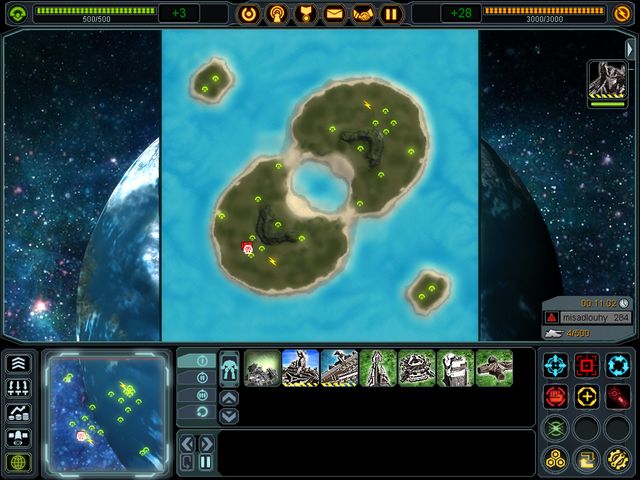
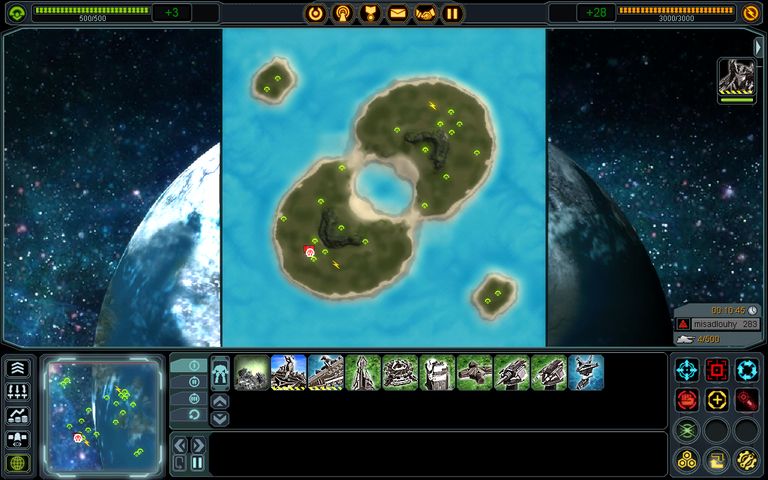
I am waiting for someone like cranky to confirm, that my opinion: Vert- is right. I would say, that when u change resolution from 4:3 to 16:10, the game zooms in little bit and FOV decreases vertically. That is what i see.

About 16:9 resolutions. I hope i did not state something that is not true. I just do not have that option in menu, although i could see it and choose it in any other game i tested. I did not try any hack, i did not look in config files if it can be changed or set. I just did this quick report to share with others, how WS is realized.

Please add information about how BETA runs on 16:9 screens and i will include it in report.

EDIT: there is 1600:900 option, which definitively is 16:9 :-) i will post screenshots from it soon
User avatar
skipclarke
Founder
Founder
Posts: 7358
Joined: 13 Oct 2003, 05:00

Supreme Commander: Detailed Report

Post by skipclarke »

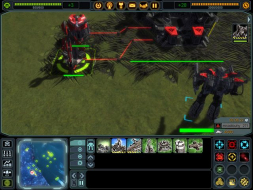
I can confirm that it is Vert - as well. The obvious one is your max zoom out shots. The top yellow dot is missing in the widescreen pic.
misadlouhy
Posts: 212
Joined: 06 Sep 2006, 15:27

Supreme Commander: Detailed Report

Post by misadlouhy »

16:9 screenshot posted in Aspect Ratio Support section

It does not matter that it is Vert-. You can zoom out little bit and you have desired FOV back if you know what i mean.
The_cranky_hermit
Insiders
Insiders
Posts: 3010
Joined: 07 Nov 2005, 04:16

Supreme Commander: Detailed Report

Post by The_cranky_hermit »

This is vert -, and it's a pity. TA got certified, and it would be a real shame to see Supreme Commander get a C+. There's still time to be fixed, and I recommend taking a second look once the actual game comes out to see if this has been fixed. Chris Taylor, are you reading this?

It does not matter that it is Vert-. You can zoom out little bit and you have desired FOV back if you know what i mean.

It does matter. Dollying out (moving the camera backwards) is not the same as zooming out unless the game is 2D, and this is 3D. Dolly out does not give you FOV back. I wrote a detailed article about this, but I forget where. I'll see if I can dig it up.


==Supported resolutions==
You said you didn't see 1280x720 listed. But in other reports, you said you were able to test it. Unless this resolution somehow disappeared from your system, this probably means that 1280x720 is unsupported.


==Grading==

Calculated grade: C+

Major unresolved issues:
None

Minor unresolved issues:
None

Summary of widescreen-related flaws:
Vert -
1280x720 unsupported.

Cranky's coverage estimate: 96.5%
norem
Posts: 3
Joined: 13 Dec 2006, 04:17

Supreme Commander: Detailed Report

Post by norem »

Hi guys, I've been lurking for a while, but I wanted to register to clear something up.

It does matter. Dollying out (moving the camera backwards) is not the same as zooming out unless the game is 2D, and this is 3D. Dolly out does not give you FOV back. I wrote a detailed article about this, but I forget where. I'll see if I can dig it up.


Why?

In Supreme Commander, I've found that you can zoom out 1 "click" more on a widescreen resolution, while still mantaining the same level of zoom as a 4:3 resolution... and seeing more of the playing field.

I have screenshots of what I'm talking about.

1024x768 - 4 clicks out of total zoom in:


1280x768 - 5 clicks out of total zoom in:


Now, am I missing something? To me, not only is this just as good as a native "+hor" implementation... it is actually better because it allows you zoom in closer.

Please explain. Thanks.
The_cranky_hermit
Insiders
Insiders
Posts: 3010
Joined: 07 Nov 2005, 04:16

Supreme Commander: Detailed Report

Post by The_cranky_hermit »

That screenshot doesn't illustrate the problem very well, because you are looking at a mostly flat area. Still, it does show signs of distortion. For example, in the 4:3 shot, the structure is clearly elevated from the ground, but in the 16:10 shot, which is simultaneously dollied out and zoomed in, the structure looks a bit closer to being flush to the ground. There isn't much depth in the picture, so there isn't much distortion, but the more depth there is, the more potential there is for distortion.

A more obvious problem is that the 16:10 shot can't dolly out as far. You have to be one level higher just to cover the same vertical space on a flat map, and if you dolly out all the way on 4:3, 16:10 can't go one level above that. Never mind that the farther you dolly out, the more pronounced the world's curve is, therefore making depth more prominent, therefore allowing for more distortion.
norem
Posts: 3
Joined: 13 Dec 2006, 04:17

Supreme Commander: Detailed Report

Post by norem »

That screenshot doesn't illustrate the problem very well, because you are looking at a mostly flat area.


Because of the scale of this game (units tower over mountains), it is hard to find a more dynamic terrain. However I did stand next to a large cliff and didn't notice any distortion. Yes, the images were slightly different, but nothing looked out of wack.

Still, it does show signs of distortion.


I agree, in that there are minor differences in both screenshots I provided. It looks like in the 16:10 screenshot, the rocks and units seem to be tilted slightly more "down and to the right" than the 4:3 screenshot.

I guess, by definition, this is distortion. But if you showed both images to a random person and said, "which is real, and which is distorted" they would be unable to give you a definitive answer. There's just not a big difference.

For example, in the 4:3 shot, the structure is clearly elevated from the ground, but in the 16:10 shot, which is simultaneously dollied out and zoomed in, the structure looks a bit closer to being flush to the ground.


I can't see what you are talking about in this specific example... but you should know that all units are touching the ground.

A more obvious problem is that the 16:10 shot can't dolly out as far. You have to be one level higher just to cover the same vertical space on a flat map, and if you dolly out all the way on 4:3, 16:10 can't go one level above that.


Actually, both aspect ratios allow you to zoom out the same distance. You can see this in the OP's pictures, here and here

The only difference in max/min zoom between widescreen and standard is the fact that you can achieve a closer zoom in widescreen mode. I noted that in my original post.

Never mind that the farther you dolly out, the more pronounced the world's curve is, therefore making depth more prominent, therefore allowing for more distortion.


Again, I never noticed any abnormal distortion at all, regardless of how far I am "dollied out".

Sorry if I am being overly argumentative or sounding like the SupCom defense force. I just havn't noticed a single drawback to running SupCom at a widescreen resolution, so I had to question the C+ grade.[/url]

The_cranky_hermit
Insiders
Insiders
Posts: 3010
Joined: 07 Nov 2005, 04:16

Supreme Commander: Detailed Report

Post by The_cranky_hermit »

The problem with your arguments (and I have no problem with arguments or challenges provided they aren't irrational and/or irrelevant attacks), is that they are subjective. I created the grading system with the intention of being as close to 100% objective as often as possible. This way, the grading scheme is consistent, and the grade is less dependent on who's grading it. Sure, you *could* say that game A suffers less from vert - than game B, and therefore, should get a better grade. But there's no objective way to measure how much less it suffers, so all other things being equal, two games with vert - will get the same grade. And you *could* say that "the distortion isn't that bad" or "I don't notice anything abnormal," but these are, again, completely subjective.

I can't see what you are talking about in this specific example... but you should know that all units are touching the ground.

I can tell that all units are touching the ground. What I said is that in the widescreen shot, the structure looks more *flush* to the ground than it actually is. If an object is totally flush to the ground, it means you could move your hand over the ground and not be able to feel the object protruding from it. In the widescreen shot, the perceived depth of the structure is reduced, making it look more flush to the ground (but not totally flush) than it actually is.

Actually, both aspect ratios allow you to zoom out the same distance. You can see this in the OP's pictures, here and here

The widescreen shot here is vert -. You can tell by looking at the bottom left corner of the screen, where a chunk of the planet is visible in a transparent overlay. In the 4:3 shot, the chunk is several degrees lower than it is in the widescreen shot.
norem
Posts: 3
Joined: 13 Dec 2006, 04:17

Supreme Commander: Detailed Report

Post by norem »

The problem with your arguments (and I have no problem with arguments or challenges provided they aren't irrational and/or irrelevant attacks), is that they are subjective. I created the grading system with the intention of being as close to 100% objective as often as possible. This way, the grading scheme is consistent, and the grade is less dependent on who's grading it. Sure, you *could* say that game A suffers less from vert - than game B, and therefore, should get a better grade. But there's no objective way to measure how much less it suffers, so all other things being equal, two games with vert - will get the same grade. And you *could* say that "the distortion isn't that bad" or "I don't notice anything abnormal," but these are, again, completely subjective.


Makes sense. Thanks for the explanation :D
User avatar
X-Warrior
Posts: 1045
Joined: 24 Jun 2005, 22:58

Supreme Commander: Detailed Report

Post by X-Warrior »


The widescreen shot here is vert -. You can tell by looking at the bottom left corner of the screen, where a chunk of the planet is visible in a transparent overlay. In the 4:3 shot, the chunk is several degrees lower than it is in the widescreen shot.


But you're talking about a static background picture, which you can even turn off. Nothing to do with the actual game. The relevant portion can be zoomed out fully on each resolution.


So anyway, since I didn't look far enough I made my own report when the full game was released. Now the best way suggested to me to solve this is to add any extras to this report.

First of all, to start with, widescreen support of the full retail version is no different from the beta tested above. So everything you posted applies to the full game, and to single player as well.

So I just have a few additions, which I'll pick from my report:

* additional supported resolutions: 1440x900, 1600x1200
* Cutscenes: Widescreen by default. Black bars at top and bottom become smaller when a widescreen display is used. (4:3 16:10)
* The loading screen has a background image. It's probably as stretched as the other backgrounds, but I'd consider this unimportant.


(I think my version of the report can be deleted now if you want to keep the forum clean :). Not much new I had to add apparently.)
The_cranky_hermit
Insiders
Insiders
Posts: 3010
Joined: 07 Nov 2005, 04:16

Supreme Commander: Detailed Report

Post by The_cranky_hermit »

Cranky's coverage estimate: 99%
User avatar
skeeder
Posts: 873
Joined: 29 May 2006, 02:23

Supreme Commander: Detailed Report

Post by skeeder »

Amazing. Every preview/article I've read mentions how this game can run on dual monitors (one article specifically mentioned dual 2407s), where all the "command" stuff was on the second monitor. It would be nice if they could actually get one widescreen monitor working properly.
you can run it that way, I had it going on my machine, of course I have no clue what I'm doing.
misadlouhy
Posts: 212
Joined: 06 Sep 2006, 15:27

Supreme Commander: Detailed Report

Post by misadlouhy »

X-Warrior: thank you :P for all your effort and completing the report
The_cranky_hermit
Insiders
Insiders
Posts: 3010
Joined: 07 Nov 2005, 04:16

Supreme Commander: Detailed Report

Post by The_cranky_hermit »

Can you merge X-Warrior's FMV screenshots into your report? Here are the links (be sure to use thumbnails):

4:3
http://www.xs4all.nl/~dplas/pics/detailedreports/supremecommander/Image2.jpg

Widescreen
http://www.xs4all.nl/~dplas/pics/detailedreports/supremecommander/Image1.jpg
User avatar
X-Warrior
Posts: 1045
Joined: 24 Jun 2005, 22:58

Supreme Commander: Detailed Report

Post by X-Warrior »

Can you merge X-Warrior's FMV screenshots into your report? Here are the links (be sure to use thumbnails):

4:3
http://www.xs4all.nl/~dplas/pics/detailedreports/supremecommander/Image2.jpg

Widescreen
http://www.xs4all.nl/~dplas/pics/detailedreports/supremecommander/Image1.jpg


Thumbnails (bit small compared to your other pics) can be found at:

4:3
http://www.xs4all.nl/~dplas/pics/detailedreports/supremecommander/Image2s.jpg

Widescreen
http://www.xs4all.nl/~dplas/pics/detailedreports/supremecommander/Image1s.jpg


I'd appreciate it if you could also upload the images to imageshack or something, so I can clean up my own webspace :)
misadlouhy
Posts: 212
Joined: 06 Sep 2006, 15:27

Supreme Commander: Detailed Report

Post by misadlouhy »

It is done. You can delete yours now. Cheers...

edit: question: Is free flickr account never going to be deleted even if i do not use it (log into it) any more? I have created new Flickr account with Yahoo email address, but the old one has all those older detailed reports screenshots in it, and i do not want it to be deleted in year or so because of me not logging into it any more.

I guess it is never going to be deleted.
User avatar
X-Warrior
Posts: 1045
Joined: 24 Jun 2005, 22:58

Supreme Commander: Detailed Report

Post by X-Warrior »

Now I started playing again, after getting the hint on HUD rearranging (By using ALT + arrow-up/down). This made me aware of a major improvement for widescreen users:


Particularly compare the first and the last here.

Now this won't change anything about the grade the game gets, as more changes than just the resolution are applied. But really, would you play with the main HUD bar to the side on a 4:3 screen ?

My opinion: widescreen owns this game.

I could almost go as far as: this game is vert+ for widescreen, if standard settings are HUD-right for widescreen and HUD-bottom for 4:3 :lol:
Shocky
Posts: 1
Joined: 14 Jun 2006, 02:09

Supreme Commander: Detailed Report

Post by Shocky »

Thanks for the results.. :)
Post Reply

Who is online

Users browsing this forum: No registered users and 11 guests