
Sid Meier's Pirates! (2004)

Detailed breakdowns of how games react to widescreen, ultra-wide, 4k and multi-mon
Post Reply
misadlouhy
Posts: 212
Joined: 06 Sep 2006, 15:27

Sid Meier's Pirates! (2004)

Post by misadlouhy »


Widescreen Grade: Unsupported
Ultra-Widescreen Grade: Incomplete
Multi-monitor Grade: Unsupported
4k Grade: Incomplete

Read Full Detailed Report - Sid Meier's Pirates! (2004)

Sid Meier's Pirates is a remake of a classic strategy game from 1987 (Sid Meier's Pirates), featuring an intoxicating blend of action, strategy, role-playing, and fun. Pirates is separated into several mini-games requiring different skills, as well as an overall "sailing map" mode where the player navigates around the Caribbean, looking for things to do. Sailing technique, evasion (running from guards), naval gunnery, turn-based strategy, dancing with the governor's daughter, fencing and strategic planning are all skills needed to succeed in Pirates.
During the game, players can acquire items and special crew members which make some mini-games less skill-dependent, but must also choose one of five different skills at the start, which the game will give them an advantage in.


4:3
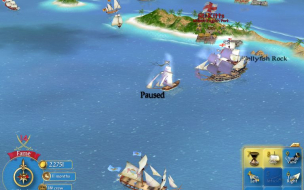

16:10


16:9


3x1

Last edited by misadlouhy on 13 Nov 2013, 12:04, edited 2 times in total.
Reason: Edit
geeman
Posts: 26
Joined: 11 Aug 2006, 19:08

Re: Sid Meier's Pirates! Live the Life: Detailed Report

Post by geeman »

What is the game grade?

F+ or D- or a simply F.
misadlouhy
Posts: 212
Joined: 06 Sep 2006, 15:27

Re: Sid Meier's Pirates! Live the Life: Detailed Report

Post by misadlouhy »

[quote]What is the game grade?

F+ or D- or a simply F.

Are you sure? That is not much :-).
User avatar
Paradigm Shifter
Editors
Editors
Posts: 5706
Joined: 14 Oct 2003, 13:52

Sid Meier's Pirates! Live the Life: Detailed Report

Post by Paradigm Shifter »

It doesn't really have much in the way of widescreen suppport... ;)
The_cranky_hermit
Insiders
Insiders
Posts: 3010
Joined: 07 Nov 2005, 04:16

Sid Meier's Pirates! Live the Life: Detailed Report

Post by The_cranky_hermit »

The grade is D if the game is even playable when the top and bottom gets cut off.
The grade is F if the game is unplayable at those times.
It's your call, but just from the screenshots, the game looks unplayable.
misadlouhy
Posts: 212
Joined: 06 Sep 2006, 15:27

Sid Meier's Pirates! Live the Life: Detailed Report

Post by misadlouhy »

I choosed D-, because "widescreen cut-off" does not affect the sea view (main part of the game where you can use keyboard and switch off keypad hud that is affected by cut-off..., config.ini file: KeypadStatus = 0) and it is playable. However, you will notice this cut-off everywhere in the game, and i would rather play this game in 4:3 stretched (that is actually what seting the game to widescreen in config.ini does except hud and sometimes view cut-off) than in widescreen, so it somewhere in between F and D. F+ or D-, i choosed D-. So Sid has his lucky day today!

Edit: important! I took another screenshots, and realized, that the game does not cut top and bottom of the screen in sea sailing, sword fighting, sea fihting, dancing... it stretches the picture horizontally and it positions the hud and text in wrong place on the screen, so what you get is stretched picture (in dynamic part of the game) and top and SOMETIMES bottom cut off (in static parts of the game). So here you go, i will document this with sceenshots soon.

If you have any comment or if you want to change the game's grade, please comment.
The_cranky_hermit
Insiders
Insiders
Posts: 3010
Joined: 07 Nov 2005, 04:16

Sid Meier's Pirates! Live the Life: Detailed Report

Post by The_cranky_hermit »

Then it gets a D.
Kon$olE
Posts: 60
Joined: 28 Sep 2006, 13:16

Sid Meier's Pirates! Live the Life: Detailed Report

Post by Kon$olE »

Hmm, bummer. I was just about to reinstall this game and enjoy it in widescreen goodness.
Im a huge fan of the gameplay, i just love customizing a ship and keeping the crew happy.
alf717
Posts: 12
Joined: 10 Apr 2008, 01:39

Sid Meier's Pirates! Live the Life: Detailed Report

Post by alf717 »

Using the Universal Resolution Changer v2.0 tool created by Racer S will give you the desired resolution that your looking for. For me the game runs and looks great at 1920x1080 however the menus still do not work correctly. I've looked into using a hex editor on the .EXE file but unfortunately this not my forte. I normally run the game at a 1400x1050 resolution and then stretch the image but while using Racer S' application the game although runs at 1920x1080 the menus still are not in there normal locations.

For example, I ran the game with this fix at a resolution of 1400x1050. Racer S' fix works great but the menu are fitted on the screen using the 1400x1050 resolution. My guess is that the game still uses the original configuration file to display what resolution the game will display the menus with. Of course matching the resolution with Racer S' fix will only produce the same results are before.

Picture:

http://img514.imageshack.us/my.php?image=36561656an6.jpg

Tool:

http://www.tocaedit.com/forum/dload.php?action=file&file_id=88
User avatar
Dem Pyros
Posts: 1060
Joined: 08 Dec 2006, 06:01

Sid Meier's Pirates! Live the Life: Detailed Report

Post by Dem Pyros »

So I've gone back and looked at this in order to append the Triplehead information.

This is what I've found:
Adjusting the configuration .ini file yields a stretched screen with a cut off HUD as follows:

4:3


16:10


Faux TH (16:8.53)


But alf717 (the poster before me) was right, using Racer_S's universal resolution changer (version 2) and keeping the configuration .ini file at a 4:3 aspect ratio resolution, the HUD will stay onscreen. Changing the configuration .ini file to the aspect ratio of the desired resolution will cut off the HUD.

With Hack:
(.ini at 4:3)

4:3 (Regular Implementation)


16:10


Faux TH (16:8.53)


(.ini at 16:10)

4:3


16:10 (Regular Implementation)


Faux TH (16:8.53)
Post Reply

Who is online

Users browsing this forum: Bing [Bot] and 10 guests
