Battlefield 1942

Detailed breakdowns of how games react to widescreen, ultra-wide, 4k and multi-mon
Post Reply
The_cranky_hermit
Insiders
Insiders
Posts: 3010
Joined: 07 Nov 2005, 04:16

Battlefield 1942

Post by The_cranky_hermit »


Widescreen Grade: C
Ultra-Widescreen Grade: Incomplete
Multi-monitor Grade: C
4k Grade: Incomplete

Read Full Detailed Report - Battlefield 1942

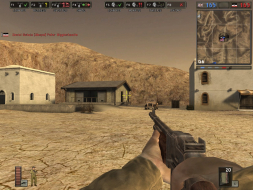
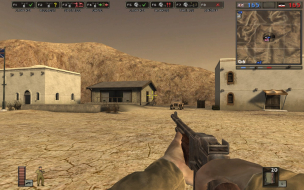
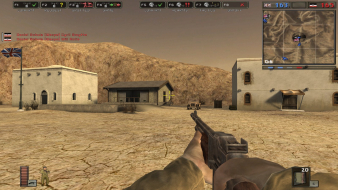
Battlefield 1942 is a multiplayer FPS from DICE and EA Games. It's set in various battlegrounds of WWII, where players fight as GI infantry, and have the ability to pilot various vehicles.


4:3


16:10


16:9


3x1

Last edited by The_cranky_hermit on 20 Jul 2015, 13:25, edited 2 times in total.
Reason: Edit
ThE_MarD
Posts: 7
Joined: 13 Jul 2008, 23:00

Battlefield 1942: Detailed report

Post by ThE_MarD »

Heyyo,

Just wanted to give you a heads up you can change the FOV.

http://www.widescreengaming.net/wiki/Battlefield_1942

You can also adjust the game's field of view (FOV) so your screen takes advantage of the extra width. To adjust your FOV, navigate to Battlefield 1942Modsbf1942Settings and open up VideoDefault.con. Find this line:

Code: Select all

renderer.fieldOfView 1


This setting defaults to 1 for a standard 4:3 monitor. Change to suit your aspect ratio:

1.33333 for 16:9
1.25 for 15:9
1.2 for 16:10

To finish, make both files read only to prevent the game undoing your changes.

I just tried it on my system and I didn't have much luck with the fov.. hmm, maybe you might have better luck.. maybe give it a shot and compare screenies?

The_cranky_hermit
Insiders
Insiders
Posts: 3010
Joined: 07 Nov 2005, 04:16

Battlefield 1942: Detailed report

Post by The_cranky_hermit »

I don't think increasing the FOV helps. The game is stretched, and increasing FOV doesn't unstretch anything.
Post Reply

Who is online

Users browsing this forum: No registered users and 8 guests