Dead Space in TripleHead ..

Discussions about getting games to run in a Multi-Mon setup.
User avatar
Paddy the Wak
Editors
Editors
Posts: 3436
Joined: 27 Jul 2004, 17:42

Dead Space in TripleHead ..

Post by Paddy the Wak »

Hey neosin ... welcome to the forum ... 8)


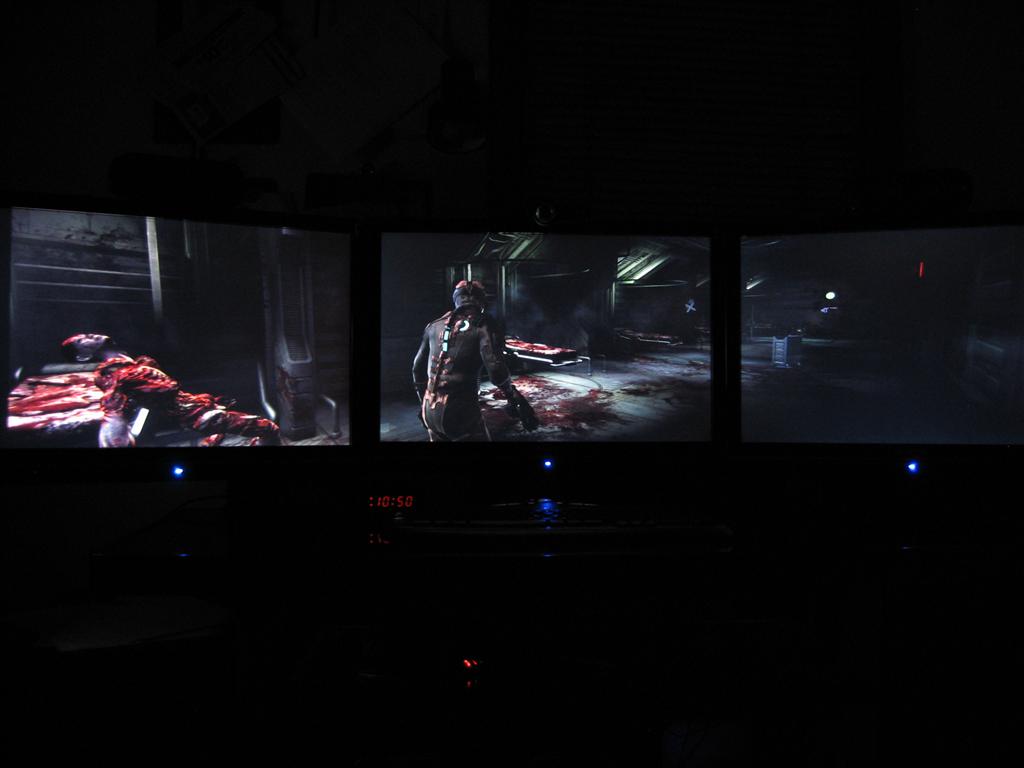
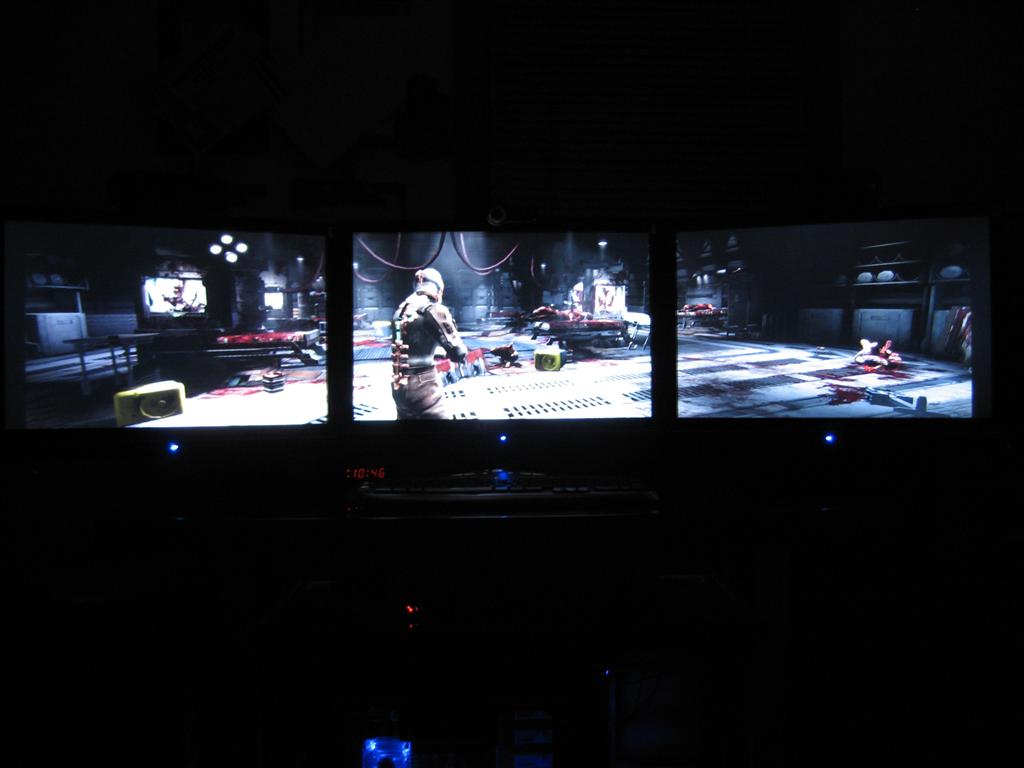
It is shockingly good isn't it ... :shock:

I added a few more shots here ... http://www.widescreengamingforum.com/node/#comment-

This little guy needed a hug ... :mrgreen:
neosin
Posts: 186
Joined: 28 Oct 2008, 09:35

Dead Space in TripleHead ..

Post by neosin »

hey mod :)

i'll be around alot from now on :) (probably complaining n whining more than anything hahaha)

ur screens r really nice, would make nice wallpapers :)

i do have some technical issues with my th2g i've got 178.13 atm and the background doesn't seem to want to refresh i.e. it will leave the last frame in the buffer :(

also sometimes this happens ingame as well, lik the frame buffer would not update and i'm left with a still frame whilst the game is still running fine ;/

it's kinda getting annoying, do u know a fix around this?

thanks mate
User avatar
Paddy the Wak
Editors
Editors
Posts: 3436
Joined: 27 Jul 2004, 17:42

Dead Space in TripleHead ..

Post by Paddy the Wak »

No sorry ... I don't know how to fix that ... that's a very odd issue.

You are using XP ...
Why 178.13 ? ... there are newer drivers than that ...

I'm using the beta 180.43 drivers in XP and all is good ...
neosin
Posts: 186
Joined: 28 Oct 2008, 09:35

Dead Space in TripleHead ..

Post by neosin »

really?

i read that they don't work?

ok so which is is best driver for xp32 and vista 32 that u can recommend me ^^
User avatar
Paddy the Wak
Editors
Editors
Posts: 3436
Joined: 27 Jul 2004, 17:42

Dead Space in TripleHead ..

Post by Paddy the Wak »

Dunno about Vista ... as I don't run it but as I say those beta 180.43 drivers in XP are fine for me ... no problems.
neosin
Posts: 186
Joined: 28 Oct 2008, 09:35

Dead Space in TripleHead ..

Post by neosin »

thanks for that, installed 180.42 beta drivers in xp and the frame buffer issue went away ^_^

i'm gonna be playing COD 5 Beta very soon, fingers crossed it will work :)
User avatar
Downtown1
Insiders
Insiders
Posts: 647
Joined: 22 Aug 2007, 19:00

Dead Space in TripleHead ..

Post by Downtown1 »

Odd that the less popular titles (compared to say Far Cry 2 or Stalker Clear Sky) seem to get proper TH2Go support out of the box... Not that I mind, but damn, I really want TH2Go for the other games a lot more.

Looks like I'll have to put this on my to-buy list after all :D
User avatar
Paddy the Wak
Editors
Editors
Posts: 3436
Joined: 27 Jul 2004, 17:42

Dead Space in TripleHead ..

Post by Paddy the Wak »

Just had to bump this to say again ... this is a friggin AWESOME game !

It is a game that for once everyone should be talking about unlike the likes of Bio(I got really really bored after just 10 minuets of the repetitive shite)Shock ... it actually deserves some attention.

If you like survival horror go buy this game.

geniv2
Posts: 373
Joined: 05 Oct 2008, 05:49

Dead Space in TripleHead ..

Post by geniv2 »

Just had to bump this to say again ... this is a friggin AWESOME game !

It is a game that for once everyone should be talking about unlike the likes of Bio(I got really really bored after just 10 minuets of the repetitive shite)Shock ... it actually deserves some attention.

If you like survival horror go buy this game.


I have to agree. this is the best game I play so far this year.

and I'm only 1 hour into it :P


it's like doom 3 + resident evil 4 mix.

I got:
- Red Alert 3
- Far Cry 2
- Fallout 3

and I'm playing deadspace.
starfighter
Posts: 295
Joined: 21 Jun 2006, 20:04

Dead Space in TripleHead ..

Post by starfighter »

What is the performance at TH resolutions ?

Is a GTX260 enough for 3840x1024?

What are your experiences?
User avatar
Mach1.9pants
Insiders
Insiders
Posts: 1512
Joined: 29 Jul 2007, 05:24
Location: NZ

Dead Space in TripleHead ..

Post by Mach1.9pants »

So far in dead space (apart from the opening scene) it has all been in doors so it runs pretty smoothly with not much draw distance
khula
Posts: 118
Joined: 12 Dec 2006, 13:56

Dead Space in TripleHead ..

Post by khula »

This game is excellent. However, on my machine it just crashes to desktop every two minutes. God knows why, but I think there is a sound card issue. So frustrating...

As for running it on a 260. Thats plenty. I run it triple screen 4320x900? with a gts 512, every thing maxed out. Graphically, that is!! Bleeding sound issue prevents me enjoying it though. I have noticed on EA's forums, it's coming in for a lot of stick for hardware issues... Hopefully they'll patch the little blighter...
starfighter
Posts: 295
Joined: 21 Jun 2006, 20:04

Dead Space in TripleHead ..

Post by starfighter »

pretty smoothly with not much draw distance
Sounds promising :)
geniv2
Posts: 373
Joined: 05 Oct 2008, 05:49

Dead Space in TripleHead ..

Post by geniv2 »

game is AWESOME in surround.


yeah I get crashes to desktop occasionally.
tricky
Posts: 205
Joined: 29 Mar 2008, 17:19

Dead Space in TripleHead ..

Post by tricky »

Just finished the game yesterday, AWESOME fun game, will definitely play it again...

Playing 3840x1024 with SoftTH, only crashed to desktop when changing levels a few times, so autosave kept me from losing any progress...

Some weapons I found pretty useless (Flame Thrower, Ripper, Contact Beam), others lifesavers (Line Gun!) and I made sure to spend alot of Power Nodes on Pulse Rifle Max Damage (can have sooo much ammo), Suit Life Energy (don't worry about Air), and range on Kinesis (I didn't upgrade Stasis).

When I got to the final boss, I had one shot left from the Line Gun, zero left on all other weapons...and...I hit the last kill point, success!
__________________________________________________________

Core i7-8086K @ 5.0 Ghz | H60 | Nvidia GTX 980 Ti 6GB | Soundblaster Z | Asus Z370-A

16GB DDR4 | Win10 x64 | 3x27" Asus IPS @ 5760x1080 | Samsung 970 1TB NVMe
njracer
Posts: 104
Joined: 20 Sep 2007, 08:05

Dead Space in TripleHead ..

Post by njracer »

my game won't even play, i get a black screen and the and exe. error. this stinks
User avatar
Downtown1
Insiders
Insiders
Posts: 647
Joined: 22 Aug 2007, 19:00

Dead Space in TripleHead ..

Post by Downtown1 »

Does anyone feel like the mouse sensitivity is off? I get the feeling like moving horizontally is faster than moving vertically, and aiming is always funky for me, like there's some kind of acceleration or something.
User avatar
ben@scan
Posts: 104
Joined: 02 Oct 2006, 13:55

Dead Space in TripleHead ..

Post by ben@scan »

You have to disable Vsync in the menu it sorts the mouse issue out :D

I am on Chapter 10 had a couple of crashes to desktop :(
geniv2
Posts: 373
Joined: 05 Oct 2008, 05:49

Dead Space in TripleHead ..

Post by geniv2 »

too bad this game don't support 5040x1050.

I just rewired my monitor connections and can do 5040x1050 now. and I tried it with alot of gmes

IT LOOKS MUCH better than 4320x600. everything is sharper and fps doesn't go down that much. too bad the Th2g can't do 3x 1920 x1200

the only game I tried that doesn't run smooth at 1050 is Gears of War, Age of Empire III. ( Crysis and Crisis WH doesn't run smooth at 900 anyway so forgot about 1050)
User avatar
Downtown1
Insiders
Insiders
Posts: 647
Joined: 22 Aug 2007, 19:00

Dead Space in TripleHead ..

Post by Downtown1 »

You have to disable Vsync in the menu it sorts the mouse issue out :D


Thanks a lot, that did the trick! I can actually aim now!
Post Reply

Who is online

Users browsing this forum: No registered users and 3 guests