Unreal Tournament 2004

Detailed breakdowns of how games react to widescreen, ultra-wide, 4k and multi-mon
The_cranky_hermit
Insiders
Insiders
Posts: 3010
Joined: 07 Nov 2005, 04:16

Unreal Tournament 2004

Post by The_cranky_hermit »


Widescreen Grade: B
Ultra-Widescreen Grade: Incomplete
Multi-monitor Grade: B
4k Grade: Incomplete

Read Full Detailed Report - Unreal Tournament 2004

Unreal Tournament 2004 is an online FPS from Epic Games and Infogrames, and the follow-up to the previous entry Unreal Tournament 2003. Assault mode returns, and a new strategy-oriented mode called Onslaught is added. Possibly more notable are vehicles throughout the maps, some of which require multiple pilots to operate completely.


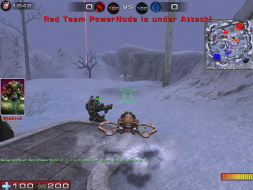
4:3


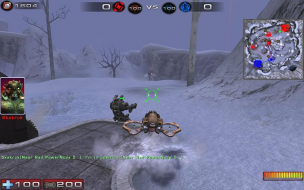
16:10


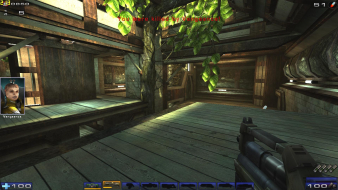
16:9


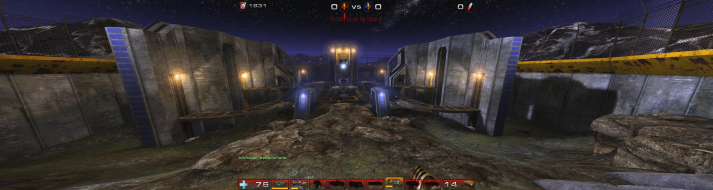
3x1

Last edited by The_cranky_hermit on 03 Mar 2015, 11:16, edited 3 times in total.
Reason: Edit
User avatar
skipclarke
Founder
Founder
Posts: 7358
Joined: 13 Oct 2003, 05:00

Unreal Tournament 2004: Detailed report

Post by skipclarke »

Added 2560x1600 support based on Ruaviator's testing
User avatar
Gilly
Insiders
Insiders
Posts: 1172
Joined: 15 Apr 2005, 23:27

Unreal Tournament 2004: Detailed report

Post by Gilly »

110* FOV works well at 1680x1050 on ONS :) i prefer 4:3 on DM though personally, to much to distract with widescreen :P
P8Z68-V Pro | 2600K | HR02 | HD5850 | 2x4GB Vengeance LP | 128GB M4 + 6TB | X-Fi > HD595 | AX850 | Tai Chi | PB278Q | G110 + Deathadder 2013
P8Z77-V | 3570K | Mugen 2 | HD5850 | 2x4GB Vengeance LP | 500GB | X-750 | Fractal R3 | U2212HM | G110 + G400
P8H77-I | G860 | 4650 | 2x2GB XMS | 320GB | CX500 | Prodigy | T22B350EW | MX518
DC3217IYE | 1x4GB Vengeance | 64GB M4 | TX-42VT20E
User avatar
P-Storm
Posts: 764
Joined: 24 Dec 2006, 18:56

Unreal Tournament 2004: Detailed report

Post by P-Storm »

You can scale also your hud under User.ini


[Engine.HUD]
bSmallWeaponBar=true
bHideHUD=false
HudOpacity=200.000000
HudScale=0.764894
HudCanvasScale=1.000000
bMessageBeep=true
bShowWeaponInfo=true
bShowWeaponBar=True
bShowPersonalInfo=true
bShowPoints=true
bCrosshairShow=true
bShowPortrait=True
bNoEnemyNames=False
CrosshairScale=1.200000
CrosshairOpacity=0.900000
CrosshairStyle=0
ConsoleMessageCount=3
ConsoleFontSize=4
MessageFontOffset=0
bShowPortraitVC=True
CrossHairColor=(B=255,G=255,R=255,A=255)

Only don't know what canvasscale exactly does.
The_cranky_hermit
Insiders
Insiders
Posts: 3010
Joined: 07 Nov 2005, 04:16

Unreal Tournament 2004: Detailed report

Post by The_cranky_hermit »

Does this actually prevent the HUD from stretching? If it does, and you can demonstrate this with a pair of screenshots, UT2004 can be upgraded to a B+.
User avatar
P-Storm
Posts: 764
Joined: 24 Dec 2006, 18:56

Unreal Tournament 2004: Detailed report

Post by P-Storm »

What resolution pics do you want to see?
The_cranky_hermit
Insiders
Insiders
Posts: 3010
Joined: 07 Nov 2005, 04:16

Unreal Tournament 2004: Detailed report

Post by The_cranky_hermit »

Anything 4:3 and anything 16:10 will do. Preferably 1024x768 and 1280x800, but higher resolutions will do. Just make sure you either use thumbnails or resize them to 640x480 and 768x480. Also, make sure you tell us what settings you are using for each setting that's relevant (resolution, FOV, HUDScale, and HUDCanvasScale).
User avatar
P-Storm
Posts: 764
Joined: 24 Dec 2006, 18:56

Unreal Tournament 2004: Detailed report

Post by P-Storm »

Did found someting usefull.

http://utforums.epicgames.com/showthread.php?p=24725256
I don't know if it works because i haven't my widescreen monitor yet. I've tested these screenshots on my 19'ich crt monitor

Normal 1280x1024


Normal 1280x800


hudscale ,25 1280x1024


hudscale ,25 1280x800


canvasscale ,5 1280x1024


canvasscale ,5 1280x800
The_cranky_hermit
Insiders
Insiders
Posts: 3010
Joined: 07 Nov 2005, 04:16

Unreal Tournament 2004: Detailed report

Post by The_cranky_hermit »

Seems to me that HUD scaling won't do anything to solve the stretching. It scales the HUD in both dimensions, and you need to shrink it in the X component without changing the Y component in order to undo the stretching.
User avatar
P-Storm
Posts: 764
Joined: 24 Dec 2006, 18:56

Unreal Tournament 2004: Detailed report

Post by P-Storm »

More then that i don't know of the hud so, it probably will be the same grade? :( :P
The_cranky_hermit
Insiders
Insiders
Posts: 3010
Joined: 07 Nov 2005, 04:16

Unreal Tournament 2004: Detailed report

Post by The_cranky_hermit »

Same grade.
User avatar
Paddy the Wak
Editors
Editors
Posts: 3436
Joined: 27 Jul 2004, 17:42

Unreal Tournament 2004: Detailed report

Post by Paddy the Wak »

You can get the HUD to scale just horizontally ... scaling the X component without changing the Y component.

In the ... UT2004.ini
Under the heading ... [WinDrv.WindowsClient]

Change the line ... ScaleHUDX=0.000000

In the case below I have scaled the HUD for TripleHead ... so that it just on the centre screen.

ScaleHUDX=0.333333


I'm not sure how this works in widescreen ... I have never tried.
The_cranky_hermit
Insiders
Insiders
Posts: 3010
Joined: 07 Nov 2005, 04:16

Unreal Tournament 2004: Detailed report

Post by The_cranky_hermit »

I tried changing it to this:
ScaleHUDX=0.833333

I got this by dividing 4/3 by 16/10. It didn't do anything to the HUD. It still stretches.

Upon further testing, ScaleHUDX doesn't seem to do anything at all unless the value is 0.5 or less. At values greater than 0.33333 but 0.5 or less, the HUD, including the weapon and crosshair, gets shifted over to the right side of my screen, which seriously screws up aiming.
rabhw
Posts: 1
Joined: 29 Dec 2006, 03:00

1280x800 not working?

Post by rabhw »

Hey I recently picked up a BenQ FP241W monitor and I've been having problems getting UT2004 to run in a 16:10 resolution outside of the monitor's native res of 1920x1200, which my computer chops a bit on :(.

I see in the confirmed working resolutions that 1280x800 is working but I've tried many times and it doesn't work. Whenever I edit the ini file to that custom resolution, the game ALWAYS resets itself back to the closest resolution it sees fit -- 1280x768 which leaves things stretched quite a bit. Is there a way to get 1280x800 that I'm not seeing? I'd really like to get this solved.

I tried making the change and then making my ini file read only but that didn't work...any idea why this is happening and/or how the others got the game to work at that res without reverting to something else?

I'm on a 9700pro if that matters.
The_cranky_hermit
Insiders
Insiders
Posts: 3010
Joined: 07 Nov 2005, 04:16

Unreal Tournament 2004: Detailed report

Post by The_cranky_hermit »

I'm willing to bet that your monitor doesn't natively support 1280x800. Try this - try setting your Windows desktop resolution to 1280x800. If you find that you can't do this, this means that no game will be able to either.

If this is the case, you might be able to add a non-native res into your drivers, but it won't be easy, because until recently, ATI has had lousy support for non-native resolutions. You might try your luck with Powerstrip, but I make no guarantees it will work. If you need help using Powerstrip, I suggest asking on either the software or tech support board, and not here.
PerfectCr
Posts: 29
Joined: 01 Jun 2006, 15:25

Unreal Tournament 2004: Detailed report

Post by PerfectCr »

Yeah the HUD is stretched but I love playing UT2004 in 1920x1080! :)

I'll post screenies if anyone wants them.
User avatar
ViciousXUSMC
Editors
Editors
Posts: 1497
Joined: 31 Jul 2006, 14:58

Unreal Tournament 2004: Detailed report

Post by ViciousXUSMC »

Works like a charm! thanks for the info on this one. Max res you can select in game was 12x10 for me that would have sucked.

I just installed it today and will have to play some over the next few weeks this game is hard to get old. One of the things so wonderfull is its does support widescreen and increased FOV online unlike another popular FPS title (cough BF2142/BF2) and also its coded so much better than most games. It runs just as fast/smooth on 1920x1080 all max as most other games do with 1/2 the eye candy.

This my fav widescreen fps game for the time being since the prementioned isnt true widescreen.
ViciousXUSMC on the Web - YouTube :: FaceBook :: Website
User avatar
P-Storm
Posts: 764
Joined: 24 Dec 2006, 18:56

Unreal Tournament 2004: Detailed report

Post by P-Storm »

I know, did play it too mutch back in those days. Now it is relax to play it on lan-party's and other stuff. Can't wait for Unreal tournament 3 (yes so is the new name of unreal tournament 2007)
CompactDestruction
Posts: 3
Joined: 06 Jul 2007, 17:39

Unreal Tournament 2004: Detailed report

Post by CompactDestruction »

Just fired this baby up again and it's so refreshing to see a native ingame widescreen/FOV selection.

The gameplay hasn't aged a bit, and as someone mentioned it is incredibly smoothly coded, while looking just as good as a lot of games being released 3-4 years later.

This game was also released for Mac and Linux (it includes an optional OpenGL renderer), which along with everything else says to me they really spent their time creating a polished product. They've certainly supported it well after release with numerous *free* bonus packs.

As of a few patches ago you don't even need the disk in to play.

There is HUD stretch, but it's only for some bits of it.

I will be more than happy to make a purchase of Unreal Tournament 3... it feels really good to know that you're buying a game from a company with such a good record for pleasing the enthusiast :D

PerfectCr
Posts: 29
Joined: 01 Jun 2006, 15:25

Unreal Tournament 2004: Detailed report

Post by PerfectCr »

Just fired this baby up again and it's so refreshing to see a native ingame widescreen/FOV selection.

As far as I know, UT2004 does NOT have native FOV. You need to change it in the ini file.
Post Reply

Who is online

Users browsing this forum: No registered users and 8 guests