
Halo 2
-
Ascii_Aficionado
- Posts: 238
- Joined: 16 May 2006, 14:55




Re: Halo 2 Detailed Report
==Version==
This report is based on the retail release of Halo 2 seeing as how the patch was only created for a problem where nudity was shown in game.
==Cynagen's Notes==
I like my ingame nudity, remind me NOT to install the patch.
This report is based on the retail release of Halo 2 seeing as how the patch was only created for a problem where nudity was shown in game.
==Cynagen's Notes==
I like my ingame nudity, remind me NOT to install the patch.
Current build: Intel i5-4670k | 32GB DDR3 | RAID0 2x250GB 850EVOs | nVidia GTX980Ti (MSI G1 Gaming Edition) | SoundBlaster Zx | Dell 2405FPW (Landscape, primary) & HP w2338h (Portrait)
-
Paddy the Wak

- Editors

- Posts: 3436
- Joined: 27 Jul 2004, 17:42
Halo 2: Detailed Report
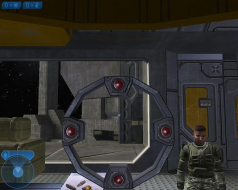
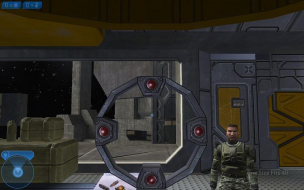
It doesn't look vert- to me ... it just looks like the camera moved as it has more at the to and less at the bottom ... and the HUD doesn't look stretched either.
Halo 2: Detailed Report
Looks like perfect hor+ widescreen goodness to me :mrgreen:
-
Ascii_Aficionado
- Posts: 238
- Joined: 16 May 2006, 14:55
Halo 2: Detailed Report
ahh I neglected to mention that the reason you see more *on the sideis b/c the camera was moving and I could not take the SS at the exact same time as the first one. :)
3rd edit,I realized what qualifies as hud stretch, I got confused.
So I re-examined the cinematic pics and you still see the same amount of in-game rendering but in widescreen mode you don't see the black bars, so that qualifies as hor + ?
3rd edit,I realized what qualifies as hud stretch, I got confused.
So I re-examined the cinematic pics and you still see the same amount of in-game rendering but in widescreen mode you don't see the black bars, so that qualifies as hor + ?
-
Paddy the Wak
- Editors
- Posts: 3436
- Joined: 27 Jul 2004, 17:42
Halo 2: Detailed Report
I still think it isn't vert- ... can you not take a couple of screenshots from the exact same spot without moving ?
-
Ascii_Aficionado
- Posts: 238
- Joined: 16 May 2006, 14:55
Halo 2: Detailed Report
I tried but there's no in game ss option so I couldnt start hitting a button asap, I had to do the whole printscreen alt tab and paste in paint type thing.
the only perfect comparison is in game when nothing is moving, the reason the crosshairs are in slightly different places is I accidentally moved the mouse, but it is still HOR b/c I barel'y moved the mouse, I can take 2 more that are perfect if you want
the only perfect comparison is in game when nothing is moving, the reason the crosshairs are in slightly different places is I accidentally moved the mouse, but it is still HOR b/c I barel'y moved the mouse, I can take 2 more that are perfect if you want
Halo 2: Detailed Report
By the way, the cutscenes are Anamorphic. They're widescreen by nature, not vert-. I'm not sure if this is what the others were talking about but I noticed you said the cut-scenes were vert- which is incorrect.
Current build: Intel i5-4670k | 32GB DDR3 | RAID0 2x250GB 850EVOs | nVidia GTX980Ti (MSI G1 Gaming Edition) | SoundBlaster Zx | Dell 2405FPW (Landscape, primary) & HP w2338h (Portrait)
-
Ascii_Aficionado
- Posts: 238
- Joined: 16 May 2006, 14:55
Halo 2: Detailed Report
I misunderstould the terms a bit, but I now understand. I seem to have thought that if the hud wasn't smaller when you use a Widescreen Rez that it is Vert - .
I'll edit my report now
I'll edit my report now
-
Paddy the Wak
- Editors
- Posts: 3436
- Joined: 27 Jul 2004, 17:42
Halo 2: Detailed Report
Use Fraps to take the screenshots ... http://www.fraps.com/
-
Ascii_Aficionado
- Posts: 238
- Joined: 16 May 2006, 14:55
Halo 2: Detailed Report
2 perfect SS's have replaced the bad ones now, :)
I also should add that Microsoft's inhouse team did this port but surprisingly it is a very nice port.
I also should add that Microsoft's inhouse team did this port but surprisingly it is a very nice port.
-
Paddy the Wak
- Editors
- Posts: 3436
- Joined: 27 Jul 2004, 17:42
Halo 2: Detailed Report
Cool ... that is much better ... 8)
-
Ascii_Aficionado
- Posts: 238
- Joined: 16 May 2006, 14:55
Halo 2: Detailed Report
Awesome, I can stop spamming my own Detailed Report now ! woot
Halo 2: Detailed Report
Good work mate :wink:
-
The_cranky_hermit
- Insiders

- Posts: 3010
- Joined: 07 Nov 2005, 04:16
Halo 2: Detailed Report
== Aspect ratio ==
This section is missing. Can you take two screenshots, one at 1280x720, another at 1680x1050?
== Grading ==
Calculated grade: C+
Potential grade: Certified
Major unresolved issues:
How does 16:9 compare with 16:10?
Is 1280x768 supported?
Are 1280x800, 1440x900, 1920x1080, and 1920x1200 supported?
Minor unresolved issues:
None
Cranky's coverage estimate: 77.5%
This section is missing. Can you take two screenshots, one at 1280x720, another at 1680x1050?
== Grading ==
Calculated grade: C+
Potential grade: Certified
Major unresolved issues:
How does 16:9 compare with 16:10?
Is 1280x768 supported?
Are 1280x800, 1440x900, 1920x1080, and 1920x1200 supported?
Minor unresolved issues:
None
Cranky's coverage estimate: 77.5%
-
Ascii_Aficionado
- Posts: 238
- Joined: 16 May 2006, 14:55
Halo 2: Detailed Report
ill take one done at 1280x720, and 2 of the ss's above are 1680x1050
nvm, I see why you want another one at 1680x1050
EDIT, SS has been fixed
nvm, I see why you want another one at 1680x1050
EDIT, SS has been fixed
-
The_cranky_hermit
- Insiders
- Posts: 3010
- Joined: 07 Nov 2005, 04:16
Halo 2: Detailed Report
Not shown in this screen shot are the top and bottem bars that preserve the 16:9 aspect ratio on a 16:10 monitor. I do not know why they did not show up in this SS.
The reason is because the black bars you see are generated by your graphics card. Screenshots capture the pixels that are generated by the game, not what is ultimately displayed on the screen. This is the same reason why your 1280x1024 shot does not have black bars on the left and right.
Now all that's left to do is verify the remaining resolution support. And until nVidia releases Vista drivers with custom resolution support, that might be hard.
== Grading ==
Calculated grade: C+
Potential grade: Certified
Major unresolved issues:
Is 1280x768 supported?
Are 1280x800, 1440x900, 1920x1080, and 1920x1200 supported?
Minor unresolved issues:
None
Cranky's coverage estimate: 78.5%
-
StingingVelvet

- Posts: 1506
- Joined: 09 Aug 2006, 14:17
Halo 2: Detailed Report
I don't have bars that make it 16:9 when playing in 1680... it fills the screen.
Also, I swear when playing this it FEELS Vert-... Maybe it isn't, I never loaded it in a 4:3 res, but it FEELS like it is, so an FOV changing method would be nice.
Also, I swear when playing this it FEELS Vert-... Maybe it isn't, I never loaded it in a 4:3 res, but it FEELS like it is, so an FOV changing method would be nice.
-
Ascii_Aficionado
- Posts: 238
- Joined: 16 May 2006, 14:55
Halo 2: Detailed Report
look at the ss's and you'll realize the FOV is correct.
If it wasn't HOR + then going from 1280x1024 to 1680x1050 would show the exact same amount.
The bars appear when using a 16:9 rez on a 16:10 screen
If it wasn't HOR + then going from 1280x1024 to 1680x1050 would show the exact same amount.
The bars appear when using a 16:9 rez on a 16:10 screen
-
StingingVelvet
- Posts: 1506
- Joined: 09 Aug 2006, 14:17
Halo 2: Detailed Report
I realize that, I'm just saying the game feels very confined and tight, like it needs a higher FOV value, even if it is HOR+.
Who is online
Users browsing this forum: No registered users and 30 guests