Need for Speed: Most Wanted

Detailed breakdowns of how games react to widescreen, ultra-wide, 4k and multi-mon
User avatar
Paddy the Wak
Editors
Editors
Posts: 3436
Joined: 27 Jul 2004, 17:42

Need for Speed: Most Wanted

Post by Paddy the Wak »


Widescreen Grade: C
Ultra-Widescreen Grade: C
Multi-monitor Grade: C
4k Grade: C

Read Full Detailed Report - Need for Speed: Most Wanted

NFS:MW is an installment in the long-running NFS series. Breaking with many other racers, NFS:MW has a strong focus on a storyline and narrative, even if the story itself is thin.


4:3


16:10


16:9


21:9


3x1

Last edited by Paddy the Wak on 16 Jan 2018, 12:53, edited 7 times in total.
Reason: Edit
User avatar
Paddy the Wak
Editors
Editors
Posts: 3436
Joined: 27 Jul 2004, 17:42

Solution: NFS: Most Wanted [-3rd]

Post by Paddy the Wak »

Hey guys ...

Now there is a new Camera Hack out for NFS-MW ... by Racer_S ... he's a star ! ... 8)
It allows you to do all sorts of things with the camera view ... such as pull back the camera to increase the FOV.

Get it here ... http://toca.game-editing.net/files ... in the Need For Speed Tools section about half way down the page ... instructions for use are in the ReadMe file that comes with it.

Some screenshots ...
-----------------------------------------------------------------------
Click on the thumbnail to see larger shot ...

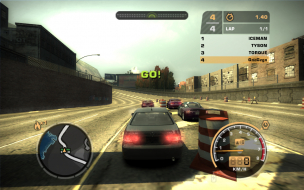
Normal view after res change ...


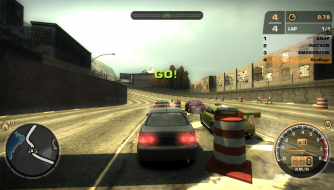
With the Camera Hack you can pull back the camera ...


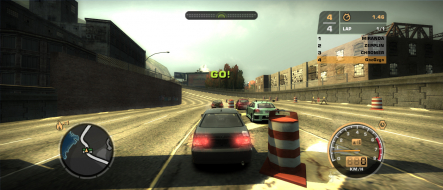
or even further if you like ...


There are other camera options available such as this ...


It is also possible to get this view like this which has the Rear View Mirror in the behind car view.
I used one of the interior views and then pulled back the camera to behind the car.


-----------------------------------------------------------------------
User avatar
Paddy the Wak
Editors
Editors
Posts: 3436
Joined: 27 Jul 2004, 17:42

Solution: NFS: Most Wanted [-3rd]

Post by Paddy the Wak »

Alternative ArtMoney Hack ... (Unnecessary if the above Res Changer works)

Firstly ... this is the way I have done it on my computer ... it may differ on your computer ... but lets hope not ... :)
I have never used ArtMoney before or any programme like it ... so ... it can't be that difficult ... :D

That said it may seem quite daunting for anyone new to this sort of thing as this explanation is very long ... BUT ... it isn't as bad as it seems ...
Hopefully I have done this clearly enough for all ... but ... if you have an issue please let me know and I will see what I can do for you ... :D
Please post any issues in the Solution Discussion forum.

----------------------------------------------------------------------------------------------------------------
How to use ArtMoney to get Need for Speed - Most Wanted to work in widescreen ...
----------------------------------------------------------------------------------------------------------------
Start ArtMoney ... do nothing else with it just yet.
Now start NFS - MW
Set resolution in the game to 800x600
Press Alt+tab to minimize the game

In ArtMoney click on the arrow next to the Select process box and choose Need for Speed Most Wanted ...


Now click the Search button ...


In the box that appears type in 800 in the Value area then click the OK button ...


Once the search process finishes ... click OK ... ArtMoney should now have quite a few entries in the field on the left (Do nothing else with ArtMoney just yet) ...


Now click back on to NFS - MW on your Taskbar to go back in to the game.
Change the resolution in the game to 1024x768
Press Alt+tab to minimize the game again


In ArtMoney use the Filter button ...


In the box that appears type in 1024 in the Value area then click the OK button ...


Once the filter process finishes ... click OK ... ArtMoney should now have about 18 entries in the field on the left ...


Now using the Green arrow button pass all of them to the right field ...


In ArtMoney use the Search button again ...


In the box that appears type in 768 in the Value area then click the OK button ...


Once the search process finishes ... click OK ... ArtMoney should now have lots more entries in the field on the left (Do nothing else with ArtMoney just yet) ...


Now click back on to NFS - MW on your Taskbar to go back in to the game.
Change the resolution in the game to 800x600
Press Alt+tab to minimize the game again

In ArtMoney use the Filter button again ...


In the box that appears type in 600 in the Value area then click the OK button ...


Once the filter process finishes ... click OK ... ArtMoney should now have about 21 entries in the field on the left ...


Now using the Green arrow button again pass all of them to the right field ...


Now right click on any entries in the right field that do not have either 800 or 600 in the Value column and choose delete ...


Now Left Click and highlight the first entry for 800 and then hold down Shift and click on the last 800 value ... so all the 800 values are selected.
Right click on any one of them and choose Edit Selected from the pop up menu ...


In the box that appears change the XXX in the Value area to your desired width resolution (in my case 1920) and click OK ...


Repeat this last process (in blue) for the 600 values changing them to your desired height resolution.


ArtMoney should now look like this ...


Click the Save button at the bottom ... enter a name in the save field ... Do not close ArtMoney


Now click back on to NFS - MW on your start bar to go back in to the game ... the game should be at your desired resolution :D :D :D


IMPORTANT
This does not fix the game for your desired resolution permanently
So ...
Next time you want to play NFS - MW you have to do some of the above process again ... but ... it isn't as bad as having to do all that above again.

Here is what you do ...
Start up ArtMoney ... do nothing else with it just yet.
Start up NFS-MW (with the game resolution set at 800x600)
Press Alt+tab to minimize the game
In ArtMoney as before Select process ...


Now using the Load button at the bottom load your saved "Table" ...


Again change the values for 800 and 600 in the Value column ... as shown in blue text above

To help next time you use ArtMoney for NFS - MW ... as before ... delete any entries in the right field that do not have either 800 or 600 in the Value column and choose delete ...


Save again
Now click back on to NFS - MW on your start bar to go back in to the game ... the game should be at your desired resolution once again.

Next time you use this process to get your desired resolution you should just have 7 entries for 800 and 7 entries for 600 to change as in the blue bit above.

That's it ... enjoy ... :shock:

Screenshots ...
click to enlarge ...
4:3


16:10 ...
User avatar
Paddy the Wak
Editors
Editors
Posts: 3436
Joined: 27 Jul 2004, 17:42

Need for Speed: Most Wanted

Post by Paddy the Wak »

Need for Speed Most Wanted ...

Racer_S tools for NFS-MW ...
Resolution Hack ... http://tocaedit.com/test/nfsmwres.zip
Camera Hack to pull back the camera thus giving you the correct FOV ....... http://www.tocaedit.com/forum/dload.php?action=file&file_id=49


keltie
Posts: 20
Joined: 16 May 2007, 00:38

Solution: NFS: Most Wanted [-3rd]

Post by keltie »

Hi Paddy,

I have read of this fix in a few places now. Can I ask for a bit more help on this as the source of camhack utility seems to want to sell me golf course grass :?

I am running a TH2Go and the resolution fixer works its magic, that's great but I have two issues with NFSMW and the camhack could try to solve both.

The first is I am really not clear on whether it does anything.. So you just like, launch it, then run your game and try to operate the hotkeys you chose in the camhack? So far that one is eluding me. Any idea on what I am missing?

The other is that my R440 wheel plays havoc with the selection system of NFSMW (and Carbon for that matter). I cannot find how to manually set things in a config file and if I use the gui it slides down to the bottom of every list when the wheel is plugged in making it impossible to user select the controls.

I notice that the camhack does have some input device mapping (although no axis, only buttons) and am curious if this could partly solve my dillema - if I could get it to do something?

Cheers

Garry
User avatar
Paddy the Wak
Editors
Editors
Posts: 3436
Joined: 27 Jul 2004, 17:42

Solution: NFS: Most Wanted [-3rd]

Post by Paddy the Wak »

Hello ... welcome to the WSGF ... :D

Yeah the link to the camera hack was dead ...
I have updated it ... it has all the instructions for it's use on the link.

I don't have the game installed any more ... but hopefully that link will help you.
keltie
Posts: 20
Joined: 16 May 2007, 00:38

Solution: NFS: Most Wanted [-3rd]

Post by keltie »

Hi Paddy,

Yeah, thanks for that. I think I was just being a nuffnut and not activating the thing with its hotkey first.

I guess I was hoping to pull back from the mirror a bit and perhaps get some bonnet (hood for our US pals) showing. That visual support is kinda critical to keep the nausea down. It looks like anything HUD, and the mirror is part of that, just gets stretched/scaled from its previous res.

My biggest beef now is my wheel. There is a lag in it that is not there in my own apps. And... it makes the selection / config dialogs go nuts. Not playable really.

From other posts, I concur with the Carbon story. I think I prefer the daytime/scenery in NFSMW more anyway.

Cos this is screengrab forum, I suppose I should post some to say thanks again? :)


Garry
User avatar
Paddy the Wak
Editors
Editors
Posts: 3436
Joined: 27 Jul 2004, 17:42

Solution: NFS: Most Wanted [-3rd]

Post by Paddy the Wak »

Holy shamoli ...!
That looks awesome ... I want ... :mrgreen:

Could you post details of your setup ... ?
User avatar
g00seberry
Editors
Editors
Posts: 1317
Joined: 24 Sep 2006, 16:57

Solution: NFS: Most Wanted [-3rd]

Post by g00seberry »

Wow..... :shock:
Formerly eZ`

Follow me on twitter: @theg00seberry and find me on Steam
emanuel.en
Posts: 185
Joined: 31 Aug 2006, 19:00

Solution: NFS: Most Wanted [-3rd]

Post by emanuel.en »

Awesome! :o
Apple
Posts: 259
Joined: 31 Jan 2007, 18:04

Solution: NFS: Most Wanted [-3rd]

Post by Apple »

Crazy stuff man.
I live quite near melbourne.. be mad to actually see that in real life, hehe :lol:
starfighter
Posts: 295
Joined: 21 Jun 2006, 20:04

Solution: NFS: Most Wanted [-3rd]

Post by starfighter »

Breathtaking!

I played it at 1 3x2 m projection and it was fun but this....holy shXX !
diehardDanny
Posts: 30
Joined: 21 Apr 2007, 23:58

Solution: NFS: Most Wanted [-3rd]

Post by diehardDanny »

:shock: :shock: :shock:

lol ... and I was thinking I have a sicko setup .... lolol
ctrlsteef
Editors
Editors
Posts: 2820
Joined: 17 Nov 2005, 09:02

Solution: NFS: Most Wanted [-3rd]

Post by ctrlsteef »

I wonder. How hard is it to setup those projectors so that they perfectly line up?

Anyway, very very nice setup. You don't see that kind of stuff often. :D
User avatar
FramerateUK
Posts: 330
Joined: 08 Dec 2005, 01:19

Solution: NFS: Most Wanted [-3rd]

Post by FramerateUK »

That is incredible! Wow! Thats a very impressive setup!
User avatar
MobsterOO7
Insiders
Insiders
Posts: 1055
Joined: 19 Sep 2006, 16:25
Location: Ruckersville, Virginia

Solution: NFS: Most Wanted [-3rd]

Post by MobsterOO7 »

Please oh please see if you can get a video of that and post it on youtube.
EVGA GeForce GTX 970 SC ACX 2.0 3.5GB | 3 X LG Flatron 24EA53VQ in Nvidia Surround | Optoma HD20
User avatar
packerfan
Posts: 1296
Joined: 22 Mar 2006, 03:09

Solution: NFS: Most Wanted [-3rd]

Post by packerfan »

I wonder. How hard is it to setup those projectors so that they perfectly line up?

Anyway, very very nice setup. You don't see that kind of stuff often. :D


You probably want to mount them on the ceiling and lock em so they don't move :D

Yea that must be hard especially if they have crossing light paths
keltie
Posts: 20
Joined: 16 May 2007, 00:38

Solution: NFS: Most Wanted [-3rd]

Post by keltie »

Um, I didn't expect quite this response...

Let me say first that: I think small is beautiful :) in that by understanding what we are and aren't doing in surround gaming environments we can understand what is and isn't happening in immersive gaming environments. This is a healthy topic which has commodity gaming interfacing with the superset of modelling and simulation.

But what is the rig? Well, its a SEOS based VR Centre or V-Room. There are three modified Barco 909 projectors (yes, very well bolted to a steel frame mounted on a concrete slab) forward projecting onto a 6m diameter screen covering 150 degrees HFOV. Generally we have the image blended and spherised but most commodity games are not set up for this type of output (requires three 50/56 degree HFOV cameras and everything in sync between them). As I cannot find a simple method in Windows to cater for a desktop/channel overlap for anything other than two outputs I now use a single output and then set up a simpler display with no blends and a small black line between the images. The idea is to leverage the already accepted metaphor of monitor bezels and to avoid the direct abutment of the images which just looks like a cheap alignment and is hard to maintain (crts drift). In fact, I do need to do some work on the colour balance as you can see in the images. It works very well for the user so long as they are immersed in the action but for spectators is it quite nauseating due to the wide angle perspective distortion and often very twitchy POV change in FPS type games.

The machines driving it are a now two year old Xenon (Australian supplier, noisy but rock solid reliability) with a dual FX4500 SLI setup and an Apple G5. I do a lot of active stereo work so the Quadros are a requirement. Of course there is a little Matrox TH2Go box in there too. We can plug and play however with any other machine.

What really makes it sing however is the audio system. This is one area I have to say that when it comes to immersion, small can be improved upon ;) Sound design is everything where things should sound and effect you like they are.

And the centre itself? Well (plug coming up), it is an RMIT University facility for researchers in visualisation fields.
http://www.rmit.edu.au/browse;ID=3jgeft8n7gdj;STATUS=A;SECTION=10;PAGE_AUTHOR=RMIT%20Research. For gamers, access would be through the RMIT Game Graphics Programming or Games Graphic Design programs or events that such groups may organise.
http://www.rmit.edu.au/browse;ID=cptx0cv4q7qp
http://www.rmit.edu.au/browse;ID=8lxyo1gzf2g61

Yeah, a video on youTube. Good idea, I hope the mic on my little camera can handle the noise :twisted:
User avatar
Paddy the Wak
Editors
Editors
Posts: 3436
Joined: 27 Jul 2004, 17:42

Solution: NFS: Most Wanted [-3rd]

Post by Paddy the Wak »

Great stuff ... thanks for the info.
A video would indeed be cool to see if you ever get around to making one.

As has been mentioned it is not often we get to see a setup that special so your posts are very much appreciated ... :D
JKeefe
Posts: 643
Joined: 21 Apr 2006, 17:17

Solution: NFS: Most Wanted [-3rd]

Post by JKeefe »

Cool setup.

As for your wheel troubles, I offer the following advice:

NFS:MW doesn't really support a split pedal axis. It is a console port in its worst form, and as such can go slightly haywire when you try to drive with real computer hardware such as your wheel. I'm not too familiar with the R440, but if its anything like Logitech wheels you have the option to report a combined pedal axis (i.e. throttle is + and brake is -) or two separate axes. For real driving sims, of course you want two separate axes for realistic control. NFS:MW, however, is no sim. It is expecting throttle/brake input from a console-style thumb joystick (i.e. single axis) and it is this same thumbstick that controls menu options; that's why your menus selections are funky. If you must use a split axis, try holding the throttle down halfway in the menus. I just use a combined axis in this game since you are either all the way on the gas or all the way on the brake most of the time.

The steering is awfully funky, too, probably another artifact of the console port. It feels like you just sort of jerk the wheel in the direction you wish to turn, and the car keeps turning. If you hold it there (like you need to do in a real car), you oversteer through the turn. I love this game for the entertainment value, but it is near impossible to alternate between it and a real driving sim.


Speaking of real sims, have you used that setup with a quality racing sim such as rFactor? It has good triplehead support (none of this stretching nonsense like NFS:MW) and you can drive just about any car imaginable. It sounds like you have various people using your setup, and the variety rFactor provides could cater well to differing tastes.
Post Reply

Who is online

Users browsing this forum: No registered users and 12 guests