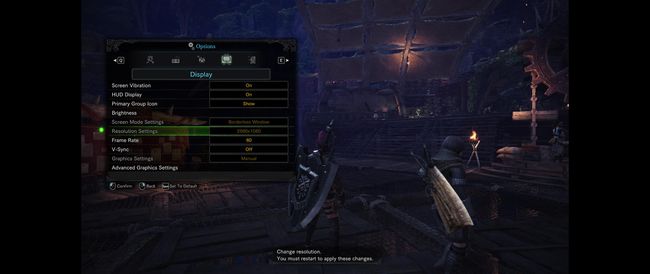
Topics about game solutions, and success or failure in getting them to work.
giubba
Posts: 4 Joined: 12 Nov 2017, 21:42
Post
by giubba 08 Aug 2018, 19:35
Yes please someone try solve this
DAOWAce
Posts: 50 Joined: 28 Apr 2013, 02:44Location: US East
Contact:
Post
by DAOWAce 09 Aug 2018, 07:22
Denuvo is going to hurt progress.
Then again, being a JP developed game (incompetent), a simple hex edit might even work.
Either way, my boat's on Kaldaien (
https://steamcommunity.com/groups/SpecialK_Mods ) looking at it.. if he plays games like this anyway.
If not, well, I won't be playing this until a major sale.. if that ever happens.
Ron_Solo_
Posts: 1 Joined: 09 Aug 2018, 07:53
Post
by Ron_Solo_ 09 Aug 2018, 07:56
Please someone help fix this!
phlorge
Posts: 10 Joined: 26 Jan 2018, 21:47
Post
by phlorge 09 Aug 2018, 15:07
DAOWAce wrote: Denuvo is going to hurt progress.
Then again, being a JP developed game (incompetent), a simple hex edit might even work.
Either way, my boat's on Kaldaien (
https://steamcommunity.com/groups/SpecialK_Mods ) looking at it.. if he plays games like this anyway.
If not, well, I won't be playing this until a major sale.. if that ever happens.
I think there was somebody with a review copy that did a hex edit and it did not work
giubba
Posts: 4 Joined: 12 Nov 2017, 21:42
Post
by giubba 09 Aug 2018, 16:43
pretty much a noob here but future update will be posted here on in another section of the forum?
Mace ya face
Posts: 20 Joined: 09 Aug 2018, 17:33
Post
by Mace ya face 09 Aug 2018, 17:34
Attempted hex edit. Game crashes after ident screens. Attempting memory overwriting at runtime. Also, ident screens are offset to the left.
Last edited by
Mace ya face on 09 Aug 2018, 17:41, edited 1 time in total.
susahamat
Posts: 530 Joined: 20 Sep 2015, 00:58
Post
by susahamat 09 Aug 2018, 17:41
yup triggered runtime , tried cheat engine but out of luck here
if you supporting what I do, buy me a coffee here https://ko-fi.com/kevinsesario or instead direct to paypal.me/kevinsesario . EMAIL:mailto: ? subject= & body=
Spacerik
Posts: 15 Joined: 08 Dec 2017, 20:25
Post
by Spacerik 09 Aug 2018, 18:56
would love 21 9 support.
AlRayes_BRN
Patreon
Posts: 49 Joined: 10 Nov 2017, 09:51
Contact:
Post
by AlRayes_BRN 09 Aug 2018, 19:02
Really sad to see new releases with no 21:9 support, I don't know why devs keep ignoring this issue
Ultrawide Benchmarks YouTube Channel: http://www.youtube.com/c/ultrawidebenchmarksDiscord: https://discord.gg/kGjfCHY
susahamat
Posts: 530 Joined: 20 Sep 2015, 00:58
Post
by susahamat 09 Aug 2018, 19:53
if you supporting what I do, buy me a coffee here https://ko-fi.com/kevinsesario or instead direct to paypal.me/kevinsesario . EMAIL:mailto: ? subject= & body=
Mace ya face
Posts: 20 Joined: 09 Aug 2018, 17:33
Post
by Mace ya face 09 Aug 2018, 20:08
Looks very promising. I might just give up and wait for him. I can get the game to load in while 21:9, but there is a lot of graphical glitches and it quickly crashes. The chuff did CAPCOM do to this game?
DAOWAce
Posts: 50 Joined: 28 Apr 2013, 02:44Location: US East
Contact:
Post
by DAOWAce 09 Aug 2018, 20:50
Was made for a DX9, 32bit game.
MH:W is DX11, 64bit.
I did try it regardless, even changing stuff in the INI, but it didn't work at all.
That aside:
https://www.youtube.com/watch?v=dXaGiRLdL_E https://www.reddit.com/r/MonsterHunterW ... gress_mod/ edit: derp my page settings reset and I didn't see there was a 2nd page
Last edited by
DAOWAce on 09 Aug 2018, 21:11, edited 2 times in total.
Mace ya face
Posts: 20 Joined: 09 Aug 2018, 17:33
Post
by Mace ya face 09 Aug 2018, 21:08
FYI, if you go in-game and then go to the second page of camera settings, you'll see an option called "Camer Distance", that will allow you to sort-of change the FOV.
Mace ya face
Posts: 20 Joined: 09 Aug 2018, 17:33
Post
by Mace ya face 09 Aug 2018, 21:36
Not a suprise. The latest pre-release version is technically two versions out of date vs release.
Users browsing this forum: Bing [Bot] , Semrush [Bot] and 8 guests