


Rainbow Six: Vegas

Detailed breakdowns of how games react to widescreen, ultra-wide, 4k and multi-mon
Post Reply
User avatar
Paddy the Wak
Editors
Editors
Posts: 3436
Joined: 27 Jul 2004, 17:42

Rainbow Six: Vegas

Post by Paddy the Wak »


Widescreen Grade: C
Ultra-Widescreen Grade: Incomplete
Multi-monitor Grade: C
4k Grade: Incomplete

Read Full Detailed Report - Rainbow Six: Vegas

Tom Clancy's Rainbow Six: Vegas is the fifth game in the Rainbow Six series of video games. It changes the series with multiple new features, such as a new health system where the player regenerates health while not taking fire (it should be noted that the player may sometimes be killed instantly, without a chance to regenerate health; this usually happens from grenades, as well as taking close range fire from very powerful weapons, particularly to the head). The player's vision is greatly impaired while damaged, similar to the health system in Gears of War. Furthermore, a third-person view has been included for moments where players can blind-fire around corners to lay down suppression or covering fire.

Other changes include a larger enemy presence and much tougher artificial intelligence, a shift in focus to where kills will be much harder to obtain, a reincarnated aiming system similar to the aiming system of the old Rainbow Six games and a context-sensitive D-pad based command system for the player's squad and sections of gameplay where the player will scale buildings and cause environmental damage.

There is no mission planning feature or save system, instead the game uses a checkpoint system. The developers also opted to exclude cutscenes, telling the story through video feeds on a heads-up display. The player also has various skills, such as the ability to rappel up and down buildings while shooting and the ability to fast rope into an area.
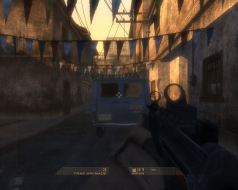


4:3


16:10


16:9
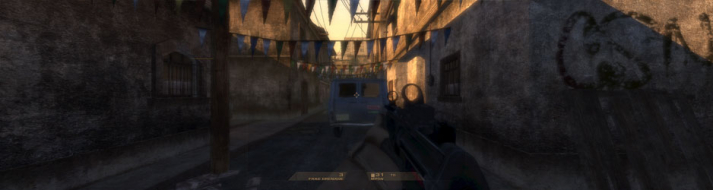

3x1

Last edited by Paddy the Wak on 13 Nov 2013, 11:37, edited 3 times in total.
Reason: Edit
User avatar
Paddy the Wak
Editors
Editors
Posts: 3436
Joined: 27 Jul 2004, 17:42

Solution: R6 Vegas [-3rd]

Post by Paddy the Wak »

Hi guys ... an alternative way to get the game in your chosen resolution ...

With big thanks to ... squ1zzy ... who made a Resolution Patcher for the game ...

Instructions in the readme ...

Place the patcher in the folowing folder:
C:Documents and Settings%username%My DocumentsUbisoftR6Vegas
Open the patcher and select the resolution you want and press the 'patch' button.
It will make a copy of the original file before applying the patch.

squ1zzy

Close the Patcher before you run the game ...
Download the Patcher here ... squ1zzy Patcher
User avatar
Paddy the Wak
Editors
Editors
Posts: 3436
Joined: 27 Jul 2004, 17:42

Solution: R6 Vegas [-3rd]

Post by Paddy the Wak »

New Patch ...
http://www.3dgamers.com/news/more/1096487361/

Amongst other things it is supposed to add widescreen support but it doesn't do it very well ... use the info above for the best results.
jdspinna
Posts: 2
Joined: 28 Nov 2006, 21:00

R6Vegas 16:9 widescreen HUD fix

Post by jdspinna »

Tired of running R6:vegas in widescreen only to have the scope views, hud and cutscene text cramped in the middle of the screen. Try this.

1. Go to program filesUbisoftTom Clancy's Rainblow Six VegasKellerGameContentMenusPC

2. Rename or R6hud.mgb

3. Go to program filesUbisoftTom Clancy's Rainblow Six VegasKellerGameContentMenusPCWidescreen

4. Copy r6hudwide.mgb to the .MenusPC folder and rename it to r6hud.mgb

5. Run r6vegas.

Looks like the main HUD is still a little off (shifted to the left) but, the scopes and the rest of the overlays should be much better. Don't try to copy any of the other widescreen files or you will end up with a messed up HUD in game.

Found a problem with 16x10 resolutions. The overlays are squished vertically. Sorry. 16:9 res look okay though.

I first posted this at NVnews. Still waiting for feeback. So far, for me, everything looks okay.
skybluerob
Posts: 1
Joined: 02 Mar 2017, 22:52

Re: Rainbow Six: Vegas

Post by skybluerob »

Hello,

I can't seem to find the files it mentions in relation to eyefinity/surround. Is anyone able to help?

Thanks.

Rob.
User avatar
scavvenjahh
Editors
Editors
Posts: 3424
Joined: 06 Mar 2008, 17:20

Re: Rainbow Six: Vegas

Post by scavvenjahh »

Lots of useful info (and working links) throughout this thread: http://www.wsgf.org/forums/viewtopic.php?f=68&t=19730
User avatar
czarman
Insiders
Insiders
Posts: 685
Joined: 11 Dec 2008, 23:51
Location: Germany

Re: Rainbow Six: Vegas

Post by czarman »

Yeah this is on my List to finish the DR - i allready found how to change the FOV.

Will be nice to finally start this Game in 3440x1440 with higher FOV.

But no luck so far to change the FOV in Vegas 2.
CZARMAN aka 彼得爸爸
Post Reply

Who is online

Users browsing this forum: No registered users and 8 guests
