Dungeon Siege

Detailed breakdowns of how games react to widescreen, ultra-wide, 4k and multi-mon
Post Reply
Tanuki
Posts: 2866
Joined: 07 Jul 2007, 23:55

Dungeon Siege

Post by Tanuki »


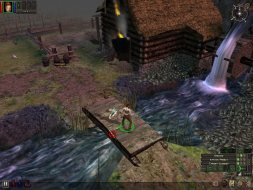
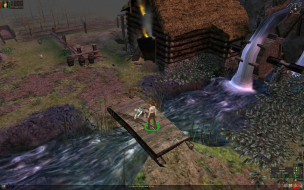
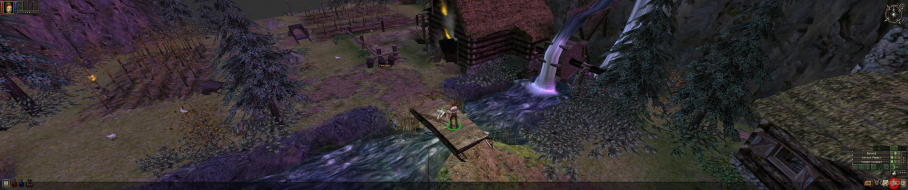
Widescreen Grade: C
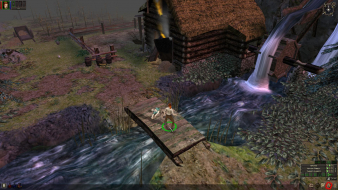
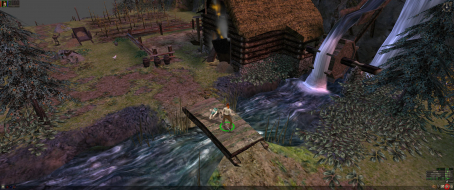
Ultra-Widescreen Grade: C
Multi-monitor Grade: C
4k Grade: C

Read Full Detailed Report - Dungeon Siege

Players control a large party of characters as they fight their way through a seamless environment. Characters develop their abilities by using a particular class of weapon or magic. Players can customize their characters to suit their playing style. Slash, burn, kill, loot. Rinse and repeat.


4:3


16:10


16:9


21:9


3x1

Last edited by Tanuki on 01 May 2018, 20:08, edited 7 times in total.
Reason: Edit
Tanuki
Posts: 2866
Joined: 07 Jul 2007, 23:55

Dungeon Siege/Aranna: Detailed Report

Post by Tanuki »

Each game world is one large packed file. In these packs are camera settings that include fov settings.

I could not discover a method to get any noticable change in the fov. I tried many listed elsewhere.

If you can get Hor + please post the method and pics so I can update the DR.
The_cranky_hermit
Insiders
Insiders
Posts: 3010
Joined: 07 Nov 2005, 04:16

Dungeon Siege/Aranna: Detailed Report

Post by The_cranky_hermit »

C+, 100%
Tanuki
Posts: 2866
Joined: 07 Jul 2007, 23:55

Dungeon Siege/Aranna: Detailed Report

Post by Tanuki »

Hor + is here I am positive. It just eludes me.
Tanuki
Posts: 2866
Joined: 07 Jul 2007, 23:55

Dungeon Siege/Aranna: Detailed Report

Post by Tanuki »

Changed method to an ini edit. Seemed simpler.
Zimbu
Posts: 1
Joined: 29 Jul 2008, 04:29

Dungeon Siege/Aranna: Detailed Report

Post by Zimbu »

The .INI method is simpler, but there is a minor problem with it. If you go into the "Options" window from the main menu, then click "OK" without changing any of your settings, the screen settings in the .INI will be set to a lower value.

In my case, I set it to 1920x1200x32 via the .INI. After entering / exiting the "Options" menu, the game defaulted back to 800x600x32.

Using the command-line to force the resolution allows you to enter/exit the "Options" menu to change audio settings, etc, without having your screen settings change unexpectedly.

1) Right-Click on the shortcut that's created in your Start Menu
2) Choose "Properties..."
3) In "Target", add "width=xxxx height=xxxx bpp=xx" at the end of the box, outside the quotes. ie:

"C:Program FilesMicrosoft GamesDungeon Siegedungeonsiege.exe" width=1920 height=1200 bpp=32

4) Click apply.
5) Run the game via the shortcut.

Tested on Dungeon Siege 1.11.1.1486 and DS: LOA 1.50.0.56
Tanuki
Posts: 2866
Joined: 07 Jul 2007, 23:55

Dungeon Siege/Aranna: Detailed Report

Post by Tanuki »

You can change the options using the ini method once the gameworld has loaded and the resolution will not revert to 800x600.

I want to try the D2 Hor+ method on this and then I will update the report to list both the ini and command line methods.
Tanuki
Posts: 2866
Joined: 07 Jul 2007, 23:55

I added a Hor + method to the

Post by Tanuki »

I added a Hor + method to the new DR thingie. Try it out if you like. I didn't really test it that deep.
User avatar
Sinbad
Posts: 59
Joined: 07 Feb 2006, 03:46

1920x1200

Post by Sinbad »

I was able to get 1920x1200 to work properly with the hex edit fix. However, I'm using the Steam version of Dungeon Siege and the entire hex string is "00 00 F0 41 00 00 70 42 00 00 00 00 8D ED B5 A0." I didn't have to use a no-cd crack; this fix worked on the Steam version.

I compared a 1600x1200 screenshot with a 1920x1200 screenshot to confirm that it rendered Hor+ correctly (see samples below reduced 50%).

2560x1600 caused the game to crash out. Lowering the color depth from 32 to 16 (both desktop and ini) didn't work.

Attached files
User avatar
czarman
Insiders
Insiders
Posts: 685
Joined: 11 Dec 2008, 23:51
Location: Germany

Re: Dungeon Siege

Post by czarman »

Fixed the crash Problem via Voodoo2 - added 21:9 Solution to DR.
CZARMAN aka 彼得爸爸
Mark_B
Posts: 8
Joined: 26 Jul 2016, 23:39

Re: Dungeon Siege

Post by Mark_B »

Don't work for me via Voodoo2, tried 2.5 and the new 2.54.

I do all as described in the screenshot but it crash after character creation. I made the hex edit in the exe and although the ini edit, what i have forget?

Help please :)
theASMRnerd
Posts: 2
Joined: 25 Apr 2018, 03:38

Re: Dungeon Siege

Post by theASMRnerd »

Hi all! I'm looking for help with the Hor+ FOV fix. I've followed the hex editing directions very carefully, but I can't get it to work.

I'm running the Steam version at 1920x1080, using the Killah Fix pack to enable DSLOA. Which means that the exe I'm editing is the DLSOA exe renamed to DungeonSiege.exe. When I follow FOV fix directions, I get a messed up main menu (so I know my hex edits are doing SOMETHING), but my in-game FOV doesn't change one bit.

This is really frustrating, because I would love to play this game in widescreen with the proper FOV. Does anybody have any suggestions or insight? Any help at all would be hugely appreciated!
User avatar
antrad
Posts: 49
Joined: 26 Aug 2016, 16:41
Contact:

Re: Dungeon Siege

Post by antrad »

Mark_B wrote:Don't work for me via Voodoo2, tried 2.5 and the new 2.54.

I do all as described in the screenshot but it crash after character creation. I made the hex edit in the exe and although the ini edit, what i have forget?

Help please :)


I have the same problem. When you don't use dgVoodoo 2 the game would show an error message saying the game doesn't support a resolution like 1920x1080, but pressing OK the game would run fine. But with dgVoodoo I can not even see this error message to click OK. You can try to fix this by opening system_details.gas file in the installation folder, and everywhere where you see 1024x768 add a new line with your own resolution, so the error message will not appear.

theASMRnerd wrote:Hi all! I'm looking for help with the Hor+ FOV fix. I've followed the hex editing directions very carefully, but I can't get it to work.

I'm running the Steam version at 1920x1080, using the Killah Fix pack to enable DSLOA. Which means that the exe I'm editing is the DLSOA exe renamed to DungeonSiege.exe. When I follow FOV fix directions, I get a messed up main menu (so I know my hex edits are doing SOMETHING), but my in-game FOV doesn't change one bit.

This is really frustrating, because I would love to play this game in widescreen with the proper FOV. Does anybody have any suggestions or insight? Any help at all would be hugely appreciated!


The FOV fix doesn't work for me either. I have the DVD version of DSLOA, tried both on dungeonsiege and DSLOA exe, the main menu is all messed up for me too, but the game is still Vert-. In DSLOA also the in game HUD is not correct, the bottom ends up on top of the screen.

User avatar
antrad
Posts: 49
Joined: 26 Aug 2016, 16:41
Contact:

Re: Dungeon Siege

Post by antrad »

Update: It turns out the FOV fix does work, but the instructions are wrong; you MUST start a new game AFTER doing the hex edit, you can not load a previous save. I will update the report.
theASMRnerd
Posts: 2
Joined: 25 Apr 2018, 03:38

Re: Dungeon Siege

Post by theASMRnerd »

antrad wrote:Update: It turns out the FOV fix does work, but the instructions are wrong; you MUST start a new game AFTER doing the hex edit, you can not load a previous save. I will update the report.


Confirmed, this does the trick! Thank you so much for the fix! The only downside is, of course, the menu is messed up for character creation, which makes customizing your character very difficult. But I can live with that.

Also, regarding your previous post about the custom resolution error message not being visible when using dgvoodoo2: when you get the black screen, just press the Enter key. It will close the error message and load as normal! It does for me, at least.
Post Reply

Who is online

Users browsing this forum: Google [Bot] and 8 guests