
Grand Theft Auto: San Andreas

Detailed breakdowns of how games react to widescreen, ultra-wide, 4k and multi-mon
Post Reply
Guest

Grand Theft Auto: San Andreas

Post by Guest »


Widescreen Grade: C
Ultra-Widescreen Grade: C
Multi-monitor Grade: C
4k Grade: Incomplete

Read Full Detailed Report - Grand Theft Auto: San Andreas

Grand Theft Auto: San Andreas is a sandbox-style action-adventure computer and video game developed by Rockstar North in Scotland. It is the third 3D game in the Grand Theft Auto video game franchise, the fifth original console release and eighth game overall. The game is set in the fictional state of San Andreas, which is based on Nevada, California, and Arizona, comprising three metropolitan cities: Los Santos, based on Los Angeles, San Fierro, based on San Francisco and Las Venturas, based on Las Vegas, with deserts, rivers, forests and a mountain separating the cities. Set in late 1992, San Andreas revolves around the gang member Carl "CJ" Johnson returning home from Liberty City to Los Santos, San Andreas, after learning of his mother's murder. Johnson finds his old friends and family in disarray. Over the course of the game, Johnson gradually unravels the plot behind his mother's murder while exploring his own business ventures.

Like other games in the series, San Andreas is composed of elements from driving games and third-person shooters, and features "open-world" gameplay that gives the player more control over their playing experience. The game also adds a number of features such as car customization, character personalization, and interactive sexual relationships.
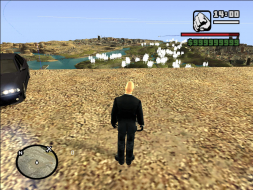


4:3
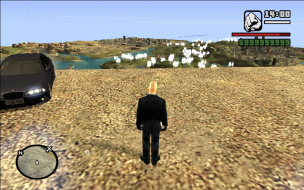

16:10
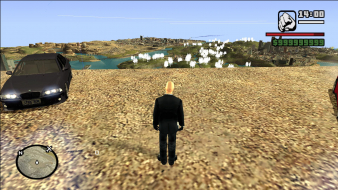

16:9
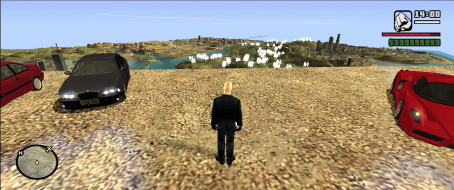

21:9


3x1

Last edited by Guest on 16 Jan 2018, 12:50, edited 1 time in total.
Reason: Edit
User avatar
Paddy the Wak
Editors
Editors
Posts: 3436
Joined: 27 Jul 2004, 17:42

Grand Theft Auto San Andreas

Post by Paddy the Wak »

Hello ...
The game has some Widescreen support ...
Widescreen resolutions are available in the display setup but depending on the options you choose you will get different views and non of them have a perfect Field of View for Widescreens.

Check out the comparison screenshots towards the bottom of this thread here ...
http://www.widescreengamingforum.com/node/

The solution is to use the Camera Hack here ... http://www.tocaedit.com/forum/dload.php?action=file&file_id=26 ... mentioned by Elod in the first post above ... :D
Dave at ToCA Edit is a real star and has made many Camera Hacks for all sorts of games ... his site is well worth checking out.
If you have any problems with his hacks just post on his forums .. he usually responds and does his best to fix things.

Thanks Dave !

Using the Camera Hack you can vary the FOV and the aspect ratio to your preference but the HUD remains stretched on widescreens whatever you do.
Here is a screenshot with the camera hack enabled ...

Click the thumbnail to enlarge.

I have scaled down the size of the screenshot ... so even when enlarged it is not at the true resolution.
Ender17
Posts: 1
Joined: 08 Sep 2005, 03:15

Grand Theft Auto San Andreas

Post by Ender17 »

Hello Ender17 ...
I can't remember ... I stoped using it when Kunaak posted this ...
There is a MUCH EASIER way to do this, then messing with the camera with programs and hacks :wink:


just press "V" to change the camera out.
then the game is in a nice wide view :)
I found it much easier and I wasn't too interested in the other features of Dave's camera hack.

Check out the readme file that comes with the Camera Hack ...

Default HotKeys are;
Numpad * = Enable
Numpad / = Disable

Left Bracket '[' = Increase FOV
Right Bracket ']' = Decrease FOV
Semicolon ; = Increase Aspect Ratio
Apostrophe ' = Decrease Aspect Ratio
P = Default FOV and Aspect Ratio


Run the Camera Hack ...enter the game ... press the Numpad * key to start the Camera Hack.
Then use the other keys to alter the view ...
Hope this helps ... :)

I tried that, but I'm not sure which one is the right one, looks like are 3 different views when using the V button.
All look about the same to me.

Also, nice system, what video settings are you using for this game?
User avatar
Paddy the Wak
Editors
Editors
Posts: 3436
Joined: 27 Jul 2004, 17:42

Grand Theft Auto San Andreas

Post by Paddy the Wak »

Hello Ender17 ...
I have everything at Max ... 1920x1200x32 ... Fraps reports an average frame rate of 62 ...

When I press the v key I get 2 quite different views from the default view ...

This is the default view ...


This is the view when I press v the fist time ...


I use this view which I get when I press v for the second time ...


If I press it a third time I get the default view again.
User avatar
Paddy the Wak
Editors
Editors
Posts: 3436
Joined: 27 Jul 2004, 17:42

Grand Theft Auto San Andreas

Post by Paddy the Wak »

In the Nvidia Profile.
AA is set to Application Controlled.
AF is set at 16x

In the game...
Draw distance is at it's maximum
Frame Limiter is Off
Widescreen is On
Visual FX Quality is at Very High
Mip Mapping is On
AA is set at 3

The only problem I get is the bottom half of the screen in the game is corrupt unless I start the game at a lower rez like 1280x1024 and then once it is going I change it to 1920x1200 and all is OK.
It must be some sort of SLI bug as I think it is rendering the top half with one card and the bottom with the other card ... but I don't really know ... :?
alf717
Posts: 12
Joined: 10 Apr 2008, 01:39

Re: Grand Theft Auto San Andreas

Post by alf717 »

Thank you for the tips. I've got a ways to go before I get all of the lingo used on the site so I'll add this info into the OP. I tried racer's tool. It works well but I'm not sure what would be a good FOV setting. I liked how with the GTA III and VC version you could set the FOV by number and go from there. This one is more open, which is nice, but I prefer a way to lock in a solid FOV number and leave it at that. I run the game at 1920x1080 and use the 16:10 settings. I didn't noticed a huge loss horizontally but I did gain back the chopped off areas so my vertical view is much better. I didn't use this method though when I did the DR since that would be misleading.

I was able to select 1280x900 from the list of resolutions. To my surprise my monitor didn't give me a no signal issue so I listed it as working. Same goes for the other resolutions as well. I picked the resolutions but was given border since I do not use GPU scaling.
User avatar
MobsterOO7
Insiders
Insiders
Posts: 1055
Joined: 19 Sep 2006, 16:25
Location: Ruckersville, Virginia

Re: Grand Theft Auto San Andreas

Post by MobsterOO7 »

I tried this hack with the Steam version. Got many "unknown code found" errors with the option to "continue without this function" eventually the game will start with no additional resolutions to choose from.
EVGA GeForce GTX 970 SC ACX 2.0 3.5GB | 3 X LG Flatron 24EA53VQ in Nvidia Surround | Optoma HD20
alf717
Posts: 12
Joined: 10 Apr 2008, 01:39

Re: Grand Theft Auto San Andreas

Post by alf717 »

All I know is this:

"The game needs to be copied somewhere else before replacing the two game EXEs with the v1 single exe or steam will "fix" it or otherwise complain" - GTA forums
Buy -> download -> Copy SA folder somewhere else -> in copied folder away from steam, delete 3.0 exe and test app exe -> replace with v1.0 exe, enjoy." - Steam Forums

Basically this:

1.) Move the GTA directory out of the Steam directory (steamappscommon)
2.) Download 1.0 no-cd (sorry but you'll have to Google this)
3.) Remove the two .EXE (v3.0 and testapp) files and only run the game with the 1.0 no-cd
4.) Run the game without Steam

You might be able to add the game to your Steam list via the third party support list if you want all your games in one place. I do this with the retail version of SA and it seem to work fine.
14600
Posts: 3
Joined: 04 Feb 2011, 19:15

Re: Grand Theft Auto San Andreas

Post by 14600 »

The Pictures of 1600x1200 and 1920x1200

1600x1200


1920x1200

146001026
User avatar
scavvenjahh
Editors
Editors
Posts: 3424
Joined: 06 Mar 2008, 17:20

Re: Grand Theft Auto San Andreas

Post by scavvenjahh »

Thanks. Screenshots were not needed - a simple "I've tested 1920x1200 and it works" will do. :)
Jemus
Posts: 1
Joined: 23 Feb 2011, 15:22

Re: Grand Theft Auto San Andreas

Post by Jemus »

i'm able to choose every resolution i want after replacing the *dll files but after the game has startet and i try to load a savestate or start a new game, it crashes after loading is finished
windows xp says that gta_sa.exe found a problem
what may i've done wrong?
alf717
Posts: 12
Joined: 10 Apr 2008, 01:39

Re: Grand Theft Auto San Andreas

Post by alf717 »

i'm able to choose every resolution i want after replacing the *dll files but after the game has startet and i try to load a savestate or start a new game, it crashes after loading is finished
windows xp says that gta_sa.exe found a problem
what may i've done wrong?


Try this link http://www.mediafire.com/?h3qq5p20jxd3ah1 this has another .ASI file that adds the resolution options from the 1.01 patch but does not offer as many display options as the exdisp.asi file. Another tip I can suggest is to delete the GTA_SA.set file within your saved game directory. I've found that the game is more stable when you use a clean .SET file when applying these mods. Just an FYI though this file holds your settings data so you will have to re-adjust all of the options you use in game.

Edit:

Well I found some more information on the display extenders so I updated the OP. Download the version you need and it should work. I had better results with the version that is modified for the US version but you cannot change the aspect ratio manually. Apparently it adjusts the setting automatically. SADisplayResolutions.asi and the US 1.0 ASI extender seem to work best for me and not crash my game. I own the retail US version 1.0.
batmanofzurenarh
Posts: 1
Joined: 04 Jun 2013, 13:34

Re: Grand Theft Auto: San Andreas

Post by batmanofzurenarh »

Sorry for bumping a 2 year old thread, but multimonitor support does work with GTA SA. Only problem I've had is stretched out words and LOD's are much more visible. One thing you have to make sure to do is if you have bezel compensation enabled, go to WINDOWS display preferences (not AMD's) and select the next resolution (without the compensation). I found that the non-standard resolution (from the bezel fix) causes most games not to recognize that there is an Eyefinity setup, and in most cases most games wont even start at all. Reverting back to a "standard resolution (without the bezel fix) usually fixes that problem. Now when you get in game, you 'll have the option to set the resolution to support eyefinity (You'll also see the resolution with bezel fix there to) just select and your good. as for GTASA, you'll need the ASI file posted on the first page of this thread. I think it's called "GTA SA Widscreen fix lite" or something like that. after that GTASA should be working perfectly. only downside is every time you want to use eyefinity in gta sa, you'll need to switch bezel compensation off.

Image

forgot to mention this: I'm running the game on a tri-monitor setup with 24" screens @1920x1080. so with eyefinity on, my resolution is about 5860x10870 with bezel compensation and 5760x1080 without.
alexs_vk
Posts: 1
Joined: 25 Nov 2013, 15:02

Re: Grand Theft Auto: San Andreas

Post by alexs_vk »

I just don't understand what version of the game should be? 1,02? I want to make a resolution 3216*1050 approximately like the picture 21*9. all the files which are references do resolution widescreen just are available set with a version of the game to 1.01. maybe someone will take off their similar files permission or help write for my case. softth kind of goes to the menu and writes that adds my permission but the menu does not appear. but if you are trying to do in the real Eyefinitу the game just makes 3 identical images on the monitors. what is the reason?
blackpill
Posts: 52
Joined: 21 Apr 2010, 20:43

Re: Grand Theft Auto: San Andreas

Post by blackpill »

I just made the loadings screens adapted to 21:9

Link fix:
https://www.dropbox.com/s/b2ud48w2o6pv1 ... 9.rar?dl=0

Images:
https://imgur.com/a/JfXOdu3
Post Reply

Who is online

Users browsing this forum: No registered users and 7 guests



