


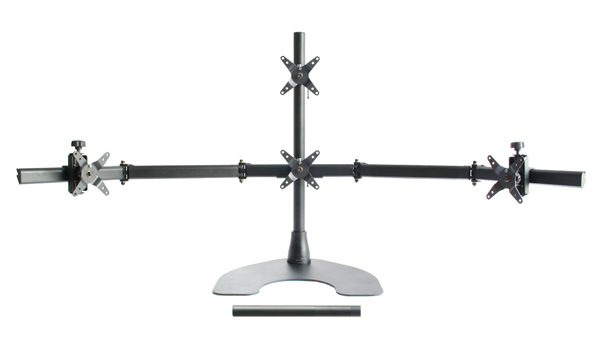
WSGF Ultimate Desk Stand v2

Discussions about the WSGF Edition Stands from Ergotech
Locked
User avatar
skipclarke
Founder
Founder
Posts: 7358
Joined: 13 Oct 2003, 05:00

WSGF Ultimate Desk Stand v2

Post by skipclarke »

15-Apr-19 Update: We are now out of stock, and no longer carry this product. Ergotech has a new product line they are launching in May 2019, and we will be reselling it.

Leaving stand in store as to note lose total visibility. Please do not order.


The WSGF Ultimate v2 is part of the Ergotech Group Freedom Desk Stand product line, and is exclusive to the WSGF. It offers a complete upgrade path for users that currently have (or want) three, to four or five monitor configurations.

The WSGF Edition Ultimate Stand v2 allows for extra large monitors to be used in a 3x1 Landscape configuration. The stand will fit most monitors up to 27" (16:9). It will also fit a 34" 21:9 ultra-wide, flanked by a pair of 24" or 25" panels. Additionally, monitors of this size can be used in a "1+3" configuration. "One plus Three" is a separate monitor mounted above or below a 3x1 Landscape Eyefinity/Surround installation.

Finally, the stand allows for a 5x1 Portrait installation using five 24" (16:10) monitors. Please note that 27" and 30" monitors cannot be used in 5x1 Portrait. The picture to the right shows the base configuration - short pole, tall pole and four pivots. If you are doing 5x1-Portrait, please ask for the extra pivot to be included. It will be added at no charge.

Check out the Reviews Page to see what people have said about the Ergotech and WSGF Edition Stands.


The shipping package includes:
  • Heavy Duty Base
  • "Short" Pole (16" height)
  • "Tall" Pole (28" height)
  • "Five Segment Bar" (each segment is 12" long)
  • "Mini Bar" (used to mount the "1" in "1 over 3" configurations)
  • 4 Pivots (1 standard, 3 adjustable)
  • 5th pivot available for customers who are setting up 5x1-Portrait Eyefinity


Please Note: If you are planning to mount a 34" ultra-wide panel, you will also need to purchase an HD Adjustable Pivot.
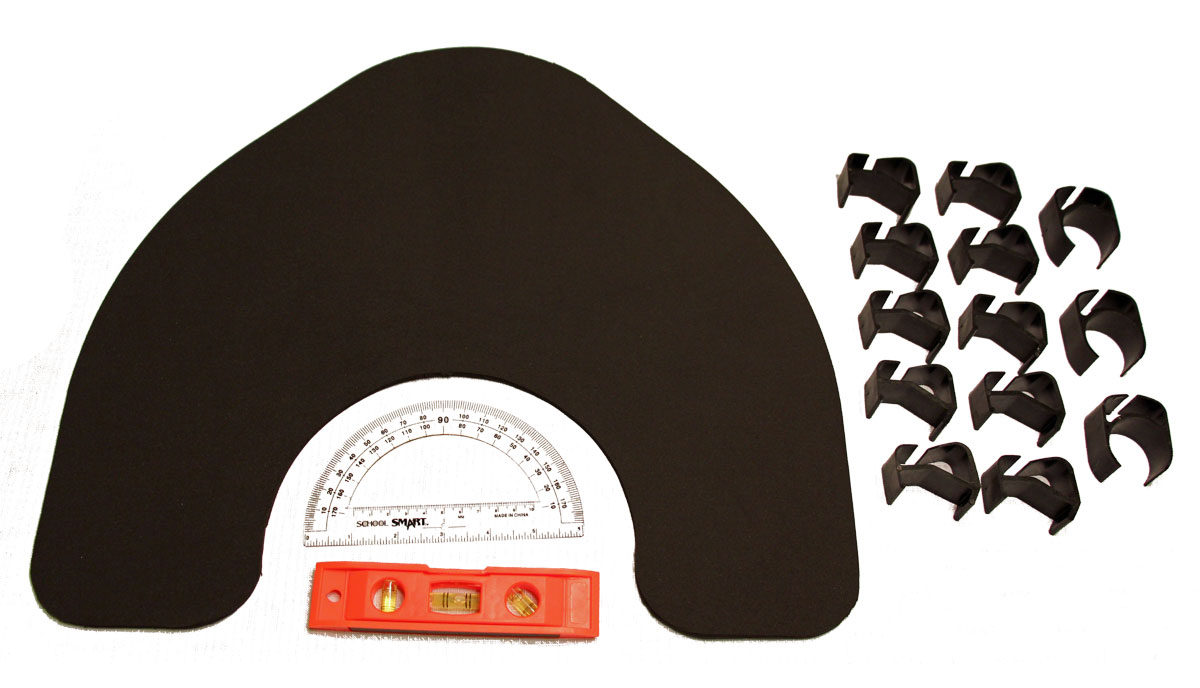


PicIt also includes the following items, which are pictured to the right.
  • 13 cable clips - 3 pole clips, 10 bar clips
  • Alignment Tools - protractor and level
  • Neoprene base pad


Technical Specifications


The stand weighs approximately 33 pounds, fully loaded with four pivots. The base measures approximately 18" square. It supports the following monitor specifications.


  Total Bar Weight 1+3 Total Weight 3x1-L Width* 5x1-P Width* 1+3-L Height* Price**
WSGF Edition Ultimate 60 lbs 85 lbs 25.5 in 15.0 in 16.0 in $374
*These measurements are the physical height and width of your monitors - NOT the diagonal viewable area. Please measure your monitors. **Street price.


Shipping & Handling


For detailed information, please visit the Shipping & Handling page. This page provides further S/H details, including which countries we ship to. PLEASE NOTE: Customers are responsible for any import taxes and fees required. These fees or taxes are not included in the product price or shipping costs.

Shipping costs for this item are as follows:


  US CAN US APO/FPO ANZ EU UK ME JP/HK
Cost $40 $150 $75 $250 $150 $175 $200 $200
Ship Method UPS (Continental US). All others USPS Global Priority.


Repairs & Refunds


TL;DR
Ergotech offers a Lifetime Warranty on their stands. Repairs are rare. We can, and will work to resolve any and all issues with your stand. For full details, visit the Repair & Refunds page.


Installation


  • USE COMMON SENSE
  • PDF Installation Instructions for "Base Model" Freedom Triple Stand from Ergotech (the basis for this SKU)
  • Don't do anything that will cause the stand to tip over
  • ALWAYS load from the center out, and the bottom up
  • After you have the center monitor installed, take time to check the height (before adding additional monitors)


15-Apr-19 Update: We are now out of stock, and no longer carry this product. Ergotech has a new product line they are launching in May 2019, and we will be reselling it.

Leaving stand in store as to note lose total visibility. Please do not order.


Last edited by skipclarke on 05 Jun 2019, 17:49, edited 92 times in total.
Reason: Edit
User avatar
RadioActiveLobster
Posts: 69
Joined: 20 Jul 2011, 17:12

Re: New WSGF Ultimate Stand v2

Post by RadioActiveLobster »

I like the changes, as my 5th mount is currently gathering dust in the closet since I don't need it.

I ordered and received my Ultimate Stand back in July and also bought the $25 extra clip pack, so the only new addition I have any interest in is the Neoprene Pad (I have no use of the short pole, I have all the clips and I own a level already). My wood desk is pretty smooth and stuff slides around so it would be useful.

Will it be available to customers from prior to August/September?
Intel i7-5930k @ 4.4Ghz ~ ASUS X99-Deluxe ~ Corsair H105 CPU Cooler ~ 16GB G.Skill DDR4 2400
EVGA 1080Ti FTW3 ~ EVGA SuperNova 1000 P2 ~ CaseLabs S8S Case
256GB OS SSD, 960GB SSD, 3.5 TB of total HDD space
1x ACER z35p 3440x1440p 120Hz G-Sync - 1x ACER XB270HU 144Hz 2560x1440 G-Sync ~ 1x BenQ GW2765 60Hz 2560x1440 ~ 1x Sanyo 1080p LCD TV
Corsair K95 RGB Cherry MX Brown ~ Corsair Scimitar RGB Pro ~ Sennheiser PC350 SE Headset
Uplift 900 2 Leg Sit/Stand Desk Frame with Custom Wood Desktop ~ Freedom WSGF Edition Ultimate Desk Stand v1
User avatar
skipclarke
Founder
Founder
Posts: 7358
Joined: 13 Oct 2003, 05:00

Re: New WSGF Ultimate Stand v2

Post by skipclarke »

RadioActiveLobster wrote:Will it be available to customers from prior to August/September?

Sure. I don't see that as a problem.
EvilFocker
Posts: 5
Joined: 06 Sep 2014, 14:32

Re: New WSGF Ultimate Stand v2

Post by EvilFocker »

Skip,


Thank you for taking the time to explain everything to me & getting me setup with my first surround gaming experience.
:triplewide:
xsolon
Posts: 1
Joined: 29 Sep 2014, 17:08

Re: New WSGF Ultimate Stand v2

Post by xsolon »

Looking forward to v2
BlakRam
Posts: 2
Joined: 27 Sep 2014, 05:01
Location: St Louis, MO(St Peters)

Re: New WSGF Ultimate Stand v2 - Announcement

Post by BlakRam »

I am looking to run a 3+1 setup with 27' Samsung monitors. My monitors are basic and don't have the Vese??? mounts. Will they still work with this stand? If not, what are my options? Thx, Jerry
Limpeklimpe
Posts: 1
Joined: 08 Nov 2014, 02:51

Question about what to buy

Post by Limpeklimpe »

Hello there!
I currently have 3 of these monitors ASUS VE278Q 27" http://www.asus.com/Monitors_Projectors/VE278Q/
Id like to add a ASUS PB279Q 27" (Cant find a product link like the other monitors)

Is it possible to have them in a 3+1 landscape configuration using this stand (Having the ASUS PB279Q 4K monitor in the middle like this http://i.imgur.com/qXZXxsy.png)
http://www.wsgf.org/products/freedom-ws ... k-stand-v2

The product description for the stand says it will fit most monitors up to 27", how do I know if it will fit my these monitors?
Will I have to buy anything extra with this stand for it to work? Should I use another stand?

My apologies if I missed something obvious :)

Best Regards
Limpeklimpe
User avatar
skipclarke
Founder
Founder
Posts: 7358
Joined: 13 Oct 2003, 05:00

Re: New WSGF Ultimate Stand v2 - Announcement

Post by skipclarke »

BlakRam wrote:I am looking to run a 3+1 setup with 27' Samsung monitors. My monitors are basic and don't have the Vese??? mounts. Will they still work with this stand? If not, what are my options? Thx, Jerry

No. You need VESA mounts to be able to use the stand. I'm not sure what options there are. Every stand I know of requires a VESA mount. The whole point of the VESA mount pattern is for mounting. Unless Samsung sells some sort of VESA adapter or option, there really are no options. Sorry.
User avatar
skipclarke
Founder
Founder
Posts: 7358
Joined: 13 Oct 2003, 05:00

Re: Question about what to buy

Post by skipclarke »

The stand should work fine. Looking at the tech specs on the WSGF Ult v2 page, it shows you can use monitors that are 25.5 inches wide. Yours (the three you posted the link for) are 643mm wide. This equates to 25.3 inches, so you are good. You will not need anything else. The stand has all you need.
Spyname149
Posts: 1
Joined: 21 Nov 2014, 03:24

Weird Monitor Setup...

Post by Spyname149 »

Hey Guys,

So I am planning probably one of the weirdest monitor setups that I've heard of. I'm using 3 Monitors:

1. AOC U3477PQU ( :TrueWS: )
2. Acer HB280HK
3. AOC U2460PG

Will all this fit on a Freedon WSGF Edition Ultimate Desk Stand 2.0? I want the AOC U3477PQU and HB280HK on the bottom, and then the AOC U2460PG on top. Will this work?

Also, please comment on what you think of my weird setup, and tell me if you seen weird or crazy setups, I'm new here, so mine might be mild compared to yours!

Thanks in advance,

Spyname149
User avatar
skipclarke
Founder
Founder
Posts: 7358
Joined: 13 Oct 2003, 05:00

Re: Weird Monitor Setup...

Post by skipclarke »

Sorry this took so long to reply. It should all fit on the stand, no problems. I can't say for sure that the monitors will sit where you can set the bezels right next to each other.

Also, I'm assuming that you are centering the bottom set of monitors across the bar. If you put one in the actual middle, and another on the side, I can't say for sure how steady the setup will be. The stand is designed to stay upright while you load monitors, so it shouldn't be an issue.

If you are doing C/L or C/R, and leaving a gap on one side, you may end up needing to add some sort of counter weight. Centering the bottom set "as a whole" should work fine.
protech93
Posts: 2
Joined: 22 Nov 2014, 10:26

Ultimate stand arm width concerns/What is the best to buy

Post by protech93 »

I have 3 23" Acer monitors along with an extra fourth 23" Asus that I'd like to use in a 3+1 configuration. My question is, would the Ultimate Stand v2 be too much for just a 3 monitor setup? My main concern is If i were to use my 23" acer's on the ultimate stand such that all monitors touch edge to edge, would there be parts of the arm that would be extended and visible beyond the edge of the monitor? Thanks!
User avatar
skipclarke
Founder
Founder
Posts: 7358
Joined: 13 Oct 2003, 05:00

Re: Ultimate stand arm width concerns/What is the best to bu

Post by skipclarke »

I don't think it would be too much - but I am biased. ;)

On my setup with 3x 21.5" panels, I have maybe two inches sticking out on each side. It is not very noticeable or distracting. With 23" panels, I imagine you'd hit it about right. I have my wireless headphones handing on the bar on one end.

You may get a hair showing when looking dead on the center, but IMHO it's nothing distracting. And you have room to grow.
protech93
Posts: 2
Joined: 22 Nov 2014, 10:26

Re: Ultimate stand arm width concerns/What is the best to bu

Post by protech93 »

Awesome to hear. The capability for upgrading is definitely a great point as I do intend to eventually upgrade to more panels. looks like I've made my decision! Thank you!
neojack
Posts: 3
Joined: 03 Dec 2014, 01:26

shipping a stnd on canada with USPS

Post by neojack »

Hello,

I have read carefully the page about the new stand "Freedom WSGF Edition Ultimate Desk Stand v2" here :
http://www.wsgf.org/products/freedom-ws ... k-stand-v2

It looks formidable and i want one !

I just have one problem with the shipping. I live in Québec, Canada, and the information says you use UPS for shipping in Canada.

I really really HATE UPS so it is possible to ship with USPS instead ?


Before you ask why i hate UPS, here is a few reasons :
- they have terrible service in my area
- they want more money when I order internationally (sometimes it's like 50% of the price of what i ordered !)
- the UPS guys seems to always pass at strange hours, and in the end always have to go to their office to get my stuff


Usually i just avoid to order on websites when the only shipping option is UPS, but I really want a stand so it is possible to make an exception please ?
User avatar
skipclarke
Founder
Founder
Posts: 7358
Joined: 13 Oct 2003, 05:00

Re: shipping a stnd on canada with USPS

Post by skipclarke »

I can do USPS shipping, though they are more expensive up front. Shipping will be about $100, if not a little more. This may save you money on the back-end, so it could be a win-win. I've had someone complain about the UPS costs after the fact, but never could get details on how much the charges actually were.

There may still be customs, taxes or import fees imposed by the Canadian government. You will still be responsible for those. I did a Google, and found this site to estimate. Looks like the taxes may be about $50, depending on your province.

http://www.crossbordershopping.ca/calcu ... calculator
neojack
Posts: 3
Joined: 03 Dec 2014, 01:26

Re: shipping a stnd on canada with USPS

Post by neojack »

Hello,

thank you !
No problem with the eventual customs and all. UPS charges them anyway PLUS a fee because they took care of it ! and the fee is very expensive...

I place my order now !
mattikinsmatt
Posts: 2
Joined: 24 Feb 2014, 08:01

Re: Freedom WSGF Edition Ultimate Desk Stand v2

Post by mattikinsmatt »

Hey there,
Was just wondering if i ordered in the next few days would the stand arrive in Australia by Christmas? If you know how quick the postage is, of course.

Cheers
User avatar
skipclarke
Founder
Founder
Posts: 7358
Joined: 13 Oct 2003, 05:00

Re: Freedom WSGF Edition Ultimate Desk Stand v2

Post by skipclarke »

mattikinsmatt wrote:Hey there,
Was just wondering if i ordered in the next few days would the stand arrive in Australia by Christmas? If you know how quick the postage is, of course.

Cheers

I can't make any promises for US or AUS postage. US postage claims 4-10 days, but AUS is on the absolutely high end of that average. I can say that if you order I ship same day, or next day (depending on time of order).
kbenton00
Posts: 3
Joined: 20 Oct 2014, 20:05

Re: Freedom WSGF Edition Ultimate Desk Stand v2

Post by kbenton00 »

Hello,

First off I'd like to say that the stand I got is working great. Handles my 3x Asus and 1x Benq monitors great. Anyway, two items to bring up...
1) All the vesa mounts that I received with the stand are the adjustable type... I thought that the center monitor mount was non-adjustable (no vertical adjustment).
2) One of the adjustable mounts is missing the c-clip on the vertical screw. This keeps the monitor/mount from lowering properly.

Looking forward to replacing my center 23" Asus monitor with the new Asus 27" ROG 1440p 144hz monitor.

Regards,
KB
Locked

Who is online

Users browsing this forum: No registered users and 1 guest

