
BenQ FP202WA isn't working with 5040x1050. I have 3 of them and they only work at 1680x1050@60Hz.
Not tested singulary. (how can i try to use lower frequences then 60Hz on a single connected monitor? My Windows doesn't offer it)
Search found 12 matches
- 29 Dec 2009, 11:31
- Forum: Other Multi-Monitor Solutions
- Topic: Monitors that will and won't run at 5040x1050 @ 57hz
- Replies: 272
- Views: 94901
- 18 Nov 2008, 07:27
- Forum: Detailed Widescreen Reports
- Topic: World of Warcraft: Wrath of the Lich King
- Replies: 51
- Views: 23365
World of Warcraft (WotLK Client)
The Wrathgate cinematic is a great story plot that leads to some epic quests.
You can see the Video here:
http://www.youtube.com/watch?v=hPW3ic4hQ38
It's the same as with the Intros, they are only available in 800x368 and 1024x464 and in other resolution they gets stretched horizontally ...
You can see the Video here:
http://www.youtube.com/watch?v=hPW3ic4hQ38
It's the same as with the Intros, they are only available in 800x368 and 1024x464 and in other resolution they gets stretched horizontally ...
- 17 Nov 2008, 23:10
- Forum: Detailed Widescreen Reports
- Topic: World of Warcraft: Wrath of the Lich King
- Replies: 51
- Views: 23365
Re: World of Warcraft (WotLK Client): Updated Detailed Repor
==Cut-scenes==
The cut-scenes are rendered in the game engine and are anamorphic up to 16x9, then they go Hor+
Didn't you forgotten the pre-rendered cutscenes?
I mean the intros and the wrathgate ingame pre-rendered cut-scene, they are still vert- and should affect the rating.
==Cut ...
The cut-scenes are rendered in the game engine and are anamorphic up to 16x9, then they go Hor+
Didn't you forgotten the pre-rendered cutscenes?
I mean the intros and the wrathgate ingame pre-rendered cut-scene, they are still vert- and should affect the rating.
==Cut ...
- 13 Nov 2008, 02:28
- Forum: Battlestations
- Topic: Post your "Command Centre" Pictures Here
- Replies: 1436
- Views: 633930
Post your "Command Centre" Pictures Here
most people put their monitors closer together for less distance between them in gaming. Do you use th2g for gaming?
Yes, i use it for gaming.
The pic is a bit old, made directly after install the last monitor (feb 08), now the monitors stand direct together.
A newer picture made today ...
Yes, i use it for gaming.
The pic is a bit old, made directly after install the last monitor (feb 08), now the monitors stand direct together.
A newer picture made today ...
- 12 Nov 2008, 02:44
- Forum: Battlestations
- Topic: Post your "Command Centre" Pictures Here
- Replies: 1436
- Views: 633930
Post your "Command Centre" Pictures Here
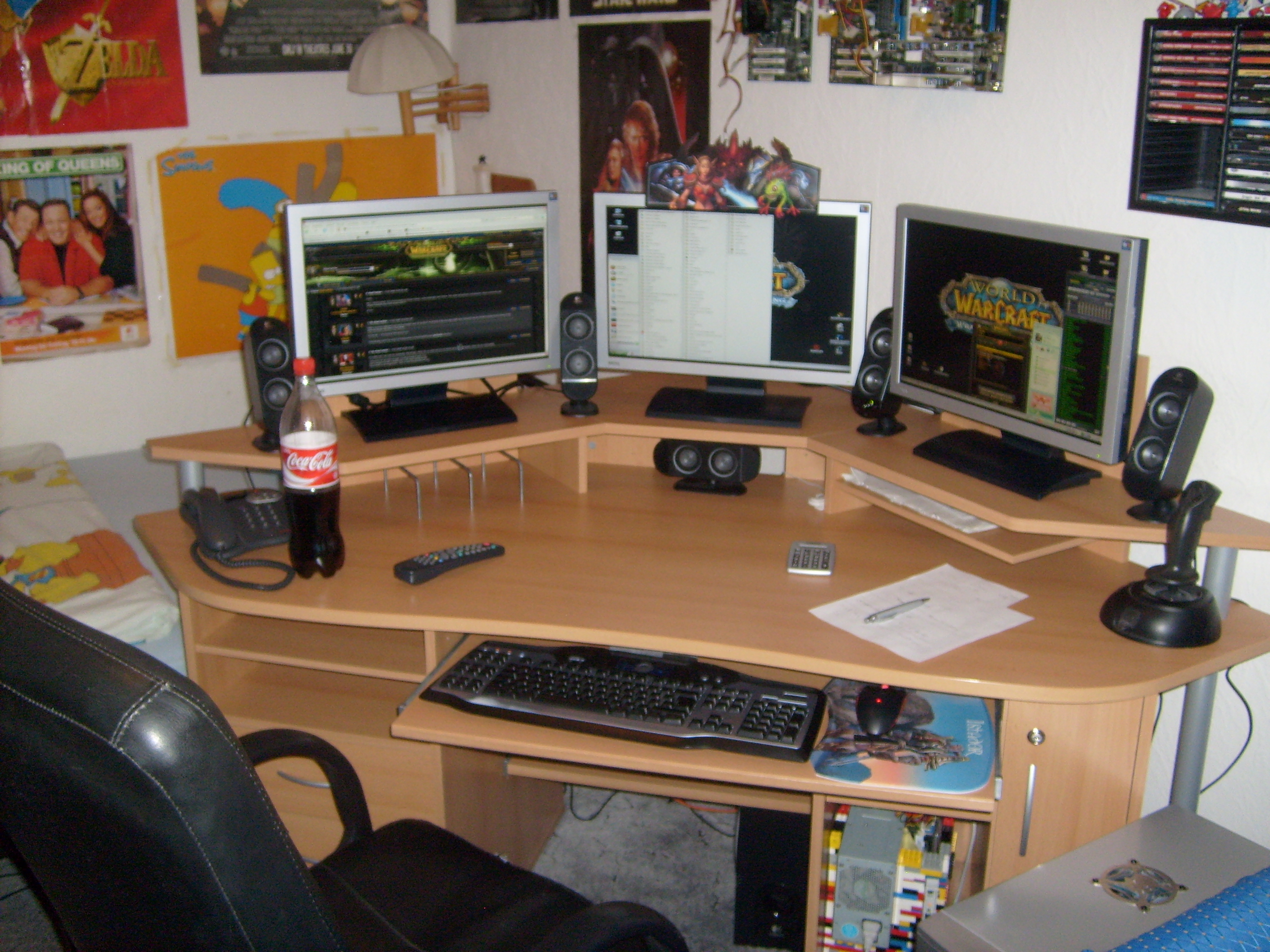
A bit old (February 08 ).
Today:
Repositioned the speakers to link the monitors together.
Whole table filled with paper.
Yes, that are motherboards at the wall.
The colorful thing under the mouse is a LEGO computer case for my 2nd pc.
I'll take a newer picture soon.
- 16 Oct 2008, 06:32
- Forum: Detailed Widescreen Reports
- Topic: World of Warcraft
- Replies: 40
- Views: 16416
World of Warcraft
With the yesterday arrived patch 3.0.2(3.0.1 exactly) "Echoes of Doom" the change made it to the live servers.
Every (because you have to patch to play) WoW-client is now Hor+ (except the chinese client AFAICS).
Also if your account is not upgraded to burning crusade or wrath of the lichking ...
Every (because you have to patch to play) WoW-client is now Hor+ (except the chinese client AFAICS).
Also if your account is not upgraded to burning crusade or wrath of the lichking ...
- 09 Oct 2008, 00:03
- Forum: Multi-Monitor Gaming
- Topic: Gothic 3 in TripleHead
- Replies: 6
- Views: 3197
Gothic 3 in TripleHead
I made a small fix, that positions the GUI Elements in the centre screen.
While the GUI reffers to a 1024x768 resolution and I found no way to change this I simply divide the Left attribute of the elements by 3 and added the ammount of the left monitor.
The Problem on this fix is, that ...
While the GUI reffers to a 1024x768 resolution and I found no way to change this I simply divide the Left attribute of the elements by 3 and added the ammount of the left monitor.
The Problem on this fix is, that ...
- 04 Oct 2008, 23:05
- Forum: Multi-Monitor Gaming
- Topic: World of Warcraft
- Replies: 22
- Views: 9401
Re: FOV Fix
There are folks on the WOW Forums that are in Beta with Triple screen setups that have taken screen shots in Ashenvale that show that with the WotLK XPac coming out in Nov, that they HAVE FIXED THE FOV ISSUE...wow will no longer be a Vert- but a Horiz+ game
http://www.flickr.com/photos ...
http://www.flickr.com/photos ...
- 11 Aug 2008, 04:02
- Forum: Other Multi-Monitor Solutions
- Topic: Matrox Updates DTH2Go for 3x1440x900 and 3x1680x1050
- Replies: 79
- Views: 25560
Matrox Updates DTH2Go for 3x1440x900 and 3x1680x1050
[quote]
(2) When you use single screen mode, does yours come up in the middle screen now? Actually I like to know if this new firmware update includes this 'single screen at center' fix.
Single screen mode can be set to any of your screens using a new feature ... "Swap Displays"
You can also ...
(2) When you use single screen mode, does yours come up in the middle screen now? Actually I like to know if this new firmware update includes this 'single screen at center' fix.
Single screen mode can be set to any of your screens using a new feature ... "Swap Displays"
You can also ...
- 29 Jul 2008, 20:05
- Forum: Detailed Widescreen Reports
- Topic: World of Warcraft
- Replies: 40
- Views: 16416
World of Warcraft
made 4 screenshots to better show the difference with WotLK
The 4 Screens where made at the NE starting location direkt after creating the Char.
The char isn't moved, the camera isn't moved and the camera isn't zoomed in or out.
Screen 1: Live-Server 1280x1024
Screen 2: Live-Server ...
The 4 Screens where made at the NE starting location direkt after creating the Char.
The char isn't moved, the camera isn't moved and the camera isn't zoomed in or out.
Screen 1: Live-Server 1280x1024
Screen 2: Live-Server ...
- 29 Jul 2008, 17:23
- Forum: Detailed Widescreen Reports
- Topic: World of Warcraft
- Replies: 40
- Views: 16416
World of Warcraft
And I'm assuming that those two shots are taken at the same zoom level right?
Yes, only changing the resolution.
Zooming and camera at login position.
max zooming at default value.
- 29 Jul 2008, 16:11
- Forum: Detailed Widescreen Reports
- Topic: World of Warcraft
- Replies: 40
- Views: 16416
World of Warcraft
With Wrath of the Lich King World of Warcraft becomes Hor+.
Tested it out on the Beta Server with TH2G, I am not loosing vert by switching from a Single Monitor resolution to a tri monitor resolution I'm only get more hor.
Unlike the live servers.
Health bars from NPC's still big.
The ...
Tested it out on the Beta Server with TH2G, I am not loosing vert by switching from a Single Monitor resolution to a tri monitor resolution I'm only get more hor.
Unlike the live servers.
Health bars from NPC's still big.
The ...