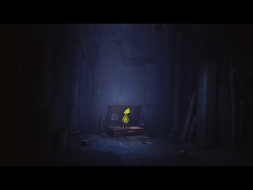
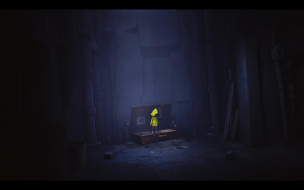
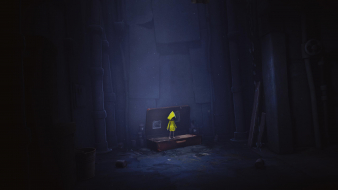
Immerse yourself in Little Nightmares, a dark whimsical tale that will confront you with your childhood fears! Help Six escape The Maw – a vast, mysterious vessel inhabited by corrupted souls looking for their next meal. As you progress on your journey, explore the most disturbing dollhouse offering a prison to escape from and a playground full of secrets to discover. Reconnect with your inner child to unleash your imagination and find the way out!
Nope, not this time ! MaintainYFOV works when screen change is Vert-. As explained in the DR it helps with menu backdrops. Gameplay on the other hand looks exactly the same with or without MaintainYFOV...
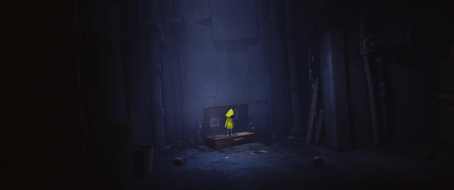
===Ultrawide,MultiMonitor Fix(UPDATE: MultiMonitor 48:9 [3840x720;4800x900; 5760x1080; etc...] )=== This Patcher to Remove Black Bars on your Side Screen and FOV Correction . How to get working ? make sure your game on latest update > download this file depending on the desired resolution & Source game(GOG/Scene/Steam) > Run Patcher > Select target file (LittleNightmares.exe) in your installation folder (\Atlas\Binaries\Win64) .
Compatible : Expansion pack Little Nightmares Secrets of The Maw Chapter 3
Known Issues: 1. 48x9 has Graphical Glitch on Main Menu , Sometimes Camera Position Change
Attachments
LittleNightmares_2018_03_04_15_43_00_509.jpg (378.56 KiB) Viewed 19198 times
LittleNightmares_2017_11_27_05_30_30_069.jpg (442.08 KiB) Viewed 19812 times
LittleNightmares_2017_11_27_04_43_32_805.jpg (423.62 KiB) Viewed 19829 times
Last edited by susahamat on 04 Mar 2018, 10:32, edited 4 times in total.
if you supporting what I do, buy me a coffee here https://ko-fi.com/kevinsesario or instead direct to paypal.me/kevinsesario . EMAIL:mailto:?subject=&body=, Steam: https://steamcommunity.com/id/sesariok
The ultrawide fix does not work with the last Gog version of the game (Patch 1.0.43.1 ; 22nd February 2018). Would it be possible to apply the fix on the most recent .exe? Thank you.
Update Ultrawide Fix for Patch (02/22/18), check post above
Chachardus wrote:The ultrawide fix does not work with the last Gog version of the game (Patch 1.0.43.1 ; 22nd February 2018). Would it be possible to apply the fix on the most recent .exe? Thank you.
working on it , sorry being late
if you supporting what I do, buy me a coffee here https://ko-fi.com/kevinsesario or instead direct to paypal.me/kevinsesario . EMAIL:mailto:?subject=&body=, Steam: https://steamcommunity.com/id/sesariok
@chachardus GOG file is ready , sorry for delay i am fall asleep lol
if you supporting what I do, buy me a coffee here https://ko-fi.com/kevinsesario or instead direct to paypal.me/kevinsesario . EMAIL:mailto:?subject=&body=, Steam: https://steamcommunity.com/id/sesariok
Pitwo wrote:Hello, i have same problem with Steam version
what your resolution ? have you installed latest update ??
if you supporting what I do, buy me a coffee here https://ko-fi.com/kevinsesario or instead direct to paypal.me/kevinsesario . EMAIL:mailto:?subject=&body=, Steam: https://steamcommunity.com/id/sesariok
3440x1440 with last update, but sorry. Its my fault. My girlfriend tried patch it alone, and she did not know that it is necessary first to remove the old patch. I have verified Integrity of game files via Steam, reapplied patch and now is all ok. Sorry and thanks for updated Fix!
if you supporting what I do, buy me a coffee here https://ko-fi.com/kevinsesario or instead direct to paypal.me/kevinsesario . EMAIL:mailto:?subject=&body=, Steam: https://steamcommunity.com/id/sesariok
susahamat wrote:@chachardus GOG file is ready , sorry for delay i am fall asleep lol
hello. I just bought the new GOG version, I play on my HTPC with a 1920x820 resolution. will this patch work? I'll try it, but if it doesn't work - any suggestions? thanks
LittleNightmares_2018_03_03_09_37_22_206.jpg (152.8 KiB) Viewed 4649 times
Last edited by susahamat on 04 Mar 2018, 09:26, edited 1 time in total.
if you supporting what I do, buy me a coffee here https://ko-fi.com/kevinsesario or instead direct to paypal.me/kevinsesario . EMAIL:mailto:?subject=&body=, Steam: https://steamcommunity.com/id/sesariok
If you have the time, would you be able to make a 1920x815? sorry to ask. I flip between those two resolutions (projector tweaks) and just checked, that is what I'm currently on. or if there I can do this myself, can you tell me how? thank you once again for your time!
if you supporting what I do, buy me a coffee here https://ko-fi.com/kevinsesario or instead direct to paypal.me/kevinsesario . EMAIL:mailto:?subject=&body=, Steam: https://steamcommunity.com/id/sesariok
Update : 48x9 Multimonitor Fix ,download on First Page
if you supporting what I do, buy me a coffee here https://ko-fi.com/kevinsesario or instead direct to paypal.me/kevinsesario . EMAIL:mailto:?subject=&body=, Steam: https://steamcommunity.com/id/sesariok