Page 1 of 39

Fallout 4 Eyefinity/Surround

Posted: 07 Nov 2015, 02:25
by Amon Amarth
So to my surprise, the game's coming out this coming Tuesday, November 10. I was under the impression that it wasn't due until next year, but looks like it's right on schedule.

Here's hoping that the game will have proper Surround/Eyefinity support and a nice SLI profile. I remember how Skyrim didn't have very good Surround support, and still doesn't to this day -- many thanks to Hayden for that fix. We may need someone to fix it on release day, knowing Bethesda.

UPDATE: Many thanks to the Widescreen Gaming community for coming up with solutions for Eyefinity/Surround and Widescreen setups. For those of you who are looking for a fix, here's what the community has so far:

Haldi wrote:Graaaaaahhhhh FTS! I'm out of Patience.

I used this tool: http://www.loverslab.com/topic/54891-f4-ba2-unpack/ to un and REpack the Fallout4 - Interface.ba2

I've modified about 22 elements in the Interface section, sometimes you NEED to force overwrite the changed elements, sadly if you're unlucky your F4 will crash at the startup, so simply add one MORE edited force file, this sometimes helps, and sometimes you need to add 2 more... i have no clue! [insert simley who hits head at wall here]

Well... i still have problems with the background shadows and stuck on left Monitor.... but here we go:

Simply Download this File and replace the Original!
make sure to edit the "Fallout4.ini" in myDocuments with the Line:
[Interface]
fSafeZoneX=250.0
fSafeZoneXWide=1300.0
Around that much, you can vary more or less to perfect it, or if you have bezel correction.
EDIT: Outdated! use the one here:
http://www.wsgf.org/forums/viewtopic.php?p=162297#p162297

If the shadows bother me too much tomorrow i'll continue ^^

ekrboi wrote:[THE GOODIES] :triplewide:

For anyone new who finds this you first need to change "sResourceDataDirsFinal=STRINGS\" to "sResourceDataDirsFinal=STRINGS\, INTERFACE\" in your fallout4.ini (My Games/Fallout 4/)

Then extract the following zip into the Data folder where the game is installed.

LINK TO EKRBOI'S FIX:
http://www.wsgf.org/forums/viewtopic.php?p=162273#p162273

That's it! Play it! Let me know if you find anything weird.


Haldi wrote:Tutorial how to edit .ba2 files
Things you need:
.ba2 un(re-)packer from here: http://www.loverslab.com/topic/54891-f4-ba2-unpack/
JPEXS Free Flash Decompiler from here: https://www.free-decompiler.com/flash/download/
the original Fallout4 Interfaces.ba2 (or you can use my modified version)

Read more here:
http://www.wsgf.org/forums/viewtopic.ph ... 54#p162454


I myself am using both Haldi's fix and ekrboi's fix to get the HUD/UI working, and fixing the broken shadows that comes with running the game in Surround and 21:9.

Mod edit by Haldi:
For Patch 1.4 use this new interface.ba2
viewtopic.php?p=164660#p164660
/Edit

For those of you with 21:9 monitors, check out this thread:
http://www.wsgf.org/forums/viewtopic.php?f=95&t=30443
Re: Fallout 4

Posted: 07 Nov 2015, 08:16
by valcan_s
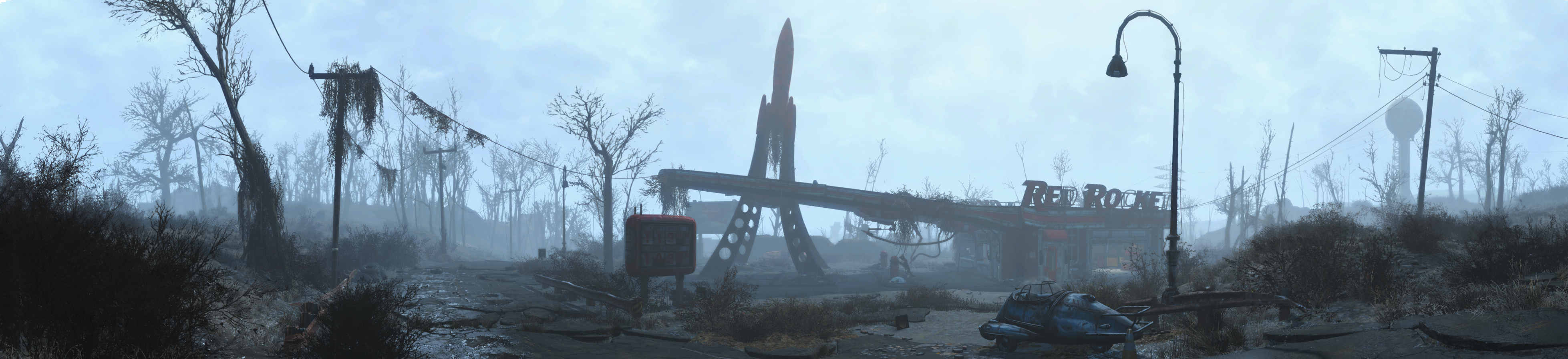
Looks like it will support multi screen out of the box :

Image

src: https://bethesda.net/data/images/event/45/Fallout4_Panorama1.jpg

My body is ready :rockout:

Re: Fallout 4

Posted: 07 Nov 2015, 13:58
by Amon Amarth
valcan_s wrote:Looks like it will support multi screen out of the box :

Image

src: https://bethesda.net/data/images/event/45/Fallout4_Panorama1.jpg

My body is ready :rockout:


Nice!

Kind of looks like a three 16:9 setup, or 4:3 setup looking at the resolution. I hope we don't get one of those games that has Surround support, but letterbox a 3x 16:10 setup.

Re: Fallout 4

Posted: 07 Nov 2015, 19:43
by X1XNobleX1X
Hoping it will, but either way if it doesn't it should be a simple fix in the .inf files.

Re: Fallout 4

Posted: 07 Nov 2015, 23:33
by Razed
Hi, can we move this thread to the more populated subforum? http://www.wsgf.org/forums/viewforum.php?f=95

I've been playing the PC version for the past week. Fallout 4 stretches out the HUD on an ultrawide display. I have a 21:9 monitor and the HUD is too stretched out, mainly noticeable on the weapon hotkey menu.

First of all, I had to modify the .ini files just to get it to display in this resolution. The launcher only supports common native resolutions such as 1920x1080. There is no way to modify the .ini files for a HUD fix, they are different than New Vegas' files, although in the same format and location.

Image


Image

Re: Fallout 4

Posted: 08 Nov 2015, 01:56
by X1XNobleX1X
Razed wrote:Hi, can we move this thread to the more populated subforum? http://www.wsgf.org/forums/viewforum.php?f=95

I've been playing the PC version for the past week. Fallout 4 stretches out the HUD on an ultrawide display. I have a 21:9 monitor and the HUD is too stretched out, mainly noticeable on the weapon hotkey menu

Image


Oh no!

This doesn't sound good.

Hopefully we can get this fixed quickly.

Re: Fallout 4

Posted: 08 Nov 2015, 15:56
by aliendejoe
It also looks like the FOV doesn't scale correctly in the Pip-Boy picture, looks a bit zoomed in.

I hope Day 1 patch fixes some of these issues.

Re: Fallout 4

Posted: 08 Nov 2015, 18:05
by Amon Amarth
Razed wrote:Hi, can we move this thread to the more populated subforum? http://www.wsgf.org/forums/viewforum.php?f=95

I've been playing the PC version for the past week. Fallout 4 stretches out the HUD on an ultrawide display. I have a 21:9 monitor and the HUD is too stretched out, mainly noticeable on the weapon hotkey menu.

First of all, I had to modify the .ini files just to get it to display in this resolution. The launcher only supports common native resolutions such as 1920x1080. There is no way to modify the .ini files for a HUD fix, they are different than New Vegas' files, although in the same format and location.

Image


Image


Is this a beta/pre-release build? There might be a day one patch out when the game's released. Although I kind of doubt that will fix the issue. Hopefully if it isn't fixed on release day, one of our regulars can fix the issue.

Re: Fallout 4

Posted: 09 Nov 2015, 14:42
by X1XNobleX1X
As I was expecting the day 1 patch hasn't fixed anything.
Here are some screenshots I have taken.

I'm sure it's a semi easy fix, as there are quite a few options in the .inf files.

Image
Image
Image
Image


As you can see HUD is stretch, which is different to previous games.

Although, the normal menu is still the same.

Re: Fallout 4

Posted: 09 Nov 2015, 16:08
by Amon Amarth
X1XNobleX1X wrote:As I was expecting the day 1 patch hasn't fixed anything.
Here are some screenshots I have taken.

I'm sure it's a semi easy fix, as there are quite a few options in the .inf files.

As you can see HUD is stretch, which is different to previous games.

Although, the normal menu is still the same.


As expected.

Not surprised about the HUD, considering how Skyrim's HUD was stretched. Looks like the HUD is centered for the most part, but stretched at the same time. Kind of strange. Other everything else seems ok. Is there a working SLI profile for the game yet?

UPDATE: Looks like no SLI profile with the latest nVidia drivers, but using the Skyrim SLI profile might be worth a try since both these games use the Creation Engine.

Re: Fallout 4

Posted: 09 Nov 2015, 19:41
by MrGrim
The news is that fo4 pretty much has the same ini files aso fo3 and skyrim. I wonder if any of our talented community is working on a multi monitor setup before the big release tomorrow. That would really make my day!

Re: Fallout 4

Posted: 09 Nov 2015, 22:33
by AussieTimmeh
Wow this game is really broken for Nvidia Surround. I am running 3 x 16:9 monitors. When I deselect Windowed Mode, I get no resolutions to choose from when 16:9 is selected, and the highest resolution when 16:10 is selected is 1680x1050. So basically I can't even run it in one monitor at its 16:9 native resolution, let alone 3. Also I noticed that the arrow keys didn't work in the menu at the broken resolution it tries to run at.

I basically have to disable Nvidia Surround and go back to a single monitor for it to work at 1920x1080. Now the arrow keys work also.

Edit: Updating to the very latest drivers means I can run a single monitor resolution only on Nvidia Surround. No idea how to make the game run over 3 screens yet. It's not an available option in the resolution drop down. 1920x1080 is the largest I can go.

Edit 2: Haldi showed me how to edit the ini files in Documents\My Games\Fallout4\Fallout4prefs.ini.

On Nvidia, I get some really bad shadowing effects and also the HUD is very stretched and unusable in places.

Good @ 1920x1080:
Image

Not so good @ 6000x1080 (look at the black shadow across the bottom of the white machine in upper left middle)
Image

Re: Fallout 4

Posted: 09 Nov 2015, 23:12
by Haldi
Know whats the best?
Every coming patch will break any available fix!

Re: Fallout 4

Posted: 10 Nov 2015, 00:34
by MrGrim
My Worst Fears Have Come! There Has To Be A Fix!

Re: Fallout 4

Posted: 10 Nov 2015, 01:05
by Haldi

Re: Fallout 4

Posted: 10 Nov 2015, 01:13
by kaburan


Just ran into the same issue. Can't see the entry to enter my name, etc :(

Re: Fallout 4

Posted: 10 Nov 2015, 02:09
by MrGrim
So I see the 6000x1080 res. Does that mean that you can play it on multi-monitors it's just not going to fit exactly the way it's suppose to?

Re: Fallout 4

Posted: 10 Nov 2015, 02:23
by Haldi

Re: Fallout 4

Posted: 10 Nov 2015, 02:36
by kaburan
Looks like we'll need to wait for either Bethesda to provide Multi-Monitor support, or hope we can get it on flawless widescreen

Re: Fallout 4

Posted: 10 Nov 2015, 03:06
by MrGrim
well Sh#! Oh well maybe when I get it here in the next 4 hours I will try and mess around with ini./Pref files. Maybe I can get something to look right. So much for Triple-screen Mind Explosion! Will let you guys know if I have any luck!!!