Fallout: New Vegas

Detailed breakdowns of how games react to widescreen, ultra-wide, 4k and multi-mon
Post Reply
User avatar
argash
Posts: 6
Joined: 27 May 2013, 17:51

Fallout: New Vegas

Post by argash »


Widescreen Grade: A
Ultra-Widescreen Grade: B
Multi-monitor Grade: B
4k Grade: Incomplete

Read Full Detailed Report - Fallout: New Vegas

Fallout: New Vegas is an action role-playing video game developed by Obsidian Entertainment and published on October 2010 by Bethesda Softworks

Obsidian Entertainment presents new features and improvements in Fallout: New Vegas that are implemented upon the foundation of Fallout 3. For example, the original Fallout 3 version of the Gamebryo engine was reworked to accommodate the extra lights and effects of the Las Vegas Strip.

(Source: Wikipedia)


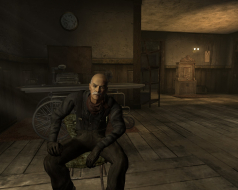
4:3


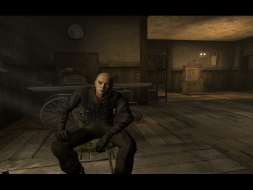
16:10


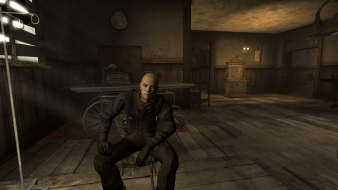
16:9


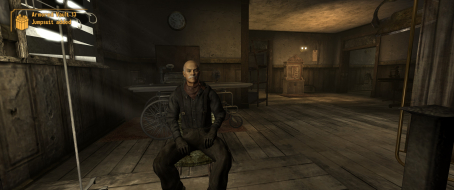
21:9


3x1

Last edited by argash on 02 Jun 2017, 01:32, edited 3 times in total.
Reason: Edit
Mawrtin
Posts: 51
Joined: 20 Mar 2013, 23:59

Re: Fallout: New Vegas

Post by Mawrtin »

Fixing the UI is the same as Fallout3:

edit the three .ini-files (Fallout_default.ini in game directory, and Fallout.ini/FalloutPrefs.ini in documents/games/FalloutNV):

Code: Select all

[Display]
fDefaultFOV=120.0000
bEnableEyefinity=0
iSize W=6048
iSize H=1080


Code: Select all

[Interface]
iSafeZoneXWide=925
iSafeZoneYWide=15
iSafeZoneX=925
iSafeZoneY=15


To make the pipboy/terminals more usable:

Code: Select all

[Fonts]
sFontFile_1=Textures\Fonts\Glow_Monofonto_Large.fnt
sFontFile_2=Textures\Fonts\Glow_Monofonto_VL_dialogs.fnt
sFontFile_3=Textures\Fonts\Glow_Monofonto_Medium.fnt
sFontFile_4=Textures\Fonts\Monofonto_VeryLarge02_Dialogs2.fnt
sFontFile_5=Textures\Fonts\Glow_Monofonto_VL_dialogs.fnt
sFontFile_6=Textures\Fonts\Glow_Monofonto_VL_dialogs.fnt
sFontFile_7=Textures\Fonts\Baked-in_Monofonto_Large.fnt
sFontFile_8=Textures\Fonts\Glow_Futura_Caps_Large.fnt
sFontFile_9=Textures\Fonts\NVFont_Test.fnt


Code: Select all

[RenderedTerminal]
fRenderedTerminalZoom=88
| i7 3770k @ 4.4, 16GB | 2x Sapphire 7970 GHz @ 1150 | Carbide 540 w H100 & HX850W | 3x Dell U2312HM @ 5760x1080 |
User avatar
argash
Posts: 6
Joined: 27 May 2013, 17:51

Re: Fallout: New Vegas

Post by argash »

Mawrtin wrote:Fixing the UI is the same as Fallout3:

edit the three .ini-files (Fallout_default.ini in game directory, and Fallout.ini/FalloutPrefs.ini in documents/games/FalloutNV):

Code: Select all

[Display]
fDefaultFOV=120.0000
bEnableEyefinity=0
iSize W=6048
iSize H=1080


Code: Select all

[Interface]
iSafeZoneXWide=925
iSafeZoneYWide=15
iSafeZoneX=925
iSafeZoneY=15


To make the pipboy/terminals more usable:

Code: Select all

[Fonts]
sFontFile_1=Textures\Fonts\Glow_Monofonto_Large.fnt
sFontFile_2=Textures\Fonts\Glow_Monofonto_VL_dialogs.fnt
sFontFile_3=Textures\Fonts\Glow_Monofonto_Medium.fnt
sFontFile_4=Textures\Fonts\Monofonto_VeryLarge02_Dialogs2.fnt
sFontFile_5=Textures\Fonts\Glow_Monofonto_VL_dialogs.fnt
sFontFile_6=Textures\Fonts\Glow_Monofonto_VL_dialogs.fnt
sFontFile_7=Textures\Fonts\Baked-in_Monofonto_Large.fnt
sFontFile_8=Textures\Fonts\Glow_Futura_Caps_Large.fnt
sFontFile_9=Textures\Fonts\NVFont_Test.fnt


Code: Select all

[RenderedTerminal]
fRenderedTerminalZoom=88


Added that information to the Detailed Report, thanks!
kingcasper
Posts: 25
Joined: 16 May 2014, 19:58

Re: Fallout: New Vegas

Post by kingcasper »

can someone help me get this game working at 21-9/2560x1080 ?

ive got it full screen at the res..but it looks awful
kingcasper
Posts: 25
Joined: 16 May 2014, 19:58

Re: Fallout: New Vegas

Post by kingcasper »

please ?
User avatar
Gnrl Kitty
Posts: 1
Joined: 09 Dec 2014, 21:17

Re: Fallout: New Vegas

Post by Gnrl Kitty »

I highly highly recommend playing around with the fRenderedTerminalZoom= setting. With a 21:9 3440x1440 monitor, setting it to 46 rather than the 75 the page said gave the expected result.
User avatar
setitimer
Posts: 1
Joined: 20 Mar 2015, 21:26

Re: Fallout: New Vegas

Post by setitimer »

Just got a LG 34UM65 2560x1080 and found some of the advice in this thread very helpful.

For me, the best setting for hacking terminals is fRenderedTerminalZoom=54. At 2560x1080 that makes them look basically the same as they did in 1920x1080.

The other thing I had to fix was the scope. With the default settings there are white rectangles to either side of the crosshairs when zooming with a scoped rifle. It didn't make the game unplayable, but it was annoying. To fix, add

fScopeScissorAmount=0

just below [Display] in each of the three ini files.
User avatar
Zaxter
Posts: 2
Joined: 29 Apr 2015, 16:06

Re: Fallout: New Vegas

Post by Zaxter »

I'm using an Eyefinity 3x1 5670x1080. I am having a rough time getting the Terminals and Pip-Boys to display readable text. I have been trying a range of numbers for the fRenderedTerminalZoom with no luck. I don't know much about the fonts, should I be looking into that for a fix?

it seems like the "scan lines" of the terminal are distorting the Font, and about half of the words are un-readable.
User avatar
RickyOG90
Posts: 1
Joined: 04 Nov 2015, 02:53

Re: Fallout: New Vegas

Post by RickyOG90 »

Hey guys, I recently upgraded my desktop from 1 25" 21:9 with 2 23" 16:9 monitors to 3 25" 21:9 monitors and I am currently loving it way more than I should. I enjoyed having games run across all three screens except for a few that didn't have support for triple screens, like fallout 3 and new vegas. I took your edits and tweaked them to fit better on my triple ultra-wide setup and i figure that I might as well share it for anybody else that might happen to do the same thing with the same monitor setup :)

By the way I also downloaded the New Vegas Stutter Remover as well from nexusmods
http://www.nexusmods.com/newvegas/mods/ ... 4832&pUp=1

However I still have an issue with text in the pipboy even after changing the frenderedterminalzoom to 88 and messing around with the frenderedterminalfov as well which did nothing. But for now, at least anybody else thats running triple ultrawides can play fallout 3 or nv across all three screens

CODE: SELECT ALL
[Display]
fDefaultFOV=120.0000
bEnableEyefinity=0
iSize W=7680
iSize H=1080


CODE: SELECT ALL
[Interface]
iSafeZoneXWide=1135
iSafeZoneYWide=15
iSafeZoneX=1135
iSafeZoneY=15


To make the pipboy/terminals more usable:

CODE: SELECT ALL
[Fonts]
sFontFile_1=Textures\Fonts\Glow_Monofonto_Large.fnt
sFontFile_2=Textures\Fonts\Glow_Monofonto_VL_dialogs.fnt
sFontFile_3=Textures\Fonts\Glow_Monofonto_Medium.fnt
sFontFile_4=Textures\Fonts\Monofonto_VeryLarge02_Dialogs2.fnt
sFontFile_5=Textures\Fonts\Glow_Monofonto_VL_dialogs.fnt
sFontFile_6=Textures\Fonts\Glow_Monofonto_VL_dialogs.fnt
sFontFile_7=Textures\Fonts\Baked-in_Monofonto_Large.fnt
sFontFile_8=Textures\Fonts\Glow_Futura_Caps_Large.fnt
sFontFile_9=Textures\Fonts\NVFont_Test.fnt


CODE: SELECT ALL
[RenderedTerminal]
fRenderedTerminalZoom=88

MRxVaultx101
Posts: 1
Joined: 14 Mar 2017, 04:58

Re: Fallout: New Vegas

Post by MRxVaultx101 »

Just in case someone is still having issues with the zoom on the terminals on widescreens; try this and see

fRenderedTerminalFOV=0.15 - Sets the Field of View for the computer terminal screens within the game. Altering this setting effectively determines the size of the screens - higher values will make the terminal screens fill less of your screen, lower values will make the terminal screens larger (Fallout.ini).

http://www.tweakguides.com/Fallout3_8.html

I changed "fRenderedTerminalFOV=0.15" to "fRenderedTerminalFOV=0.17" in the Fallout_default config text in the steam/steamapps/common/Fallout New Vegas

[RenderedTerminal]
bUseRenderedTerminals=1
fRenderedTerminalFOV=0.17
fRenderedTerminalZoom=46

bDoRenderedTerminalScanlines=1
fRenderedTerminalScanlineScale=130.000000
fRenderedTerminalHPos=0.0
fRenderedTerminalVPos=0.38
fScreenLightBaseIntensity=1.2
fScreenLightRadius=80
fScreenLightColorR=0.68
fScreenLightColorG=0.74
fScreenLightColorB=0.62
Post Reply

Who is online

Users browsing this forum: No registered users and 1 guest