Final Fantasy VII

Detailed breakdowns of how games react to widescreen, ultra-wide, 4k and multi-mon
boardboyt
Posts: 8
Joined: 17 Aug 2006, 07:09

Final Fantasy VII

Post by boardboyt »


Widescreen Grade: Unsupported
Multi-monitor Grade: Unsupported

Read Full Detailed Report - Final Fantasy VII

Fnal Fantasy VII is a fantastic fantasy RPG game brought to PC in 1998


ctrlsteef
Editors
Editors
Posts: 2820
Joined: 17 Nov 2005, 09:02

FINAL FANTASY VII

Post by ctrlsteef »

Can you provide some more info on what the problem is, does the game not run at all, does it run but with artifacts, it's really bad stretched.
If it are the last one there is unfortunatly no way of helping you since there is no way of getting FF7 widescreen. :(
You can try to get it to run with black bars though.

Btw, your title should say Final Fantasy VII which is the correct Latin version of 7.
Your title now says Final Fantasy 12. :wink:
Also, this should be in the Request/Discuss Widescreen Solutions - PC section.

Oh, and last but not least, Welcome to the family. :D
User avatar
Paradigm Shifter
Editors
Editors
Posts: 5706
Joined: 14 Oct 2003, 13:52

FINAL FANTASY VII

Post by Paradigm Shifter »

I moved this - and edited the title so its correct. ;)

Unfortunately, FF7 is hard coded, and all the backdrops are a fixed res. This means that you won't be able to play it in widescreen; although if you can get it running on XP (something I've never succeeded in doing) then you should be able to play it normally.
mengzor
Posts: 173
Joined: 06 Jun 2006, 18:49

FINAL FANTASY VII

Post by mengzor »

theres no windowed mode?
boardboyt
Posts: 8
Joined: 17 Aug 2006, 07:09

FINAL FANTASY VII

Post by boardboyt »

haha yeah FF VII i should say.. and I mean it wont start at all. iv played it on Windows XP before with my old CRT and it worked fine.
but i dont care about the quality or if I have to play it in windowed mode.
I just would really like to play it again on my pc. :)
realfolkblues
Posts: 17
Joined: 17 Aug 2006, 06:32

FINAL FANTASY VII

Post by realfolkblues »

I've got 1 word. Emulator.
User avatar
Paradigm Shifter
Editors
Editors
Posts: 5706
Joined: 14 Oct 2003, 13:52

FINAL FANTASY VII

Post by Paradigm Shifter »

I've got 1 word. Emulator.

Y'know, that's surprisingly little help when we're talking about the PC version... :roll:
realfolkblues
Posts: 17
Joined: 17 Aug 2006, 06:32

FINAL FANTASY VII

Post by realfolkblues »

the ps version is really cheep. get it at gamestop. and it looks better to boot.
Microtia
Posts: 193
Joined: 05 Jul 2006, 02:35

FINAL FANTASY VII

Post by Microtia »

Technically, it wouldn't be a terrible solution if it absolutely annoys you that much. Pick it up cheap and running it in the emulator would cost relatively little.
cmay119
Posts: 29
Joined: 22 Nov 2005, 00:23

FINAL FANTASY VII

Post by cmay119 »

Don't give up!


Get the High Resolution patch which will allow resolution of 1280x960 or 1280x1024. I know these are not wide screen resolutions, but I just played it on my new monitor today and it doesn't look bad at all.

Download and read about the patch here:

http://forums.qhimm.com/index.php?topic=5327.0

What's really cool about this patch, is not only can you have a higher resolution, but you can also add Anti-Aliasing and Anisotropic Filtering to the game with out getting the dreaded Grid-Line affect.
boardboyt
Posts: 8
Joined: 17 Aug 2006, 07:09

FINAL FANTASY VII

Post by boardboyt »

cool thanks alot .. im going to dl this right now and try it out
cmay119
Posts: 29
Joined: 22 Nov 2005, 00:23

FINAL FANTASY VII

Post by cmay119 »

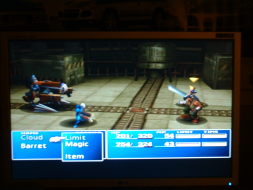
Hey guys just wanted to update this with a screenie that I took today with the High-Res Patch. The Patch I use is the 1280x1024 instead of the 1280x960, and although it does leave a black bar at the bottom of the screen, it doesn't look as pixelated as the 1280x960 when stretched out to 1680x1050.

Note this is FF7 PC Version (This is not an emulator) on Windows XP Pro with the following hardware in my signature w/ 16x Anisotropic Filtering and 8x Anti-Aliasing:


It's a beautiful thing isn't it? Watch out now that buster sword'll cut ya!

I'll take a digi cam picture later this evening once I have my camera back.

Good news on the horizon as well, because the Hi-Res patch creator is planning on making the resolution of 1600x1200 available soon so stretching won't look too bad on monitors with more resolution than 1680x1050. :)
realfolkblues
Posts: 17
Joined: 17 Aug 2006, 06:32

FINAL FANTASY VII

Post by realfolkblues »

Sweet! you have to love fan high res patches. They are makeing a highres patch for zelda 64. I cant wait for it to be out of beta! it looks like gamecube graphics!
cmay119
Posts: 29
Joined: 22 Nov 2005, 00:23

FINAL FANTASY VII

Post by cmay119 »

Here's some pictures I took of my monitor while playing (sorry the camera is a little shaky).


As you can see from the pictures if you use the 1280x1024 Patch it will leave a black bar at the bottom of the screen. You will not get a black bar if you use the 1280x960 patch, so test the 960 version out first and if you like it stay with it. :)
realfolkblues
Posts: 17
Joined: 17 Aug 2006, 06:32

FINAL FANTASY VII

Post by realfolkblues »

Here's some pictures I took of my monitor while playing (sorry the camera is a little shaky).


As you can see from the pictures if you use the 1280x1024 Patch it will leave a black bar at the bottom of the screen. You will not get a black bar if you use the 1280x960 patch, so test the 960 version out first and if you like it stay with it. :)


Think i could ge it to work well on my 1440x900?
cmay119
Posts: 29
Joined: 22 Nov 2005, 00:23

FINAL FANTASY VII

Post by cmay119 »

Yeah, my uncle has a 19" widescreen that he's been playing it on as well. It looks just as good as on my 20".
boardboyt
Posts: 8
Joined: 17 Aug 2006, 07:09

FINAL FANTASY VII

Post by boardboyt »

so i added the high res patch and im using it on at 1280*1024 and everything looks much better expept when im walking around (anytime not in a battle, menu, or a cinimatic) it appears to be a brick lay out where the cement bettween the bricks will be a mostly solid color such as green or red... what that all about?
cmay119
Posts: 29
Joined: 22 Nov 2005, 00:23

FINAL FANTASY VII

Post by cmay119 »

hmmm...I'm not sure... what video card are you using? I don't experience this when playing the game. Perhaps you could play with some of your graphics settings to make it work?

Make sure in your FFVII Configuration to that the resolution is set @ 640x480 Full Screen and that the Nvidia Box is check and the radio button is selected next to TNT not Riva128.

My uncle plays this game with a Radeon X850XT and I play this with a 7900GT and both work flawlessly, so the game isn't biased towards one or the other.

If you want more help with it, post in the thread I linked to in the above post as the patch creator should be able to help you. :)
cmay119
Posts: 29
Joined: 22 Nov 2005, 00:23

FINAL FANTASY VII

Post by cmay119 »

Looking at his pictures. I notice one of them was showing the same signs that you were describing, Red lines and such. He said the reason that happened for him was because he was using Bilinear Interpolation. Make sure you have Trilinear Interpolation enabled, in your video card drivers. Hopefully that should clear up the issue for you.
User avatar
Paradigm Shifter
Editors
Editors
Posts: 5706
Joined: 14 Oct 2003, 13:52

FINAL FANTASY VII

Post by Paradigm Shifter »

:(

I still can't get FF7 running on any of my XP boxes. And yes, I've tried it on 3 of 'em today... :cry: it just goes to 100% CPU and a black screen.
Post Reply

Who is online

Users browsing this forum: Semrush [Bot] and 8 guests