New User Badges in WSGF Forum

Comments about news articles posted by the WSGF
Post Reply
User avatar
skipclarke
Founder
Founder
Posts: 7358
Joined: 13 Oct 2003, 05:00

New User Badges in WSGF Forum

Post by skipclarke »


We are pleased to announce that we now have user badges (AMD Eyefinity, NVIDIA Surround, S-3D, 21:9, and more) in the WSGF forum, which you can assign to yourself. This has been a long time coming, and something that we've wanted since the last time we were on phpBB. Problem is that phpBB doesn't natively support this behavior. Luckily our faithful admin Delphium has kicked phpBB in bollocks and made it do what we wanted (and what it should have done in the first place).

The problem is that phpBB only natively supports one "badge" related to a user group, and that group has to be listed as your "default" group. This behavior is problematic for people who fit into more than one group. Like Stereoscopic 3D and NVIDIA Surround (a likely combination), we'll under native phpBB you can only show one of those badges. Have experience with both AMD Eyefinity and NVIDIA Surround? Sorry, you can only show one. This is doubly problematic for WSGF Insiders and the site staff.

We got around some of the issues for insiders and site staff needing multiple badges (many have also made donations to the site), by installing a multi-badge mod. However, that mod required you to go in and manually set up badges for those people. This is fine for this select audience, but it isn't feasible for the whole community.

Luckily we have great staff members like Delphium. His dedication to figuring this out was unending. He found old abandoned phpBB mods (courtesy of the Wayback Machine), and his own ingenuity, he was able to make it serve our purposes. Rather than have that mod simply serve up your list of group memberships, he made it show the badges of those groups.

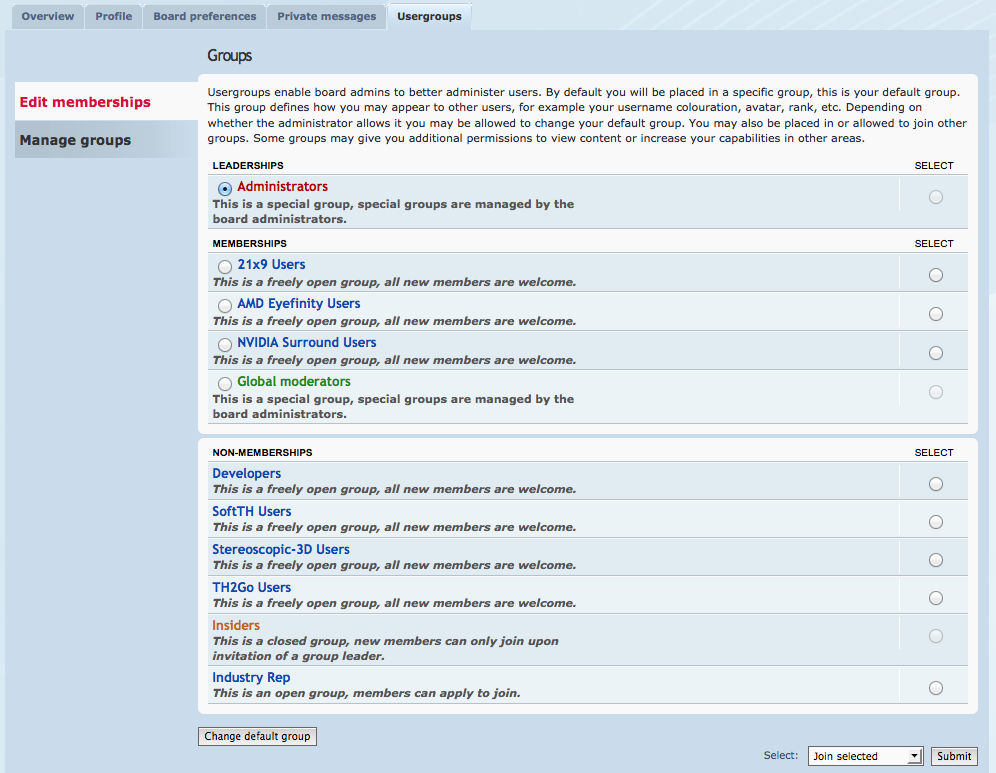
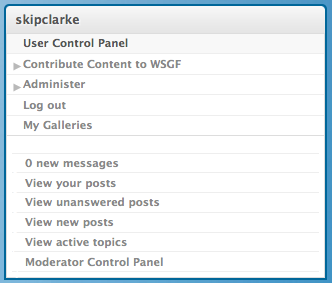
This is one feature we've wanted forever, and are now chuffed to bits to offer it to you. All you have to do is join the appropriate group, and the badges will be assigned to your profile. Now other forum members will know what systems you have experience in, and you can also show off your own interests. To do this, click on the "User Control Panel" in your user navigation on the sidebar. From there click the "Usergroups" tab. Now select the group you want to join and click the join button. If you want to join multiple groups, just repeat the process.

Please give Delphium your thanks in the discussion link, and let us know other badges you'd like us to consider.

Pic Pic Pic Pic
Last edited by skipclarke on 28 Apr 2013, 22:11, edited 4 times in total.
Reason: Edit
User avatar
Haldi
Editors
Editors
Posts: 2286
Joined: 08 May 2011, 18:58

Re: New User Badges in WSGF Forum

Post by Haldi »

Banzai!

Thx a lot for all your Work!

They're awesome!
We gonna send it to outa space!
User avatar
AussieTimmeh
Editors
Editors
Posts: 1441
Joined: 14 Oct 2009, 03:11

Re: New User Badges in WSGF Forum

Post by AussieTimmeh »

Thanks delphium, your dedication to the cause is fantastic.
i5-2500K @ 4Ghz ° Asus P8Z68 ° GTX670 Windforce OC ° 8GB DDR3 RipjawsX ° 4x Viewsonic VA2703 ° Logitech G15 / G5 / G27 ° Razer Vespula ° TrackIR 5 ° Thrustmaster Warthog HOTAS
User avatar
Wijkert
Insiders
Insiders
Posts: 552
Joined: 06 Sep 2011, 09:29
Location: Haarlem, the Netherlands

Re: New User Badges in WSGF Forum

Post by Wijkert »

Very nice work Delphium :twothumb:
Philips BDM4065UC(3840x2160) Acer Z35(2560x1080@200hz); 980 Ti Hybrid @stock ; 6700K 4.6ghz (1.35v)/D15; 16GB 3200mhz; Asus Maximus Ranger VIII; AX860; 1TB 960 EVO; 750GB 840 EVO; Teufel Concept D 500; Sennheiser HD6XX; Windows 10 (latest build)
Oraijon
Posts: 82
Joined: 03 Apr 2012, 13:59

Re: New User Badges in WSGF Forum

Post by Oraijon »

:clap: Very cool! Thanks for the awesome work :D
LG 34UM95-P (3440x1440) + 2x Dell U2412M; MSI GeForce GTX 970 GAMING 4G in 2-SLI; i5 4690k w/ Mugen 4 PCGH; 16GB Crucial; MSI Z97-G45 GAMING; Crucial M500 480GB; Corsair Enthusiast TX750M; CM Storm Scout 2
User avatar
LordJuanlo
Posts: 97
Joined: 06 Nov 2006, 10:37

Re: New User Badges in WSGF Forum

Post by LordJuanlo »

Very nice! But, where is the Oculus Rift badge? I just received my developer kit :mrgreen:
Asus Rampage IV Formula / Intel i7 3930K C2 / 32 GB G.Skill RipjawsZ DDR3 2133 Quad Channel
Corsair Force GT 60 GB SATA3 / WD Caviar Black 2 TB / Seagate Barracuda Green 2 TB
3 x Radeon 7970 in Benq XL2420T (EyeFinity 5760x1080 @ 120Hz)
Oculus Rift
User avatar
Delphium
Administrators
Administrators
Posts: 1789
Joined: 27 Dec 2009, 14:27

Re: New User Badges in WSGF Forum

Post by Delphium »

:rockout: all.


LordJuanlo wrote:where is the Oculus Rift badge? I just received my developer kit :mrgreen:

On its way, ill make sure of that :)
| Gigabyte X79S-UP5-WiFi Skt2011 | i7 4820k @4.4GHz Watercooled (Ivy Bridge-E) | Corsair Vengence 32GB @2133MHz 11-11-11-27 2T Quad-Channel (8x4GB) | AMD R9-Fury-X 4GB @1140/505MHz + EKWB Watercooled | 256GB Crucial MX200 SSD | 8x 1TB Samsung F3 SATA-II | Corsair 850W TX PSU | 3x Dell S2209W 22"wide TFT's (5760x1080res) | Logitech Z-5400 5.1ch speakers | Win7 Ultimate x64 |
User avatar
LeandroJVarini
Insiders
Insiders
Posts: 77
Joined: 04 May 2011, 22:54
Location: Space
Contact:

Re: New User Badges in WSGF Forum

Post by LeandroJVarini »

congratulations on the job! :clap: :clap: :clap: :clap: :rockout:
Sorry my bad english!


My Wallpapers For Multi Display Monitors => http://www.wsgf.org/forums/viewtopic.php?t=22137
User avatar
Delphium
Administrators
Administrators
Posts: 1789
Joined: 27 Dec 2009, 14:27

Re: New User Badges in WSGF Forum

Post by Delphium »

Delphium wrote::rockout: all.


LordJuanlo wrote:where is the Oculus Rift badge? I just received my developer kit :mrgreen:

On its way, ill make sure of that :)


Well I have been slack, sorry.
The Oculas Rift group is now active, we just need Skipclarke to knock us out a new graphic for it, join the group and when Skipclarke is done, you will see the badge appear :)

EDIT: All done, join away :)
Image
LordJuanlo I added you to the group ;)
| Gigabyte X79S-UP5-WiFi Skt2011 | i7 4820k @4.4GHz Watercooled (Ivy Bridge-E) | Corsair Vengence 32GB @2133MHz 11-11-11-27 2T Quad-Channel (8x4GB) | AMD R9-Fury-X 4GB @1140/505MHz + EKWB Watercooled | 256GB Crucial MX200 SSD | 8x 1TB Samsung F3 SATA-II | Corsair 850W TX PSU | 3x Dell S2209W 22"wide TFT's (5760x1080res) | Logitech Z-5400 5.1ch speakers | Win7 Ultimate x64 |
User avatar
skipclarke
Founder
Founder
Posts: 7358
Joined: 13 Oct 2003, 05:00

Re: New User Badges in WSGF Forum

Post by skipclarke »

It's done. Delphium with do the background magic for this one.

Image

The background color is the color of the iris in the Oculus VR logo.
User avatar
Delphium
Administrators
Administrators
Posts: 1789
Joined: 27 Dec 2009, 14:27

Re: New User Badges in WSGF Forum

Post by Delphium »

:cheers:
| Gigabyte X79S-UP5-WiFi Skt2011 | i7 4820k @4.4GHz Watercooled (Ivy Bridge-E) | Corsair Vengence 32GB @2133MHz 11-11-11-27 2T Quad-Channel (8x4GB) | AMD R9-Fury-X 4GB @1140/505MHz + EKWB Watercooled | 256GB Crucial MX200 SSD | 8x 1TB Samsung F3 SATA-II | Corsair 850W TX PSU | 3x Dell S2209W 22"wide TFT's (5760x1080res) | Logitech Z-5400 5.1ch speakers | Win7 Ultimate x64 |
v81
Posts: 3
Joined: 13 Aug 2014, 00:39

Re: New User Badges in WSGF Forum

Post by v81 »

Can i add a suggestion for a PLP badge ?

It seems to be a growing trend, and is not supported by NV Surround nor Eyefinity so i don't use either of them.
A few people are moving in the PLP direction despite it's lack of support as we're finding PPP to be too wide.
Would love a way to say " here is my configuration ".
User avatar
skipclarke
Founder
Founder
Posts: 7358
Joined: 13 Oct 2003, 05:00

Re: New User Badges in WSGF Forum

Post by skipclarke »

Do you have a preferred color? No promises, but I thought I'd try for something you'd like.
Post Reply

Who is online

Users browsing this forum: No registered users and 1 guest