Papo & Yo

Detailed breakdowns of how games react to widescreen, ultra-wide, 4k and multi-mon
Post Reply
User avatar
LuckyNoS7evin
Posts: 163
Joined: 27 Feb 2013, 16:25
Location: Gloucester, UK
Contact:

Papo & Yo

Post by LuckyNoS7evin »


Widescreen Grade: A
Ultra-Widescreen Grade: A
Multi-monitor Grade: A
4k Grade: Incomplete

Read Full Detailed Report - Papo & Yo

Papo & Yo is a fantasy adventure video game, The game takes place in an unspecified Brazilian favela which the player has to navigate. The player takes on the role of Quico, a young kid who has run away from his home to escape his abusive and alcoholic father. Quico has the ability to turn the environment into a magical and dream-like world.

Lead developer Julian Barnoin came to say thanks for WSGF being a great resource while porting Papo & Yo from PS3 to PC. Read his blog post here


4:3


16:10


16:9


21:9


3x1

Last edited by LuckyNoS7evin on 04 Jan 2014, 00:17, edited 10 times in total.
Reason: Edit
i7 3770K (Ivy bridge) | Corsair Dominator 32GB | Asus P8Z77-V LE Plus Intel Z77 | Corsair H100i | 2 x Gigabyte ATi Radeon HD 7950 in crossfire | NXZT Phantom case | OCZ 1000W Powersupply | Samsung 840 PRO 256GB | 2x OCZ agility 3 60GB SSDs | 2x 1TB HDDs |
User avatar
LuckyNoS7evin
Posts: 163
Joined: 27 Feb 2013, 16:25
Location: Gloucester, UK
Contact:

Re: Papo & Yo

Post by LuckyNoS7evin »

Quick one on this one, will try again with the screenshots as the 16:10 isn't right

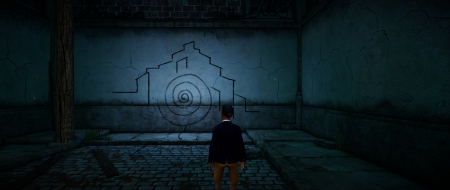
In Fullscreen mode couldn't select any 21:9 res when on eyefinity and even in windowed mode couldn't select anything higher than 1920x1080, someone with 21:9 monitor may have better luck.

I hope I've filled everything else out right, shoot me down if wrong! Well not proper shoot more tell me :)

I do have to say thanks to Julien for coming, saying hi and mentioning the game, it's really surreal and some good puzzples
i7 3770K (Ivy bridge) | Corsair Dominator 32GB | Asus P8Z77-V LE Plus Intel Z77 | Corsair H100i | 2 x Gigabyte ATi Radeon HD 7950 in crossfire | NXZT Phantom case | OCZ 1000W Powersupply | Samsung 840 PRO 256GB | 2x OCZ agility 3 60GB SSDs | 2x 1TB HDDs |
User avatar
Haldi
Editors
Editors
Posts: 2286
Joined: 08 May 2011, 18:58

Re: Papo & Yo

Post by Haldi »

You should be able to simulate 2560x1080 on a FullHD monitor with this tool
http://www.wsgf.org/forums/viewtopic.ph ... 43&p=11832
We gonna send it to outa space!
User avatar
skipclarke
Founder
Founder
Posts: 7358
Joined: 13 Oct 2003, 05:00

Re: Papo & Yo

Post by skipclarke »

LuckyNoS7evin wrote:Quick one on this one, will try again with the screenshots as the 16:10 isn't right

In Fullscreen mode couldn't select any 21:9 res when on eyefinity and even in windowed mode couldn't select anything higher than 1920x1080, someone with 21:9 monitor may have better luck.

I hope I've filled everything else out right, shoot me down if wrong! Well not proper shoot more tell me :)

I do have to say thanks to Julien for coming, saying hi and mentioning the game, it's really surreal and some good puzzples


You did excellent mate. Thanks a lot for this. To get a 16:10 res with Eyefinity, you have to either break you Eyefinity group or boot up with just one monitor plugged in. It's crazy, but that's how they role. I generally choose the one monitor method. That way when I plug the other two in, the Eyefinity group is still there.

Can you also grab screen caps for the cut-scenes and FMVs?
User avatar
LuckyNoS7evin
Posts: 163
Joined: 27 Feb 2013, 16:25
Location: Gloucester, UK
Contact:

Re: Papo & Yo

Post by LuckyNoS7evin »

skipclarke wrote:
LuckyNoS7evin wrote:Quick one on this one, will try again with the screenshots as the 16:10 isn't right

In Fullscreen mode couldn't select any 21:9 res when on eyefinity and even in windowed mode couldn't select anything higher than 1920x1080, someone with 21:9 monitor may have better luck.

I hope I've filled everything else out right, shoot me down if wrong! Well not proper shoot more tell me :)

I do have to say thanks to Julien for coming, saying hi and mentioning the game, it's really surreal and some good puzzples


You did excellent mate. Thanks a lot for this. To get a 16:10 res with Eyefinity, you have to either break you Eyefinity group or boot up with just one monitor plugged in. It's crazy, but that's how they role. I generally choose the one monitor method. That way when I plug the other two in, the Eyefinity group is still there.

Can you also grab screen caps for the cut-scenes and FMVs?


after my reply I had to delete it, went into the game to get a few screens and bam there it was an FMV :doh:

Just looking to see if it stretches or Hor+ etc

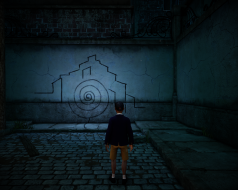
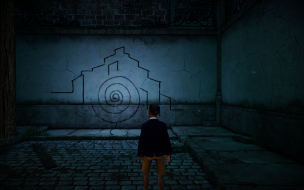
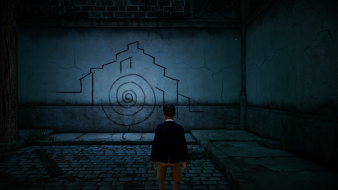
EDIT: After running through the FMV a few times (5) I noticed I got it wrong.... it seems to be vert- from 4:3 to 16:10 to 16:9 then from 16:9 to eyefinity it's Hor+, wha\t do i put that as? I've changed it to vert- as that's the main behaviour, I'm sorry I missed that in my first set of screens, I've uploaded a new set from in-game, I'm just sorting out the FMV ones now

Edit 2: Now added FMV screens
i7 3770K (Ivy bridge) | Corsair Dominator 32GB | Asus P8Z77-V LE Plus Intel Z77 | Corsair H100i | 2 x Gigabyte ATi Radeon HD 7950 in crossfire | NXZT Phantom case | OCZ 1000W Powersupply | Samsung 840 PRO 256GB | 2x OCZ agility 3 60GB SSDs | 2x 1TB HDDs |
jbarnoin
Industry Rep
Industry Rep
Posts: 4
Joined: 12 Apr 2013, 15:05

Re: Papo & Yo

Post by jbarnoin »

Hi guys, I thought I'd chime in about the FOV thing to explain how the game works.

You correctly deduced the aspect ratio behaviour (at least part of it).
I tried many different things and settled on the following solution:
Between 16:9 and 3x 16:9, the horizontal FOV expands.

Between 16:9 and 4:3, the vertical FOV expands. I wanted to preserve the original game behaviour as I didn't see any reason to change that part.
Essentially, the game is originally designed for 16:9 TVs and 16:10 monitors (which is all we have at work).
4:3 is our backwards compatibility mode for old-ass TVs, and we decided expanding the FOV was the most reasonable way to experience the game on these. Not that you'd want to...

As for the extremes, below 4:3 I go back to contracting the horizontal FOV again so that you don't get a huge vertical FOV, and above 3x 16:9 I start reducing the vertical FOV, as the horizontal FOV would become huge and normal rendering algorithms start breaking down at some point (not to mention the wall clipping and near plane issues). I decided 3x16:9 was a fair max limit to the FOV.

So there's essentially 4 different types of FOV adaptation going on depending on aspect ratio. I settled on this after playing with the window size in windowed mode to cover all possible aspect ratios (you can try and play with it), to be future proof.

If you can think of a better solution, I'll be happy to discuss it with you and make a patch if it does seem like an improvement :)

Julien Barnoin
User avatar
LuckyNoS7evin
Posts: 163
Joined: 27 Feb 2013, 16:25
Location: Gloucester, UK
Contact:

Re: Papo & Yo

Post by LuckyNoS7evin »

jbarnoin wrote:Hi guys, I thought I'd chime in about the FOV thing to explain how the game works.

You correctly deduced the aspect ratio behaviour (at least part of it).
I tried many different things and settled on the following solution:
Between 16:9 and 3x 16:9, the horizontal FOV expands.

Between 16:9 and 4:3, the vertical FOV expands. I wanted to preserve the original game behaviour as I didn't see any reason to change that part.
Essentially, the game is originally designed for 16:9 TVs and 16:10 monitors (which is all we have at work).
4:3 is our backwards compatibility mode for old-ass TVs, and we decided expanding the FOV was the most reasonable way to experience the game on these. Not that you'd want to...

As for the extremes, below 4:3 I go back to contracting the horizontal FOV again so that you don't get a huge vertical FOV, and above 3x 16:9 I start reducing the vertical FOV, as the horizontal FOV would become huge and normal rendering algorithms start breaking down at some point (not to mention the wall clipping and near plane issues). I decided 3x16:9 was a fair max limit to the FOV.

So there's essentially 4 different types of FOV adaptation going on depending on aspect ratio. I settled on this after playing with the window size in windowed mode to cover all possible aspect ratios (you can try and play with it), to be future proof.

If you can think of a better solution, I'll be happy to discuss it with you and make a patch if it does seem like an improvement :)

Julien Barnoin


As I'm up and about and messing with something codewise I thought I would give it a go and the higher ups can tell me if I'm wrong.

I think the general idea is 4:3 is standard, you should always then expand the horizontal FOV in each case of going wider, so in my series of screenshots above instead of losing a bit off the top and bottom when we go from 4:3->16:10->16-9 therefore chopping his feet off, we should just get more the the left and right of our views.
i7 3770K (Ivy bridge) | Corsair Dominator 32GB | Asus P8Z77-V LE Plus Intel Z77 | Corsair H100i | 2 x Gigabyte ATi Radeon HD 7950 in crossfire | NXZT Phantom case | OCZ 1000W Powersupply | Samsung 840 PRO 256GB | 2x OCZ agility 3 60GB SSDs | 2x 1TB HDDs |
User avatar
skipclarke
Founder
Founder
Posts: 7358
Joined: 13 Oct 2003, 05:00

Re: Papo & Yo

Post by skipclarke »

We realize that 4:3 really isn't taken into account these days. However, we do want to see more hFOV between 16:10 > 16:9 > 21:9. You could just cut the hFOV in 4:3. If you didn't want to do that, you could make the on 4:3/5:4 resolution with a larger vFOV, while the widescreen aspect ratios follow the fixed vFOV and expanding hFOV. this could be for anything from 15:9 all the way through multi-monitor.

The other thing you could do is make the 16:10 and 4:3 (or just the 4:3) anamorphic in 16:9 widescreen. This would mean that they have the widescreen image formatting with black bars. Think how anamorphic movies work.
User avatar
LuckyNoS7evin
Posts: 163
Joined: 27 Feb 2013, 16:25
Location: Gloucester, UK
Contact:

Re: Papo & Yo

Post by LuckyNoS7evin »

skipclarke wrote:We realize that 4:3 really isn't taken into account these days. However, we do want to see more hFOV between 16:10 > 16:9 > 21:9. You could just cut the hFOV in 4:3. If you didn't want to do that, you could make the on 4:3/5:4 resolution with a larger vFOV, while the widescreen aspect ratios follow the fixed vFOV and expanding hFOV. this could be for anything from 15:9 all the way through multi-monitor.

The other thing you could do is make the 16:10 and 4:3 (or just the 4:3) anamorphic in 16:9 widescreen. This would mean that they have the widescreen image formatting with black bars. Think how anamorphic movies work.


Thanks for clearing that one up :) when I noticed my mistake I made the edit but glad you cleared the rest up as that got a little complicated.

Still a lovely game
i7 3770K (Ivy bridge) | Corsair Dominator 32GB | Asus P8Z77-V LE Plus Intel Z77 | Corsair H100i | 2 x Gigabyte ATi Radeon HD 7950 in crossfire | NXZT Phantom case | OCZ 1000W Powersupply | Samsung 840 PRO 256GB | 2x OCZ agility 3 60GB SSDs | 2x 1TB HDDs |
jbarnoin
Industry Rep
Industry Rep
Posts: 4
Joined: 12 Apr 2013, 15:05

Re: Papo & Yo

Post by jbarnoin »

Like most game studios I'm sure, we work exclusively on 16:10 or 16:9 screens. We actually had have a colleague bring out an old CRT SDTV from his garage a few weeks before release so we could check that 4:3 actually worked :)
Try buying a 4:3 TV or monitor nowadays, it's not easy.

I do think it's a bit strange that the crowd of 16:9 gamers is requesting a change to the 4:3 mode that they'll never play. I don't think the game will be more playable for them if I do that, and you guys won't see any difference.

So, I'll think about what I should do for that, I certainly didn't come here to start an argument. I might add an option in the next build so that you guys can try it, I'll let you know if I do that.

Respectfully,
Julien
User avatar
skipclarke
Founder
Founder
Posts: 7358
Joined: 13 Oct 2003, 05:00

Re: Papo & Yo

Post by skipclarke »

Julien,

I know you're not hear for an argument, and we're not looking for one. Our grading system was created back when 4:3 and 5:4 monitors were the prevalent display. If something was designed on those, and then Vert- on widescreen, it made a big difference.

We've had tons of arguments over the grading system over the years, and we've stuck with leaving it alone. I have reset the game entry to Hor+, and put a note in the game about the behavior. It's put it at a Silver grade now, and Gold for multi-mon. We've had a few games like this where the multi-mon gets a higher grade than the widescreen.

Our baseline is really that 16:9 should have a wider hFOV than 16:10. Going anamorphic for 4:3 would allow you to retain the vision you had for the game with those users. There are still some old-school guys around here who have 3x5:4 or 3x4:3 on their TH2Go rigs. If a game doesn't work in multi-mon, we want them to have the best experience possible.

Adding extra sky and floor don't really do much for them, and can take their focus away from the "center action". We've seen that with a really large vFOV, your focus can tend to drift up and down. Even those "square screen" users are a minority, we are still concerned about their experience too. In looking at the Steam Survey, they still make up about 9% of that market sample.

At the end of the day, it would be tough for us to overhaul the entire system given the paradigm shift in the market. Knocking off the penalty for Vert- would make a bunch of older game "over-graded" and have poor performance. The change would possibly do the same for some current indie or retro games which do have FOV problems in widescreen.

In thinking about this, we might be able to fix this by adding a new term of Vert+. It denote a change in vFOV, but not have a negative connotation. And it would also indicate that the baseline widescreen FOV was "correct". I'm going to point my Editors here to solicit their feedback as well.
User avatar
AussieTimmeh
Editors
Editors
Posts: 1441
Joined: 14 Oct 2009, 03:11

Re: Papo & Yo

Post by AussieTimmeh »

LuckyNoS7evin wrote:In Fullscreen mode couldn't select any 21:9 res when on eyefinity and even in windowed mode couldn't select anything higher than 1920x1080, someone with 21:9 monitor may have better luck.

I had to add a custom resolution in Nvidia Surround to do this.

In response to the FOV problem, my problem with this idea is that it rewards people who own 4:3 monitors. In fact, a 16:9 monitor user is worse off than any other user. You'd be better off with 4:3 or 21:9 - doesn't matter which way you go, you see more.

It's not as bad as a Vert- game that is unplayable in 16:9 of course, but it's not as ideal as a a Hor+ game.
1. It does not reward widescreen users over narrow monitor users. You would be better off with a 4:3 monitor.
2. However, it is fully functional at 16:9, so it is not bad like a Vert- game that is unplayable at 16:9.

So the correct grade is Silver, the correct grade for 21:9 is Gold and the correct grade for multimon is Gold. Whether we need a new term for this or not is the question, I guess.

If the dev put in black bars and made it anamorphic, it would be classified as Gold. So the question is: Is allowing a non-widescreen user to see this extra space a problem? Well in a competitive FPS shooter, it would be an advantage. In a puzzle game, probably less of an advantage or no advantage. But they will never be worse off than a widescreen user who will always be worse off with FOV, and that's what we are all about here.
i5-2500K @ 4Ghz ° Asus P8Z68 ° GTX670 Windforce OC ° 8GB DDR3 RipjawsX ° 4x Viewsonic VA2703 ° Logitech G15 / G5 / G27 ° Razer Vespula ° TrackIR 5 ° Thrustmaster Warthog HOTAS
User avatar
AussieTimmeh
Editors
Editors
Posts: 1441
Joined: 14 Oct 2009, 03:11

Re: Papo & Yo

Post by AussieTimmeh »

jbarnoin wrote:I do think it's a bit strange that the crowd of 16:9 gamers is requesting a change to the 4:3 mode that they'll never play. I don't think the game will be more playable for them if I do that, and you guys won't see any difference.

You're absolutely right for this as well. I can totally appreciate where you are coming from, especially if the game is not a competitive FPS shooter or whatever. Does the game work well and is playable in all widescreen resolutions? Yes. So why would it get penalised?

Only because the user worst off for FOV is the 16:9 user. The FOV gets worse as you head towards 16:9 and better as you head away from 16:9.

So it really brings the question back to the fundamental:
1. Are we trying to grade/reward all games to play on all resolutions, regardless of who is better off with FOV, or
2. Are we trying to grade/reward all games that reward widescreen users by giving them better FOV than narrower aspect ratios?
i5-2500K @ 4Ghz ° Asus P8Z68 ° GTX670 Windforce OC ° 8GB DDR3 RipjawsX ° 4x Viewsonic VA2703 ° Logitech G15 / G5 / G27 ° Razer Vespula ° TrackIR 5 ° Thrustmaster Warthog HOTAS
User avatar
skipclarke
Founder
Founder
Posts: 7358
Joined: 13 Oct 2003, 05:00

Re: Papo & Yo

Post by skipclarke »

Aussie and I chatted about this again tonight. We have agreed the term of Vert+ is proper, and has been added to the site nomenclature. We'll be adjusting the grading to allow this setting to achieve Gold status. For more details on this and other tweaks, check out the full post here: http://www.wsgf.org/forums/viewtopic.ph ... 33#p145233
Amon Amarth
I Donated
I Donated
Posts: 513
Joined: 18 Jul 2007, 04:19

Re: Papo & Yo

Post by Amon Amarth »

jbarnoin wrote:Like most game studios I'm sure, we work exclusively on 16:10 or 16:9 screens. We actually had have a colleague bring out an old CRT SDTV from his garage a few weeks before release so we could check that 4:3 actually worked :)
Try buying a 4:3 TV or monitor nowadays, it's not easy.

I do think it's a bit strange that the crowd of 16:9 gamers is requesting a change to the 4:3 mode that they'll never play. I don't think the game will be more playable for them if I do that, and you guys won't see any difference.

So, I'll think about what I should do for that, I certainly didn't come here to start an argument. I might add an option in the next build so that you guys can try it, I'll let you know if I do that.

Respectfully,
Julien


We sincerely need more developers like you, who communicate with not only the gamers, but the widescreen users as well. Kudos to you!
Post Reply

Who is online

Users browsing this forum: No registered users and 5 guests