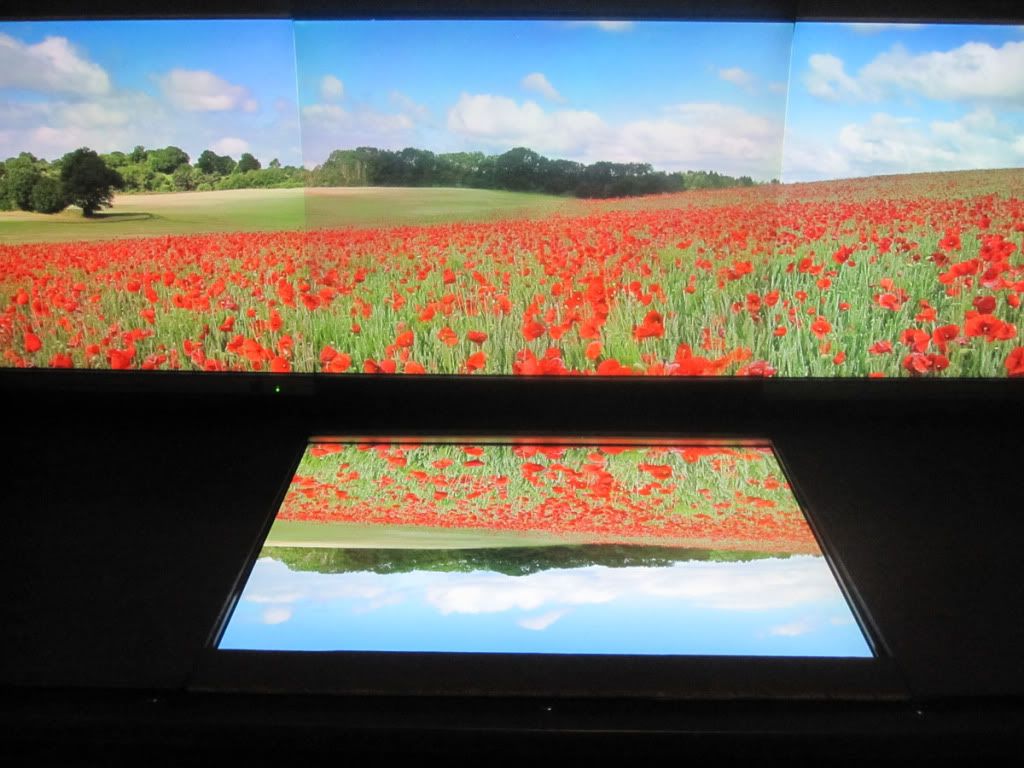
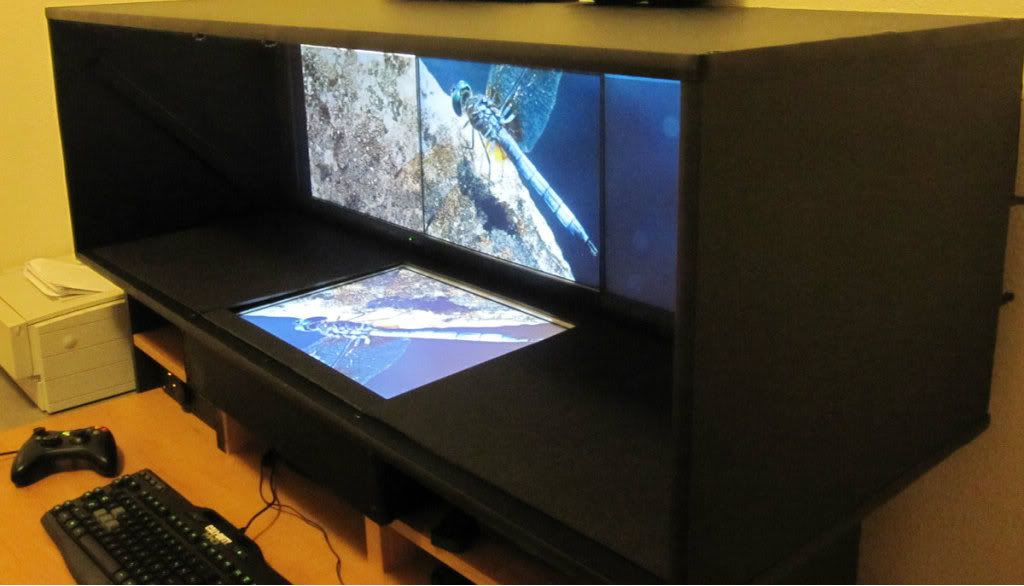
A true zero-bezel widescreen setup (mirror box)

Discussions about getting games to run in a Multi-Mon setup.
Truecade
Posts: 3
Joined: 05 Jan 2013, 02:36

A true zero-bezel widescreen setup (mirror box)

Post by Truecade »

Greetings fellow widescreen gamers! I wanted to share a little project I've been working on over the holidays. It is something I’ve been thinking about for the past several months but only recently had the time to build.

The concept is pretty simple: build a box that utilizes a half-silvered mirror to create a zero-bezel multi-monitor widescreen effect. I didn’t invent this concept, it was used in several 80’s arcade games such as Darius, Ninja Warriors, and Tecmo Bowl. (I’ve built many MAME cabinets over the years, so this is where I got the idea- small plug for the BYOAC forum. :wave: )

I acquired a few used LCDs from a local business closing down, so I’ve only been doing the multi-monitor thing since October. In general they are good monitors (HP 2065), but it has been quite tedious to match the color/contrast/brightness due to their age. In any case, the bezels were buggin’ and so this project was born.

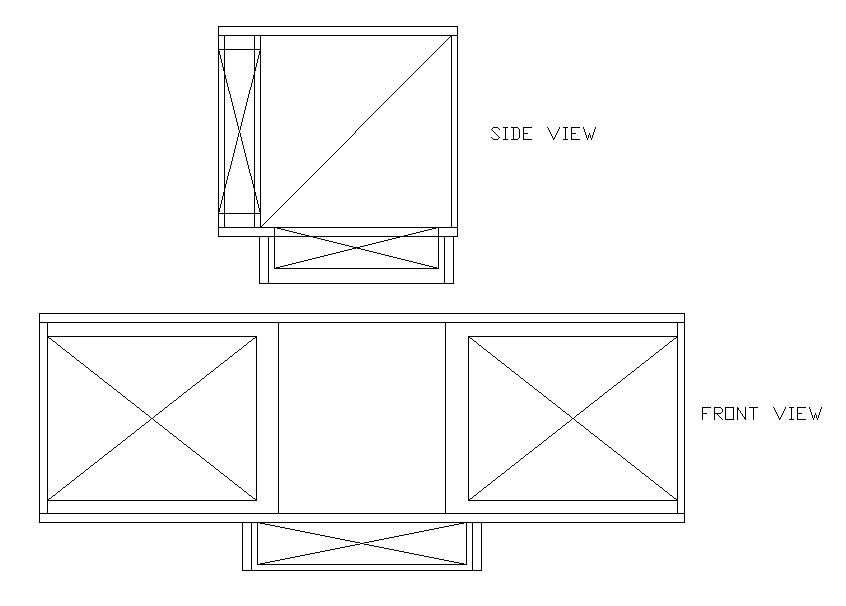
This is a just a proof of concept, and there are many things I would do differently that I’ll write about later. These are the prototype elevation views I drew up in AutoCAD. The approx. dimensions are 54” x 20” x 20” WxHxD. (The large X’s on the elevation views are the monitor locations.)
Image

Two monitors are mounted vertical on the right and left side. One monitor is mounted horizontal on the bottom. The half-mirror glass is set at a 45 degree angle in the box between the vertical and horizontal monitors. (The diagonal line in the side view in the middle of the box in the glass.)

So how does it work? The image from the vertical mounted monitors passes through the half-mirror and the image from the horizontal mounted monitor reflects off the 45 degree angle half-mirror to create the ‘seamless’, bezel –free, continuous image. (The function is similar to how a teleprompter or stereoscopic display works.)
Image

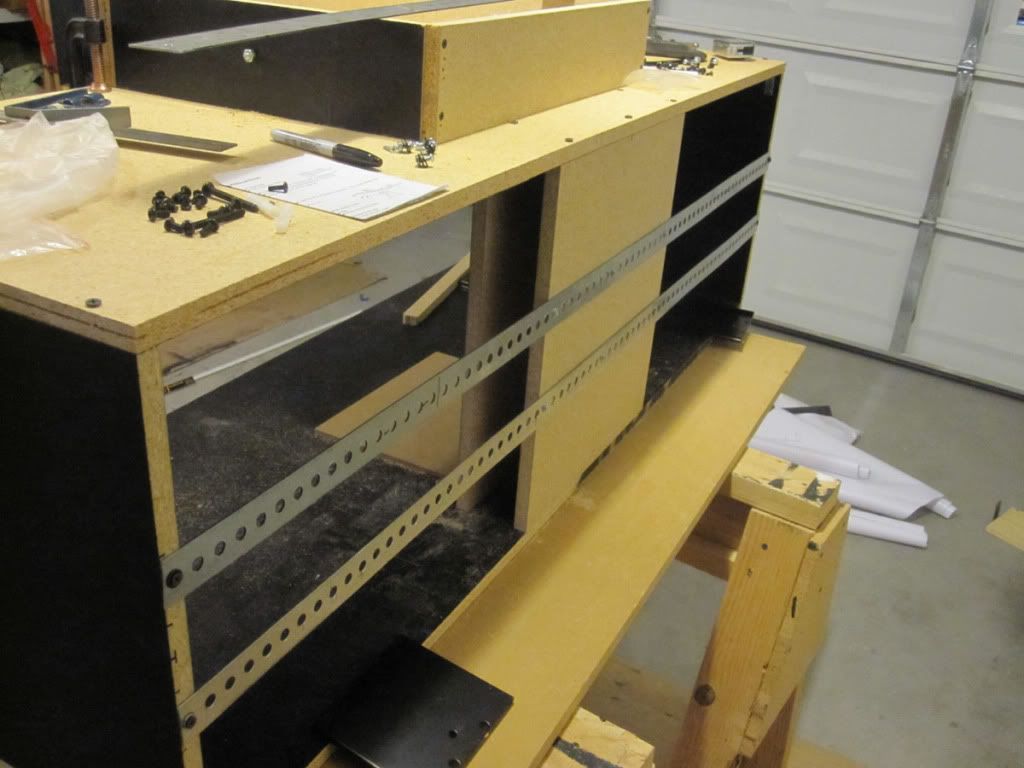
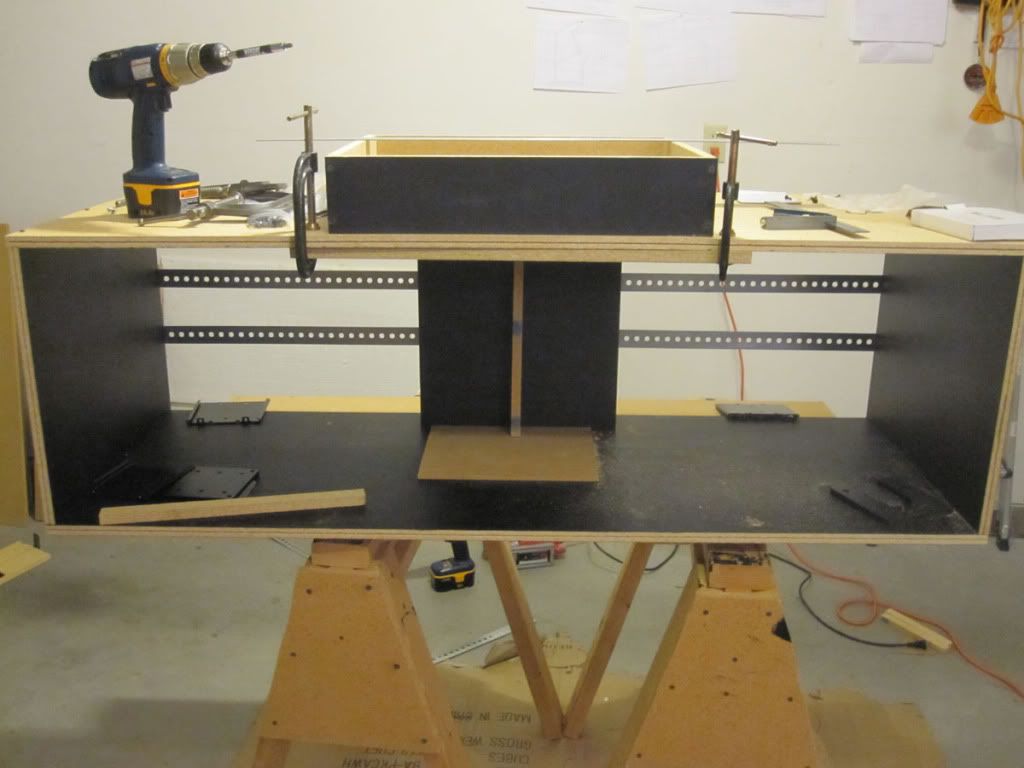
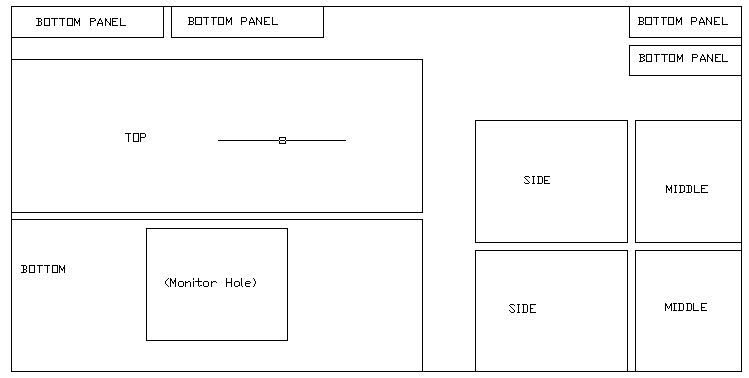
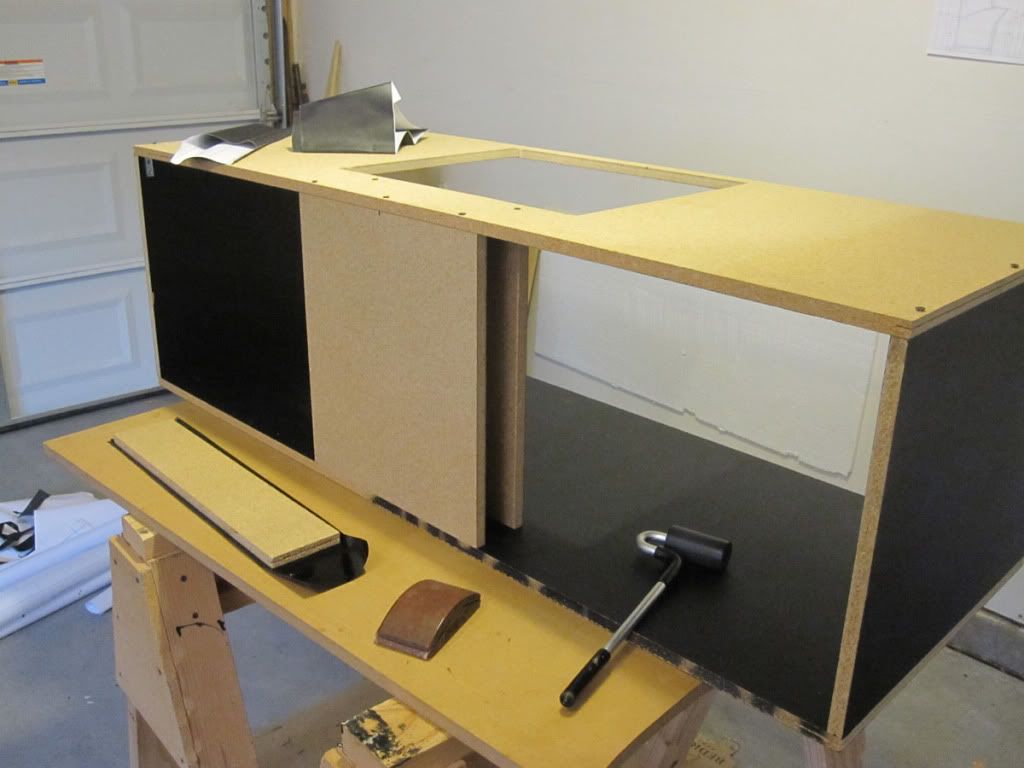
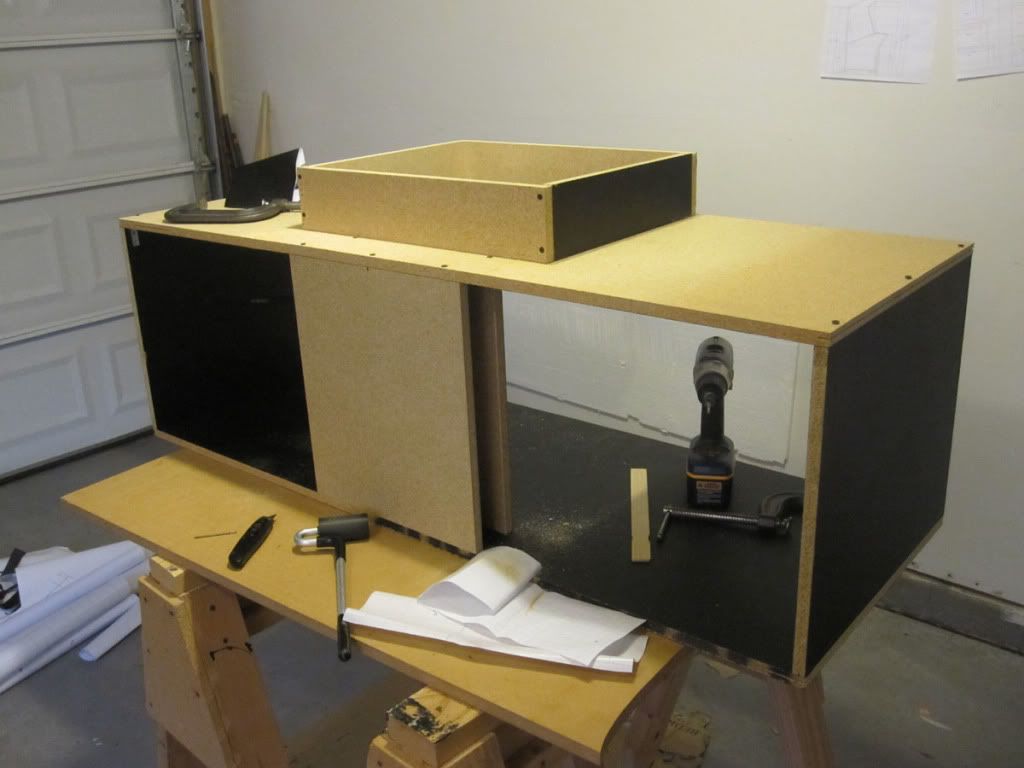
Next it was time to cut some wood. All of the panels fit on one standard 4x8 sheet of wood, in this case 5/8” particle board. The next step was to cover the panels in black. I used a roll of vinyl laminate from Parts Express. Finally the box started to come together…
Image
Image
Image
Image

I initially tried used some straight rails on the back to hold up the two vertical monitors. This turned out to be a bad idea… too wobbly. So I switched to L-channel rails.
Image
Image
Image

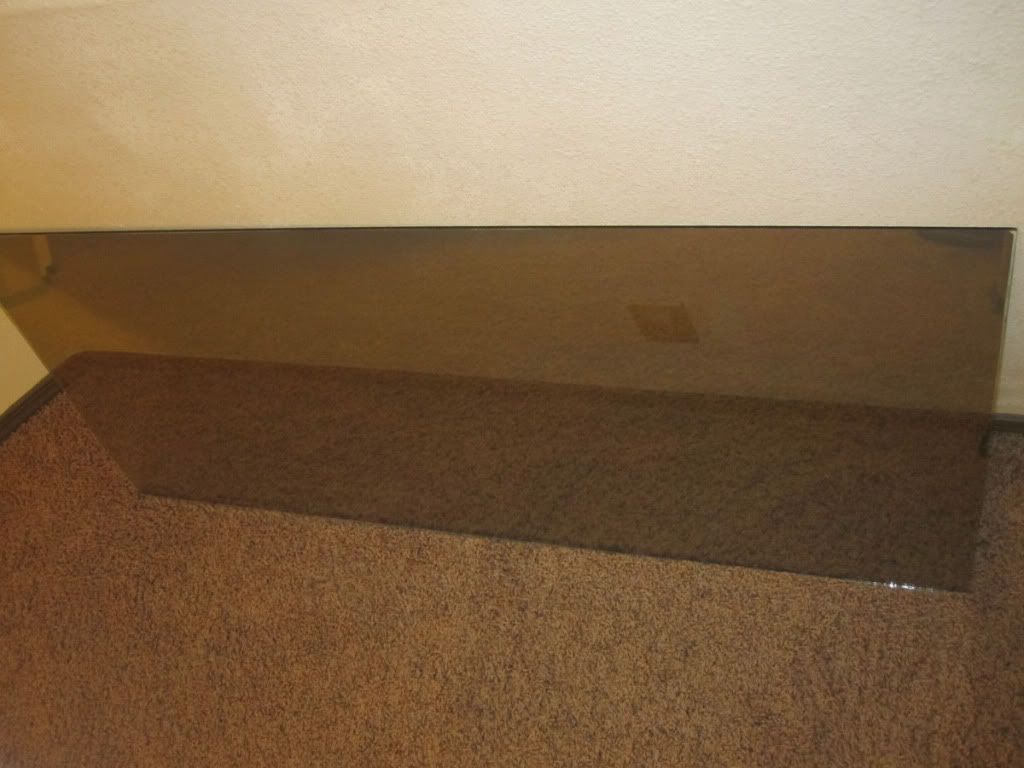
Once the wood box was finished and the monitors mounted, it was time to add the half-mirror. Now, I considered several options for this glass. I got a sample piece of two-way mirror from a local glass shop, but it was tinted and it altered the color too much. Then, I went online and checked locally for beam splitter (a.k.a teleprompter) glass, but the cost was waaay too high for this prototype project. Finally, I settled on a piece of clear glass with a semi-silver tint from the local tint shop.
Image

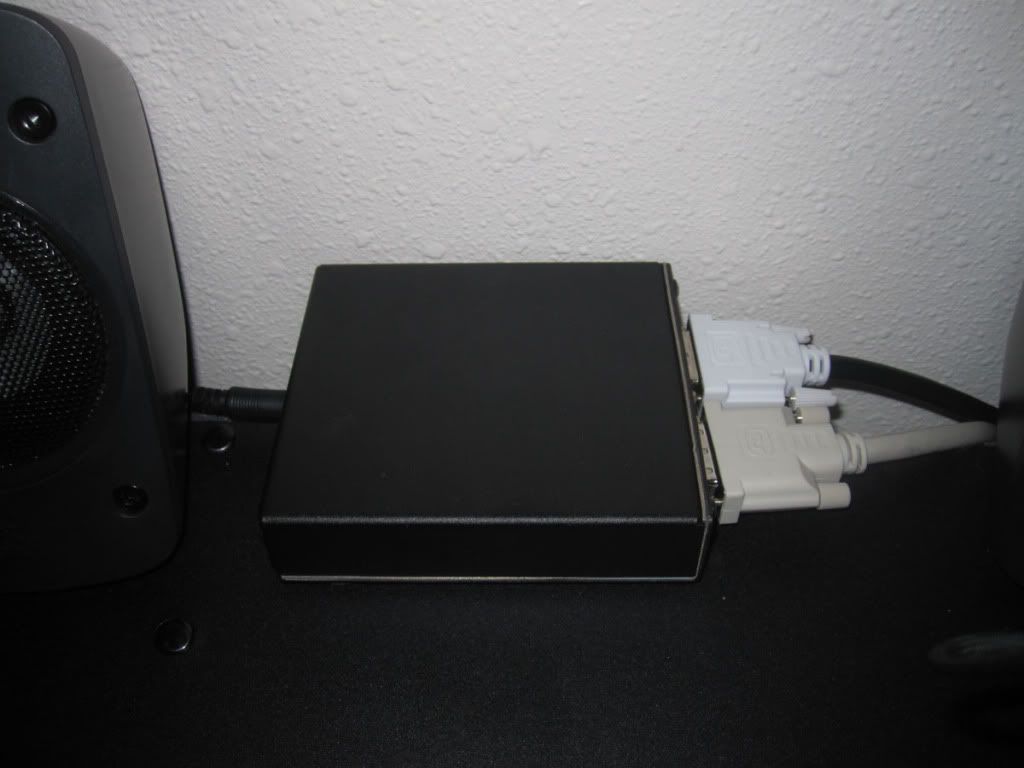
The next step is to hook up the center monitor to a mirror-flip inverter so the center image appears correctly when reflected on the half-mirror. This was by far the most expensive component of the prototype. :thumbdown:

Image

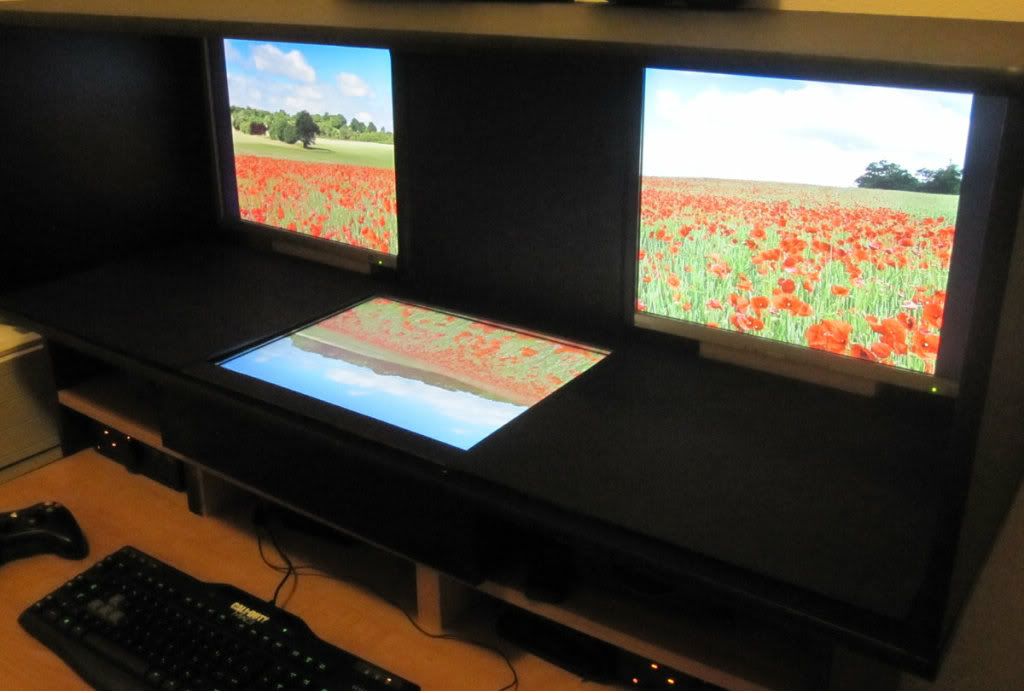
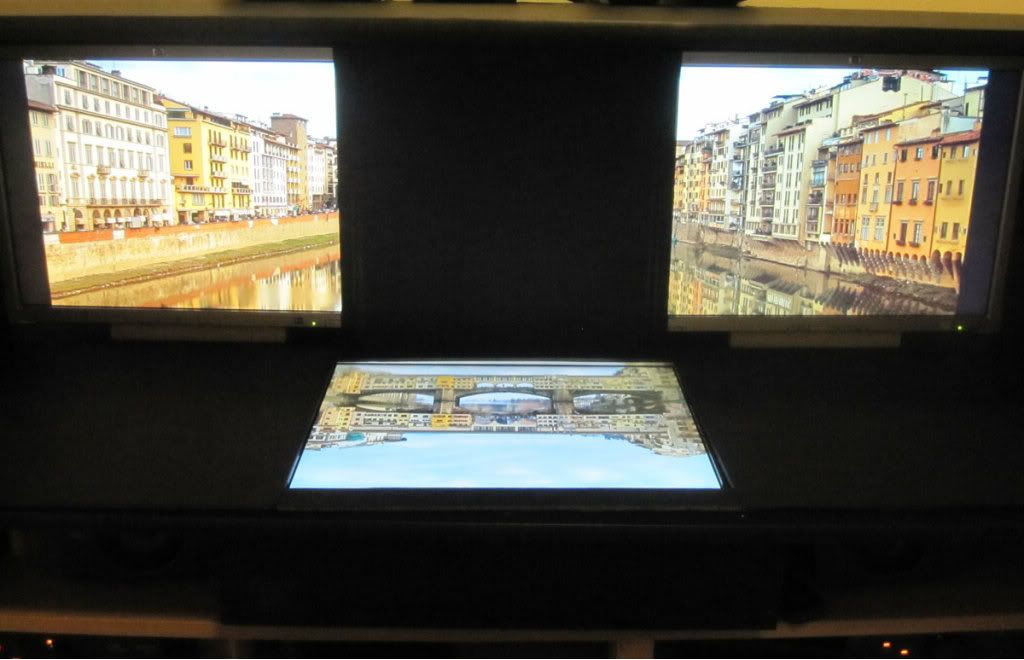
Once the glass was mounted, then came aligning the monitors. Now ideally, the display areas of the vertical and horizontal monitors would be *exactly* the same distance from the half-mirror glass. Also, the glass would be mounted at a *perfect* 45 degree angle. Then, the two vertical mounted monitors would slide left & right and the horizontal mounted monitor would slide back and forth until the display areas lined up perfectly. Once this happens, you can move from side to side of the box and the bezels are gone!

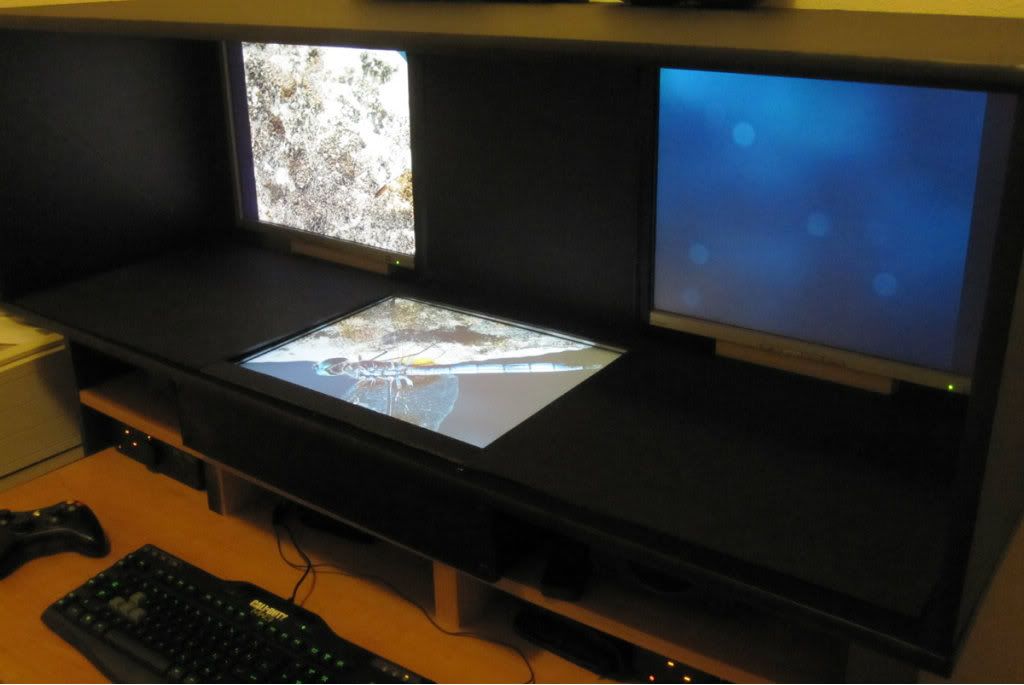
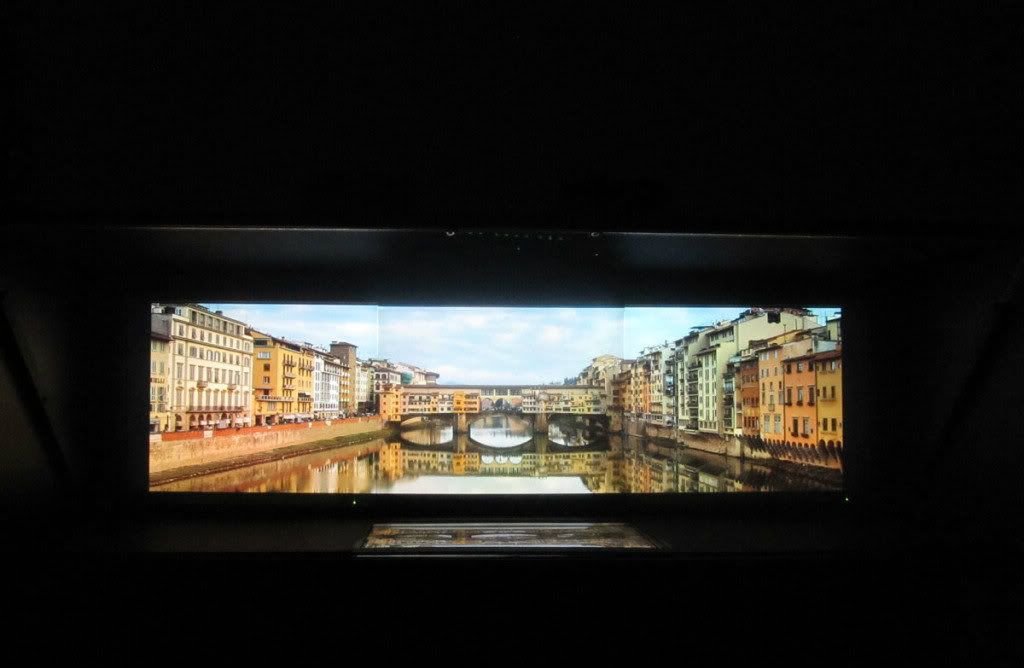
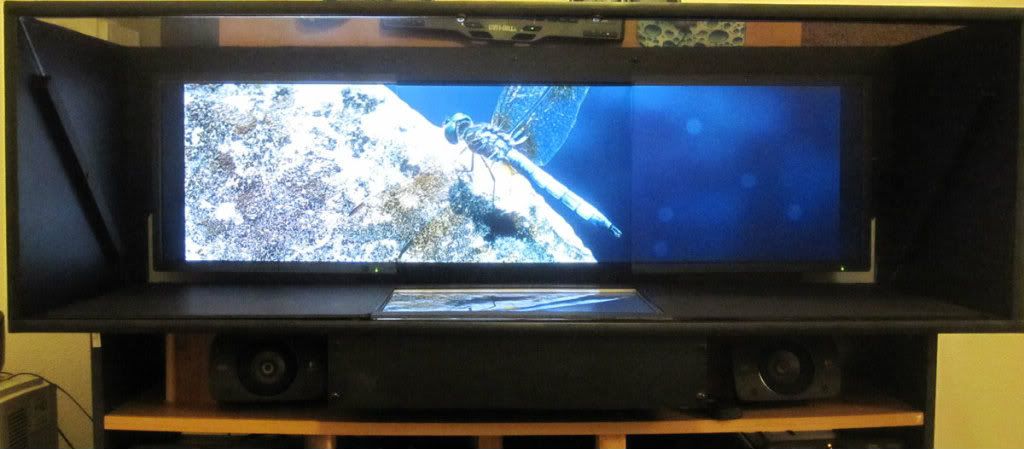
Well, this being a prototype, the glass wasn’t quite a perfect 45 degrees and it was extremely difficult to manually get the monitors to be the same distance from the glass. This was an inherent design flaw in this prototype- the vertical mounted monitors only moved left to right but also needed to move front to back. (The verticals ended up a slightly different distance from the glass as the horizontal monitor). But… I was still able to get a pretty damn good alignment that looks really good if you are sitting in the center of the display.
Image
Image
Image
Image

Note that I still haven’t gotten the brightness/contrast adjusted to be the same on all of the monitors, but the color is very close. Also, the last pic above looks like there are lines between the monitors when viewed from the side. This is due to the vertical monitors being slightly further away from the half-mirror.

Here are a couple short videos of the display in action. Apologies for the grainy video, but you get the idea. Setup is three 20” HP monitors, 4800x1200, and of course no bezel compensation.

My favorite wide screen indie game, Syder Arcade.
[youtube]http://www.youtube.com/v/FIrH4zn64no[/youtube]

Need for Speed HP
[youtube]http://www.youtube.com/v/eJ3b7ZOSabM[/youtube]

Ninja Warriors Arcade (An 80’s three monitor arcade game that used this exact setup)
[youtube]http://www.youtube.com/v/Xk8Go1Sz9zc[/youtube]

Closing thoughts:
The brightness/contrast would be much easier to match across the monitors if I was using true beam splitter glass that reflects/transmits 50%. The tint I’m using reflects/transmits ~35%, so it is not ideal. However, beam splitter glass of this size would have cost $900+ where my piece of silver tinted glass was <$100.

I’m not sure if I can ever get these particular monitors to match color/contrast exactly since they are old and at least one is pretty dim. But the ability to adjust the RGB on each monitor got me pretty close on the colors.

There should a better way to mirror-flip the center monitor image instead of using the expensive hardware based solution I have here. Modified driver? Modified firmware? If only I had the time to tinker more….

One downside of using a setup like this is that monitor brightness is reduced as the image passes through and/or reflects off the half-mirror. This is a trade-off for a zero-bezel display setup….

I’ll probably try and build a version 2.0 of this mirror setup sometime in the spring or summer. The design will need to be improved for monitor alignment and to get a perfect glass angle. Who knows, maybe I can even score a cheap piece of beam splitter glass. Once version 2.0 is done, it’s going into a custom arcade/gaming cabinet!

Check out the arcade version of Darius Burst that uses two 32” LCDs for an ultra-wide gaming experience. This is a good example of modern bezel-free multi-monitor gaming at its best.
http://www.youtube.com/watch?v=SpEz3dsbwUc

Constructive feedback appreciated.

User avatar
Racer_S
Insiders
Insiders
Posts: 118
Joined: 29 Jul 2004, 11:47

Re: A true zero-bezel widescreen setup (mirror box)

Post by Racer_S »

This is yenius!

Not sure what hardware you're using but something like Eyefinity or NVIDIA's Surround may have the option to flip hor/vert each monitor. I know this is not possible with Matrox Triplehead2go, maybe someone else can chime in on this.

I think a proxy directx dll could do the flipping/mirroring for you, basically youd just need to flip the direct3d backbuffer in the middle section before presenting. You could look at the source for SoftTH here http://www.kegetys.fi/forum/index.php?topic=3176.0 for a bit of guidance.

The bad about this is some games may think you are cheating and directx9 is the only option.


I like it!
ToCA EDIT - Over 10 Years of Game Modding and Research
bahnzii
Posts: 65
Joined: 21 Jan 2007, 02:20

Re: A true zero-bezel widescreen setup (mirror box)

Post by bahnzii »

Have to agree with Racer_S...that is cool :onethumb:

Having been an arcade kid of the 80's, I totally forgot about some of those ultra-wide screen games :doh:
One thing you could possibly consider to increase brightness is to remove any AG coating the screens may have.
Since they are in an enclosure and you are viewing them from the reflected angles and not directly, an AG coating may not be needed.

I was reading up on this the other day, ironically enough...
http://www.overclock.net/t/1230911/remo ... g-on-u2711
User avatar
AllGamer
Posts: 29
Joined: 26 Jun 2006, 22:10

Re: A true zero-bezel widescreen setup (mirror box)

Post by AllGamer »

wouldn't I'd be better if all 3 monitors were mirrored, then you wont have the trouble of matching colour & brightness as all 3 of them will be going through the same "filter"

I like the idea, it'll help on the immersion in games, by blocking out the ambient lights with the BOX feel of the old Arcades :D

that combined with Eyefinity / Surround view it's perfect.

now if i could design something similar with ANGLED side panels for that Cockpit feel...

time to take some measurements of the desk and monitors :D
i7-3970X, Corsair H80, 32GB G.SKILL, ASUS RAMPAGE4 Formula, VG278H(3x27")+3D Vision2, EVGA GTX 690(2x), OCZ ZX1250W, 256GB Vertex4(2x), Seagate 3TB(6x), Antec LanBoyAir, Logitech G510, G600, Z560THX, T.Flight Hotas, PZ35, Sennheiser PC163D, TrackIR5
User avatar
Delphium
Administrators
Administrators
Posts: 1789
Joined: 27 Dec 2009, 14:27

Re: A true zero-bezel widescreen setup (mirror box)

Post by Delphium »

Nice first post Truecade, this was a good read and I like what you have achieved.

:welcome
| Gigabyte X79S-UP5-WiFi Skt2011 | i7 4820k @4.4GHz Watercooled (Ivy Bridge-E) | Corsair Vengence 32GB @2133MHz 11-11-11-27 2T Quad-Channel (8x4GB) | AMD R9-Fury-X 4GB @1140/505MHz + EKWB Watercooled | 256GB Crucial MX200 SSD | 8x 1TB Samsung F3 SATA-II | Corsair 850W TX PSU | 3x Dell S2209W 22"wide TFT's (5760x1080res) | Logitech Z-5400 5.1ch speakers | Win7 Ultimate x64 |
brokenblade30
Posts: 2
Joined: 12 Jan 2013, 01:27

Re: A true zero-bezel widescreen setup (mirror box)

Post by brokenblade30 »

Wow this is incredible! I really want to try it with my displays. I just purchased 3x27" IPS 120Hz monitors.

Beam-splitting glass is so expensive. Is there a way to possibly use glass reflective film to reproduce the two-way mirror like affect for much cheaper? I was looking at a website that was doing a DIY for a teleprompter and it uses beam-splitter glass as well to do this. The website used a slate window film that has 50% reflective to accomplish this. Here is the website:
http://tompter.com/index-5.html

It appears to do a great job and can just be laid over a standard piece of glass or even acrylic. I have e-mails out to the company that makes the film to see how much it would be for a piece to span over 3 27" monitors. The film reflects on one side and allows the image to pass through the other side much like beam-splitter glass. Let me know what you think of this idea.

Another thing I was pondering...was if there is a way to have the side monitors (left and right) be angled at 45 degree angle like most people set it up while being able to still use the mirror technique for a zero-bezel display.

Also I was thinking of expanding this idea...would there be a way to do a 4-head configuration in a square (2 top and 2 right below it) with this technique? That would make a huge combined display with amazing resolution and would be awesome for more applications such as movies and everything.

I will continue to post anything I find on the film and progress I have.
brokenblade30
Posts: 2
Joined: 12 Jan 2013, 01:27

Re: A true zero-bezel widescreen setup (mirror box)

Post by brokenblade30 »

AllGamer wrote:wouldn't I'd be better if all 3 monitors were mirrored, then you wont have the trouble of matching colour & brightness as all 3 of them will be going through the same "filter"


How would you be able to mirror all 3 while still keeping the zero bezel. I think they have to overlap the bezels in order to achieve this and it wouldnt be possible if they were all next to eachother...not sure maybe if we could expand on the idea.
Truecade
Posts: 3
Joined: 05 Jan 2013, 02:36

Re: A true zero-bezel widescreen setup (mirror box)

Post by Truecade »

Thanks for the comments.

@Racer_S
I'm using an Eyefinity setup (single HD5770), but there are no options to mirror-flip a single screen. I did some research on the web and it might be possible to do this using an ATI FirePro card since they have more features in the drivers. But they are pretty expensive and I couldn't acquire a FirePro card for testing. I think NVIDIA dropped their stereoscopic driver support and that would have provided the same mirror-flip capability.

If anyone finds a better way to mirror-flip a single screen in a multi-monitor Eyefinity setup, I'm all ears. I'm thinking it would have to be a custom driver or firmware.

@ AllGamer
I'm not sure how it would be possible to mirror all three monitors due to the way the bezels overlap in the reflection. There is probably a way using even fancier optics and reflections, but it is beyond my skill.

@BrokenBlade30
I am just using regular glass with a silver mirror tint, though all I could find was a 35% film. I'll probably special order a 50% silver mirror tint and see if it improves the brightness/contrast in the next iteration of this project. One thing to keep in mind with normal mirror tints is that they are meant to go on the inside of a window, so you get a reflection when looking through the glass. However, in this setup, the tint needs to be on the outside of the glass (closest to the reflecting monitor) or else you will get a blur in the reflection as the image bounces between the film and the glass. Apparently there are special mirror tints that reflect on the outside vs. the inside, but they would be special order. There is also acrylic beam splitter, but it is still much more expensive than plain glass with a silver tint and plexi-glass scratches easily.

One thing I recommend is to build a simple cardboard prototype using a 6" piece of sample glass and some free tint samples from your local tint shop. I used a couple cell phones as screens in my cardboard prototype to test the different types of glass, tints, etc. before ordering & building. This is how I found out that the tint needs to be 'reversed' and closest to the reflecting monitor.
User avatar
AllGamer
Posts: 29
Joined: 26 Jun 2006, 22:10

Re: A true zero-bezel widescreen setup (mirror box)

Post by AllGamer »

re: all 3 on mirrors

OK, you guys might consider this cheating...
but since we are going through the trouble of putting the monitors in a BOX
it wouldn't hurt to go the extra mile and remove the casing from the monitors (bezels)

depending on the LCD/LED panel quality you might have almost no border at all
you can still overlap one monitor on top of the other to get an even thinner black border

to completely remote that line, will require some cheat cheat on the reflective surface as well.

instead of one continuous mirror, you'd want 3 pieces of it, so you'd bend the mirrors right at the edge of the black border

that should setup a proper nVidia 2D Surround View for games and such, and still give you the feel of the 180 wrapped around, instead of the fish eye effect

That's just theory, it'll still need to be tested in real life to see how well it hides, or rather it fails to reflect the black border. ;)
i7-3970X, Corsair H80, 32GB G.SKILL, ASUS RAMPAGE4 Formula, VG278H(3x27")+3D Vision2, EVGA GTX 690(2x), OCZ ZX1250W, 256GB Vertex4(2x), Seagate 3TB(6x), Antec LanBoyAir, Logitech G510, G600, Z560THX, T.Flight Hotas, PZ35, Sennheiser PC163D, TrackIR5
User avatar
Mephilth
Posts: 3
Joined: 24 Feb 2012, 19:50

Re: A true zero-bezel widescreen setup (mirror box)

Post by Mephilth »

very nice prototype!
User avatar
skipclarke
Founder
Founder
Posts: 7358
Joined: 13 Oct 2003, 05:00

Re: A true zero-bezel widescreen setup (mirror box)

Post by skipclarke »

I have replicated this post as an article on the site (attributed to Truecade). Just wanted to thank you for sharing your work with us. The article is in the news feed, and has been Tweeted/Facebooked.

http://www.wsgf.org/article/zero-bezel- ... tysurround
User avatar
AussieTimmeh
Editors
Editors
Posts: 1441
Joined: 14 Oct 2009, 03:11

Re: A true zero-bezel widescreen setup (mirror box)

Post by AussieTimmeh »

Our previous military flight simulator at work used a very similar process to get a 3x1 visual setup. Nice job!
i5-2500K @ 4Ghz ° Asus P8Z68 ° GTX670 Windforce OC ° 8GB DDR3 RipjawsX ° 4x Viewsonic VA2703 ° Logitech G15 / G5 / G27 ° Razer Vespula ° TrackIR 5 ° Thrustmaster Warthog HOTAS
porosenoq
Posts: 1
Joined: 04 Apr 2013, 13:04

Re: A true zero-bezel widescreen setup (mirror box)

Post by porosenoq »

Hello,
really nice project. I registered because I have some questions about the way you built it. I want to make one for myself, but I dont really get how it actually works.
I will be glad if someone explains me how this works exactly. The things that I dont understand are:

1.Are you seeing the real image of the monitors that are placed on the sides (left and right)
2.If you are seing the real image of the two side monitors, why do you need so wide glass(mirror) ?
3.Where exactly is the mirror placed(situated) (Is is on the top of the box on a 45 degree angle according to the monitors (side monitors) ?
4.What is the surface (material, color) that you are projecting the reflected image on ?

Thanks in advance
Regards
Rosen
User avatar
AussieTimmeh
Editors
Editors
Posts: 1441
Joined: 14 Oct 2009, 03:11

Re: A true zero-bezel widescreen setup (mirror box)

Post by AussieTimmeh »

Just had a look for you to see if I could answer any of these.

1.Are you seeing the real image of the monitors that are placed on the sides (left and right) - Yes
2.If you are seing the real image of the two side monitors, why do you need so wide glass(mirror) ? - Because the edges of a mirror that did not extend all the way across would refract light where they end and create a physical line that you could see if it ended halfway along the side monitors.
3.Where exactly is the mirror placed(situated) (Is is on the top of the box on a 45 degree angle according to the monitors (side monitors) ? - The mirror is at 45 degrees, with the top of the mirror closest to you and the bottom furthest from you, and runs the full length from left to right.
4.What is the surface (material, color) that you are projecting the reflected image on ? - The side monitors simply shine through the half-mirror (it's a mirror that lets light through so you can see the monitors behind). The center monitor bounces off the mirror directly to your face. It does not project onto anything.

Hope that helps.
i5-2500K @ 4Ghz ° Asus P8Z68 ° GTX670 Windforce OC ° 8GB DDR3 RipjawsX ° 4x Viewsonic VA2703 ° Logitech G15 / G5 / G27 ° Razer Vespula ° TrackIR 5 ° Thrustmaster Warthog HOTAS
zyndro
Posts: 1
Joined: 12 May 2013, 01:25

Re: A true zero-bezel widescreen setup (mirror box)

Post by zyndro »

Hello everyone!

im new here and im more than interested in building this setup myself, however im worried about the monitor that is laid on the setup's base because from my point of view it can be pretty annoying just having that reflection there.

so i was thinking how can this be erradicated and i thought on a possible setup, similar the the way the pheriscopes on the submarines work.

so i did this drawing, please forgive my english and drawing skills!

the view is side view, the red lines are mirrors ( i will need 2 of them instead of 1 ) and the whole idea is putting the 3rd monitor below the others 2, in standing position, rather than laid out in the base.

i hope you can get my point

please let me know your thoughts, will this be possible?


thanks and regards!!

Image
ZeNmAc
Posts: 1
Joined: 28 Jun 2013, 02:13

Re: A true zero-bezel widescreen setup (mirror box)

Post by ZeNmAc »

This is awesome...

Truecade wrote:
If anyone finds a better way to mirror-flip a single screen in a multi-monitor Eyefinity setup, I'm all ears. I'm thinking it would have to be a custom driver or firmware.


Pop the middle monitor open and flip the LCD panel around. It should work, but it may be a little jenky to keep together depending on how the monitor is designed.

One other question, how does it look from an angle? And with everything aligned properly, will it look just as good from the side?

This could potentially be awesome. Just think, 2 screen eyefinity is now feasible...
Valo
Posts: 2
Joined: 20 Jul 2013, 05:48

Re: A true zero-bezel widescreen setup (mirror box)

Post by Valo »

Possibly a little late to the party but Windows 7 has the option to flip/rotate monitors via software on the desktop when you setup your screen orientations and resolution. Awkward when working outside of a Windows environment I'm sure but definitely a cheaper option for "testing" purposes.

My concern about this setup is making it narrower as I'm thinking of running displays in portrait with this setup (something along the lines of 3240/3600x1920) but even with a 22" monitor it just comes out way too far for my liking. Trying to play around with different angles come to mind but at the moment I'm still in the guessing game arena. Any thoughts?

Something 13-15" wide is fine but 20"+ is definitely pushing it for me. Thinking if I orient the bottom screen at say 60/65/70 degrees and then try and match that with a mirror on top will I still get the right picture.
User avatar
suiken_2mieu
Insiders
Insiders
Posts: 2351
Joined: 20 Aug 2009, 04:20
Location: Virginia
Contact:

Re: A true zero-bezel widescreen setup (mirror box)

Post by suiken_2mieu »

Valo wrote:Possibly a little late to the party but Windows 7 has the option to flip/rotate monitors via software on the desktop when you setup your screen orientations and resolution. Awkward when working outside of a Windows environment I'm sure but definitely a cheaper option for "testing" purposes.

My concern about this setup is making it narrower as I'm thinking of running displays in portrait with this setup (something along the lines of 3240/3600x1920) but even with a 22" monitor it just comes out way too far for my liking. Trying to play around with different angles come to mind but at the moment I'm still in the guessing game arena. Any thoughts?

Something 13-15" wide is fine but 20"+ is definitely pushing it for me. Thinking if I orient the bottom screen at say 60/65/70 degrees and then try and match that with a mirror on top will I still get the right picture.

Unfortunately, windows 7 doesn't allow you to mirror the output, just turn it 0, 90, 180, 270 degrees.
System Core: | Intel Core i5-2500K + ASUS P8Z68-V + 16GB Corsair XMS3 DDR3 1333 MHz | Win7 x64 | MSI R7970 Lightning 3GB [1105/1400] |
Display: | 3 x Dell Ultrasharp 3007WFP-HC @ 7680x1600 | Dell u3011 |
Valo
Posts: 2
Joined: 20 Jul 2013, 05:48

Re: A true zero-bezel widescreen setup (mirror box)

Post by Valo »

Ahh yes I see my mistake there now. Surely if those movements can be done then mirror can be done in software somewhere too.
Amon Amarth
I Donated
I Donated
Posts: 513
Joined: 18 Jul 2007, 04:19

Re: A true zero-bezel widescreen setup (mirror box)

Post by Amon Amarth »

Sorry for bumping this old thread, but is the OP still around? If so, any new projects?
Post Reply

Who is online

Users browsing this forum: No registered users and 7 guests