[-noun] Web community dedicated to ensuring PC games run properly on your tablet, netbook, personal computer, HDTV and multi-monitor gaming rig. https://www.wsgf.org/phpBB3/
Counter-Strike: Global Offensive (CS: GO) will expand upon the team-based action gameplay that it pioneered when it was launched 12 years ago.
CS: GO features new maps, characters, and weapons and delivers updated versions of the classic CS content (de_dust, etc.). In addition, CS: GO will introduce new gameplay modes, matchmaking, leader boards, and more.
"Counter-Strike took the gaming industry by surprise when the unlikely MOD became the most played online PC action game in the world almost immediately after its release in August 1999," said Doug Lombardi at Valve. "For the past 12 years, it has continued to be one of the most-played games in the world, headline competitive gaming tournaments and selling over 25 million units worldwide across the franchise. CS: GO promises to expand on CS' award-winning gameplay and deliver it to gamers on the PC as well as the next gen consoles and the Mac."
CS: GO is being developed by Valve in cooperation with Seattle-based Hidden Path Entertainment. The title is targeted for release in early 2012 and will be playable at this year's PAX Prime and Eurogamer Expo.
Counter-Strike: Global Offensive (CS: GO) will expand upon the team-based action gameplay that it pioneered when it was launched 12 years ago.
CS: GO features new maps, characters, and weapons and delivers updated versions of the classic CS content (de_dust, etc.). In addition, CS: GO will introduce new gameplay modes, matchmaking, leader boards, and more.
"Counter-Strike took the gaming industry by surprise when the unlikely MOD became the most played online PC action game in the world almost immediately after its release in August 1999," said Doug Lombardi at Valve. "For the past 12 years, it has continued to be one of the most-played games in the world, headline competitive gaming tournaments and selling over 25 million units worldwide across the franchise. CS: GO promises to expand on CS' award-winning gameplay and deliver it to gamers on the PC as well as the next gen consoles and the Mac."
CS: GO is being developed by Valve in cooperation with Seattle-based Hidden Path Entertainment. The title is targeted for release in early 2012 and will be playable at this year's PAX Prime and Eurogamer Expo.
have you tried if there is a way to adjust the hud via ini edit? just like in left 4 dead?
skipclarke wrote:I saw your
Posted: 23 May 2012, 04:42
by Jackal Frost
I saw your comments on the HUD, and see the issues with the scaling, but I don't think it would prevent you from playing the game. Correct?
Incorrect, a lot of stuff is cut off. It's better with the hud_scaling set to 0.5, however.
And yes, I adjusted the .res files, but the game won't acknowledge them.
Locking the value located at
Posted: 23 May 2012, 07:07
by HaYDeN
Locking the value (hud_scaling as found by Lolotov) located at materialsystem.dll+31F614 to 0.75 / horizontal monitors will scale it correctly, but its still spanned - spent about 1/2 hour on it, _seems_ like its using ScaleForm (same as UE3 typically, Mass Effect, Tribes, TESV etc) -- needs a memhack to get it below 0.5 (about 0.25 required for 5760)
This is a VAC game so any code caves are strictly a no-go really, modifying values is also going to be semi-dangerous, I only played around in steam-offline mode,
Plugin now available in
Posted: 23 May 2012, 08:59
by HaYDeN
Plugin now available in Flawless Widescreen -> Link Here
Read and understand the notes before you use it, I've tried it online for a short duration.
I'd imagine Valve will fix this - it's very simple for them to fix (at the very least they just need to allow <0.5 for HUD Scaling)
Props to TheLolotov for sparing a invite and finding HUD_Scaling.
sorted
Posted: 23 May 2012, 09:06
by HaYDeN
Derived by:
SafeZoneX 0.33333 in the console. (1 = 100%, 0.333 = 33.3%)
and Memhack Scale value to 0.25 (0.75 / 3)
------------
I'll make a plugin - but it will be a zomg entirely your fault if you get banned situation, the scale value is the only thing being hacked, no codecave - so its safer, but not entirely safe.
HaYDeN wrote:Plugin now
Posted: 23 May 2012, 21:39
by Jackal Frost
Plugin now available in Flawless Widescreen -> Link Here
Read and understand the notes before you use it, I've tried it online for a short duration.
I'd imagine Valve will fix this - it's very simple for them to fix (at the very least they just need to allow <0.5 for HUD Scaling)
Props to TheLolotov for sparing a invite and finding HUD_Scaling.
NOTE: VAC bans are usually given anywhere from a day to two weeks or more after a cheat is detected. I, personally, am not going to use the hack until I get a hold of someone at Valve.
EDIT: Nevermind, be careful guys, even if you uncheck "Fix enabled" in Flawless Widescreen, it will attempt to patch the game anyway. So, we'll see if I get VACed.
I noticed that in the report
Posted: 25 May 2012, 21:51
by Thebutcher
I noticed that in the report it claimed that SoftTh was tested and works.
I tried last night, however when I try and set the aspect ratio to 16:9 to select my custom resolution, the game crashes.
Anyone that got it to work, can you reply with what you did to make it work?
20x30x20 (1490x1600) PLP
My typical SoftTH process for steam games:
1) Copy the config and dll to the directory containing the .exe.
2) make my left most monitor my primary
3) launch the game, it only launches in the left monitor
4) goto video settings and select 16:9, see my custom res from the config, select it, apply, and softTH kicks in appropriately
Any help is appreciated.
thelolotov wrote:EDIT:
Posted: 25 May 2012, 22:00
by HaYDeN
EDIT: Nevermind, be careful guys, even if you uncheck "Fix enabled" in Flawless Widescreen, it will attempt to patch the game anyway. So, we'll see if I get VACed.
That is not the correct behavior, I will investigate, my apologies.
Fixed: Enable/Disable function was missing from the LUA script.
Thebutcher wrote:I noticed
Posted: 25 May 2012, 23:01
by Jackal Frost
I noticed that in the report it claimed that SoftTh was tested and works.
I tried last night, however when I try and set the aspect ratio to 16:9 to select my custom resolution, the game crashes.
Anyone that got it to work, can you reply with what you did to make it work?
20x30x20 (1490x1600) PLP
My typical SoftTH process for steam games:
1) Copy the config and dll to the directory containing the .exe.
2) make my left most monitor my primary
3) launch the game, it only launches in the left monitor
4) goto video settings and select 16:9, see my custom res from the config, select it, apply, and softTH kicks in appropriately
Any help is appreciated.
Woops, checked that on accident, was thinking of a different game. Sorry man, I dunno.
OK guys, I can confirm that
Posted: 28 May 2012, 20:10
by Thebutcher
OK guys, I can confirm that SoftTh works with CS:GO.
FYI: My setup: 20x30x20 PLP Resolutions: 20 = 1200x1600 : 30 = 2560x1600 (Total = 4960x1600) With Bezel compensation, the resolution I use in SoftTH = 5360x1600
I followed the standard process for SoftTh, but unfortunately I was unable to select 16:9 aspect ratio without the game crashing. and there was no way to apply the settings on the primary monitor since it was sut off at the low resolution.
So I found that the config file and the dll need to go into the bin folder (C:Program Files (x86)SteamsteamappscommonCounter-Strike Global Offensivebin) Then I put the following in the "set launch options" [ -w 5360 -h 1600 ] in the properties in steam. That way the game launches at the correct resolution. as always i have my left most monitor set as the primary.
The Hud scaled poorly just like it does with eyefinity, but I downloaded flawless widescreen, and it fixed the scaling perfectly. 1 last note, for a resolution the same as mine I used a different value for the safezone fix I used: /safezonex=.47000
That puts it almost to the edges of the 30"
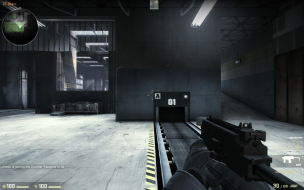
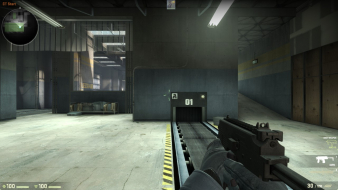
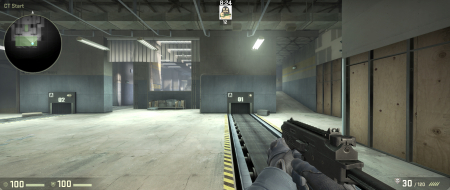
Screens: With the bad scaled HUD
With Flawless widescreen fix, and /safezonex=.47000
Flawless widescreen actually
Posted: 28 May 2012, 20:53
by HaYDeN
Flawless widescreen actually supports SoftTH detection (including bezel compensation) - when you have odd size monitors you must add a directive to the config file to get it to detect properly, this is because from a calculational perspective it's difficult for it to know if the top and bottom of the larger display is on the same grid axis without "guessing" so you must tell it, Here's an example of what you would put in your SoftTH config for a 3x1 grid.
[FWS]
;GridX must be set to the number of horizontal monitors and GridY must be
;set to the number of vertical monitors.
FWS_GridX=3
FWS_GridY=1
You shouldn't have to adjust anything manually.
Thanks hayden, i will give
Posted: 30 May 2012, 20:42
by Thebutcher
Thanks hayden, i will give that a shot
Hayden, So i tried adding
Posted: 08 Jun 2012, 19:04
by Thebutcher
Hayden,
So i tried adding that to the SoftTH config, and the HUD is still the same.
Resolutions:
20"=1200x1600 / 30"=2560x1600 / 20"=1200x1600
With 200 pixels of bezel correction on each side of the 30"
Total res = 5360x1600
Based on where the hud ends up by deafault, i dont think [FW] is taking into account the bezel correction as it sits 1/3 under the bezel.
If I use safezonex .47000 it moves to the correct spot.
Update
Posted: 21 Jun 2012, 20:37
by Ninjastarr
I just update Flawless Widescreen and CS:GO hud is no longer centered.
There's a HUD size under
Posted: 15 Aug 2012, 03:07
by Downtown1
safezonex 0.333 hud_scaling 0.5
this gets the HUD centered and its a fairly reasonable size. unfortunately the icons at the top (I'm guessing kill stats) get larger whenever they get reordered, so you have to re-run the "hud_scaling 0.5" again to fix it (health ammo etc stays small as normal).
for some reason they took out the "wait" command so you can't just write a quick alias fixhud "hud_scaling 0.5; wait 1; fixhud"; fixhud ... oh well.
EDIT: after playing this for a little while, it seems that the radar (minimap) scales inversely with hud_scaling (i.e. its 2x as big on 0.5 as on 1.0) and also every time someone gets a kill the icons on top get larger again (plus the kill notifications). also the text like "you have leveld up" or your own kill notifications are too big at 0.5 they obscure the crosshair every time making you extremely vulnerable after a kill.
I've had some issues with my
Posted: 15 Aug 2012, 17:59
by jeanp3rez
I've had some issues with my Chat and Kill Boxes at my Resolution of 5040x1050.
In the Images i posted my chat box is way too off on the Y Axis and my Killbox is HUGE. Also when im playing on regualr servers my HUD Scale Keeps changing back to 0.75 every few seconds after changing it to 0.25 with the Flawless Widescreen Fixer.
Programs im using are Flawless Widescreen Fixer with hud_scale 0.25 and SafeZoneX 0.33333
Any thoughts on what i can do to fix or adjust this?
Ok I think there's a few more
Posted: 17 Aug 2012, 22:55
by Downtown1
Ok I think there's a few more important bugs in surround mode:
1) missing damage direction indicator (100% sure about this one) - when you get shot it doesn't have any visual indication. its there in 1920x1080
2) when you shoot enemies your crosshair doesn't turn red (50% sure about this one, i was using a green xhair earlier though so maybe I didn't notice the colors changing)
To be honest it's pretty unplayable with #1/#2 even if the HUD is fixed not to overlap with your crosshair since they are both hit indicators
I posted these bugs here http://forums.steampowered.com/forums/showthread.php?t=2263804 but who knows if they'll ever get around to them