Call of Duty: Black Ops II

Detailed breakdowns of how games react to widescreen, ultra-wide, 4k and multi-mon
User avatar
czarman
Insiders
Insiders
Posts: 685
Joined: 11 Dec 2008, 23:51
Location: Germany

Call of Duty: Black Ops II

Post by czarman »


Widescreen Grade: A
Ultra-Widescreen Grade: C
Multi-monitor Grade: C
4k Grade: A

Read Full Detailed Report - Call of Duty: Black Ops II

Call of Duty: Black Ops II is a first-person shooter video game, developed by Treyarch. It is the ninth game in the Call of Duty franchise of video games and a sequel to the 2010 game Call of Duty: Black Ops. Black Ops II is the first game in the Call of Duty franchise to feature future warfare technology and the first to present branching storylines driven by player choice. It also offers a 3D display option. The single-player campaign features two connected storylines, with one set in the 1970s through 1980s and the other in 2025.
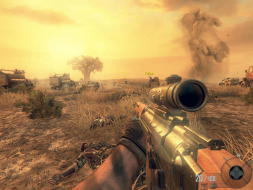

4:3
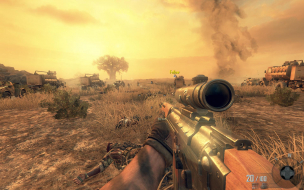

16:10


16:9


21:9


3x1

Last edited by czarman on 19 Oct 2017, 09:50, edited 8 times in total.
Reason: Edit
CZARMAN aka 彼得爸爸
User avatar
Mach1.9pants
Insiders
Insiders
Posts: 1512
Joined: 29 Jul 2007, 05:24
Location: NZ

Re: Call of Duty Black Ops II

Post by Mach1.9pants »

Beat me to it, my copy arrived this AM.

At the moment MP so laggy as to be unplayable :(
User avatar
Grizz
Posts: 31
Joined: 14 Dec 2011, 19:15

Re: Call of Duty Black Ops II

Post by Grizz »

hello,
i have tried both dopefishs and haydens widescreen fixers.
at first..the right side screen had flickering image, instead of being cutoff..
but once a movie started... it went back to cutoff the image on right side again.
nivida 680gtx, tried multiple driver versions.
the hotfix and game was enabled in the widescreen menu.
but like i said..it was only showing a flickering image..
never actually worked for me..
i went back to 1920 regular screen.
any help with this plz ?
Holok
Posts: 2
Joined: 04 Dec 2012, 05:10

Re: Call of Duty Black Ops II

Post by Holok »

CoD : BO2 can't handle more than 4800 in width on the resolution properly, lowering to a value close or below this will help for ex. 4800x900 works great, 5760x1080 not so much as you lose all aspect fixes etc.
Holok
Posts: 2
Joined: 04 Dec 2012, 05:10

Re: Call of Duty Black Ops II

Post by Holok »

Seems flawless widescreen has fixed the 5760x1080 issue

5:4 (1280 x 1024)
Image

16:9 (1920 x 1080)
Image

Eyefinity / Surround Resolutions (without fixes)
4800x900
Image
5760x1080
Image

Eyefinity / Surround Resolutions (with Flawless Widesceen fixes through memory hack)
4800x900
Image
5760x1080
Image


Video cutscenes are vert-, multiplayer works great with flawless widescreen and you can change FoV between 60 and 90 ingame natively to match your needs.

Tested with Eyefinity 3x1 setup
Zatie
Posts: 10
Joined: 09 Nov 2012, 16:08

Re: Call of Duty Black Ops II

Post by Zatie »

Widescreen Fixer solved the problems for me too. I love that program!
AW51
Posts: 24
Joined: 08 Nov 2011, 22:09

Re: Call of Duty Black Ops II

Post by AW51 »

I have the hayden patch working for me across all three monitors but my guys are short and fat! lol

* does not work as it does with other fixes. What do I have to do to make everything look `normal`
De La NoChe
Posts: 47
Joined: 04 May 2010, 23:56

Re: Call of Duty Black Ops II

Post by De La NoChe »

AW51 wrote:I have the hayden patch working for me across all three monitors but my guys are short and fat! lol

* does not work as it does with other fixes. What do I have to do to make everything look `normal`


Black Ops 2 was just updated to version 23.422.2.

The fix still spreads the picture across all three screens but the aspect ratio and menus are all stretched out :doh:

I tried both Hayden's fix and Dopefish's fix. They both did the same thing.

I hope one of them releases an update soon.
AW51
Posts: 24
Joined: 08 Nov 2011, 22:09

Re: Call of Duty Black Ops II

Post by AW51 »

Guess I am playing 1920x10?? I rebooted my PC to get back to the dopefish 2 1/4 screen where I can play normally however the image is full 3 screen and I cannot get back
User avatar
HaYDeN
Insiders
Insiders
Posts: 761
Joined: 14 Feb 2010, 13:39

Re: Call of Duty Black Ops II

Post by HaYDeN »

De La NoChe wrote:
AW51 wrote:I have the hayden patch working for me across all three monitors but my guys are short and fat! lol

* does not work as it does with other fixes. What do I have to do to make everything look `normal`


Black Ops 2 was just updated to version 23.422.2.

The fix still spreads the picture across all three screens but the aspect ratio and menus are all stretched out :doh:

I tried both Hayden's fix and Dopefish's fix. They both did the same thing.

I hope one of them releases an update soon.


"Dopefishes fix" = My fix, altho as usual he's listed himself as the author in the plugin... but anyway, short story is if the update broke Flawless Widescreen it will have broke Widescreen Fixer.
Resident Jester - Flawless Widescreen - Widescreen gaming the way it should be.
[Steam Profile]

Want to keep Flawless Widescreen alive? Donate Here
alamakluke
Posts: 8
Joined: 24 Feb 2011, 22:55

Re: Call of Duty Black Ops II

Post by alamakluke »

Thanks Hayden for the update. I dit not know that COD Black Ops II had a recent update. I started my own thread and no one was able to reply with that info.

thanks

Are you or anybody else going to great a fix the new version of the game? And then apply it in Widescreen fixer?
upgradebios
Posts: 11
Joined: 17 Aug 2012, 20:25

Re: Call of Duty Black Ops II

Post by upgradebios »

I'm also looking forward to the updated WSF or FW so that I can play BO2 on my 3 screens again...

It always bums me out when Treyarch/Steam update the game and them i have to play 1920/1080 until our friends Hayden and Dopefish come to the rescue :)

Thanks in advance guys.
PowerPos
Posts: 2
Joined: 15 Dec 2012, 12:07

Re: Call of Duty Black Ops II

Post by PowerPos »

Just reporting that is also broken in my box, was working fine before Steam applied a patch on my box

Version Number:12 [23.422.2.1468705]
User avatar
HaYDeN
Insiders
Insiders
Posts: 761
Joined: 14 Feb 2010, 13:39

Re: Call of Duty Black Ops II

Post by HaYDeN »

Flawless Widescreen has been updated to support the latest version of Black Ops II.

The latest fix also corrects the HUD in Zombie / Single Player / MP. [milage may vary, do report your findings]

Image

Link in Signature.
Resident Jester - Flawless Widescreen - Widescreen gaming the way it should be.
[Steam Profile]

Want to keep Flawless Widescreen alive? Donate Here
upgradebios
Posts: 11
Joined: 17 Aug 2012, 20:25

Re: Call of Duty Black Ops II

Post by upgradebios »

Thanks Hayden for the latest fix to BO2. Way better to play 5670 vs 1080.

Thanks again.
User avatar
Dezno
Posts: 4
Joined: 18 Dec 2012, 22:03

Re: Call of Duty Black Ops II

Post by Dezno »

Hey, guys! I've fixed the multiplayer version of Black Ops II with Flawless Widescreen now, and it looks amazing. My fps is anything between 70 - 100, but when i aim down the sight, my fps suddenly drops down to around 60 and it's a slight lag. It's every time i aim down the sights as well, it's not random fps drops. I'm kinda new to this so thought I'd ask the pros :D Thanks for your help! :lol:
User avatar
Dezno
Posts: 4
Joined: 18 Dec 2012, 22:03

Re: Call of Duty Black Ops II

Post by Dezno »

HaYDeN wrote:Flawless Widescreen has been updated to support the latest version of Black Ops II.

The latest fix also corrects the HUD in Zombie / Single Player / MP. [milage may vary, do report your findings]

Image

Link in Signature.


Hey, my fps drops down from 10 - 20 when i aim down the sights in multiplayer, any way i can fix this? It's really annoying because i can clearly see it starting to lagg alot. It's not my computer since the specs are sick. :D
upgradebios
Posts: 11
Joined: 17 Aug 2012, 20:25

Re: Call of Duty Black Ops II

Post by upgradebios »

I get the same FPS loss if I aim down the sights as well. You may want to check the game without WSF enabled (use 1 monitor at 1920 x 1080. Do you still see a FPS loss? If so, it's not WSF, it's the way the game is.

If the drop in FPS is unacceptable to you, turn down some of the settings in the video settings until you achieve the FPS that you want. Turning all the "extra" graphics stuff down will greatly help your FPS and I bet you'll hardly be able to tell since the game is so fast paced.

Or... buy a faster video card, buy a 2nd video card for crossfire/SLI, a new CPU, RAM, modem, router... the list goes on and on :)

Good luck.
lamalawa
Posts: 3
Joined: 01 Dec 2014, 14:23

Re: Call of Duty Black Ops II

Post by lamalawa »

The latest Black Ops II is supported by FlawlessWidescreen or WidescreenFixer?
I looks like not detected the process.
Is it just me of environment?
User avatar
scavvenjahh
Editors
Editors
Posts: 3424
Joined: 06 Mar 2008, 17:20

Re: Call of Duty Black Ops II

Post by scavvenjahh »

HaYDeN made a plugin for both programs, but I think the Flawless version is the most up-to-date. You should ask for help on the Flawless WS thread.
Post Reply

Who is online

Users browsing this forum: No registered users and 11 guests