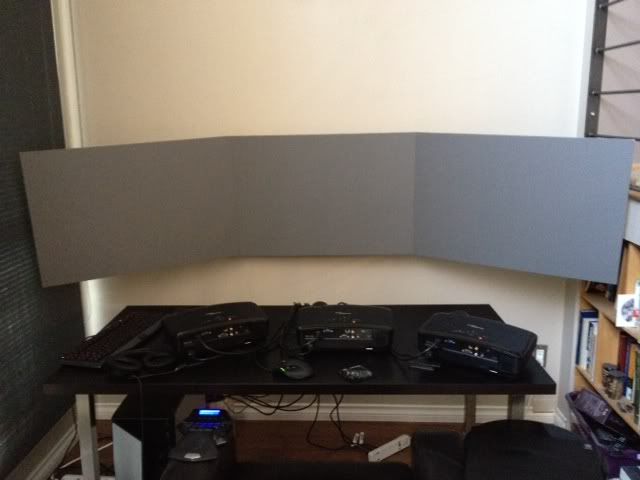
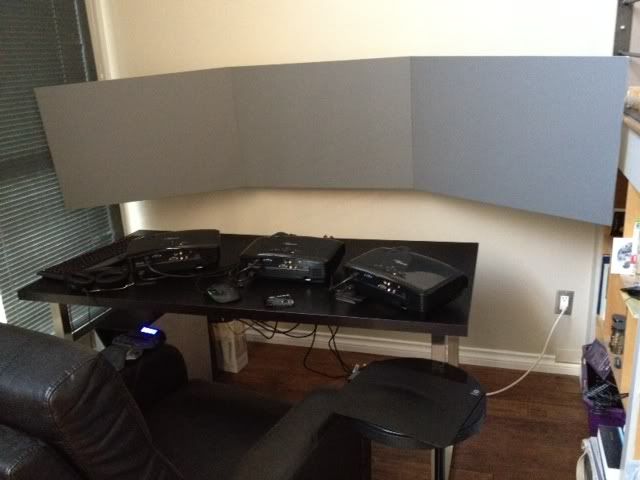
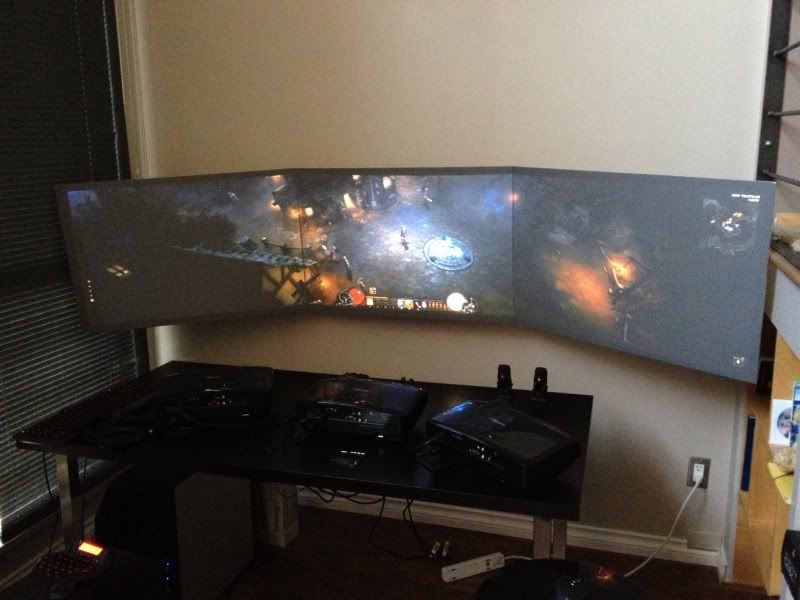
Final coat of paint is on the screens. I'm happy enough with it now that I'm not going to mess with it further (some wire management but that's it). I ended up removing all of the Screen Goo paint and simply going with a flat neutral grey paint. Thanks go out to the guys at Home Theatre Shack for setting me on the right path as far as the screen goes.
Here are some pics in full daylight with the blinds in the room open so that you can actually see the setup. You maybe can't tell from the pics but it's completely usable like this and if you close the blinds it's perfect (and LOL awesome).
Also want to thank everyone at the WSGF community for help with Eyefinity, projector knowledge, game fixes and the developer lobbying that's going on. This place is great :)
A few reasons:
1) I use this setup for general computing and edge-blending/screen warping for the desktop isn't enabled in the consumer versions of the more popular software packages (at least it wasn't when I started down this path, perhaps that's changed now). Most of them only work on fullscreen OpenGL or DirectX applications. They also end up with other weird problems for desktop use (Ex: mouse pointers not being redrawn by the application and so behave strangely in combination with the warping software).
2) projector optics are designed to create an in-focus image on a flat screen. Projecting onto a curved surface results in image "softness" in at least some parts of the picture. A custom lens can be made to project onto a curved surface but that's crazy $$$ and my projectors don't support aftermarket lenses anyways. The out-of-focus parts of the curved screen probably wouldn't be noticed in games but as I said I use this for more than games.
3) The flat screen assembly was super easy to build. 3 Sintra boards, 3 adjustable VESA mounts, plywood, glue and some paint. I designed a curved screen for this space as well but constructing it was going to be complex or expensive or both.
4) Lack of experience with the pre-warping software itself. If I had BHawthorne living down the street it would be different but I don't really want to be at the mercy of random internet people no matter how helpful they are. :)
Beautiful setup. I use a G13 myself, defiantly helpful when it isn't practical to have a full size keyboard in front of you. What are your specs?
Azza Fusion 4000 Liquid Cooled Full/Mini-ITX Tower - AMD Ryzen 1700x CPU - Tt Water 3.0 Ultimate CPU Cooler - ASUS ROG Crosshair VI Extreme - 2x EVGA GTX 980 in SLI - Geil 16GB - Klipsch 5.1 THX Speakers - Vertex 4 128GB SSD, Sandisk 256GB SSD, Samsung 512GB 850 PRO SSD, WD Black 320GB & Two times Toshiba 5TB (one for Games and the other for Storage) - Logitech G502 - Corsair K65 RGB - Logitech G13 - Win10 Pro 64bit - 2-over-1 Viewsonic VA2448M 24" (2x 1920x1080 Secondary) & Samsung CHG90 Series Curved 49" (3840x1080) - Ergotech Monitor Stand - Shout out to WSGF for the upgrade on my stand!
the screens look too small for projectors.. why not go with lcd displays instead of burning bulbs? Also how to you work on that desk ? from 3 feet away? Isnt that too far away. How about put the projectors sideways and use that whole wall can that be done?
i would put that setup on a big ass wall.
edit-- ok i get it you made this so you would have no bezels ok i like. question now how to you work there with projectors there or are you going to hang them above? still think go bigger though. why not all three portrait mode? sideways using the wall space better or can projectors do that? sounds like you did some homework.
the screens look too small for projectors.. why not go with lcd displays instead of burning bulbs? Also how to you work on that desk ? from 3 feet away? Isnt that too far away. How about put the projectors sideways and use that whole wall can that be done?
i would put that setup on a big ass wall.
edit-- ok i get it you made this so you would have no bezels ok i like. question now how to you work there with projectors there or are you going to hang them above? still think go bigger though. why not all three portrait mode? sideways using the wall space better or can projectors do that? sounds like you did some homework.
Ok for everyone's questions ...
Each screen is equivalent to about a 36" 16:10 monitor. So it's about 30"x19". I sit about 66" back from the screens. I wanted a triple landscape setup because I was really after the increased field of view in FPS games. Going bigger (or sitting closer) results in not being able to "take it all in" so to speak. A triple portrait setup is nearly impossible with these projectors in a front projection setup. There is no horizontal lens shift on these things. Mounting the projectors above
Projecting onto a "big ass wall" isn't in the cards because I only had this small corner to work with. Sitting closer to a larger screen would be more immersive but immersion doesn't necessarily mean better from a competitive FPS perspective. This thing is about as good as it gets for BC2 or BF3 ... it also works well for general desktop use. I was permanently banned from a BC2 server this past weekend by a group of admins that were convinced I was cheating. The 120Hz projectors and the 7970 video card have definitely improved my game as compared to the triple LCD setup with a 5870 that I was running previously. The lower resolution means that I can come closer to maintaining 120fps all the time. I'm just guessing here but I don't think that lame-ass aimbotters or wall-hackers spend 3k on their video system to gain an advantage that's completely outdone by $10/month(?) spent on their hack. Usually I take being called a hacker as a compliment but getting perma-banned from a server I liked playing on was pretty annoying but whatever, I digress.
As for the rest my rig:
Core i5 750 overclocked to 3.?GHz (I forget what exactly)
XFX 7970 BEDD overclocked to the max allowed by CCC
4GB RAM (I forget what it's running at)
older Intel SSD 120GB
2 500GB hard drives in RAID 0
ASUS Xonar sound card with Sennheiser PC350 headphones
Logitech G13, G110, G700
One of the things I've not put too much time into with my experimentation is screen paints. This would be something I'm interested in learning more about. I know about Goo Paint but have no real experience with it. My focus has always been with the software side of things more than the screen surface. Sort of silly I've not experimented with screen paints more by now when I think about it because really big projections need high gain or high contrast to make up for the projection size.
One of the things I've not put too much time into with my experimentation is screen paints. This would be something I'm interested in learning more about. I know about Goo Paint but have no real experience with it. My focus has always been with the software side of things more than the screen surface. Sort of silly I've not experimented with screen paints more by now when I think about it because really big projections need high gain or high contrast to make up for the projection size.
If you're looking into DIY screens then Home Theatre Shack has an awesome forum. They also have an in-house paint formula called Black Widow. It's a mixture of beige paint and an aluminum base air brush paint. They've done all the color analysis for it to make sure that it comes out neutral grey with a bit of gain to it.
I can't recommend Screen Goo. My experience with it was pretty terrible. The first bottle of finish coat I got was completely dried out - it had the consistency of a sponge. The second one that replaced it (I paid for the shipping) rolled on like tar and made the screen so textured that it looked horrible.
that is absolutely uber sicktastic and i am totally jealous. personally don't think i could afford to (or want to even if i could) take up that much space anywhere in my place, but man is that cool.
rdqlus wrote:I was permanently banned from a BC2 server this past weekend by a group of admins that were convinced I was cheating......I'm just guessing here but I don't think that lame-ass aimbotters or wall-hackers spend 3k on their video system to gain an advantage that's completely outdone by $10/month(?) spent on their hack. Usually I take being called a hacker as a compliment but getting perma-banned from a server I liked playing on was pretty annoying but whatever, I digress.
I know that feeling. Just because I spent more money on being able to see the enemy doesnt mean I should be labled as a cheat!
Rock on brother!
Gaming Rig: Intel i7-5820K 3.30GHz::Asus X99 Deluxe II::Corsair Dom 16GB DDR4 2133MHz::2xATI HD7950 3GB::120GB SSD+3TB+2TB::Samsung Syncmaster SA350 x3::Win10 Pro x64 Media Centre: AMD Phenom II X4 965BE::Asus M4A87TD::Corsair Dom 8GB DDR3 1600MHz::ATI HD4890::120GB SSD::Acer H6518BD Projector::Win10 Pro x64