How to mount a stripped-down LCD (Asus VW246H) ?

Video cards, monitors, CPUs and the like
Post Reply
Seraph
Posts: 15
Joined: 10 Mar 2011, 02:55

How to mount a stripped-down LCD (Asus VW246H) ?

Post by Seraph »

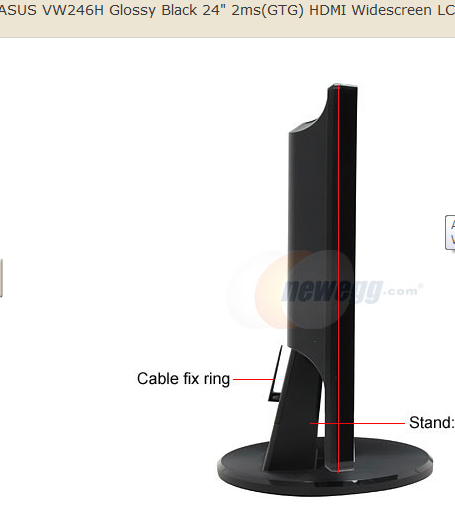
So I've got these 3 great Asus 24" monitors - VW246H.

I took one apart to see what it looked like and brainstorm options for mounting it. It seems the VESA mounting is built into the outer shell, not the panel housing itself.

Pics here:


I was planning to get an Ergotech Triple Monitor Stand (100-D16-B03) to mount these puppies on after I removed the casing, is this possible? I don't see any screw holes. O_o
Would I need to buy VESA mounting brackets and gorilla glue them on?

Any ideas or suggestions would be greatly appreciated. Removing the outer casing cuts the bezel size in half, so I'd really like to be able to do it.

Thanks in advance!

User avatar
suiken_2mieu
Insiders
Insiders
Posts: 2351
Joined: 20 Aug 2009, 04:20
Location: Virginia
Contact:

How about the backs? Can they

Post by suiken_2mieu »

How about the backs? Can they go on the back and not make the bezels any bigger?
System Core: | Intel Core i5-2500K + ASUS P8Z68-V + 16GB Corsair XMS3 DDR3 1333 MHz | Win7 x64 | MSI R7970 Lightning 3GB [1105/1400] |
Display: | 3 x Dell Ultrasharp 3007WFP-HC @ 7680x1600 | Dell u3011 |
Seraph
Posts: 15
Joined: 10 Mar 2011, 02:55

suiken_2mieu wrote:How about

Post by Seraph »

How about the backs? Can they go on the back and not make the bezels any bigger?

hmmmm.. the back part of the case comes out just as far as the front, see this pic:


However, it does seem possible that having them seating in just the rear casing would allow enough room... Thinking about it, I believe I'd be able to get the half the size benefit this way, by lining them up so that the back casing of the two side monitors overlaps behind the center monitor. I wouldn't get the full benefit because the center monitor bezel would still be full size, unless I physically cut the plastic away. Anyway, I'd much prefer to have them mounted than have a jerry-rigged solution.
TheUnk
Posts: 49
Joined: 22 Aug 2007, 21:04

I have a similar problem. I

Post by TheUnk »

I have a similar problem. I too removed the horribly oversized casing which cut the bezel size in half.. For now I was able to use binder clips to hold it onto the back casing and use the original stands as most of the bezel was on the front part. Mine have no mounting holes at all.

Might just some some of that strong adhesive plastic velcro type tape I see at target. It's not velcro but rather plastic hooks and is really strong.. They are LED panels so they are really light anyways.
Seraph
Posts: 15
Joined: 10 Mar 2011, 02:55

Binder clips... interesting..

Post by Seraph »

Binder clips... interesting.. would you mind posting a pic ?

Thanks
Jothay
Posts: 13
Joined: 06 Nov 2008, 06:33

With the backing coming out

Post by Jothay »

With the backing coming out all the way on the sides, how far does it also come forward? If it's not much, or just flush with the back then your /``` positioned setup should still work, just use the angles to your advantage, as much as you can.
darkproduce
Posts: 2
Joined: 19 Sep 2010, 13:02

Mounting of Monitors

Post by darkproduce »

Hi,

I stripped my 3 x samsungs 24 inchers and got a 10mm arcylic being fabricated (front frame and rear full piece with 2 pieces across the top and base) and used a sandwich approach to sandwich the panels and the power / inverter board housing inbetween the front / rear pieces and the base will support the panels in place.

Only down side of this is the angle for the 2 side monitors cannot be adjusted, which is ok for me as I prefer a clean table-top with the monitors flushing to the wall as close as possible.

Setiawan
Posts: 2
Joined: 31 Aug 2011, 11:09

If you're ballsy enough, you

Post by Setiawan »

If you're ballsy enough, you can drill holes into it. That's what I did and it worked a treat :)

Results
lololoooool
kamel
Posts: 1
Joined: 04 Sep 2011, 08:41

You're lucky your monitor

Post by kamel »

You're lucky your monitor internals are all one piece. My three Fujitsu FA-24LCM-WB's came aprat into three seperate electronic bits... made mounting them in a seperate case a bit tough. Worth it though. Bezels went from two inches to less than an inch.

Before [with case bezels overlapped behind the center one]


After
Post Reply

Who is online

Users browsing this forum: No registered users and 7 guests