
Hi,
I have a Matrox TripleHead2Go Digital Edition, and three 17" LCDS.. Eech one of these monitors works perfectly at their default resolution 1440x900, but when I connect them to the TH2Go I can't get them all to work at 4320x900 (1440x900 each), it only shows two monitors working. instead, or it forces me to show 3840x1024 (1280x1024 on each) which looks very bad and widened.
I hope you can help me find a way to force it to show 4320x900. I looked everywhere and couldn't find any way to even make a custom resolution.
Thanks in advance!
Shell
PS: My graphic card is ATI Radeon HD 6970, using a DVI to VGA to plug the TH2Go into it.
2880x900 working but not 4320x900, how to force it?
-
suiken_2mieu

- Insiders

- Posts: 2351
- Joined: 20 Aug 2009, 04:20
- Location: Virginia
- Contact:
Well first thing you need to
Well first thing you need to do is use a Dual-Link DVI cable. 4320x900@60Hz is too large for VGA.
Next after that, you may need to follow this: ATI / AMD Custom Resolutions (Non-EDID Method)
Next after that, you may need to follow this: ATI / AMD Custom Resolutions (Non-EDID Method)
System Core: | Intel Core i5-2500K + ASUS P8Z68-V + 16GB Corsair XMS3 DDR3 1333 MHz | Win7 x64 | MSI R7970 Lightning 3GB [1105/1400] |
Display: | 3 x Dell Ultrasharp 3007WFP-HC @ 7680x1600 | Dell u3011 |
Display: | 3 x Dell Ultrasharp 3007WFP-HC @ 7680x1600 | Dell u3011 |
Dual-Link DVI cable..
thanks for your reply.
About the Dual-Link DVI cable how do I use it? from the monitors to TH2Go? or from TH2Go to my graphic card?
that's what I'm using right now:


About the Dual-Link DVI cable how do I use it? from the monitors to TH2Go? or from TH2Go to my graphic card?
that's what I'm using right now:
GXM Quick Setup
Also when I start Matrox GXM quick setup I get this :

the second monitor is not connected? even though it's working well on 1440x900 alone, and working fine on 3840x1024 combined with the other two monitors.
the second monitor is not connected? even though it's working well on 1440x900 alone, and working fine on 3840x1024 combined with the other two monitors.
I apologize for asking too
I apologize for asking too much, but about the dual dvi cable, is it a cable that has dvi (24) in both ends? and if so.. how do I use it; should I leave the vga alone and use the dvi only? seeing that TH2Go has DVI and VGA ports, and my graphics card has two DVI ports. or am i going to use both vga and dvi ports?
I was able to get it to work
I was able to get it to work by using two monitors through TH2Go, and the third monitor working seperately using a (mini-display to vga to caple) and ended with two screans, one (2 monitors, 1440x900 eaco) and the other (the seperated thid monitor, 1440x900)
but the third screen which is seen as an extended display, doesn't show taskbar, and doesn't work with games anymore.
but the third screen which is seen as an extended display, doesn't show taskbar, and doesn't work with games anymore.
-
suiken_2mieu
- Insiders
- Posts: 2351
- Joined: 20 Aug 2009, 04:20
- Location: Virginia
- Contact:
Okay, The Dual-Link DVI
Okay, The Dual-Link DVI cable goes from your video card to your TH2go.
Here's the pin out for it:
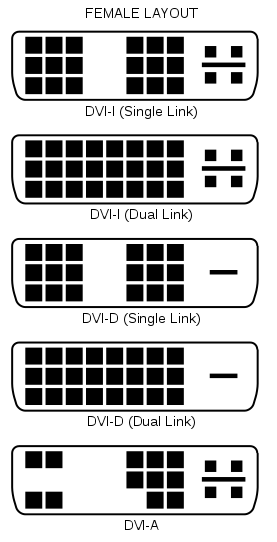
Using DVI to VGA adapters from the TH2go to the monitors should be fine as long as it's detecting you have all three monitors hooked up.
Also a rule of thumb, you should update your TH2go to the latest firmware and use the latest GXM Software.
EDIT: I might have been mistaken, if 3840x1024 works, so should 4320x900 (uses less bandwidth).
The thing to try would be making a custom resolution with that thread above. You also may want to test your VGA adapters.
If you can, use dvi connections through and through all your monitors.
Stock, no one has been able to get a bigger resolution than 3840x1024 on there TH2Go using an ATI card 5XXX series or newer.
But the custom resolution should do the trick. Hopefully anyway.
Here's the pin out for it:
Using DVI to VGA adapters from the TH2go to the monitors should be fine as long as it's detecting you have all three monitors hooked up.
Also a rule of thumb, you should update your TH2go to the latest firmware and use the latest GXM Software.
EDIT: I might have been mistaken, if 3840x1024 works, so should 4320x900 (uses less bandwidth).
The thing to try would be making a custom resolution with that thread above. You also may want to test your VGA adapters.
If you can, use dvi connections through and through all your monitors.
Stock, no one has been able to get a bigger resolution than 3840x1024 on there TH2Go using an ATI card 5XXX series or newer.
But the custom resolution should do the trick. Hopefully anyway.
System Core: | Intel Core i5-2500K + ASUS P8Z68-V + 16GB Corsair XMS3 DDR3 1333 MHz | Win7 x64 | MSI R7970 Lightning 3GB [1105/1400] |
Display: | 3 x Dell Ultrasharp 3007WFP-HC @ 7680x1600 | Dell u3011 |
Display: | 3 x Dell Ultrasharp 3007WFP-HC @ 7680x1600 | Dell u3011 |
Thank you suiken_2mieu, I
Thank you suiken_2mieu, I really appreciate it.
I tried dual dvi cable, it looks like the on in the picture ( DVI-I dual link) but the monitors were flickering
But I found another solution, hooking two monitors to theTH2GO into the dvi input of my card with 2880x900 resolution. And hooking the third monitor through the mini-display port, making it show as an extended second monitor with 1440x900 resolution. Which ends with 4320x900 resolution.
But the problem is that when I play games on fullscreen, they either show on the first monitor 2880x900 or the second 1440x900. can't get them to combine both monitors and show 4320x900 fullscreen.
I tried dual dvi cable, it looks like the on in the picture ( DVI-I dual link) but the monitors were flickering
But I found another solution, hooking two monitors to theTH2GO into the dvi input of my card with 2880x900 resolution. And hooking the third monitor through the mini-display port, making it show as an extended second monitor with 1440x900 resolution. Which ends with 4320x900 resolution.
But the problem is that when I play games on fullscreen, they either show on the first monitor 2880x900 or the second 1440x900. can't get them to combine both monitors and show 4320x900 fullscreen.
Who is online
Users browsing this forum: No registered users and 3 guests