
Hello this is my first post on the forums so bear with me and thank you for any help.
Please read my post thoroughly, this is not a common issue as all my monitors are IDENTICAL.
I recently bought two Gainward GTX-460 GS-GLH graphics cards to run in SLI on my setup with 3 matching PC monitors, all being Samsung 226BW (22" / 60hz / 1680x1050) monitors. Installation for the cards worked fine and I have the most recent drivers from Nvidia (260.99) for my cards. I am able to run all monitors in 1680x1050 when NOT running SLI-Surround. When I turn on Surround though, that's when things get messy. The Nvidia control panel only offers me 3840x1024 resolution when spanning the image to all monitors, untop of that the images are 'boxed' in the middle of the monitors leaving black bars on each side.
The full specs for my computer are:
_____
EVGA Nvidia 680i 3-way-SLI
Intel Core 2 Duo E6400; 2,13Ghz @ 3,62Ghz (overclock)
4x Kingston HyperX 1024MB / 1033Mhz DDR2 RAM
2x Gainward GTX-460 'GLH' 1024MB / 800Mhz/4000Mhz - 900Mhz/4400Mhz (same overclock for both cards)
_____
I have tried using previous drivers, and the drivers which came with the gainward CD's. I have disabled overclocking too and mixed and matched different configurations with no results. All monitors WORK in 1680x1050 and I was able to use 5040x1050 on my previous GTX260 + Accessory card for third DVI-Out to run games on Softth. So the monitors are fully functional.
If I left any information out that may be valid, please point it out to me
Thank you for these great forums, they have helped me get past many troubles over the past years.
Nvidia surround not working at 5040x1050
-
suiken_2mieu

- Insiders

- Posts: 2351
- Joined: 20 Aug 2009, 04:20
- Location: Virginia
- Contact:
Re: Nvidia surround not working at 5040x1050
Oh that weird. I can probably fix you issue with the pillar boxed images.
There's two things that could be happening.
1. GPU scaling: Go into control panel and turn it to fill the whole screen.
2. Monitor Scaling: Where your monitor is scaling it automatically. Go into the OSD and turn it to fill.
I don't use nVidia Surround, so I'm not sure how to fix those.
There's two things that could be happening.
1. GPU scaling: Go into control panel and turn it to fill the whole screen.
2. Monitor Scaling: Where your monitor is scaling it automatically. Go into the OSD and turn it to fill.
I don't use nVidia Surround, so I'm not sure how to fix those.
System Core: | Intel Core i5-2500K + ASUS P8Z68-V + 16GB Corsair XMS3 DDR3 1333 MHz | Win7 x64 | MSI R7970 Lightning 3GB [1105/1400] |
Display: | 3 x Dell Ultrasharp 3007WFP-HC @ 7680x1600 | Dell u3011 |
Display: | 3 x Dell Ultrasharp 3007WFP-HC @ 7680x1600 | Dell u3011 |
-
stangflyer
- Posts: 280
- Joined: 10 May 2009, 19:46
Re: Nvidia surround not working at 5040x1050
That is weird! I had to get matching monitors to get 5040x1050 to work. I would try a complete reinstall of the drivers first. Im on 260.99.
I had to reinstall and reboot when going from 3 diff monitors to three identical monitors.
Windows does not let you go 5040x1050 in display settings??
Good luck!
I had to reinstall and reboot when going from 3 diff monitors to three identical monitors.
Windows does not let you go 5040x1050 in display settings??
Good luck!
-
FinnishSpartan
- Posts: 9
- Joined: 16 Dec 2010, 07:35
Re: Nvidia surround not working at 5040x1050
I got the scaling to work correctly earlier, but I'm still restricted to 3840x1024.
I contacted Nvidia support but appearantly they are out for the holidays and I would most likely get a reply in the new years.
So if anyone has any ideas on how to possible fix this, please post by.
I will update this thread if I make any progress towards a solution.
I contacted Nvidia support but appearantly they are out for the holidays and I would most likely get a reply in the new years.
So if anyone has any ideas on how to possible fix this, please post by.
I will update this thread if I make any progress towards a solution.
-
scavvenjahh

- Editors

- Posts: 3424
- Joined: 06 Mar 2008, 17:20
Re: Nvidia surround not working at 5040x1050
680i chipset and GF10x cards !? That means a state-of-the-art SLI system on PCI-E 1.0 ports :?
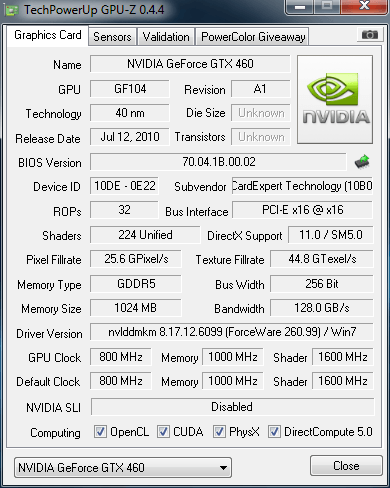
Can you post a GPU-Z screenshot of one of the cards ?
Can you post a GPU-Z screenshot of one of the cards ?
-
FinnishSpartan
- Posts: 9
- Joined: 16 Dec 2010, 07:35
Re: Nvidia surround not working at 5040x1050
680i chipset and GF10x cards !? That means a state-of-the-art SLI system on PCI-E 1.0 ports :?
Can you post a GPU-Z screenshot of one of the cards ?
Here is an image of the GPU-z setup:
-
scavvenjahh
- Editors
- Posts: 3424
- Joined: 06 Mar 2008, 17:20
Re: Nvidia surround not working at 5040x1050
Yeah, that's PCI-E 1.0 alright. Not that I have any reason to be sure that that's the problem... but with SLI and Surround involved, who knows ? The lower bandwidth and power draw *may* become an issue beyond a certain pixel count.
Hopefully Nvidia support will have more info for you :oops:
Hopefully Nvidia support will have more info for you :oops:
Re: Nvidia surround not working at 5040x1050
Not sure if this will help with your particular situation but have you tried disabling bezel compensation? I've seen that work in multi monitor gaming.
-
FinnishSpartan
- Posts: 9
- Joined: 16 Dec 2010, 07:35
Re: Nvidia surround not working at 5040x1050
Not sure if this will help with your particular situation but have you tried disabling bezel compensation? I've seen that work in multi monitor gaming.
Yeah, tried that. Not that much of a fan with Bezel so I had it off the first time I ran surround.
This problem still persists, so far no decent help from Nvidia.
I'm trying to exchange these cards to a single GTX-580 at the store I bought them from. And run my 3 monitors using SofTh similiar to my GTX 260 setup earlier.
Re: Nvidia surround not working at 5040x1050
Go get the 266.58 WHQL HERE: http://www.nvidia.com/Download/index.aspx?lang=en-us
Then report back.
Then report back.
https://t.me/pump_upp
-
FinnishSpartan
- Posts: 9
- Joined: 16 Dec 2010, 07:35
Re: Nvidia surround not working at 5040x1050
Go get the 266.58 WHQL HERE: http://www.nvidia.com/Download/index.aspx?lang=en-us
Then report back.
The latest driver update did not solve my problem :(
Nice to see an update from Nvidia though.
I noticed one new thing about my monitors, in the "information" tab on my monitors setup. My third monitor (plugged into my 2nd graphics card). Is running at " 65.2KHz / 60Hz / NP " Whilst my two other monitors are running in " 64.6KHz / 60Hz / PN "
Could this mean anything? I know what the first two numbers correspond to, but I have no clue what "NP" and "PN" mean.
-
FinnishSpartan
- Posts: 9
- Joined: 16 Dec 2010, 07:35
Re: Nvidia surround not working at 5040x1050
I have gathered new information, if it is of any help:
I upgraded to a EVGA 780i SLI "FTW" motherboard (which by irony is not winning me anything).
There has been no change to my issue, I'm still experiencing the problem stated in the first post and can only achieve a resolution of 3840x1024 (whilst my monitors go up to 5040x1050).
So now both of my cards are running from PCI-E 2.0 slots.
Nvidia has not responded to my emails for a while now, the store I bought the cards from will check for any defects and maybe give me a refund. We will see...
However I'm getting a beast overclock on my old cheap E6400, now it's running at 3,8Ghz idling at 38-39*c
However I'm going to purchase an E8600 hoping to reach 4,5Ghz. Spire Thermax Eclipse II = An amazing cooler, highly reccomended for anyone (the 2 fans did not fit my case :( but the 140mm fan at the top is practically attached to the heatsink, so you could consider it as 2 fans :) and I attached the fan that I had left over to the top front of my case (below the DVD drive).
I upgraded to a EVGA 780i SLI "FTW" motherboard (which by irony is not winning me anything).
There has been no change to my issue, I'm still experiencing the problem stated in the first post and can only achieve a resolution of 3840x1024 (whilst my monitors go up to 5040x1050).
So now both of my cards are running from PCI-E 2.0 slots.
Nvidia has not responded to my emails for a while now, the store I bought the cards from will check for any defects and maybe give me a refund. We will see...
However I'm getting a beast overclock on my old cheap E6400, now it's running at 3,8Ghz idling at 38-39*c
However I'm going to purchase an E8600 hoping to reach 4,5Ghz. Spire Thermax Eclipse II = An amazing cooler, highly reccomended for anyone (the 2 fans did not fit my case :( but the 140mm fan at the top is practically attached to the heatsink, so you could consider it as 2 fans :) and I attached the fan that I had left over to the top front of my case (below the DVD drive).
-
FinnishSpartan
- Posts: 9
- Joined: 16 Dec 2010, 07:35
Re: Nvidia surround not working at 5040x1050
Hoo-ray! After 2 months of dilligent and hard work, I got my setup working! I bought a 4th Samsung 226bw monitor, and tested it by replacing each one of my previous monitors one by one. Now, I found a "faulty" monitor amongst the three identical monitors I had, replaced it. And got the 5040x1050 working!
I dont know what could have been wrong, but the fault was in the monitors. So if anyone else is experiencing a similiar problem. Try to lend another monitor from somewhere to see if that is the problem.
This was a really odd and difficult troubleshoot, as I would never suspect 3 IDENTICAL monitors to have interferance with eachother. I had run pretty much every other scenario through and this was my last option, lucky for me someone was selling a cheap used monitor. So I wen ahead and bought it.
In short, all monitors worked by themselves, and at the same time through Windows in 5040x1050, but failed to work on that resolution through Nvidia surround. They worked trough SoftTH as well.
I would like to thank everyone who helped me, although I did not find an answer here, it was nice to see that some people had my back and tried to troubleshoot the problem with me. I will do my best to help you guys too if there are any problems I can help with. These seem to be great forums, thank you for that =)
I dont know what could have been wrong, but the fault was in the monitors. So if anyone else is experiencing a similiar problem. Try to lend another monitor from somewhere to see if that is the problem.
This was a really odd and difficult troubleshoot, as I would never suspect 3 IDENTICAL monitors to have interferance with eachother. I had run pretty much every other scenario through and this was my last option, lucky for me someone was selling a cheap used monitor. So I wen ahead and bought it.
In short, all monitors worked by themselves, and at the same time through Windows in 5040x1050, but failed to work on that resolution through Nvidia surround. They worked trough SoftTH as well.
I would like to thank everyone who helped me, although I did not find an answer here, it was nice to see that some people had my back and tried to troubleshoot the problem with me. I will do my best to help you guys too if there are any problems I can help with. These seem to be great forums, thank you for that =)
-
ReverendUk
- Posts: 10
- Joined: 27 Mar 2011, 01:02
5040 x 1050 rez
Ok I have added a post on the forum here which explains how to achieve the resolution you are after using software fix of the EDID settings on your screens.
Just check my post history for the guide and please follow it to the letter as you can cause problems should you mess it up (but nothing that cannot be rectified)
Just check my post history for the guide and please follow it to the letter as you can cause problems should you mess it up (but nothing that cannot be rectified)
Who is online
Users browsing this forum: No registered users and 5 guests