
Hello,
This probably has been brought up in this forum.
The 5870 eyefinity edition comes with 6 displayport outputs.
If we don't have Displayport on the monitor, do we still need an active dvi-DP adapter for the third monitor. How would it work if there are 6?
My second question is, if the dvi-dp adapter is required, is the blanking/flickering/notwaking-up issue happening with those eyefinity 6 cards?
Thanks,
Karim
Two questions regarding 5870 Eyefinity 6 edition card
-
suiken_2mieu

- Insiders

- Posts: 2351
- Joined: 20 Aug 2009, 04:20
- Location: Virginia
- Contact:
Re: Two questions regarding 5870 Eyefinity 6 edition card
Okay for the first two DVI monitors, you can use passive DP->DVI adapter that come with the card.
Anything after that you need DP->VGA (Active / Cheaper) or DP->DVI (Active / Expensive)
Have had no issues with DP->VGA adapters, but I haven't used Active DVI adapters yet. But I assume it will still have the same issues as the other cards. I think for now the best bet is the Apple MiniDP->Dual Link DVI adapters. It seems they have the best results with the 10.4 drivers or later. The Accel / Bizlink / Dell / Sapphire Adapters, which are all the same seem to choke up anything after 10.3.
Anything after that you need DP->VGA (Active / Cheaper) or DP->DVI (Active / Expensive)
Have had no issues with DP->VGA adapters, but I haven't used Active DVI adapters yet. But I assume it will still have the same issues as the other cards. I think for now the best bet is the Apple MiniDP->Dual Link DVI adapters. It seems they have the best results with the 10.4 drivers or later. The Accel / Bizlink / Dell / Sapphire Adapters, which are all the same seem to choke up anything after 10.3.
System Core: | Intel Core i5-2500K + ASUS P8Z68-V + 16GB Corsair XMS3 DDR3 1333 MHz | Win7 x64 | MSI R7970 Lightning 3GB [1105/1400] |
Display: | 3 x Dell Ultrasharp 3007WFP-HC @ 7680x1600 | Dell u3011 |
Display: | 3 x Dell Ultrasharp 3007WFP-HC @ 7680x1600 | Dell u3011 |


Re: Two questions regarding 5870 Eyefinity 6 edition card
Okay for the first two DVI monitors, you can use passive DP->DVI adapter that come with the card.
Anything after that you need DP->VGA (Active / Cheaper) or DP->DVI (Active / Expensive)
Have had no issues with DP->VGA adapters, but I haven't used Active DVI adapters yet. But I assume it will still have the same issues as the other cards. I think for now the best bet is the Apple MiniDP->Dual Link DVI adapters. It seems they have the best results with the 10.4 drivers or later. The Accel / Bizlink / Dell / Sapphire Adapters, which are all the same seem to choke up anything after 10.3.
+1, beat me to it ;)
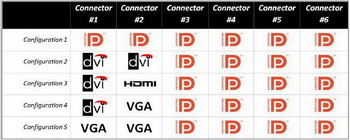
Essentially you can have the below configurations, using active adaptors to convert from DP to DVI/VGA/HDMI
| Gigabyte X79S-UP5-WiFi Skt2011 | i7 4820k @4.4GHz Watercooled (Ivy Bridge-E) | Corsair Vengence 32GB @2133MHz 11-11-11-27 2T Quad-Channel (8x4GB) | AMD R9-Fury-X 4GB @1140/505MHz + EKWB Watercooled | 256GB Crucial MX200 SSD | 8x 1TB Samsung F3 SATA-II | Corsair 850W TX PSU | 3x Dell S2209W 22"wide TFT's (5760x1080res) | Logitech Z-5400 5.1ch speakers | Win7 Ultimate x64 |
-
suiken_2mieu
- Insiders
- Posts: 2351
- Joined: 20 Aug 2009, 04:20
- Location: Virginia
- Contact:
Re: Two questions regarding 5870 Eyefinity 6 edition card
[quote]Okay for the first two DVI monitors, you can use passive DP->DVI adapter that come with the card.
Anything after that you need DP->VGA (Active / Cheaper) or DP->DVI (Active / Expensive)
Have had no issues with DP->VGA adapters, but I haven't used Active DVI adapters yet. But I assume it will still have the same issues as the other cards. I think for now the best bet is the Apple MiniDP->Dual Link DVI adapters. It seems they have the best results with the 10.4 drivers or later. The Accel / Bizlink / Dell / Sapphire Adapters, which are all the same seem to choke up anything after 10.3.
+1, beat me to it ;)
Essentially you can have the below configurations, using active adaptors to convert from DP to DVI/VGA/HDMI
I like the chart, but it's lying. Because when I did the 5x1 I have VGA,VGA,DVI,DVI,VGA as my setup. :P Unless those VGA adapters on that chart are passive (apple makes them, because they have internal clocks on their GFX Chips / Cards)
System Core: | Intel Core i5-2500K + ASUS P8Z68-V + 16GB Corsair XMS3 DDR3 1333 MHz | Win7 x64 | MSI R7970 Lightning 3GB [1105/1400] |
Display: | 3 x Dell Ultrasharp 3007WFP-HC @ 7680x1600 | Dell u3011 |
Display: | 3 x Dell Ultrasharp 3007WFP-HC @ 7680x1600 | Dell u3011 |
Re: Two questions regarding 5870 Eyefinity 6 edition card
Just to clarify the chart is not really lying, but it is stating what you can do without the need for any active adaptors. :)
Then using active adaptors to convert from the remaning DP ports to DVI/VGA/HDMI
Then using active adaptors to convert from the remaning DP ports to DVI/VGA/HDMI
| Gigabyte X79S-UP5-WiFi Skt2011 | i7 4820k @4.4GHz Watercooled (Ivy Bridge-E) | Corsair Vengence 32GB @2133MHz 11-11-11-27 2T Quad-Channel (8x4GB) | AMD R9-Fury-X 4GB @1140/505MHz + EKWB Watercooled | 256GB Crucial MX200 SSD | 8x 1TB Samsung F3 SATA-II | Corsair 850W TX PSU | 3x Dell S2209W 22"wide TFT's (5760x1080res) | Logitech Z-5400 5.1ch speakers | Win7 Ultimate x64 |
Re: Two questions regarding 5870 Eyefinity 6 edition card
Thanks for info
Re: Two questions regarding 5870 Eyefinity 6 edition card
Okay for the first two DVI monitors, you can use passive DP->DVI adapter that come with the card.
Anything after that you need DP->VGA (Active / Cheaper) or DP->DVI (Active / Expensive)
Have had no issues with DP->VGA adapters, but I haven't used Active DVI adapters yet. But I assume it will still have the same issues as the other cards. I think for now the best bet is the Apple MiniDP->Dual Link DVI adapters. It seems they have the best results with the 10.4 drivers or later. The Accel / Bizlink / Dell / Sapphire Adapters, which are all the same seem to choke up anything after 10.3.
2x DVI
4x DP @ VGA
no-flicker or other problems
you have to use minimum 10.5 drivers (10.4 not support 6 screen 3x2 mode)
on 10.6 I have bsods every time when i start creating 3x2 group, 10.7 and 10.8, I didnt test yet
Who is online
Users browsing this forum: No registered users and 3 guests