
Hey,
just today my eyefinity setup properly today :rockout
have tried both orientations and i thought id share what i think so far
firstly..
I have to say having 3 samsung x 2048 x 1152p monitors in landscape great and im still trying to get my head round how one saphire 5850 can power this lot but in actuality i think i prefer portrait !
ok so the only problems with portrait are because a 23" 16:9 monitor isnt wide enough to allow for a decent center vision width before bezels but perhaps this is short term and il get used to it, but its absolutley amazing on FPS games !!! :shock:
I cant really use the 3 screens in landscape for browsing that well as they are so wide i have to physically turn :? I do prefer portrait for this.
i have noticed most new games work fine with this tech but i did an experiment on HalfLife 2 (CM mods) i played for a while and then turned off the flanking screens.. and ok so my mind was used to the 'idea' of outscreens and they were still physically there but i didnt really miss the peripheral vision at all, well perhaps a small ammount but most is wasted unless you sit really far back.. but then you lsoe your pixel pitch and you have to move forwarded for browsing after gaming.
Im going to stick with portrait for now i think its awesome :D its 'almost' the best of both worlds, ultra HD, extra 16:10 verticle FOV and easy to fit on the desk and browse + game.
a few questions though
1. my 5850 was running nearly all games including metro2033 on top settings and this was great, obviously i dont always want to run reduced image quality so is there an easy way to play on just 1 screen thus increasing frame rate?
2. when i run my single screen native res across three screens.. i.e same image on all screens when i enter a game and i dont change it to my custom eyefintiy res, am i effectivley rendering the same ammount of data or am i rendering 1 screen and the video dac is outputting to three monitors (hence no frame loss)
all in all eyefinity is worth the effort but you do have increased heat from computer,and monitors and that means higher fan speeds, not to mention you really need a second gfx card.
For now i can recommend portrait eyefinity as a 100% stepup from single screen gaming and landscape as a nice way to see huge compressed vertically wide vistas, that ultimatley you cant see all at once.
perfect setup ? 5 portrait monitors with no bezzel 8) im sure this will be possible next year with new screen tech out
i dont have a decent digicam but il try sort some pics :mrgreen:
hello new eyefinity user + some questions
Re: hello new eyefinity user + some questions
While I'm thrilled that you're enjoying your new setup, keep a couple things in mind:
As has been discussed before, when you use 3x1 Portrait you're not seeing much gain over having a large monitor. Allow me to explain... Let's say your monitors are 1920x1080. If you flip them in portrait they then become 1080x1920. If you have 3 of them you now have 3240x1920. This seems like a huge difference until you explore that 1920x1080 is a 16:9 ratio versus 3240x1920 is a 27:16 ratio (or divided down to 13.5:8 which is nearly identical). The size difference is there, however because you've increased both the vertical and horizontal FOV the aspect ratio is almost the same as what it was before, and you're seeing nearly no difference in FOV, simply a difference in the size of screen. Let's compare this to the difference better 3x1 Landscape. Let's say for a minute that you have those same 1920x1080 monitors and you put them into landscape. Your FOV has now been expanded from 1920x1080 all the way out to 5760x1080. The aspect ratio difference here shifts from 16:9 to 16:3. Keep this in mind when you make a decision. That's not to say that 3x1 Portrait is bad, and in fact several members on the forum here love 3x1 Portrait. However most of use eyefinity so that we can have peripheral vision, allowing us to be immersed in the game. Right now the majority of people tend to use 3x1 Landscape for this reason, and believe me, we're all praying for the day that ATI lets use 5x1 Portrait.
1) Yes you can put Metro 2033 on a single screen, and in fact most people were having problems with Metro 2033 in eyefinity. If I remember correctly there was some sort of mouse glitch that convinced me not to buy it.
2)When you clone screens at a native resolution, your graphics card itself is only rendering one image. There is a slight load increase on the card as it then has to send the image to all three monitors, however nowhere even remotely close to the load increase of rendering one massive eyefinity resolution. If I decide to play a game on 1 screen (which almost never happens) I simply turn off my outside two monitors so I don't have to look at the cloning.
As has been discussed before, when you use 3x1 Portrait you're not seeing much gain over having a large monitor. Allow me to explain... Let's say your monitors are 1920x1080. If you flip them in portrait they then become 1080x1920. If you have 3 of them you now have 3240x1920. This seems like a huge difference until you explore that 1920x1080 is a 16:9 ratio versus 3240x1920 is a 27:16 ratio (or divided down to 13.5:8 which is nearly identical). The size difference is there, however because you've increased both the vertical and horizontal FOV the aspect ratio is almost the same as what it was before, and you're seeing nearly no difference in FOV, simply a difference in the size of screen. Let's compare this to the difference better 3x1 Landscape. Let's say for a minute that you have those same 1920x1080 monitors and you put them into landscape. Your FOV has now been expanded from 1920x1080 all the way out to 5760x1080. The aspect ratio difference here shifts from 16:9 to 16:3. Keep this in mind when you make a decision. That's not to say that 3x1 Portrait is bad, and in fact several members on the forum here love 3x1 Portrait. However most of use eyefinity so that we can have peripheral vision, allowing us to be immersed in the game. Right now the majority of people tend to use 3x1 Landscape for this reason, and believe me, we're all praying for the day that ATI lets use 5x1 Portrait.
1) Yes you can put Metro 2033 on a single screen, and in fact most people were having problems with Metro 2033 in eyefinity. If I remember correctly there was some sort of mouse glitch that convinced me not to buy it.
2)When you clone screens at a native resolution, your graphics card itself is only rendering one image. There is a slight load increase on the card as it then has to send the image to all three monitors, however nowhere even remotely close to the load increase of rendering one massive eyefinity resolution. If I decide to play a game on 1 screen (which almost never happens) I simply turn off my outside two monitors so I don't have to look at the cloning.
Re: hello new eyefinity user + some questions
2)When you clone screens at a native resolution, your graphics card itself is only rendering one image. There is a slight load increase on the card as it then has to send the image to all three monitors, however nowhere even remotely close to the load increase of rendering one massive eyefinity resolution. If I decide to play a game on 1 screen (which almost never happens) I simply turn off my outside two monitors so I don't have to look at the cloning.
thanks for your replies BRPunk :D
iam back to landscape now, the novelty has worn a bit. im wondering if there is a decent way to be withing windows(7) and have firefox on left, steam on right and game in the middle?
cheers


Re: hello new eyefinity user + some questions
For that you'll need to "Extended" you second and third displays and designate your center as the Primary Display. Then you can fling the Steam to one side and Firefox to the other, and game on the center. Of course, this will mean your Eyefinitiy resolution will be disabled. But you can also just run your Eyefinity reslolution on a game, and size the other programs to fit on your side displays. Windows 7 is pretty good with remembering previous window size/position, even after swapping screen setups.
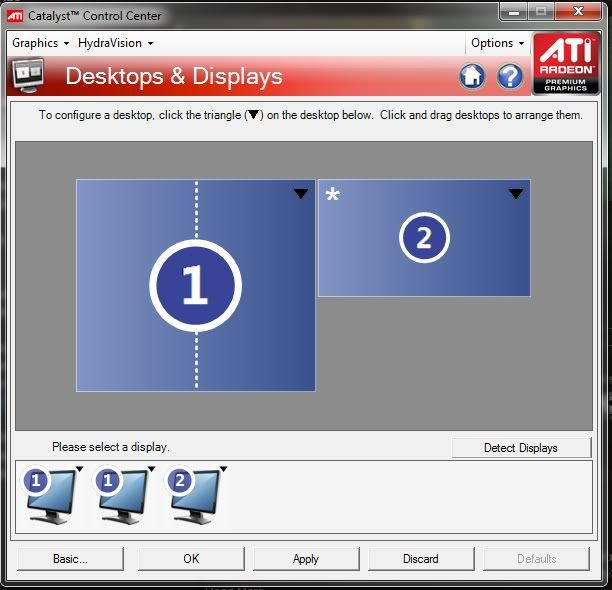
a tip for ya: if you decide to have all monitors as seperate displays (no Eyefintiy), I suggest staggering the edges so you can still move you mouse to the edge to bring up the taskbar, sidebars, etc. On mine, i have only about 10% of each display touching, as such:

The asterisk denotes the Primary display.
If course, once you have it set up, be sure to save the profile so you don't have to go through the fuss of lining them up again. A warning: with most ATI driver versions, I've ahd to load Extended profiles TWICE for it to align the screens properly. I've also noticed that a game or two that run like shit with the extended displays enabled, pictured above. Disabling the side display fixes it.
a tip for ya: if you decide to have all monitors as seperate displays (no Eyefintiy), I suggest staggering the edges so you can still move you mouse to the edge to bring up the taskbar, sidebars, etc. On mine, i have only about 10% of each display touching, as such:
The asterisk denotes the Primary display.
If course, once you have it set up, be sure to save the profile so you don't have to go through the fuss of lining them up again. A warning: with most ATI driver versions, I've ahd to load Extended profiles TWICE for it to align the screens properly. I've also noticed that a game or two that run like shit with the extended displays enabled, pictured above. Disabling the side display fixes it.
Re: hello new eyefinity user + some questions
thanks Abram thats really helpfull m8
at the moment i have two verticle 23" samsungs on my left for browsing and one horizontal 23" for gaming.. i can move the mouse across all three, the taskbar is fully on the gaming monitor and the other two are just open spaces for web browsers. when i launch a game both screens are turned into powersave and it just runs one game screen.
i havent decided wether to manipulate this setup yet as two full screen browser windows and one game is perfect, however i would like the ability to game live on the game screen and retain both browsers on the right withouth them going into sleep.
also havent tried a custom profile for 2x vert and 1 x horizontal as one big display ? i am using it this way in windows.. but is it theoretically possible to have it as one big display in my games also as an option???
thanks for your time and help, i may not have been totally sold on eyefinity for gaming just yet but as a solution for browsing,music + gaming i think its brilliant TBH.
cheers
at the moment i have two verticle 23" samsungs on my left for browsing and one horizontal 23" for gaming.. i can move the mouse across all three, the taskbar is fully on the gaming monitor and the other two are just open spaces for web browsers. when i launch a game both screens are turned into powersave and it just runs one game screen.
i havent decided wether to manipulate this setup yet as two full screen browser windows and one game is perfect, however i would like the ability to game live on the game screen and retain both browsers on the right withouth them going into sleep.
also havent tried a custom profile for 2x vert and 1 x horizontal as one big display ? i am using it this way in windows.. but is it theoretically possible to have it as one big display in my games also as an option???
thanks for your time and help, i may not have been totally sold on eyefinity for gaming just yet but as a solution for browsing,music + gaming i think its brilliant TBH.
cheers
Re: hello new eyefinity user + some questions
I think your other screens turn off because they are a different resolution from you gaming screen. I'm jsut guessing, because that's when happens on Nvidia cards. I've never had mis-matched resolutions on ATI. I suppose running your game in a window would fix it, if you can stomach having the title bar showing. When i start a game on my Extended setup, the side screes don't change. But then, i run every game on the same res as my desktop.
Officially, Eyefinity does not support mixing portrait and landscape modes, but I do believe there's a workaround thread somewhere in here..I'm off to bed, or I'd dig it up for you. Others will probably have better information than me. Like i said; I haven't had to deal with mixed display resolutions/orientation quirks.
Interesting setup you have. And Eyefinity gaming fucking rocks. The only downside is that it's soured single-screen gaming :?
Officially, Eyefinity does not support mixing portrait and landscape modes, but I do believe there's a workaround thread somewhere in here..I'm off to bed, or I'd dig it up for you. Others will probably have better information than me. Like i said; I haven't had to deal with mixed display resolutions/orientation quirks.
Interesting setup you have. And Eyefinity gaming fucking rocks. The only downside is that it's soured single-screen gaming :?
Re: hello new eyefinity user + some questions
i dont mind the screens sleeping at all tbh. just wondered if the former was possible.
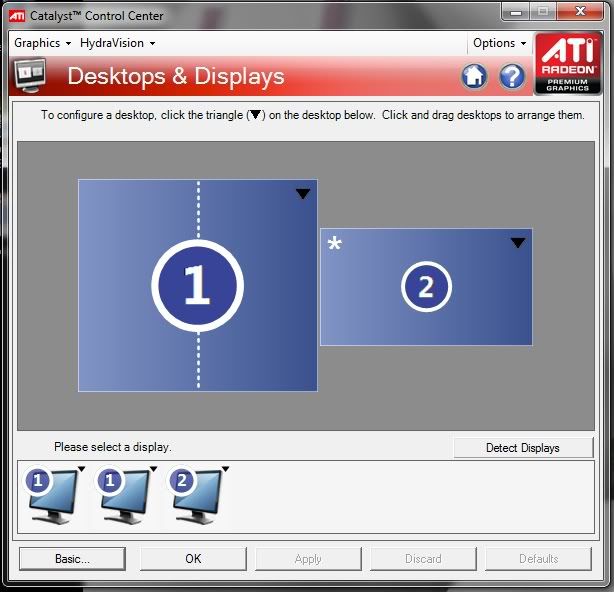
moved the screens to the middle so the overlap is perfect :)
i do like eyefinity gaming but the price you pay for the resolution is very high. i have to sit further back than my arms can reach the keyboard and mouse to appreciate the whole image or even 75% of it (and im not talking extreme periphery either)
at medium/low settings as the next gen i.e crysis2 arrive your effectivley at xbox360 image quality but with massive resolution and at this point i would prefer a single larger best graphcis screen rather than 3 wide lower graphics screens.
i will continue to fiddle and post on here. I will also keep moving my screens to landscape view to see if i can get on with the poorer graphics and maybe purchase another card? if im allowed given the large ammount of expense so far
:)
moved the screens to the middle so the overlap is perfect :)
i do like eyefinity gaming but the price you pay for the resolution is very high. i have to sit further back than my arms can reach the keyboard and mouse to appreciate the whole image or even 75% of it (and im not talking extreme periphery either)
at medium/low settings as the next gen i.e crysis2 arrive your effectivley at xbox360 image quality but with massive resolution and at this point i would prefer a single larger best graphcis screen rather than 3 wide lower graphics screens.
i will continue to fiddle and post on here. I will also keep moving my screens to landscape view to see if i can get on with the poorer graphics and maybe purchase another card? if im allowed given the large ammount of expense so far
:)
Re: hello new eyefinity user + some questions
Frankly I think you've entirely missed the point of eyefinity gaming, and as such I don't feel like there's much I or any of the other members can really say to influence your decision about your setup. I will however make one final comment:
Have you tried getting a bigger desk? I can see every inch of my monitors.
i do like eyefinity gaming but the price you pay for the resolution is very high. i have to sit further back than my arms can reach the keyboard and mouse to appreciate the whole image or even 75% of it (and im not talking extreme periphery either)
Have you tried getting a bigger desk? I can see every inch of my monitors.
Re: hello new eyefinity user + some questions
BRPunk have i offended you? :hide :doh
i know the point of eyefinity but anyone thinking of trying a setup should bear in minds some of the things ive said which are mostly true, if not all.. when maxing out your cpu and gfx card.
However
I have found heaven in a setup new layout :D
Im happy with it, very happy in fact ! it might not be traditional 'eyefinity' but its using the gpu power and all the connectors and display port adapter, also catalyst control setup and running just over twice as wide as my existing 16:9 screens
i have my screens
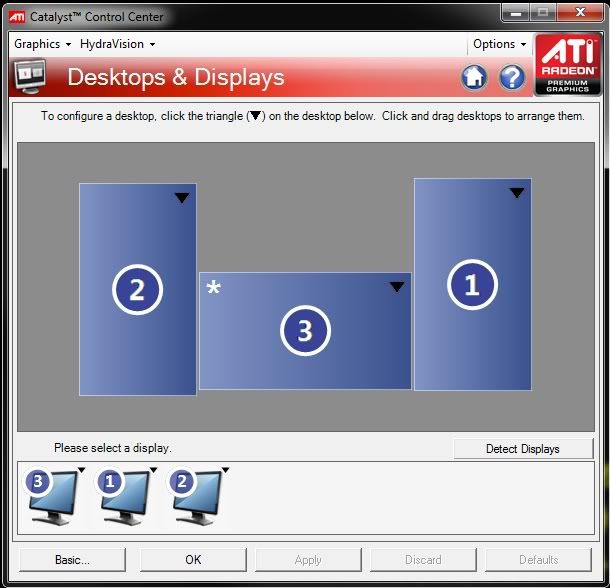
This setup hardly impedes frame rate, in fact i can barley notice a difference from running one screen on ultra settings to three and the fans dont spin any faster and so less heat
its a perfect fov for me and my desk area, i can sit closer too so i can appreciate the high pixel pitch of my monitors and to top it off the top half of each out monitor can have youtube running on one and steam on the other :D
yes im running my games in windows7 with no window borders on
so i dont see any 6400 x 1152p settings anywhere to pump my ego or willy wave, but i have acheived what i wanted finally and i also have good productivity space
:cheers
its sweet
i know the point of eyefinity but anyone thinking of trying a setup should bear in minds some of the things ive said which are mostly true, if not all.. when maxing out your cpu and gfx card.
However
I have found heaven in a setup new layout :D
Im happy with it, very happy in fact ! it might not be traditional 'eyefinity' but its using the gpu power and all the connectors and display port adapter, also catalyst control setup and running just over twice as wide as my existing 16:9 screens
i have my screens
This setup hardly impedes frame rate, in fact i can barley notice a difference from running one screen on ultra settings to three and the fans dont spin any faster and so less heat
its a perfect fov for me and my desk area, i can sit closer too so i can appreciate the high pixel pitch of my monitors and to top it off the top half of each out monitor can have youtube running on one and steam on the other :D
yes im running my games in windows7 with no window borders on
so i dont see any 6400 x 1152p settings anywhere to pump my ego or willy wave, but i have acheived what i wanted finally and i also have good productivity space
:cheers
its sweet
Re: hello new eyefinity user + some questions
You didn't offend me necessarilly, you just seem like you spent money on the setup without actually putting much thought into it. I feel blessed in this awful economy to be doing well enough to have been able to build my computer. It's frustrating to see someone blow money on a setup without really thinking it through.
Re: hello new eyefinity user + some questions
You didn't offend me necessarilly, you just seem like you spent money on the setup without actually putting much thought into it. I feel blessed in this awful economy to be doing well enough to have been able to build my computer. It's frustrating to see someone blow money on a setup without really thinking it through.
i built my comp from scratch over 6 months, it wasnt blown at all i saved for it.
but how can you really try something like this without buying it first? im the only person i know who games on pc`s and i work in the I.T field ! most are into consoles, let alone having three screens.
your being overly harsh to me TBH and i didnt expect it on this forum, perhaps your a bad apple? :?
again you always see the plus side on the internet about a new technology or some crazy way to do something, lots of people speaking almost religiously about it, because they feel they have to justify the purchase, there is hardly any talk of using the screens for 2D productivity and very little scope within the software to accomodate both. all im doing is being honest, all your doing is being defensive and rude
cheers :doh
(btw im running full landscape now, i needed to toe my monitors in a lot more (and i need a deeper desk) but with the profiles i run extended desktop in windows and use 'windowed mode' in some games to stretch wide than one screen.. i just dont use all of either screen as there too wide and too hungry for power for some games. of course for older games i shall use full eyefinity :))
Re: hello new eyefinity user + some questions
Off topic, but phill1978; Capitalization and punctuation, man.
Re: hello new eyefinity user + some questions
My whole point was essentially this: If you were simply looking for more productivity with extended desktops, there are cheaper ways to achieve this than building an eyefinity setup. If you do build an eyefinity setup, there's hardly anyway to justify using a 3x1 portrait setup when a larger monitor or tv will have nearly the same aspect ratio and most likely be cheaper. In fact, the only real way I could justify turning my monitors to portrait would be if the game was vert- and didn't scale correctly, however at that point, I'm not very likely to buy it anyways. Welcome to the forum, and I'm sorry for frustrating you. It's just annoying that all of my friends can't even afford to run new games, and some people who can take what they have for granted. You have what is in my opinion, the future of gaming on your desk and you're electing to use it in ways that defeat the purpose in even buying it.
Re: hello new eyefinity user + some questions
ok BRPunk no worries :) i intend to be on here often so i dont want to piss anyone off tbh..
ok so..
Ive updated to ati 10.6 driver today and oddly my performance has increased? i cant remember what my gfx card shipped with but im getting into my setup a bit better now (apart from some 2D issues)
my main problem is that a 775/1125 5850 saphire whilst powerfull can only just run Dirt2 in ultra on 2048 x1152p on the benchmark at 57-65fps (only 2x mssa). I moved from a pants 8600GS, but ive also got a x360 and there suprisingly good gfx and well optimised.. for me even though ive come a long,long way from a 8600gs i havent really felt that a 5850 is a revolution (having also played on a gtx nvidia setup a while ago) i mean given the specs and 2BN transistors i think it should run dirt2 at silly speeds on full settings.
I possibly have a cpu bottle neck as there is some stuttering at my huge 7077888 pixel res this res and i need to work out how to overclock my 1055T thuban cpu as it runs 2.8ghz(3.3TB on 3 cores) but ive seen people overclock to 3.8-4.0ghz easy. further more my gpu is locked so i cant overclock withouth a bios flash :cry: i think tweaking of both will add about 8-10FPS which is all im lacking at the moment.
I will also upgrade to any gpu revision perhaps a 5890 2GB?
ok so..
Ive updated to ati 10.6 driver today and oddly my performance has increased? i cant remember what my gfx card shipped with but im getting into my setup a bit better now (apart from some 2D issues)
my main problem is that a 775/1125 5850 saphire whilst powerfull can only just run Dirt2 in ultra on 2048 x1152p on the benchmark at 57-65fps (only 2x mssa). I moved from a pants 8600GS, but ive also got a x360 and there suprisingly good gfx and well optimised.. for me even though ive come a long,long way from a 8600gs i havent really felt that a 5850 is a revolution (having also played on a gtx nvidia setup a while ago) i mean given the specs and 2BN transistors i think it should run dirt2 at silly speeds on full settings.
I possibly have a cpu bottle neck as there is some stuttering at my huge 7077888 pixel res this res and i need to work out how to overclock my 1055T thuban cpu as it runs 2.8ghz(3.3TB on 3 cores) but ive seen people overclock to 3.8-4.0ghz easy. further more my gpu is locked so i cant overclock withouth a bios flash :cry: i think tweaking of both will add about 8-10FPS which is all im lacking at the moment.
I will also upgrade to any gpu revision perhaps a 5890 2GB?
Re: hello new eyefinity user + some questions
Well on the GPU side, most of us tend to agree that the standard for eyefinity is a 5850 Crossfire setup, or at minimum a single 5870. Most tests showed that a single 5850 did have some problems with newer games, and anything below that was almost laughable for eyefinity. I myself use a single 1G 5870 and it scales pretty well to most new games, however I do have to tone things down on some beasts. AA on Dirt 2 kills my FPS, but I can still play the rest of the settings on high. Crysis Warhead sits quite well on gamer with no AA on. Arkham Asylum was also quite painful, but once I got my quad core it actually sat quite well even with AA turned on. The real trick to all of it is that your specific setup may scale differently, especially based on your resolution. After my bezel compesation I'm sitting at 5808x1080 which hits me pretty hard. Even I'm considering selling my 1G 5870 and trying to pick up two 2G 5870's by the end of the year, even though most of my games are still perfection. I would recommend at minimum a 5850 CFX, or single 5870. Most people are aiming for more, myself included at this point.
On the CPU side, it's harder for me to tell. I've always been a big believer in sticking with what works, rather than a brand name, and as such I've used all sorts of different companies with varying results. However, Intel has never steered me wrong with their CPU's and as such I've never owned an AMD cpu (except once in a laptop, but I hardly count that since I wasn't really testing it). I know that most games right now can only take advantage of Dual-Core CPU's, and even having a Quad-Core CPU right now is only useful in certain games (Only ones I own that I can think of off the top of my head are TF2, L4D2 and Crysis) so I can't really say whether or not have the hex-core CPU is helping or hurting you in framerates. The 2.8GHZ is a bit low these days, since 3.0 is basically the minimum standard these days with most gamers pushing their's into the 4-5 range. If you can manage an overclock to get it to 3.8-4.0 GHZ that would help you, however be careful on air and run tons of tests. Every single chip, even if it's the same model, will overclock differently. For example, my 975-Extreme was won at a lan party for being beastly at TF2, and most people can air-OC this to the 4.5 GHZ range no problem, and several people have taken this to the 5.0GHZ range and beyond on water (I even heard of one beast at 5.3 GHZ on air). I on the other hand struggled to get my chip to , and am considering setting up watercooling just to try to take better advantage of the chip. I find it hard to complain since I had a 3.2 GHZ Dual Core, and won a $1000 chip for free, however it was still disappointing and a testament to how different chips react differently.
On the CPU side, it's harder for me to tell. I've always been a big believer in sticking with what works, rather than a brand name, and as such I've used all sorts of different companies with varying results. However, Intel has never steered me wrong with their CPU's and as such I've never owned an AMD cpu (except once in a laptop, but I hardly count that since I wasn't really testing it). I know that most games right now can only take advantage of Dual-Core CPU's, and even having a Quad-Core CPU right now is only useful in certain games (Only ones I own that I can think of off the top of my head are TF2, L4D2 and Crysis) so I can't really say whether or not have the hex-core CPU is helping or hurting you in framerates. The 2.8GHZ is a bit low these days, since 3.0 is basically the minimum standard these days with most gamers pushing their's into the 4-5 range. If you can manage an overclock to get it to 3.8-4.0 GHZ that would help you, however be careful on air and run tons of tests. Every single chip, even if it's the same model, will overclock differently. For example, my 975-Extreme was won at a lan party for being beastly at TF2, and most people can air-OC this to the 4.5 GHZ range no problem, and several people have taken this to the 5.0GHZ range and beyond on water (I even heard of one beast at 5.3 GHZ on air). I on the other hand struggled to get my chip to , and am considering setting up watercooling just to try to take better advantage of the chip. I find it hard to complain since I had a 3.2 GHZ Dual Core, and won a $1000 chip for free, however it was still disappointing and a testament to how different chips react differently.
Re: hello new eyefinity user + some questions
BRPunk thanks for your words m8 :)
I agree that a 5850 is a awesome card...... for those stuck in the dark ages of 1 monitor (see i cant go back now haha my love for it is evolving every hour) but i darent put bezel management on it takes my res to frankly silly levels lol, no instead ive angled and overlapped slightly my monitors and it looks fine.
are there any teething or serious issues with crossfire and eyefinity?
i cant wait to get another faster card already :doh money £££, I differ from other people who sit on the fence, they all want a 6xxx series to come out.. well considering i want to protect my 5850 investment i want the 5xxx series to go hybrid and be revised in a more powerfull format before i crossfire 8)
also ive posted in another thread about the woes of extended desktop and eyefinity profiles.. ive given up on that and mirrored my other pc`s setup and i run RocketDock with the windows task bar hidden, i can customise it heavily and run the launcher in the center screen (by default) with all the icons i need. in truth i dont need start menu much, just steam, mozila,music,vpn etc.. launchers
I agree that a 5850 is a awesome card...... for those stuck in the dark ages of 1 monitor (see i cant go back now haha my love for it is evolving every hour) but i darent put bezel management on it takes my res to frankly silly levels lol, no instead ive angled and overlapped slightly my monitors and it looks fine.
are there any teething or serious issues with crossfire and eyefinity?
i cant wait to get another faster card already :doh money £££, I differ from other people who sit on the fence, they all want a 6xxx series to come out.. well considering i want to protect my 5850 investment i want the 5xxx series to go hybrid and be revised in a more powerfull format before i crossfire 8)
also ive posted in another thread about the woes of extended desktop and eyefinity profiles.. ive given up on that and mirrored my other pc`s setup and i run RocketDock with the windows task bar hidden, i can customise it heavily and run the launcher in the center screen (by default) with all the icons i need. in truth i dont need start menu much, just steam, mozila,music,vpn etc.. launchers
Re: hello new eyefinity user + some questions
Some people have experienced minor issues with crossfire and eyefinity. It seems to change based upon the game. I know several people on here use two 5850 and two 5870 quite successfully, but others report that they've had stuttering with their CFX enabled, which was actually why I bought a 5870 instead of a 5970, I didn't feel like taking the risk. So, it's give and take. You might see if any friends have a 5850 you could test next to yours.
As for the extended desktop and eyefinity profiles, tbh I just minimize windows and continue running eyefinity all the time. When I surf multiple websites I do so in eyefinity. I never have any reason to switch to extended these days, but when I did try, I remember it being finnicky.
As for the extended desktop and eyefinity profiles, tbh I just minimize windows and continue running eyefinity all the time. When I surf multiple websites I do so in eyefinity. I never have any reason to switch to extended these days, but when I did try, I remember it being finnicky.
Re: hello new eyefinity user + some questions
in your experience does tri-fire work? :?
also i thought the 5970 was dual gpu but seen as single gpu.
regards 5850 vs 5870 i couldn't justify £100 more, my sapphire at 775,1125 clocks oc`d from factory is only 10%-15% behind a 5870, if i could unlock the card and OC people have been able to run 995/1225 clocks on the sapphire toxic with its custom cooler (and a bios flash) which takes it past a 5870. Of course you could oc a 5870 but most dont want to and the reference cooler can get loud.
I await the next gen cards with baited breath.
Also i downloaded a eyefinity wallpaper from this site and none are big enough i have a fair amount of extra resolution over the typical 5040 res that people run :shock: in fact its incredible that i was playing dirt2 with some optimized settings at 45-50fps which is 353Million pixels a second :shock:
i have now got most games running with decent gfx on mostly high settings and no AA (don't really need it at my pixel pitch) apart from metro and crysis which to be fair are both hideously hard to run even on 1 monitor
eyefinity really is good, you just need to get used to it and get it setup right its quite a big change from anything ive used or seen before
:cheers
also i thought the 5970 was dual gpu but seen as single gpu.
regards 5850 vs 5870 i couldn't justify £100 more, my sapphire at 775,1125 clocks oc`d from factory is only 10%-15% behind a 5870, if i could unlock the card and OC people have been able to run 995/1225 clocks on the sapphire toxic with its custom cooler (and a bios flash) which takes it past a 5870. Of course you could oc a 5870 but most dont want to and the reference cooler can get loud.
I await the next gen cards with baited breath.
Also i downloaded a eyefinity wallpaper from this site and none are big enough i have a fair amount of extra resolution over the typical 5040 res that people run :shock: in fact its incredible that i was playing dirt2 with some optimized settings at 45-50fps which is 353Million pixels a second :shock:
i have now got most games running with decent gfx on mostly high settings and no AA (don't really need it at my pixel pitch) apart from metro and crysis which to be fair are both hideously hard to run even on 1 monitor
eyefinity really is good, you just need to get used to it and get it setup right its quite a big change from anything ive used or seen before
:cheers
Re: hello new eyefinity user + some questions
I haven't messed with any CFX while I've had my eyefinity, however word on the forums is that CFX in general had some problems dealing with eyefinity at the same time. Tri-fire and Quad-fire I know, in particular, was sketchy as hell because there was a gigantic thread about it for a while. I just run basic windows wallpapers... I can't figure out why, but the one I use is vert- so it just shrinks my FOV, and it actually still looks awesome across my 3 desktops. Glad to hear you're enjoying you're setup. :D
Who is online
Users browsing this forum: Bing [Bot] and 5 guests