Page 1 of 1
Split Second: Velocity
Posted: 20 May 2010, 19:34
by scavvenjahh
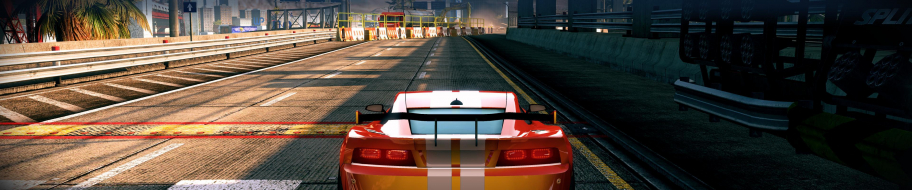
 Widescreen Grade: CUltra-Widescreen Grade: IncompleteMulti-monitor Grade: Incomplete4k Grade: IncompleteRead Full Detailed Report - Split Second: VelocitySplit Second: Velocity is an arcade racing video game developed by Black Rock Studio and published by Disney Interactive Studios for Microsoft Windows, PlayStation 3, and Xbox 360. Revealed in March 2009, the game was released in May 2010. In the game, players take part in a fictional reality television show, consisting of a variety of events, each focusing on destructible environments triggered remotely by driver actions known as "powerplays".
Of the four families of car featured in the game, three (with "Elite" being the exception) take their name from action movie characters: "Cobretti" from Sylvester Stallone's character in Cobra; "Ryback" from Steven Seagal's character in the Under Siege films; and "Hanzo" from Sonny Chiba's character in Kill Bill and Shadow Warriors.
hey scavvenjah..this might be
Posted: 17 Dec 2011, 14:27
by axxel
hey scavvenjah..this might be silly...there is no HUD display in my game...i tried to reinstall but it doesnt solve my problem...can u tell me the HUD file so that i can download and replace?
No idea. This thing is not
Posted: 17 Dec 2011, 22:48
by scavvenjahh
No idea. This thing is not installed on my computer anymore. Contact official game support.
Has anyone found a fix for
Posted: 23 Mar 2012, 08:33
by sparx1981
Has anyone found a fix for eyefinity for this? E.g. the menu's and the car being so close to the screen? It looks much nicer on a single screen compared to eyefinity.
sparx1981 wrote:Has anyone
Posted: 23 Mar 2012, 17:01
by jackfuste
Has anyone found a fix for eyefinity for this? E.g. the menu's and the car being so close to the screen? It looks much nicer on a single screen compared to eyefinity.
Eyefinity/Surround fix - available from the
PC Gaming Wiki Community Files (search there)
jackfuste
Posted: 23 Mar 2012, 18:47
by thales100
Eyefinity/Surround fix
Awesome, thanks jackfuste ! :twothumb
Thanks for this... it's
Posted: 23 Mar 2012, 19:01
by sparx1981
Thanks for this... it's better but still not quite what i was hoping for.
It looks great at lower speeds but as soon as you get any speed up the view is screewed up. Is that just my system?
sparx1981 wrote:Thanks for
Posted: 23 Mar 2012, 22:06
by jackfuste
Thanks for this... it's better but still not quite what i was hoping for.
It looks great at lower speeds but as soon as you get any speed up the view is screewed up. Is that just my system?
It seems camera does not fit into the narrow road. I reduce an angle a little, so now at speed should be fine.
Redownload - available from the
PC Gaming Wiki Community Files (search there)
That seems a lot better
Posted: 27 Mar 2012, 10:23
by sparx1981
That seems a lot better thanks.
Performance isn't great though. I can game on Shift 2 at this res with everything on Ultra and no issues. In Split Second at this res and the hightest settings it's slow and jerking....
Seems ok if I drop the settings down though. Just suprising seeing as I'm running a 7970.
Thanks for the fix though.
Framerate is capped at 30
Posted: 28 Mar 2012, 10:55
by scavvenjahh
Framerate is capped at 30 fps, and yet it easily drops lower even in widescreen, so I wouldn't expect better performance in multi-mon.
Anyway, cheers jackfuste !
Re: Split Second: Velocity
Posted: 26 Sep 2016, 20:52
by Norrin78
Hello there,
I've been playing this really good game for a while and now I got my hands on a 21:9 display (3440x1440), I thought I'd give it try. Natively, this game supports 3440x1440 resolution but it's only a 2560x1440 zoom in so cars appear a little too big on screen.
For example in menus:


Or in game:


I tried Jackfuste tweaked exe for Eyefinity/Surround fix, and it looks great:

But it has flaws. I think camera is a little too far behind, and it creates annoying artifacts:
Sometimes, icons to trigger effects appear way too big so you can't see the track.
On occasion, the camera just slips under the road, so you can't really see what's ahead for a few seconds..
And finally, it seems to modify car physics, and on some tracks, make some event impossible to complete (when you can't change the car).
Anyway, could it possible to reduce zoom out (halfway between)?
How could I achieve that? I tried to edit the exe file and the rdl.dll from jackfuste with "Resource Hacker" but didn't figure out how to do it.
If anyone can help,
Thank you
Re: Split Second: Velocity
Posted: 28 Sep 2016, 21:32
by Norrin78
As you actually might think from my previous post that ingame 3440x1440 is perfectly playable, here comes another shot to demonstrate that the zoom-in from 2560x1440 is not comfortable:

Camera is definitely too close.
Re: sparx1981 wrote:Thanks for
Posted: 06 Jun 2018, 00:01
by Adam-2012
does not work with version 1.4 =(