Detailed breakdowns of how games react to widescreen, ultra-wide, 4k and multi-mon
scavvenjahh
Editors
Posts: 3424 Joined: 06 Mar 2008, 17:20
Post
by scavvenjahh 05 Jan 2010, 15:28
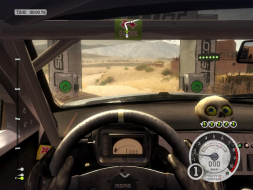
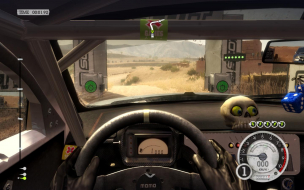
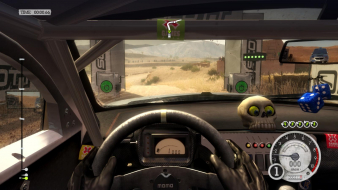
Widescreen Grade: A Ultra-Widescreen Grade: Incomplete Multi-monitor Grade: A 4k Grade: Incomplete Read Full Detailed Report - DiRT 2 DiRT 2 is an all-terrain arcade racing game. It adds GRID's flashback system to DiRT's gameplay and is also the first racing game to support DirectX 11.
Last edited by
scavvenjahh on 05 Jan 2015, 03:33, edited 5 times in total.
Reason: Edit
scavvenjahh
Editors
Posts: 3424 Joined: 06 Mar 2008, 17:20
Post
by scavvenjahh 07 Jan 2010, 23:34
I know you're asking cranky, but there are no blemishes and no DR omissions, so yes.
Jedibeeftrix
Posts: 17 Joined: 07 Dec 2010, 12:52
Post
by Jedibeeftrix 07 Dec 2010, 13:02
i have three 1920x1200 screens and i get the option for eyefinity, but it appears to be very stretched horizontally, and not at all like the screen shots shown in the report.
scavvenjahh
Editors
Posts: 3424 Joined: 06 Mar 2008, 17:20
Post
by scavvenjahh 07 Dec 2010, 16:51
In the graphics options, make sure to set Aspect Ratio to Normal.
Jedibeeftrix
Posts: 17 Joined: 07 Dec 2010, 12:52
Post
by Jedibeeftrix 07 Dec 2010, 21:04
cheers, but i either get 16:10 or 5:3, and both are distorted.
scavvenjahh
Editors
Posts: 3424 Joined: 06 Mar 2008, 17:20
Post
by scavvenjahh 08 Dec 2010, 12:55
There's definitely something wrong. I have 4:3, 16:10, 16:9, 5:3 and Normal to choose from. Maybe you can try a manual edit, here's what my config file looks like:
aspect="normal" fullscreen="true" vsync="0" multisampling="4xmsaa">[/list:u]
Jedibeeftrix
Posts: 17 Joined: 07 Dec 2010, 12:52
Post
by Jedibeeftrix 08 Dec 2010, 17:33
cheers, is this possible with the steam version of the game?
tet5uo
Insiders
Posts: 405 Joined: 28 Nov 2010, 22:18
Post
by tet5uo 08 Dec 2010, 23:34
I love this game so much. It's just gorgeous in surround too !
stone
Insiders
Posts: 86 Joined: 05 Apr 2011, 21:52
Post
by stone 07 Jun 2012, 01:26
I still keep playing DiRT 2. Anyone welcome to join.
Asus P8Z68-V Pro | i7 2600K @4.5GHz Watercooled | 16GB Corsair @1600mhz | ATI 6970 2GB Watercooled | 64GB Crucial C300 SSD | Corsair 1200W AX PSU | 3x Samsung SyncMaster 2443 24" 3600x1920 | Microsoft Sidewinder X8 | Win7 Ultimate x64
Jademalo
Posts: 13 Joined: 25 May 2012, 00:05
Post
by Jademalo 16 Jul 2012, 02:02
I've just picked this up in the steam sale - and I've got a problem.
Jademalo
Posts: 13 Joined: 25 May 2012, 00:05
Post
by Jademalo 16 Jul 2012, 21:43
Right, discovered the issue - the HUD uses all three screens and isn't centered if you use a bezel corrected resolution, mine being 6040x1080
AussieTimmeh
Editors
Posts: 1441 Joined: 14 Oct 2009, 03:11
Post
by AussieTimmeh 17 Jul 2012, 01:05
Right, discovered the issue - the HUD uses all three screens and isn't centered if you use a bezel corrected resolution, mine being 6040x1080
Wow, I don't remember it behaving like this with Eyefinity, but I just re-tried it then on my Nvidia Surround setup and you're absolutely right.
i5-2500K @ 4Ghz ° Asus P8Z68 ° GTX670 Windforce OC ° 8GB DDR3 RipjawsX ° 4x Viewsonic VA2703 ° Logitech G15 / G5 / G27 ° Razer Vespula ° TrackIR 5 ° Thrustmaster Warthog HOTAS
scavvenjahh
Editors
Posts: 3424 Joined: 06 Mar 2008, 17:20
Post
by scavvenjahh 30 Jul 2012, 13:38
That's because you can't divide 6040 by 3. Try a bezel-compensated width that's divisible by 3, e.g 6030 or 6060.
AussieTimmeh
Editors
Posts: 1441 Joined: 14 Oct 2009, 03:11
Post
by AussieTimmeh 30 Jul 2012, 22:07
I tried a bezel correct resolution of 6000x1080 and it did not work either, however it worked at 5760x1080. I don't remember having this issue when I played through the first time, though.
i5-2500K @ 4Ghz ° Asus P8Z68 ° GTX670 Windforce OC ° 8GB DDR3 RipjawsX ° 4x Viewsonic VA2703 ° Logitech G15 / G5 / G27 ° Razer Vespula ° TrackIR 5 ° Thrustmaster Warthog HOTAS
scavvenjahh
Editors
Posts: 3424 Joined: 06 Mar 2008, 17:20
Post
by scavvenjahh 21 Aug 2012, 19:36
Oh noes, did Codies break something that was working earlier again ? :~
Users browsing this forum: Bing [Bot] , Semrush [Bot] and 8 guests