
I decided with the new ATI 5870 card on market now is the time to go surround if I ever am.
I have to do it on a budget but I dont want to spend money on junk and wish I had saved more later, likewise I do not want to overspend or have to call off the project due to cost.
To start out I use a single 37" 1920x1080 Westinghouse right now and I love it, I feel it was single handedly the best computer purchase I ever made. I would rather use my old slow P4 machine with this monitor than my new quad core dual 4850 machine with my old 19" 4:3 monitor. It made that much of an impact on interacting and enjoying the computer.
My wife and I watch a lot of TV shows and movies on it and I also have my Wii & Dreamcast hooked to it, so it fills the spot perfectly.
While not surround gaming it still takes up enough of your vision to put you in the games and the big screen even makes stuff like typing up this post easy to do since I can see everything so easy :D
So to replace this 37" monitor I think I need to be around 24" with the new trio or I would think the screen too small for stuff that can only use 1 screen.
I want thin bezels if possible and a nice look.
Im eying this right now: http://www.newegg.com/Product/Product.aspx?Item=N82E16824001317
23" and it has a boosted res too, and those bezels look really thin, and the price is nice @ $200 w/ free ship.
Anybody have experience with these? I am afraid the res will be too high for gaming so I may have to scale down and that has me worried, also when using 3 screens what happens to a wacom tablet? one of the best new things I can think of is having more photoshop space but if it ruins my tablet mapping that will really suck.
I am really set on trying to do this but I am going to have a hard time compensating for the loss of the 37" and I dont really have a way to just move it for movies & game consoles to somewhere else. No space period and my speakers would not be in the right place for it.
Triple Wide on the Cheap
-
ViciousXUSMC

- Editors

- Posts: 1497
- Joined: 31 Jul 2006, 14:58
-
suiken_2mieu

- Insiders

- Posts: 2351
- Joined: 20 Aug 2009, 04:20
- Location: Virginia
- Contact:
Triple Wide on the Cheap
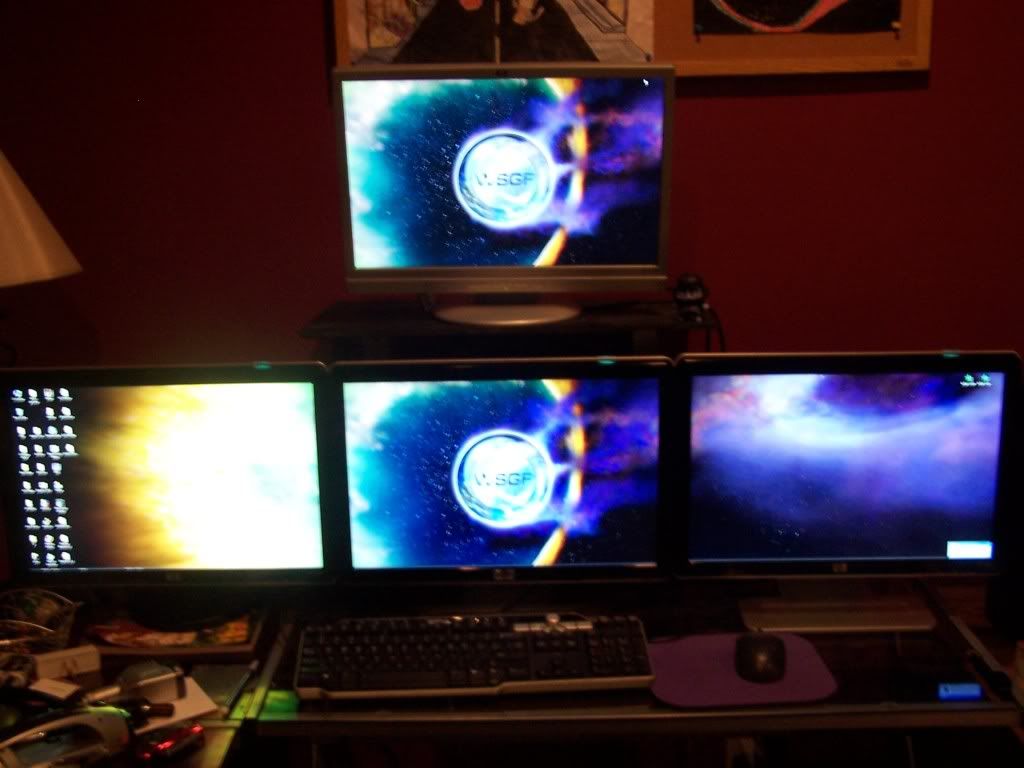
I have a 4 monitor setup, 1 on top and 3 on bottom. Mount the 37" to the wall or make a stand or put it to the side and just have the 3 in front of the desk. Mos people use a similar setup for game they couldn't play in triplehead.
EDIT: CLARIFICATION:
I meant keep the 37" on the top and buy 3 x 24" monitors for a bottom row.
For Reference:
EDIT: CLARIFICATION:
I meant keep the 37" on the top and buy 3 x 24" monitors for a bottom row.
For Reference:
System Core: | Intel Core i5-2500K + ASUS P8Z68-V + 16GB Corsair XMS3 DDR3 1333 MHz | Win7 x64 | MSI R7970 Lightning 3GB [1105/1400] |
Display: | 3 x Dell Ultrasharp 3007WFP-HC @ 7680x1600 | Dell u3011 |
Display: | 3 x Dell Ultrasharp 3007WFP-HC @ 7680x1600 | Dell u3011 |
-
Paradigm Shifter

- Editors
- Posts: 5706
- Joined: 14 Oct 2003, 13:52
Triple Wide on the Cheap
Wow... that's an interesting res...
No experience, sorry, but I'd think about that one for a quintuple setup, if the UK price is ~£150. :oops:
edit: £172 - close enough. The VGA only version is £20 less. *sigh* If I can get confirmation that an active DP adaptor isn't needed for DVI monitors from the ATi rep we've got on the forum (still waiting back on the PM) then they're a definite possibility.
Currently the only DisplayPort monitor I think is worth buying is the Dell U2410. But the price on that makes it impossible to buy more than one. :|
No experience, sorry, but I'd think about that one for a quintuple setup, if the UK price is ~£150. :oops:
edit: £172 - close enough. The VGA only version is £20 less. *sigh* If I can get confirmation that an active DP adaptor isn't needed for DVI monitors from the ATi rep we've got on the forum (still waiting back on the PM) then they're a definite possibility.
Currently the only DisplayPort monitor I think is worth buying is the Dell U2410. But the price on that makes it impossible to buy more than one. :|
-
ViciousXUSMC
- Editors
- Posts: 1497
- Joined: 31 Jul 2006, 14:58
Triple Wide on the Cheap
I thought about putting the 37" above like that, I just dont like the idea of having to look UP so high to see it, but atleast for laying in bed watching movies it would be ok, but for sitting at the desk to play a game it would be too sharp of an angle.
If I had the space the 37" would go away and I would get a HD projector instead, that has always been my dream setup. 3x monitors and 1x HD projector on the wall above them.
Looks like any of these affordable monitors are TN panels, I hope I can be happy with that, I have always been an IPS panel guy.
For that monitor I linked above ECost has them for $165 refurbished, it still has the manufacturers warranty so it should be pretty safe I think.
I have a lot of work and planning to do to make this come to fruition. First is build a new desk lol, my corner desk is not going to hold 3 monitors side by side. I have may have a lot more money to have to put into this than its worth so I will have to evaluate it carefully. And taking down my current computer desk means destroying my arcade project.
If I had the space the 37" would go away and I would get a HD projector instead, that has always been my dream setup. 3x monitors and 1x HD projector on the wall above them.
Looks like any of these affordable monitors are TN panels, I hope I can be happy with that, I have always been an IPS panel guy.
For that monitor I linked above ECost has them for $165 refurbished, it still has the manufacturers warranty so it should be pretty safe I think.
I have a lot of work and planning to do to make this come to fruition. First is build a new desk lol, my corner desk is not going to hold 3 monitors side by side. I have may have a lot more money to have to put into this than its worth so I will have to evaluate it carefully. And taking down my current computer desk means destroying my arcade project.
-
Paradigm Shifter
- Editors
- Posts: 5706
- Joined: 14 Oct 2003, 13:52
Triple Wide on the Cheap
Looks like any of these affordable monitors are TN panels, I hope I can be happy with that, I have always been an IPS panel guy.
Urgh, totally. I hate TN... oh well, seems like those Samsung's aren't so good. :(
-
ViciousXUSMC
- Editors
- Posts: 1497
- Joined: 31 Jul 2006, 14:58
Triple Wide on the Cheap
[quote]Looks like any of these affordable monitors are TN panels, I hope I can be happy with that, I have always been an IPS panel guy.
Urgh, totally. I hate TN... oh well, seems like those Samsung's aren't so good. :(
I have not confirmed those are TN, I just assumed due to price. Though with that strange resolution they maybe unique and not part of the TN family.
-
suiken_2mieu
- Insiders
- Posts: 2351
- Joined: 20 Aug 2009, 04:20
- Location: Virginia
- Contact:
Triple Wide on the Cheap
I thought about putting the 37" above like that, I just dont like the idea of having to look UP so high to see it, but atleast for laying in bed watching movies it would be ok, but for sitting at the desk to play a game it would be too sharp of an angle.
If I had the space the 37" would go away and I would get a HD projector instead, that has always been my dream setup. 3x monitors and 1x HD projector on the wall above them.
Looks like any of these affordable monitors are TN panels, I hope I can be happy with that, I have always been an IPS panel guy.
For that monitor I linked above ECost has them for $165 refurbished, it still has the manufacturers warranty so it should be pretty safe I think.
I have a lot of work and planning to do to make this come to fruition. First is build a new desk lol, my corner desk is not going to hold 3 monitors side by side. I have may have a lot more money to have to put into this than its worth so I will have to evaluate it carefully. And taking down my current computer desk means destroying my arcade project.
it dosn't look like it but my top monitor has a reall sharp angle down to be able to see.
System Core: | Intel Core i5-2500K + ASUS P8Z68-V + 16GB Corsair XMS3 DDR3 1333 MHz | Win7 x64 | MSI R7970 Lightning 3GB [1105/1400] |
Display: | 3 x Dell Ultrasharp 3007WFP-HC @ 7680x1600 | Dell u3011 |
Display: | 3 x Dell Ultrasharp 3007WFP-HC @ 7680x1600 | Dell u3011 |
-
skipclarke

- Founder

- Posts: 7358
- Joined: 13 Oct 2003, 05:00
Triple Wide on the Cheap
Those monitors don't have a DP port. If you want to run EyeFinity, you need at least one with a DP port.

Triple Wide on the Cheap
Is there some reason you can't do DVI DVI HDMI?
-
Paradigm Shifter
- Editors
- Posts: 5706
- Joined: 14 Oct 2003, 13:52
Triple Wide on the Cheap
Yeah, the way ATi lined up the HDMI port on the TMDS transmitters.
Still waiting on the ATi rep to reply to my PM asking about passive DisplayPort adaptors.
Still waiting on the ATi rep to reply to my PM asking about passive DisplayPort adaptors.
Triple Wide on the Cheap
So wait, does it like duplicate one of the DVI ports? or can it simply just not be an eyefinity port?
-
whismerhill
- Posts: 760
- Joined: 28 Jun 2009, 22:17
Triple Wide on the Cheap
5870 cards have a total of 6 display pipelines which power 2 DACs for VGA & 6 TMDS/DP (for HDMI/DVI/DP outputs)
2 TMDS are needed per DVI dual link due to their architecture.
which means a total of 4 TMDS for the two DVIs dual link output & 1 TMDS for HDMI & 1 TMDS for Display Port.
Of course the 6 mini DP cards (which are not out yet) will get 1 TMDS per output.
this is an almost strait translation of a part of the hardware.fr review (which is not yet translated to behardware.com )
2 TMDS are needed per DVI dual link due to their architecture.
which means a total of 4 TMDS for the two DVIs dual link output & 1 TMDS for HDMI & 1 TMDS for Display Port.
Of course the 6 mini DP cards (which are not out yet) will get 1 TMDS per output.
this is an almost strait translation of a part of the hardware.fr review (which is not yet translated to behardware.com )
Triple Wide on the Cheap
http://www.pcper.com/images/reviews/783/crossbar.jpg
That picture makes it Make sense
With the TMDS if you run Dual Link DVI, you kill off the opportunity to use the HDMI port because the DVI and HDMI share a port, while there are two guaranteed TMDS (whatever they are) things for DP
Unfortunately single link DVI and HDMI share the same TMDS also so you cannot use single links and a HDMI
That picture makes it Make sense
With the TMDS if you run Dual Link DVI, you kill off the opportunity to use the HDMI port because the DVI and HDMI share a port, while there are two guaranteed TMDS (whatever they are) things for DP
Unfortunately single link DVI and HDMI share the same TMDS also so you cannot use single links and a HDMI
-
ViciousXUSMC
- Editors
- Posts: 1497
- Joined: 31 Jul 2006, 14:58
Triple Wide on the Cheap
i'll sit tight till we get more info on how they have these cards setup. I have read a lot of conflicting information.
It will probably be cheaper to get the DP adapter even an "active" one than it would be to get a good DP monitor, plus I would not like having a monitor that does not match the rest.
I wonder how long until the 6x mini DP card is on market. Probably will have a cost premium since it would be more professional based for 6x displays and gaming with 6x monitors is not a good idea IMO the bezels are right in the middle of your screen.
It will probably be cheaper to get the DP adapter even an "active" one than it would be to get a good DP monitor, plus I would not like having a monitor that does not match the rest.
I wonder how long until the 6x mini DP card is on market. Probably will have a cost premium since it would be more professional based for 6x displays and gaming with 6x monitors is not a good idea IMO the bezels are right in the middle of your screen.
-
ViciousXUSMC
- Editors
- Posts: 1497
- Joined: 31 Jul 2006, 14:58
Triple Wide on the Cheap
Heads up guys!
today only Bing.com cashback for Dell is 15%
Im thinking about getting 3 of these - http://accessories.us.dell.com/sna/products/Displays/productdetail.aspx?c=us&l=en&s=dhs&cs=19&sku=2209WA3
22" good res, and uses e-IPS panels.
Id have to toss it on a card though and I know thats a bad idea, by the time I pay it off I may pay more than 15% savings.
today only Bing.com cashback for Dell is 15%
Im thinking about getting 3 of these - http://accessories.us.dell.com/sna/products/Displays/productdetail.aspx?c=us&l=en&s=dhs&cs=19&sku=2209WA3
22" good res, and uses e-IPS panels.
Id have to toss it on a card though and I know thats a bad idea, by the time I pay it off I may pay more than 15% savings.
Triple Wide on the Cheap
Hey Vicious,
Have ya given any thought about getting refurbs?
Price can be very nice, and quality imo is just as good as brand new, but i've only had one experience with refurb so far.
I got my 3 refurbs 22" 1680x1050 for <140 each. When new is still selling for 210 at newegg
You can always add in 16 for 2yr warranty if ya want that.
Deke
Have ya given any thought about getting refurbs?
Price can be very nice, and quality imo is just as good as brand new, but i've only had one experience with refurb so far.
I got my 3 refurbs 22" 1680x1050 for <140 each. When new is still selling for 210 at newegg
You can always add in 16 for 2yr warranty if ya want that.
Deke
-
ViciousXUSMC
- Editors
- Posts: 1497
- Joined: 31 Jul 2006, 14:58
Triple Wide on the Cheap
Yep I got 2x Dell 2407WFP refurbs directly from dell, they were just as good as new and a good price.
If you didnt see any of my other posts, even though they were spot on I am selling them and spending a lot more for 3x dell u2410's because of how eyefinity requires a display port monitor to work and the 2407 does not have it I had a 2408 as my center monitor and it would not match the color of the 2407.
So I am just going to upgrade the whole set to U2410's
I do not feel like spending $100 on an adapter and hunting down another cheap 2407, I probably would if it was not for the fact that even the working adapters still seem to have some small issues with them.
If you didnt see any of my other posts, even though they were spot on I am selling them and spending a lot more for 3x dell u2410's because of how eyefinity requires a display port monitor to work and the 2407 does not have it I had a 2408 as my center monitor and it would not match the color of the 2407.
So I am just going to upgrade the whole set to U2410's
I do not feel like spending $100 on an adapter and hunting down another cheap 2407, I probably would if it was not for the fact that even the working adapters still seem to have some small issues with them.
Who is online
Users browsing this forum: No registered users and 7 guests