
Hello all
I am still reading and researching all options before building TH2 gaming system, I usually play only racing games, rfactor, GTR EVO, etc.. right now I have 1 asus 25.5 monitor
I was looking at the "show your rig post " I saw alot of people have 3 24" setup..
if playing with all 3 24" wide screen monitor and setting the reso to 3x1440x900, does it look bad?, for what I understand is playing at native reso of the monitor is always the best... how does lower the reso with TH2go effect gameplay and quality
Please advice, I thank you for your help
24 inch monitor questions - looking at all the screenshot


24 inch monitor questions - looking at all the screenshot
i think most play it at 1680*1050 @ 57Hz actually (x3) of course.
it normally looks very good, if you have time to spot the imperfections with the image then your probibly playing the wrong game :P
it normally looks very good, if you have time to spot the imperfections with the image then your probibly playing the wrong game :P
P8Z68-V Pro | 2600K | HR02 | HD5850 | 2x4GB Vengeance LP | 128GB M4 + 6TB | X-Fi > HD595 | AX850 | Tai Chi | PB278Q | G110 + Deathadder 2013
P8Z77-V | 3570K | Mugen 2 | HD5850 | 2x4GB Vengeance LP | 500GB | X-750 | Fractal R3 | U2212HM | G110 + G400
P8H77-I | G860 | 4650 | 2x2GB XMS | 320GB | CX500 | Prodigy | T22B350EW | MX518
DC3217IYE | 1x4GB Vengeance | 64GB M4 | TX-42VT20E
P8Z77-V | 3570K | Mugen 2 | HD5850 | 2x4GB Vengeance LP | 500GB | X-750 | Fractal R3 | U2212HM | G110 + G400
P8H77-I | G860 | 4650 | 2x2GB XMS | 320GB | CX500 | Prodigy | T22B350EW | MX518
DC3217IYE | 1x4GB Vengeance | 64GB M4 | TX-42VT20E
-
SuperGenius
- Posts: 5
- Joined: 01 Aug 2009, 04:30
24 inch monitor questions - looking at all the screenshot
I have had mine setup across 3 24 inchers for less than a week now. Native resolution is 1900x1200. Playing games at 3X 1680x1050 is fatansticly sharp and smooth off my 4870x2. Desktop at this resolution tho... Text is fuzzy and hard to read.
So I made a profile that puts 2 of the monitors in native 1900x1200 and run the 2nd output off my vid card to the extra input on the 3rd monitor, and easily switch between the two resolutions. The third monitor does Blu-Ray play back too. This gives me:
3X 1680x1050 (beautiful for gaming so far)
3X 1900x1200 (Large desktop in native res)
So far I have played Halflife 2 episode 1&2
Il2 Sturmovic
UT3 (having issues right now)
I was expecting the larger screen to give a more immersive feeling, and it does. What I wasn't expecting was the oddly relaxing gameplay, doesn't feel so frantic to me.
This is one of the best upgrades I have ever made. I absolutely love it. Even after a few days, there is no going back to a single monitor now.
That would be like going back to dial up...
Mark
So I made a profile that puts 2 of the monitors in native 1900x1200 and run the 2nd output off my vid card to the extra input on the 3rd monitor, and easily switch between the two resolutions. The third monitor does Blu-Ray play back too. This gives me:
3X 1680x1050 (beautiful for gaming so far)
3X 1900x1200 (Large desktop in native res)
So far I have played Halflife 2 episode 1&2
Il2 Sturmovic
UT3 (having issues right now)
I was expecting the larger screen to give a more immersive feeling, and it does. What I wasn't expecting was the oddly relaxing gameplay, doesn't feel so frantic to me.
This is one of the best upgrades I have ever made. I absolutely love it. Even after a few days, there is no going back to a single monitor now.
That would be like going back to dial up...
Mark
24 inch monitor questions - looking at all the screenshot
What 24" Monitors do you have. And how do you find the HD4870x2. I have two of them going in to my new build.
-
atledreier
- Posts: 40
- Joined: 24 Jul 2007, 06:47
24 inch monitor questions - looking at all the screenshot
I'm usually pretty picky about image quality, and was concerned with the scaling too. I actually find 4398x900 to scale better than 5040x1050 on my monitors. Games look better at 5040 though. So I run my desktop at 900 lines and games at 1050.
24 inch monitor questions - looking at all the screenshot
i guess its down to the screens themselves and personal preference also
P8Z68-V Pro | 2600K | HR02 | HD5850 | 2x4GB Vengeance LP | 128GB M4 + 6TB | X-Fi > HD595 | AX850 | Tai Chi | PB278Q | G110 + Deathadder 2013
P8Z77-V | 3570K | Mugen 2 | HD5850 | 2x4GB Vengeance LP | 500GB | X-750 | Fractal R3 | U2212HM | G110 + G400
P8H77-I | G860 | 4650 | 2x2GB XMS | 320GB | CX500 | Prodigy | T22B350EW | MX518
DC3217IYE | 1x4GB Vengeance | 64GB M4 | TX-42VT20E
P8Z77-V | 3570K | Mugen 2 | HD5850 | 2x4GB Vengeance LP | 500GB | X-750 | Fractal R3 | U2212HM | G110 + G400
P8H77-I | G860 | 4650 | 2x2GB XMS | 320GB | CX500 | Prodigy | T22B350EW | MX518
DC3217IYE | 1x4GB Vengeance | 64GB M4 | TX-42VT20E
-
SuperGenius
- Posts: 5
- Joined: 01 Aug 2009, 04:30
24 inch monitor questions - looking at all the screenshot
What 24" Monitors do you have. And how do you find the HD4870x2. I have two of them going in to my new build.
I am running Gateway FHD2400's. They are discontinued, replaced by FHD2401's. I found a couple on Amazon and recieved them a week ago today. If you are picky about viewing angle, there are prolly others that are better. I have had mine for a year and love it. I did not find these listed as working on the monitor sticky (I need to go post that these work). So when I found the DTH2GO would do 59hz, I got 2 more and they worked, 5040x1050. The bezels are prolly a little wideer than others available.
The 4870X2? Its great. I have only had time to play HalfLife2 Ep 1&2, and Il2 across 3 monitors so far. I really don't notice any difference in play between 1@1900X1200, or 3@5040X1050. A couple spots in Ep 2 got a little choppy, which was odd, nothing really going on. Nothing seems to slow it down enough for me to complain about. Cept Crysis (blah), oh and it hates NeverWinter Nights 2 for some reason. I have heard people complain about not being able to get load temps below 90c! I keep mine on manual @ 40% fan and crank it to 60% before loading a game. Idles ~45, highest I have seen it load is 65 I think. This is in South Texas where my AC has a hard time keeping the house a comfortable 80F. Run the fans manual, or set up a profile, don't let the cards do it on their own.
Mark
-
Typhoon2000
- Posts: 59
- Joined: 29 Dec 2008, 15:42
24 inch monitor questions - looking at all the screenshot
From the Volvo game which is pretty much the same as Race 07/GTR Evo.
3x24"
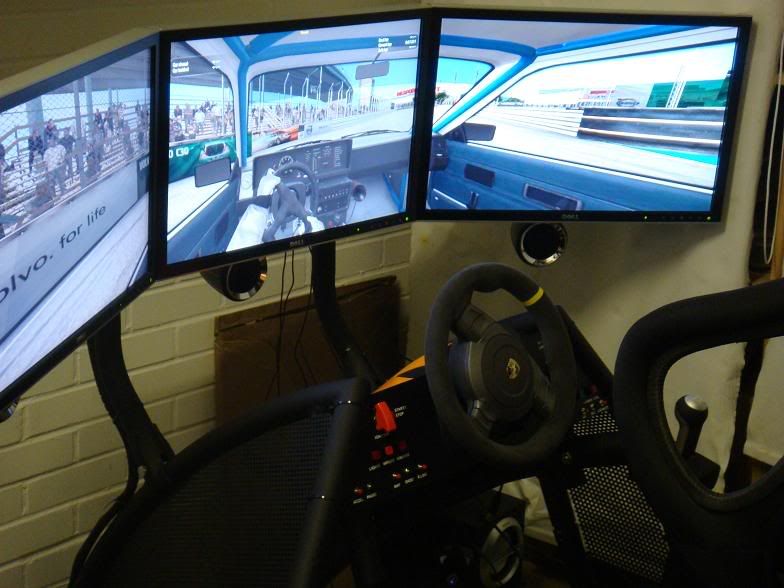
3x24"
Who is online
Users browsing this forum: Bing [Bot] and 2 guests