
Hi guys,
My brother recently purchased triple head2go. He has the following setup:
Vista 32-bit and 2 x 9800 GT (SLI)...
He has 3 x 22" monitors (checked to make sure they were compatible), now the issues are as follows:
No matter what I can't get it to work for him, he lives in the Netherlands I am in UK and I have suggested everything I can from....
1. Downloading the Beta driver
2. Updating the fireware
3. Trying to force custom resolutions.
But no matter what he can't seem to get any resolution to work over 3 screens even 3840 x 1024 or 4320 x 900, please can you offer any suggestions or advice or perhaps something else that might help/work - he is obviously very disappointed and I feel bad as I told him how great triplehead2go was :(
I think when he selects 4320 x 900 the images are squashed into the middle of the monitors and not stretched as they should be.
I guess I am begging for some help as I had hoped it would have beena simple plug and play affair and I have been helping him for over 6 hours
I don't know what else to suggest....
Please Help, Yet Another 5040 x 1050 issue :-(
-
thefunk007
- Posts: 75
- Joined: 27 Jul 2006, 18:27
Please Help, Yet Another 5040 x 1050 issue :-(
Just one or two suggestions would be most helpful guys :-/


Please Help, Yet Another 5040 x 1050 issue :-(
Try the 190.56 beta driver plus the latest matrox forceware, ive just installed them and runs great at 5040x1050 57 Hz.
But try to set the 5040x1050 resolution using the matrox multi-display setup. :wink:
But try to set the 5040x1050 resolution using the matrox multi-display setup. :wink:
-
thefunk007
- Posts: 75
- Joined: 27 Jul 2006, 18:27
Please Help, Yet Another 5040 x 1050 issue :-(
Ok will give that a go buddy, thanks.
-
skipclarke

- Founder

- Posts: 7358
- Joined: 13 Oct 2003, 05:00
Re: Please Help, Yet Another 5040 x 1050 issue :-(
We don't see many Vista32 installs here, so that is a new wrinkle. He might try XP. 182.50 were the previously known working driver for Vista64. Some are having luck with the new 190.56 (not installed myself).
For this:
I'd have him check the scaling on the monitor. Sounds like they may be set 1:1, rather than full or aspect scaling.
For this:
I think when he selects 4320 x 900 the images are squashed into the middle of the monitors and not stretched as they should be.
I'd have him check the scaling on the monitor. Sounds like they may be set 1:1, rather than full or aspect scaling.
Please Help, Yet Another 5040 x 1050 issue :-(
Yes, im running Vista 32 bits, and 190.56 + latest powedesk are working fine for 5040x1050 57Hz.
-
thefunk007
- Posts: 75
- Joined: 27 Jul 2006, 18:27
Please Help, Yet Another 5040 x 1050 issue :-(
I told him to change the aspect scaling in Nvidia control panel to 'use Nvidia scaling', when he selected this and went through the Wizard he got an out of range error :-/
I am unsure as to what to try, you think giving Matrox a call will help?!
Any other ideas?!
I am unsure as to what to try, you think giving Matrox a call will help?!
Any other ideas?!
-
thefunk007
- Posts: 75
- Joined: 27 Jul 2006, 18:27
Please Help, Yet Another 5040 x 1050 issue :-(
Here are some screen shots of my Brothers current issue, when he selects 5040 x 1050 this is what happens to his screens.
If he selects 4320 x 900 the only screen that displays anything is the far left screen both the middle and right are blank.
The only res that spans across all his three screens is 640 x 480 which just sucks, any more suggestions guys as I don't know why he can't get at least a better res then that..
I should point out that he has tested each screen at 1440 x 900 and each work fine on their own.
HELP both of us are going MAD!!!!!!!
:oops:
Left Screen

Middle Screen
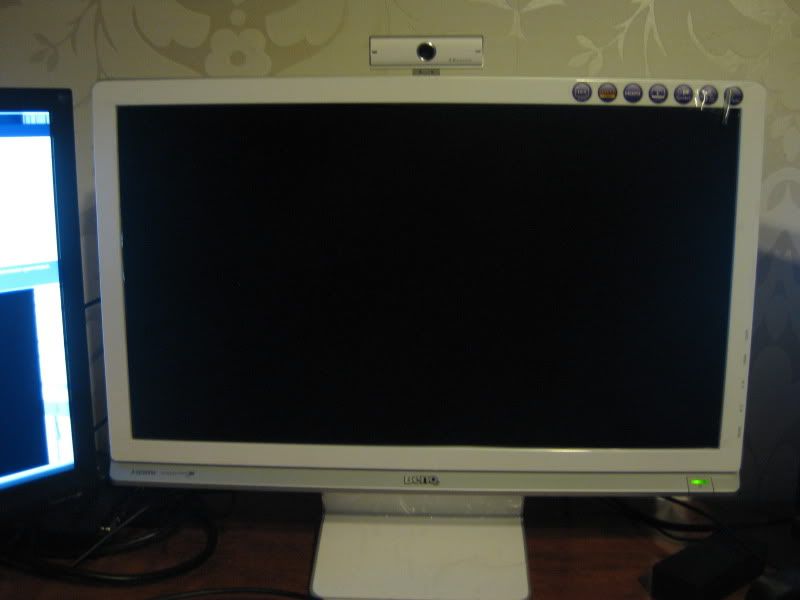
Right Screen
If he selects 4320 x 900 the only screen that displays anything is the far left screen both the middle and right are blank.
The only res that spans across all his three screens is 640 x 480 which just sucks, any more suggestions guys as I don't know why he can't get at least a better res then that..
I should point out that he has tested each screen at 1440 x 900 and each work fine on their own.
HELP both of us are going MAD!!!!!!!
:oops:
Left Screen
Middle Screen
Right Screen
Who is online
Users browsing this forum: No registered users and 5 guests