
I had issues with my upgrade from 19' monitors to 23' Samsung monitors.
I came to this forum and read a lot and was given good advise.
I was told to use the Beta Matrox desktop with nVidia driver 180.52. It solved my issues and I was happy....for a while :P
So today, i point my mouse pointer over to http://www.guru3d.com and downloaded nVidia driver ver 190.58. I also downloaded the latest Matrox driver.
I proceeded to uninstall all the old drivers and installed all the new. Well, it works...I am over the moon. My screen res is 5040x1050 :)
Has anyone else tried this? Did you get it working?
Tested - nVidia 190.58 + Matrox Powerdesk ver 2.05.00.020


Tested - nVidia 190.58 + Matrox Powerdesk ver 2.05.00.020
Yes, ive tried, but it didnt work for me at 5040x1050.
Edit: 190.58, 190.38 or 190.56 ? I cant find any 190.58.
Edit: 190.58, 190.38 or 190.56 ? I cant find any 190.58.
Tested - nVidia 190.58 + Matrox Powerdesk ver 2.05.00.020
RUBBISH DONT WORK DONT WAIST 40 MINS LIKE I HAVE. why post somthing thaty just dont work :(
Tested - nVidia 190.58 + Matrox Powerdesk ver 2.05.00.020
Fill us in with some info please:
OS?
Firmware version?
powerdesk version?
Did you setup a custom resolution in the nVidia control panel or did it pass through the powerdesk test? What did the powerdesk test it at 55hz or 57hz for the 5040 resolution.
Thanks.
OS?
Firmware version?
powerdesk version?
Did you setup a custom resolution in the nVidia control panel or did it pass through the powerdesk test? What did the powerdesk test it at 55hz or 57hz for the 5040 resolution.
Thanks.
Tested - nVidia 190.58 + Matrox Powerdesk ver 2.05.00.020
I'm using 190.56 since it came out with the beta Powerdesk and managed to get 5040x1050 at 65Hz.
Played through the latest Fallout DLC at this rez, nice :)
Set-up the rez using the tutorial show here http://www.widescreengamingforum.com/node/9741
The Powerdesk wizard still has the error when trying to apply a widescreen triplehead resolution though.
Some photo's of monitor status displays


OS = Windows 7 x64
Firmware = 2.3.40
Video table = 6.56
Powerdesk = Beta
The latest version of Powerdesk removes any custom resolutions when the PC is restarted.
Played through the latest Fallout DLC at this rez, nice :)
Set-up the rez using the tutorial show here http://www.widescreengamingforum.com/node/9741
The Powerdesk wizard still has the error when trying to apply a widescreen triplehead resolution though.
Some photo's of monitor status displays


OS = Windows 7 x64
Firmware = 2.3.40
Video table = 6.56
Powerdesk = Beta
The latest version of Powerdesk removes any custom resolutions when the PC is restarted.
Tested - nVidia 190.58 + Matrox Powerdesk ver 2.05.00.020
Fill us in with some info please:
OS?
Firmware version?
powerdesk version?
Did you setup a custom resolution in the nVidia control panel or did it pass through the powerdesk test? What did the powerdesk test it at 55hz or 57hz for the 5040 resolution.
Thanks.
I think the following screen shots will prove that it works...
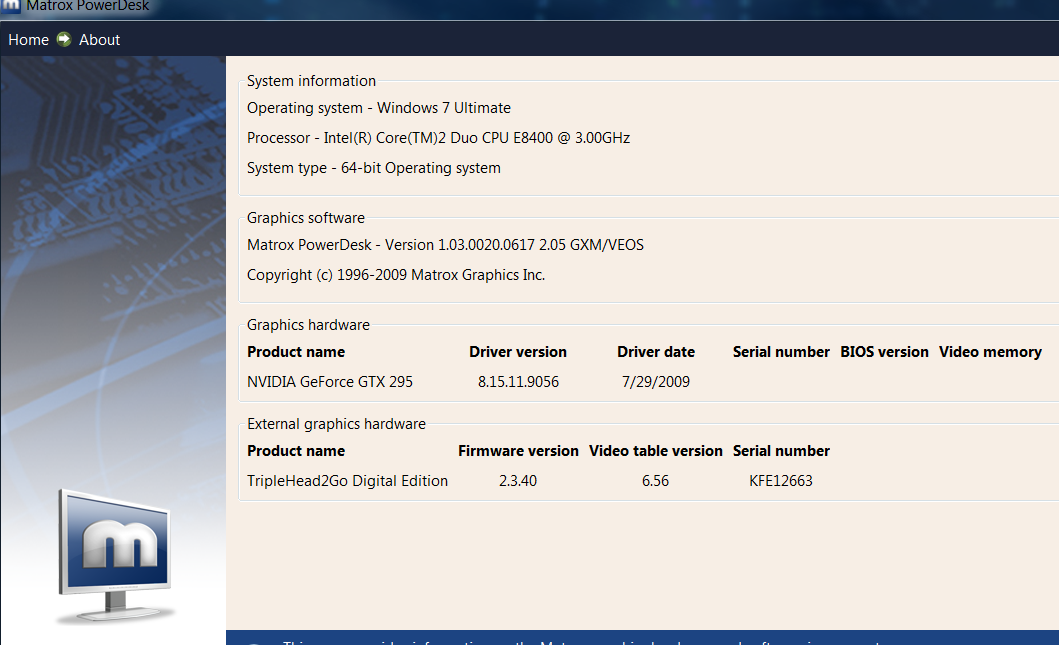
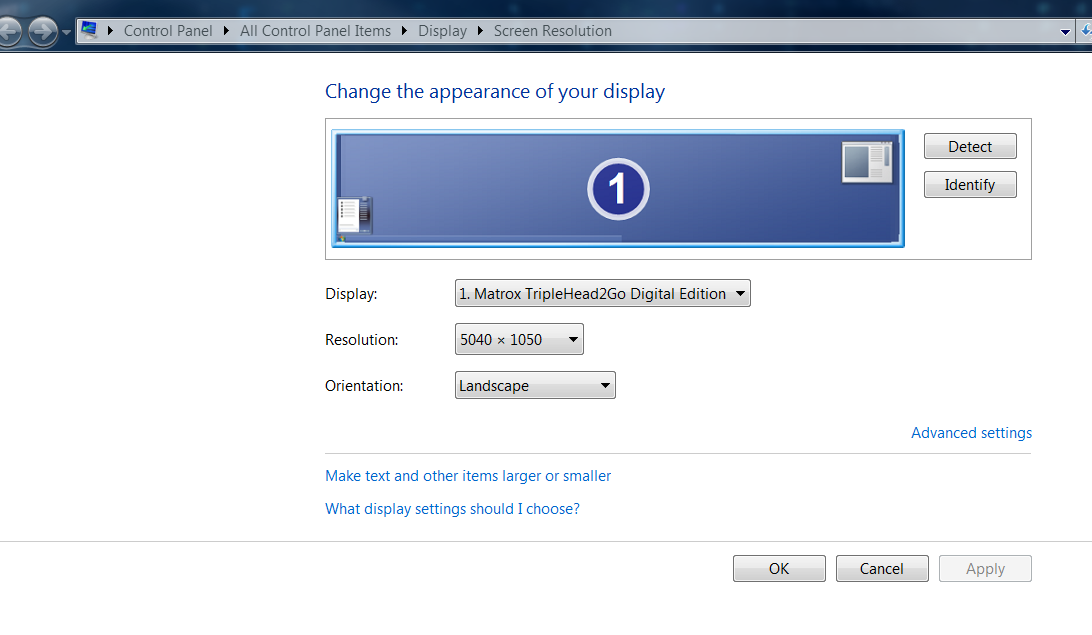
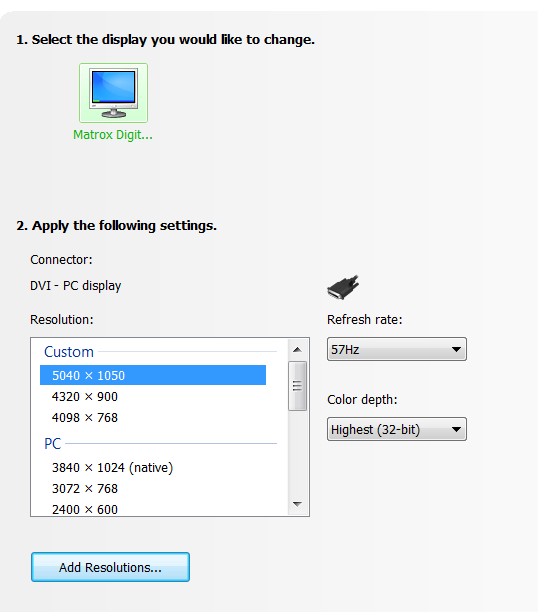
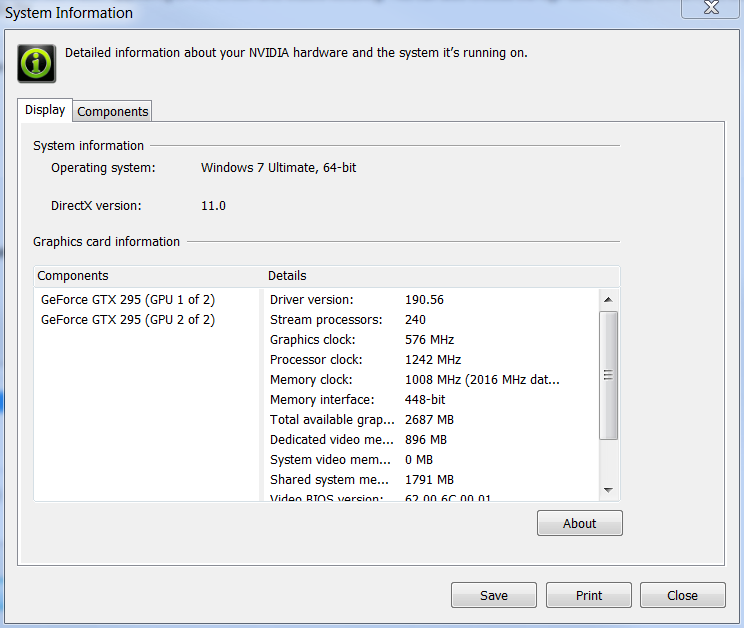
Tested - nVidia 190.58 + Matrox Powerdesk ver 2.05.00.020
RUBBISH DONT WORK DONT WAIST 40 MINS LIKE I HAVE. why post somthing thaty just dont work :(
Just cuase it did not work for you does not mean it does not work...maybe you need to try and give more info on what you tried, not just come to this forum and make a comment like yours...
Tested - nVidia 190.58 + Matrox Powerdesk ver 2.05.00.020
I think the following screen shots will prove that it works...
Did you manually enter those custom resolutions or did PowerDesk create them?
Tested - nVidia 190.58 + Matrox Powerdesk ver 2.05.00.020
[quote]
I think the following screen shots will prove that it works...
Did you manually enter those custom resolutions or did PowerDesk create them?
I used powerdesk to create them
Hope it helps
Tested - nVidia 190.58 + Matrox Powerdesk ver 2.05.00.020
Well...Thats good news! Thanks for the info.
Tested - nVidia 190.58 + Matrox Powerdesk ver 2.05.00.020
I can confirm that it's working
-
skipclarke

- Founder

- Posts: 7358
- Joined: 13 Oct 2003, 05:00
Tested - nVidia 190.58 + Matrox Powerdesk ver 2.05.00.020
The driver version is 190.56. You can find it here:
http://developer.nvidia.com/object/opengl_3_driver.html
They were released to coincide with OpenGL 3. I cannot find the PDF of the release notes. Is there a notes file generated after the extraction and/or install?
http://developer.nvidia.com/object/opengl_3_driver.html
They were released to coincide with OpenGL 3. I cannot find the PDF of the release notes. Is there a notes file generated after the extraction and/or install?
Tested - nVidia 190.58 + Matrox Powerdesk ver 2.05.00.020
Thanks AzzKikr, i tried the 190.56, it works perfectly at 5040x1050 57Hz with the new powerdesk, Vista 32 bits here. :D
-
BHawthorne

- Insiders

- Posts: 1640
- Joined: 06 May 2006, 12:46
Tested - nVidia 190.58 + Matrox Powerdesk ver 2.05.00.020
Confirmed working with 200-series. :D

Brad Hawthorne
Product Manager
Nthusim Pty. Ltd. | www.nthusim.com
Product Manager
Nthusim Pty. Ltd. | www.nthusim.com
-
WaveZtream
- Posts: 140
- Joined: 07 Mar 2008, 14:00
Tested - nVidia 190.58 + Matrox Powerdesk ver 2.05.00.020
I am going to make a better attempt later but atm 190.56 with latest powerdesk got a error applying the resolution :/
-
BHawthorne
- Insiders
- Posts: 1640
- Joined: 06 May 2006, 12:46
Tested - nVidia 190.58 + Matrox Powerdesk ver 2.05.00.020
Might be the fact of the firmware flash too. I think compatibility is because of video card drivers, PowerDesk and the TH2G firmware.
Brad Hawthorne
Product Manager
Nthusim Pty. Ltd. | www.nthusim.com
Product Manager
Nthusim Pty. Ltd. | www.nthusim.com
Tested - nVidia 190.58 + Matrox Powerdesk ver 2.05.00.020
Might be the fact of the firmware flash too. I think compatibility is because of video card drivers, PowerDesk and the TH2G firmware.
I think you might be right with that comment. I did update the firmware as well before I upgraded the video drivers and powerdesk software.
Re: Tested - nVidia 190.58 + Matrox Powerdesk ver 2.05.00.02
Cannot get it to work, I got 5040x1050 with 180.52 and Beta PowerDesk before. When I test custom resolution 1680x1050@57Hz it works, but not 5040x1050 then it fails.
I have installed the newest firmware, drivers ( 190.58 ) and PowerDesk.
Any ideas?
Using W7x64 and GTX260 cards in SLI-mode. Is it SLI-mode that is FUBAR:ing?
I have installed the newest firmware, drivers ( 190.58 ) and PowerDesk.
Any ideas?
Using W7x64 and GTX260 cards in SLI-mode. Is it SLI-mode that is FUBAR:ing?
Re: Tested - nVidia 190.58 + Matrox Powerdesk ver 2.05.00.02
after testing more, it give lower performance than the powerdesk beta + 182 series drivers (at least in iracing)
Re: Tested - nVidia 190.58 + Matrox Powerdesk ver 2.05.00.02
Cannot get it to work, I got 5040x1050 with 180.52 and Beta PowerDesk before. When I test custom resolution 1680x1050@57Hz it works, but not 5040x1050 then it fails.
I have installed the newest firmware, drivers ( 190.58 ) and PowerDesk.
Any ideas?
Using W7x64 and GTX260 cards in SLI-mode. Is it SLI-mode that is FUBAR:ing?
maybe
I have a GTX260 (190.56) with W7x64 and the latest powerdesk and it work flawlessly except for fps hit
Who is online
Users browsing this forum: No registered users and 2 guests