New nv driver 190.15, kinda working with 5040 again - prelim

Matrox TH2Go, MView, Projectors, SofTH, etc.
mattsimis
Posts: 298
Joined: 19 Mar 2004, 15:19

New nv driver 190.15, kinda working with 5040 again - prelim

Post by mattsimis »

The very latest Vista and Windows 7 driver, "190.15_win7x64" (on Guru3D.com) has a new nV Control Panel applet for changing and setting custom resolutions. I was able to get it to test and pass 5040x1050@56hz (and below) only. 57hz and the "fake" 60Hz I was using on older 182 drivers fail the test immediately. I do not know what negative effects running at <56Hz may have other than perhaps even less LCD panel support.

To get to the new Custom Res section:

Open nVidia Control Panel
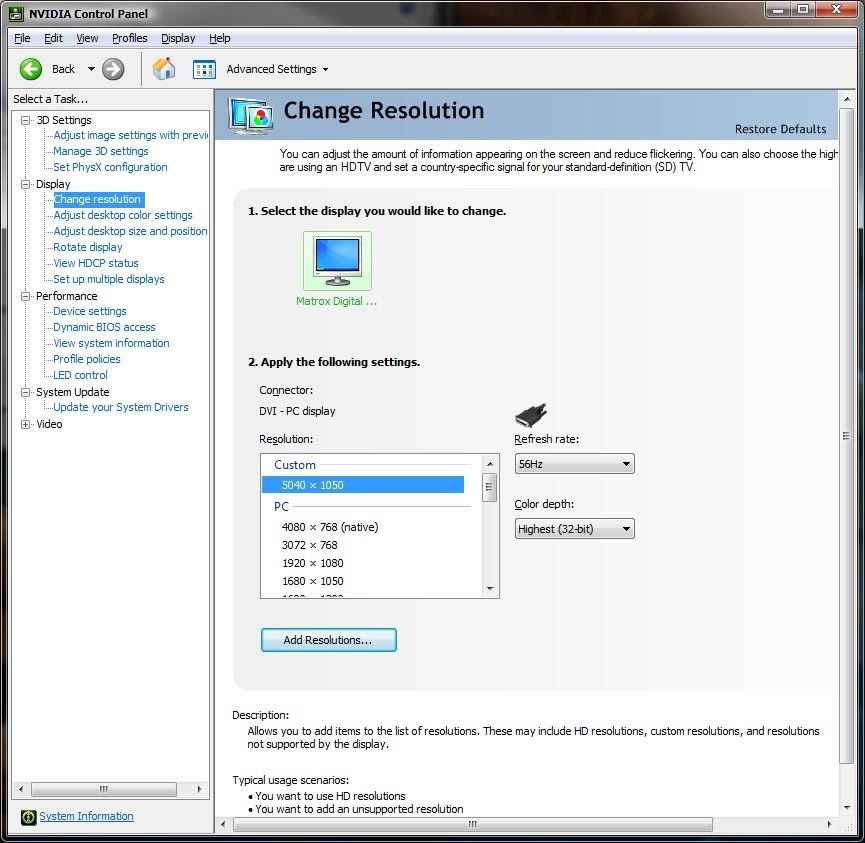
Goto "Change Resolution" (listed under Display)
Click on "Add Resolutions"
Click on "Create Custom Resolution" (also tick the box Enable Resolutions not exposed by the Display)

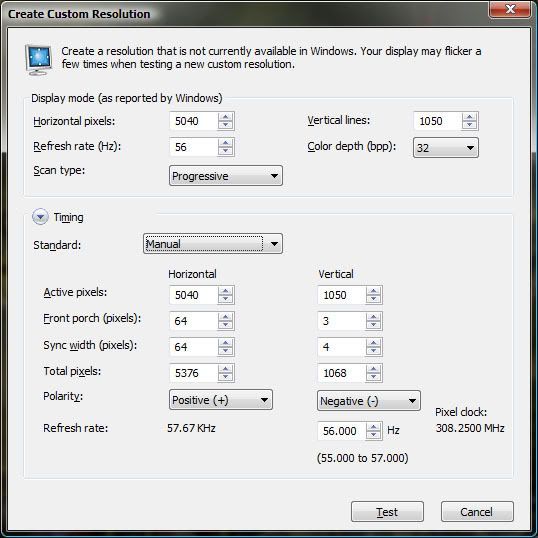
Put in the resolution as in the image below (note under Timing Standard you may need to select CVT Reduced Blank before "Manual" to get the Pixel Clock down to 319.x Mhz or below).


This bit is important, they have changed the position of the boxes (Active Pixels, Sync Width etc)! They are now cleanly separated as Horizontal and Vertical, so do not "blindly" fill in the boxes like on the older Howto threads for older drivers.

End Result:


You can now select 5040x1050 in Windows Display Settings as normal.


I haven't got a chance to test games etc yet, but Desktop works. The fact the nV Control Panel specifically states "Your display does not support this resolution" on 57Hz+ implies there is some feedback from the Matrox box that isnt happening, in theory.
[GTX1080 - 4.48GHz 4690k - planning projector mayhem]
mero
Posts: 19
Joined: 11 Mar 2009, 18:06

New nv driver 190.15, kinda working with 5040 again - prelim

Post by mero »

I haven't got a chance to test games etc yet


If you do this, let us know something about DX10 in 5040x1050!!!!!
Supported or not?!?!


Tobi
mattsimis
Posts: 298
Joined: 19 Mar 2004, 15:19

New nv driver 190.15, kinda working with 5040 again - prelim

Post by mattsimis »

Hmm... do you know something we dont?

Ive just tested World in Conflict and Farcry 2, 5040x1050 res.
WiC doesnt load with DX10 support enabled, at all.

Farcry2 runs on both DX9 and DX10 (or at the very least with the option in the menu selected). Without having the images side by side, I cant spot a visual difference.
I did test the FC2 Benchmark however, DX10 is meant to be faster, here were the results:

Directx9 Benchmark, Ranch Small

Code: Select all

Settings: Demo(Ranch Small), 5040x1050 (56Hz), D3D9, Fixed Time Step(No), Disable Artificial Intelligence(No), Full Screen, Anti-Aliasing(None), VSync(Yes), Overall Quality(Custom), Vegetation(Very High), Shading(Ultra High), Terrain(Ultra High), Geometry(Ultra High), Post FX(High), Texture(Ultra High), Shadow(Ultra High), Ambient(High), Hdr(Yes), Bloom(Yes), Fire(Very High), Physics(Very High), RealTrees(Very High)

* Total Frames: 1224, Total Time: 51.04s
* Average Framerate: 23.98
* Max. Framerate: 37.49 (Frame:193, 6.77s)
* Min. Framerate: 17.09 (Frame:1, 0.12s)

Directx10 Benchmark, Ranch Small

Code: Select all

Settings: Demo(Ranch Small), 5040x1050 (56Hz), D3D10, Fixed Time Step(No), Disable Artificial Intelligence(No), Full Screen, Anti-Aliasing(None), VSync(Yes), Overall Quality(Custom), Vegetation(Very High), Shading(Ultra High), Terrain(Ultra High), Geometry(Ultra High), Post FX(High), Texture(Ultra High), Shadow(Ultra High), Ambient(High), Hdr(Yes), Bloom(Yes), Fire(Very High), Physics(Very High), RealTrees(Very High)

* Total Frames: 1570, Total Time: 51.03s
* Average Framerate: 30.77
* Max. Framerate: 43.57 (Frame:261, 7.19s)
* Min. Framerate: 24.31 (Frame:988, 31.23s)

Actually quite a bit faster in DX10 mode. According to reviews, with AA on (was off in my test) its actually even faster in DX10 mode.


Does anyone know of a sure fire "is DX10 working" game or benchmark to try so we can double confirm?

Edit: Just tested the "Cyrostasis" techdemo, which only gives DX10 as a graphics path option, FOV totally messed up, but it did run and display..
Edit2: Tested Crysis without passing the "-DX9" flag to the shortcut, so it should default to DX10 on a Vista system. It certainly ran in 5040x1050. I know specifically with Crysis when I tried it "out of the box" it defaults to DX10 and cannot run higher than something like 2500x1050 (or whatever that limitation that existed in nVidias drivers)

[GTX1080 - 4.48GHz 4690k - planning projector mayhem]
User avatar
thales100
Editors
Editors
Posts: 1898
Joined: 06 Nov 2008, 01:08

New nv driver 190.15, kinda working with 5040 again - prelim

Post by thales100 »

So Far Cry 2 is working on DX10 at 5040x1050 with these new drivers , awesome news. :D
User avatar
skipclarke
Founder
Founder
Posts: 7358
Joined: 13 Oct 2003, 05:00

New nv driver 190.15, kinda working with 5040 again - prelim

Post by skipclarke »

Working on the drivers now. Will have to try LOTRO in DX10. There is an option in the WIC config file to turn DX10 off. Had to do that so I could bench.

Edit: Got it working after a number of tries. Had to go with 55Hz. A number of times it did it, but then popped up the window that said it didn't support it.

Edit 2: Ran the HAWX demo in DX10.
Robbaz
Posts: 37
Joined: 30 May 2009, 08:20

New nv driver 190.15, kinda working with 5040 again - prelim

Post by Robbaz »

Great drivers, warmly recommended.
User avatar
skipclarke
Founder
Founder
Posts: 7358
Joined: 13 Oct 2003, 05:00

New nv driver 190.15, kinda working with 5040 again - prelim

Post by skipclarke »

My experience is a little less than stellar...

I have the same monitor as mattsimis, but his settings don't work for me. (GFX diff?) I can get 5040x1050 @55HZ, only using Auto timings.

* Far Cry doesn't show 5040x1050 in the menu (so I can't test in DX9 or DX10)
* HAWX demo runs fine in DX10 in 5040x1050
* LOTRO detects DX10 capabilities at launch from a 5040x1050 desktop. But, 5040x1050 isn't available from the in-game menu.

It appears that DX10 is possible, if the game accepts your refresh rate.

Will try Windows 7. I never could get 5040x1050 there. Maybe I can in the RC and these drivers.
mero
Posts: 19
Joined: 11 Mar 2009, 18:06

New nv driver 190.15, kinda working with 5040 again - prelim

Post by mero »

THX for testing...

Hmm... do you know something we dont?


What do you mean??

is DX10 working


A quick opportunity to see if games running in DX10 is FRAPS.

If the fps will shown in a black box, the dx10 mode is on.
If not, dx9.


I´ll try some games, too.


Tobi

EDIT:
Update: I cant get 5040x1050@xxHz to run. It always fails custom res testing.
I installed 190.15, no probs.
Installing PowerDesk, PD cant set wished resolution...
mattsimis
Posts: 298
Joined: 19 Mar 2004, 15:19

New nv driver 190.15, kinda working with 5040 again - prelim

Post by mattsimis »

After swapping back in the Geforce after my Radeon testing, I can now only get by the "test failed" error at 54Hz. Settings that were working no longer pass the fickle nVidia refresh validation.
[GTX1080 - 4.48GHz 4690k - planning projector mayhem]
sepffuzzball
Posts: 5
Joined: 13 Mar 2009, 04:49

New nv driver 190.15, kinda working with 5040 again - prelim

Post by sepffuzzball »

Unfortunately, I have not been able to get 5040x1050 working with 190.15 on Windows 7 Build 7100 x64 using a pair of GTX260 Core216s.

This was on my previous OS installation that had my HD4870X2 in it at one point, so just to make sure it wasn't junk in the computer, I did a fresh windows installation and started with the 190.15 drivers (not even allowing Windows Update to install video drivers). Sadly, I haven't been able to get it working even with said fresh installation (even when using Powerstrip!).

On that note...anyone want to buy a pair of EVGA GTX260 Core 216s that were purchased on Friday? LOL
mattsimis
Posts: 298
Joined: 19 Mar 2004, 15:19

New nv driver 190.15, kinda working with 5040 again - prelim

Post by mattsimis »

What monitors are you using and what error you getting?
[GTX1080 - 4.48GHz 4690k - planning projector mayhem]
mero
Posts: 19
Joined: 11 Mar 2009, 18:06

New nv driver 190.15, kinda working with 5040 again - prelim

Post by mero »

What monitors are you using and what error you getting?


3xSamsung syncmaster 2243bw


Tobi
mattsimis
Posts: 298
Joined: 19 Mar 2004, 15:19

New nv driver 190.15, kinda working with 5040 again - prelim

Post by mattsimis »

What monitors are you using and what error you getting?


3xSamsung syncmaster 2243bw
Tobi


And the error message, specially whats not working?
[GTX1080 - 4.48GHz 4690k - planning projector mayhem]
mero
Posts: 19
Joined: 11 Mar 2009, 18:06

New nv driver 190.15, kinda working with 5040 again - prelim

Post by mero »

Error message from nv-cp: that my monitors won´t run that resolution.

It doesn´t matter what Hz I take. From 60 to 50 HZ its always the same error message!!!


The highest resolution i can choose is 3840x1024!!!


Tobi

EDIT

Update

I installed the powerdesk and the 190.15 driver again. Now I got a new problem. Now my highest res is 4320x900!
During wizard i can only choose 1680x1050@55Hz for each monitor. It doesn´t work at all.PD says that an Windows error has occured. So I choose 4320x900@60Hz. So far so good.

In the NV-Control Panel i would like to add an custom res, but there is 5040x1050@57Hz in the Custom-Tab. I selected it, but it will not appear in the first CP-Window.


Tobi
mattsimis
Posts: 298
Joined: 19 Mar 2004, 15:19

New nv driver 190.15, kinda working with 5040 again - prelim

Post by mattsimis »

Just tried the latest "official" beta's, 190.38. Custom Resolution validation worse than ever, could only get it to pass the test at 52Hz (strangely all my monitors still work fine at 52hz).

57Hz wouldnt display at all, it drops the resolution to the next down and gives a fail message. 53-56Hz all displayed fine but the nVidia applet failed them anyway, "Your display does not support this resolution".
[GTX1080 - 4.48GHz 4690k - planning projector mayhem]
Sir Drip
Posts: 55
Joined: 28 Mar 2009, 18:25

New nv driver 190.15, kinda working with 5040 again - prelim

Post by Sir Drip »

Seems to be getting worse...
mattsimis
Posts: 298
Joined: 19 Mar 2004, 15:19

New nv driver 190.15, kinda working with 5040 again - prelim

Post by mattsimis »

Seems to be getting worse...


Yeah, if other people werent reporting the same I would be starting to suspect something was wrong with my system by now. Every new driver drops the passed res test by 1Hz, its freakish. 51hz does display for me, but wouldnt you know it, the test fails.

So from 51-59Hz only one frequency will pass for me on this driver version. Incidentally I was trying out 2x GTX260s (which were a little underwhelming compared to the single very overclocked GTX280) and getting SLI and the 5040 to work together is a nightmare, as enabling SLI mode effectively resets the supported resoliutions.
[GTX1080 - 4.48GHz 4690k - planning projector mayhem]
The Beard
Posts: 36
Joined: 29 Oct 2008, 17:04

New nv driver 190.15, kinda working with 5040 again - prelim

Post by The Beard »

What about using these with the beta powerdesk driver? (which bypasses using custom resolutions; I'm using it because I couldn't get custom resolutions working in the first place.)
User avatar
thales100
Editors
Editors
Posts: 1898
Joined: 06 Nov 2008, 01:08

New nv driver 190.15, kinda working with 5040 again - prelim

Post by thales100 »

I tried it here, it doesnt work at 5040x1050 57 Hz.
User avatar
Gilly
Insiders
Insiders
Posts: 1172
Joined: 15 Apr 2005, 23:27

New nv driver 190.15, kinda working with 5040 again - prelim

Post by Gilly »

can i ask a really stupid question... i havent had a nV card since I had a 6800GT agp card, and i dont have a TH2Go... but seems like there is LOTS of people having problems with running more than standard resolutions.

am i about right there?
P8Z68-V Pro | 2600K | HR02 | HD5850 | 2x4GB Vengeance LP | 128GB M4 + 6TB | X-Fi > HD595 | AX850 | Tai Chi | PB278Q | G110 + Deathadder 2013
P8Z77-V | 3570K | Mugen 2 | HD5850 | 2x4GB Vengeance LP | 500GB | X-750 | Fractal R3 | U2212HM | G110 + G400
P8H77-I | G860 | 4650 | 2x2GB XMS | 320GB | CX500 | Prodigy | T22B350EW | MX518
DC3217IYE | 1x4GB Vengeance | 64GB M4 | TX-42VT20E
Post Reply

Who is online

Users browsing this forum: No registered users and 7 guests